

return_citations turned on, each text and table block lists every word of its content with the word’s position in that content and the box around the word on the page. Table blocks also list each cell with its row and column indices and the box around the cell’s words.
Use citations when you need to point from parsed text back to the exact spot in the source document.
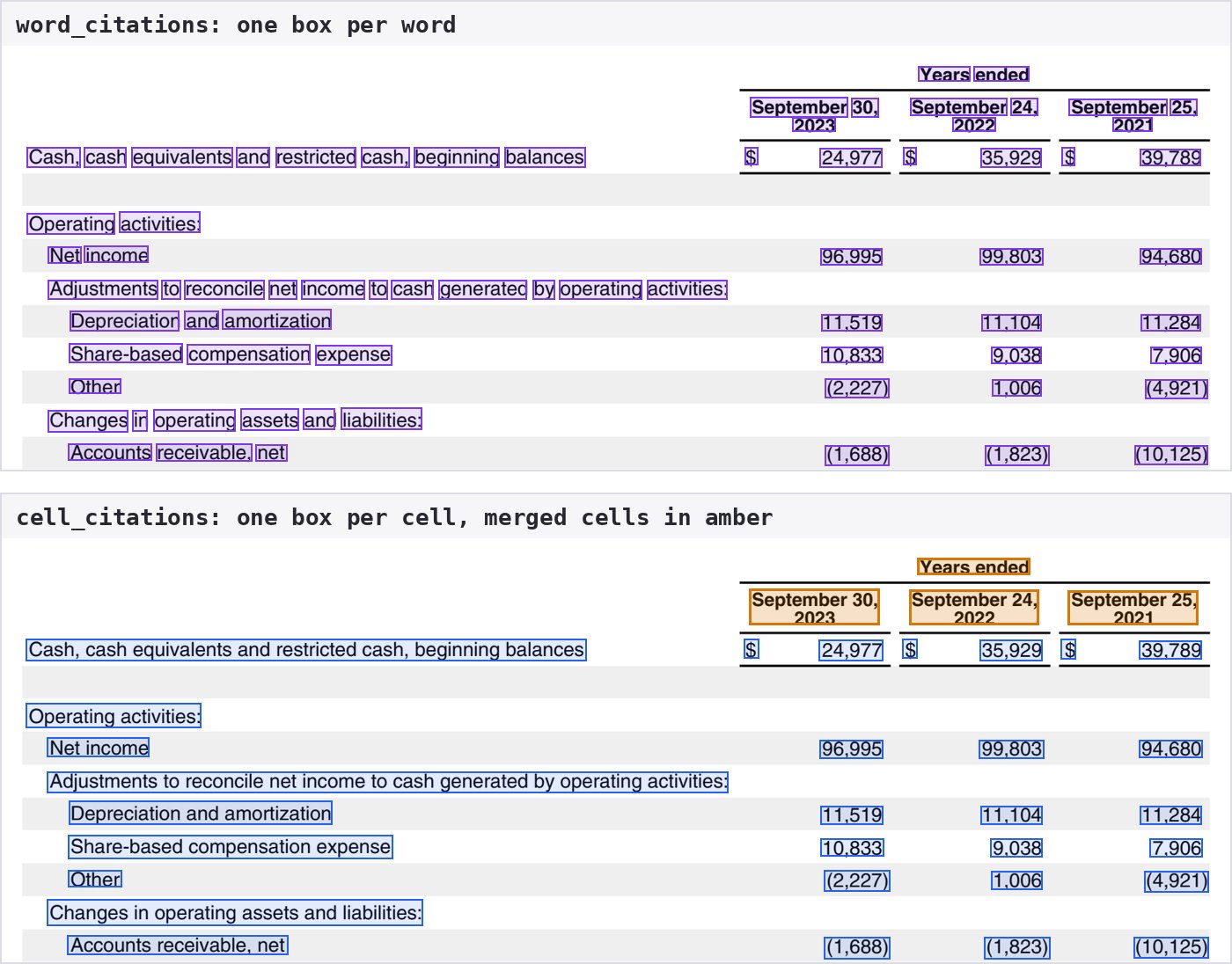
Word and cell citations on the cash flow statement in Apple's 2023 Form 10-K, parsed with r-1. Merged header cells are in amber.
When to Use
- Highlight the exact words a value came from, not the whole block.
- Link a value in a table, such as a dollar amount, to its cell’s row and column, including merged cells.
- Build review tools where a reader clicks text and sees it on the page.
- Search or redact at word level using the parsed text instead of raw OCR.
Enabling Citations
Setsettings.return_citations to true. It defaults to false.
return_citations requires r-1. A request that runs on legacy Parse returns a 400 error.Citations run OCR along with r-1. r-1 includes OCR at no extra charge (see Usage and Pricing).Explore a Response
The boxes below come from a realreturn_citations response for page 35 of the Apple 10-K sample. Hover over a box to see its entry.
Word Citations
Every text and table block gets anextra.word_citations list, one entry per word, in the order the words appear in content:
Positions count the markup in
content. In the example, $1,200 starts at 14 because <b> comes before it. Markup never becomes a word: HTML tags, Markdown table pipes, and the brackets and quotes of a JSON table are skipped. In a JSON table, a word’s range points at the word inside its JSON string.
The slice content[char_start:char_end] can differ from text when the source contains an entity or an escape. For example, S&P in HTML has the text S&P, and Shareholders\u2019 in a JSON table has the text Shareholders’.
Positions count Unicode code points. In JavaScript, index Array.from(content) rather than the string itself, so a character such as an emoji earlier in the block does not shift the range.
Cell Citations
Table blocks also get anextra.cell_citations list, one entry per non-empty cell, in the order the cells appear in content.
For this table, rendered as HTML:
extra holds word_citations for its words and this cell_citations list:
JSON and Markdown tables don’t record merged cells, so each of their cells covers one row and one column.
Drawing a Citation on the Page
Eachbbox is normalized from 0 to 1 against the page width and height, measured from the top-left corner. Multiply by the size of your page image to draw it:
Python
Node.js
bbox.page to pick the page image. page counts pages in this response and original_page counts pages in the source document. They differ when you set a page range.
Compatibility
return_citations requires r-1. A request that runs on legacy Parse returns a 400 error.
return_citations cannot be combined with formatting.merge_tables. A request that sets both returns a 400 error.
Figure blocks have no word or cell citations.