---
title: "Parse citations"
description: "Optional add-on: word-level bounding boxes for every word in the Parse output, and cell boxes for tables."
---
> Documentation Index
> Fetch the complete documentation index at: https://docs.reducto.ai/llms.txt
> Use this file to discover all available pages before exploring further.
# Parse citations
Parse citations is an optional add-on that locates the parsed output on the page, word by word. It costs $2 per 1,000 pages on top of r-1 (see [Usage and Pricing](/reference/credit-usage#parse-endpoint)). With `return_citations` turned on, each text and table block lists every word of its `content` with the word's position in that content and the box around the word on the page. Table blocks also list each cell with its row and column indices and the box around the cell's words.
Use citations when you need to point from parsed text back to the exact spot in the source document.
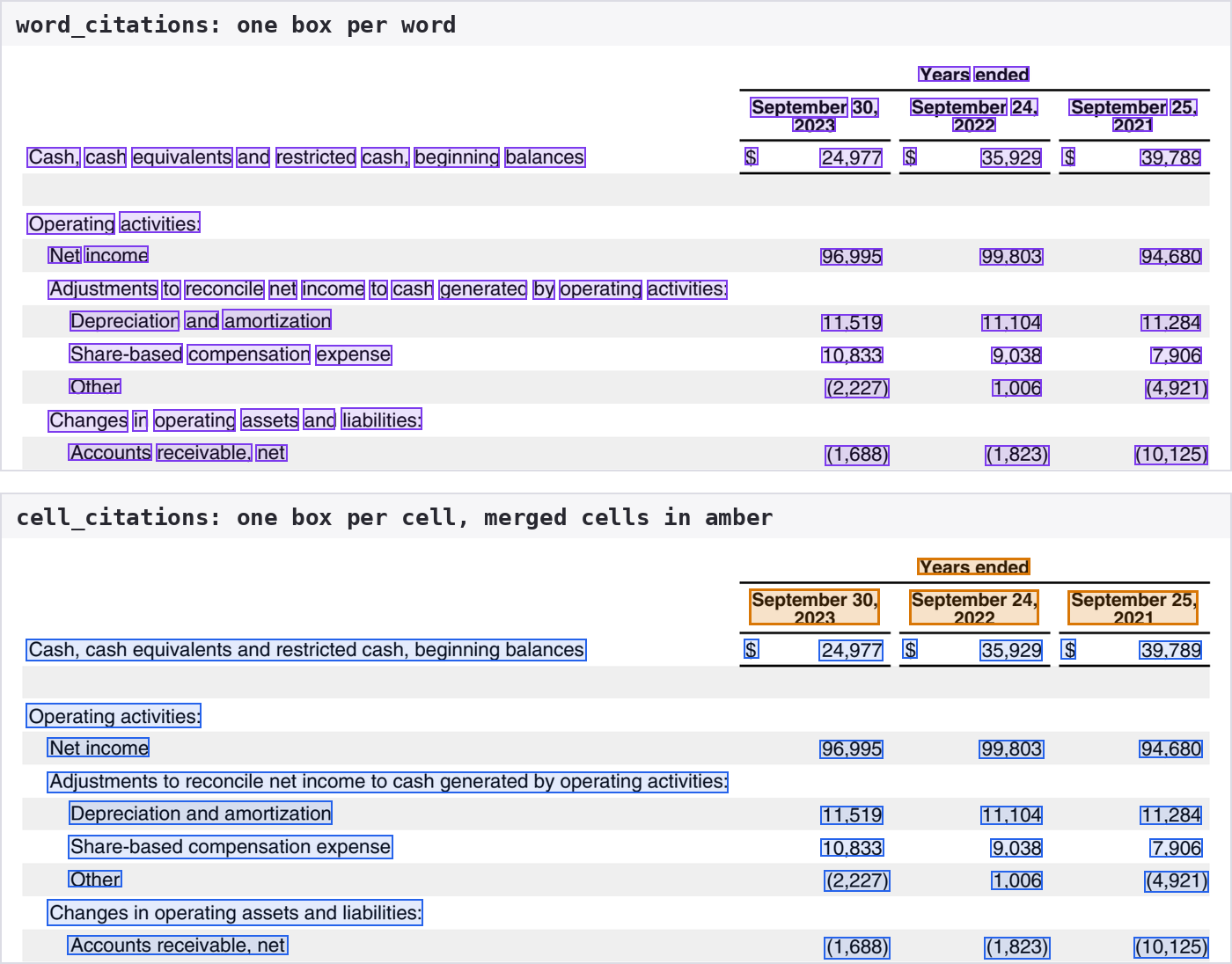 *Word and cell citations on the cash flow statement in Apple's 2023 Form 10-K, parsed with r-1. Merged header cells are in amber.*
## When to Use
- Highlight the exact words a value came from, not the whole block.
- Link a value in a table, such as a dollar amount, to its cell's row and column, including merged cells.
- Build review tools where a reader clicks text and sees it on the page.
- Search or redact at word level using the parsed text instead of raw OCR.
## Enabling Citations
Set `settings.return_citations` to `true`. It defaults to `false`.
**Python**
```python
from reducto import Reducto
client = Reducto()
result = client.parse.run(
input="https://cdn.reducto.ai/samples/10k-apple.pdf",
settings={
"model": "r-1",
"return_citations": True,
},
formatting={"table_output_format": "html"},
)
```
**Node.js**
```javascript
import Reducto from 'reductoai';
const client = new Reducto();
const result = await client.parse.run({
input: 'https://cdn.reducto.ai/samples/10k-apple.pdf',
// The SDK's Settings type does not list return_citations yet.
settings: {
model: 'r-1',
return_citations: true,
} as Reducto.Settings,
formatting: { table_output_format: 'html' },
});
```
**cURL**
```bash
curl -X POST https://platform.reducto.ai/parse \
-H "Authorization: Bearer $REDUCTO_API_KEY" \
-H "Content-Type: application/json" \
-d '{
"input": "https://cdn.reducto.ai/samples/10k-apple.pdf",
"settings": {
"model": "r-1",
"return_citations": true
},
"formatting": {"table_output_format": "html"}
}'
```
> **Note:** `return_citations` requires [r-1 or r-1 mini](/parse/r-1). A request that runs on legacy Parse returns a 400 error.
>
> Citations run OCR. r-1 includes OCR at no extra charge. With r-1 mini, OCR is an add-on at a list price of \$1 per 1,000 pages (see [Usage and Pricing](/reference/credit-usage#parse-endpoint)). If you also use `return_ocr_data` or `embed_pdf_metadata` with r-1 mini, OCR is billed only once per page.
> **Warning:** `return_citations` can't be combined with `formatting.merge_tables`, which joins a table that continues across pages. A request that sets both returns a 400 error. Merged cells within a table are supported. See [Compatibility](#compatibility).
HTML tables give the best cell citations, because HTML is the only [table format](/configs/parse/table-output-formats) that keeps a merged cell as one cell. JSON and Markdown tables also get citations, with one row and one column per cell.
## Explore a Response
The boxes below come from a real `return_citations` response for page 35 of the [Apple 10-K sample](https://cdn.reducto.ai/samples/10k-apple.pdf). Hover over a box to see its entry.
> **Note:** This page has an interactive example on [docs.reducto.ai](https://docs.reducto.ai/configs/parse/citations).
## Word Citations
Every text and table block gets an `extra.word_citations` list, one entry per word, in the order the words appear in `content`:
```json
{
"type": "Text",
"content": "Total due: $1,200",
"bbox": {
"left": 0.10, "top": 0.20, "width": 0.30, "height": 0.02,
"page": 3, "original_page": 3
},
"extra": {
"word_citations": [
{
"text": "Total",
"char_start": 0,
"char_end": 5,
"bbox": {
"left": 0.10, "top": 0.20, "width": 0.05, "height": 0.02,
"page": 3, "original_page": 3
}
},
{
"text": "due:",
"char_start": 6,
"char_end": 10,
"bbox": {
"left": 0.16, "top": 0.20, "width": 0.04, "height": 0.02,
"page": 3, "original_page": 3
}
},
{
"text": "$1,200",
"char_start": 14,
"char_end": 20,
"bbox": {
"left": 0.21, "top": 0.20, "width": 0.07, "height": 0.02,
"page": 3, "original_page": 3
}
}
]
}
}
```
| Field | Type | Description |
|-------|------|-------------|
| `text` | string | The word as it reads on the page. HTML entities and JSON escapes are decoded, so `S&P` becomes `S&P`. |
| `char_start` | integer | Where the word starts in the block's `content`. |
| `char_end` | integer | Where the word ends in the block's `content`. The range is half-open: `content[char_start:char_end]` is the word's source text. |
| `bbox` | object or null | The box around the word on the page, in the same format as the block's [`bbox`](/parse/response-format). `null` when the word cannot be located on the page. |
Positions count the markup in `content`. In the example, `$1,200` starts at 14 because `` comes before it. Markup never becomes a word: HTML tags, Markdown table pipes, and the brackets and quotes of a JSON table are skipped. In a JSON table, a word's range points at the word inside its JSON string.
The slice `content[char_start:char_end]` can differ from `text` when the source contains an entity or an escape. For example, `S&P` in HTML has the `text` `S&P`, and `Shareholders\u2019` in a JSON table has the `text` `Shareholders’`.
Positions count Unicode code points. In JavaScript, index `Array.from(content)` rather than the string itself, so a character such as an emoji earlier in the block does not shift the range.
## Cell Citations
Table blocks also get an `extra.cell_citations` list, one entry per non-empty cell, in the order the cells appear in `content`.
For this table, rendered as HTML:
```html
| Region | Revenue |
|---|
| North America | 2025 | $1.2M |
| 2026 | $1.5M |
```
the block's `extra` holds `word_citations` for its words and this `cell_citations` list:
```json
{
"cell_citations": [
{
"text": "Region",
"row_idx": [0],
"col_idx": [0],
"bbox": {
"left": 0.11, "top": 0.11, "width": 0.06, "height": 0.02,
"page": 1, "original_page": 1
}
},
{
"text": "Revenue",
"row_idx": [0],
"col_idx": [1, 2],
"bbox": {
"left": 0.345, "top": 0.11, "width": 0.06, "height": 0.02,
"page": 1, "original_page": 1
}
},
{
"text": "North America",
"row_idx": [1, 2],
"col_idx": [0],
"bbox": {
"left": 0.11, "top": 0.17, "width": 0.13, "height": 0.02,
"page": 1, "original_page": 1
}
},
{
"text": "2025",
"row_idx": [1],
"col_idx": [1],
"bbox": {
"left": 0.26, "top": 0.15, "width": 0.04, "height": 0.02,
"page": 1, "original_page": 1
}
},
{
"text": "$1.2M",
"row_idx": [1],
"col_idx": [2],
"bbox": {
"left": 0.45, "top": 0.15, "width": 0.05, "height": 0.02,
"page": 1, "original_page": 1
}
},
{
"text": "2026",
"row_idx": [2],
"col_idx": [1],
"bbox": {
"left": 0.26, "top": 0.19, "width": 0.04, "height": 0.02,
"page": 1, "original_page": 1
}
},
{
"text": "$1.5M",
"row_idx": [2],
"col_idx": [2],
"bbox": {
"left": 0.45, "top": 0.19, "width": 0.05, "height": 0.02,
"page": 1, "original_page": 1
}
}
]
}
```
| Field | Type | Description |
|-------|------|-------------|
| `text` | string | The cell's words, separated by single spaces. |
| `row_idx` | array of integers | Every row the cell covers, counting from 0. A cell merged across rows 1 and 2 has `[1, 2]`. |
| `col_idx` | array of integers | Every column the cell covers, counting from 0. |
| `bbox` | object or null | The box around all of the cell's words. `null` when none of them can be located on the page. |
JSON and Markdown tables don't record merged cells, so each of their cells covers one row and one column.
## Drawing a Citation on the Page
Each `bbox` is normalized from 0 to 1 against the page width and height, measured from the top-left corner. Multiply by the size of your page image to draw it:
```python
for chunk in result.result.chunks:
for block in chunk.blocks:
for word in (block.extra or {}).get("word_citations", []):
box = word["bbox"]
if box is None:
continue
x = box["left"] * image_width
y = box["top"] * image_height
w = box["width"] * image_width
h = box["height"] * image_height
source = block.content[word["char_start"]:word["char_end"]]
```
```javascript
for (const chunk of result.result.chunks) {
for (const block of chunk.blocks) {
const chars = Array.from(block.content);
for (const word of block.extra?.word_citations ?? []) {
const box = word.bbox;
if (!box) continue;
const x = box.left * imageWidth;
const y = box.top * imageHeight;
const w = box.width * imageWidth;
const h = box.height * imageHeight;
const source = chars.slice(word.char_start, word.char_end).join('');
}
}
}
```
Use `bbox.page` to pick the page image. `page` counts pages in this response and `original_page` counts pages in the source document. They differ when you set a [page range](/configs/parse/page-ranges).
## Compatibility
`return_citations` requires r-1 or r-1 mini. A request that runs on legacy Parse returns a 400 error.
`return_citations` cannot be combined with `formatting.merge_tables`. A request that sets both returns a 400 error.
Figure blocks have no word or cell citations.
Source: https://docs.reducto.ai/configs/parse/citations/index.mdx