

Svix webhooks provide cryptographic request signing, automatic retries with exponential backoff, and a delivery dashboard for debugging. Use Svix for production applications.

Accessing the Svix dashboard

You can access your Svix webhook dashboard in two ways:
In Reducto Studio, go to Account → Webhooks. This opens your Svix dashboard directly.

Adding an endpoint

In the Svix dashboard, click + Add Endpoint to configure where webhooks are delivered:
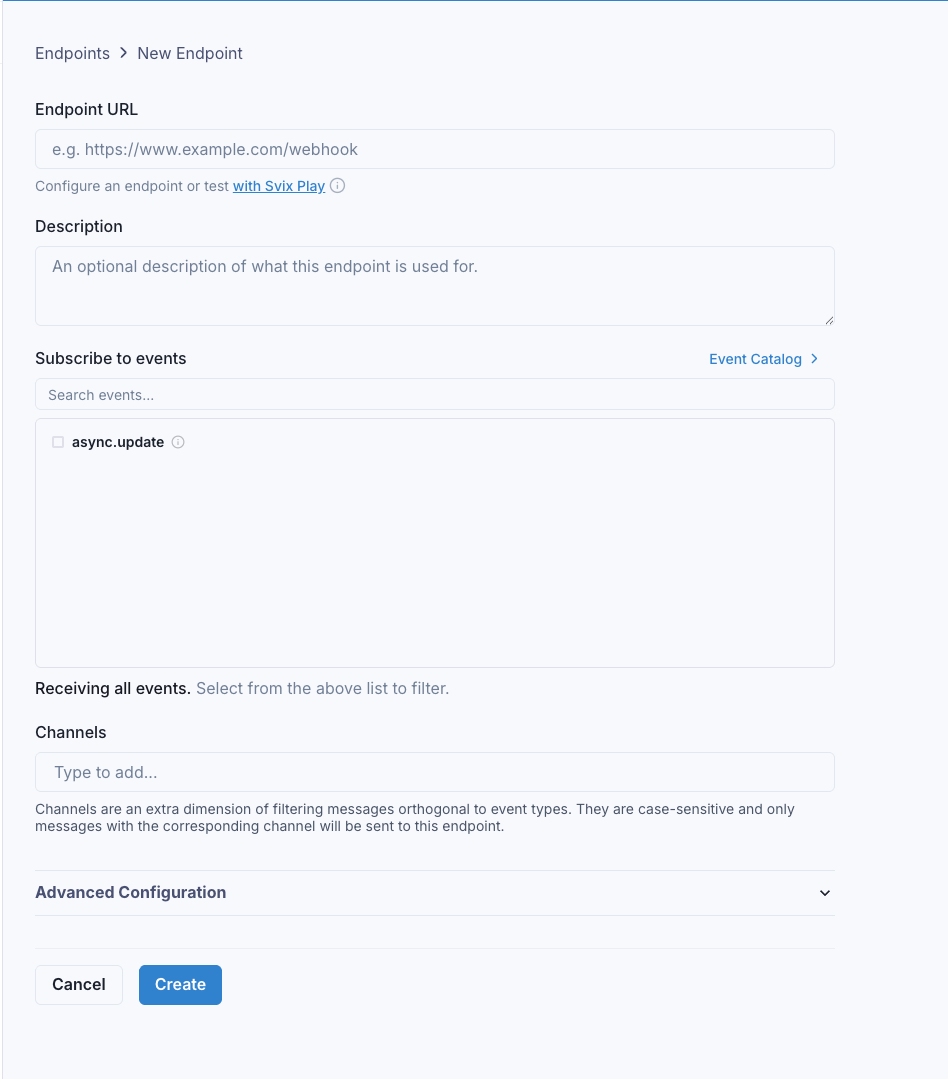
Add endpoint dialog in Svix
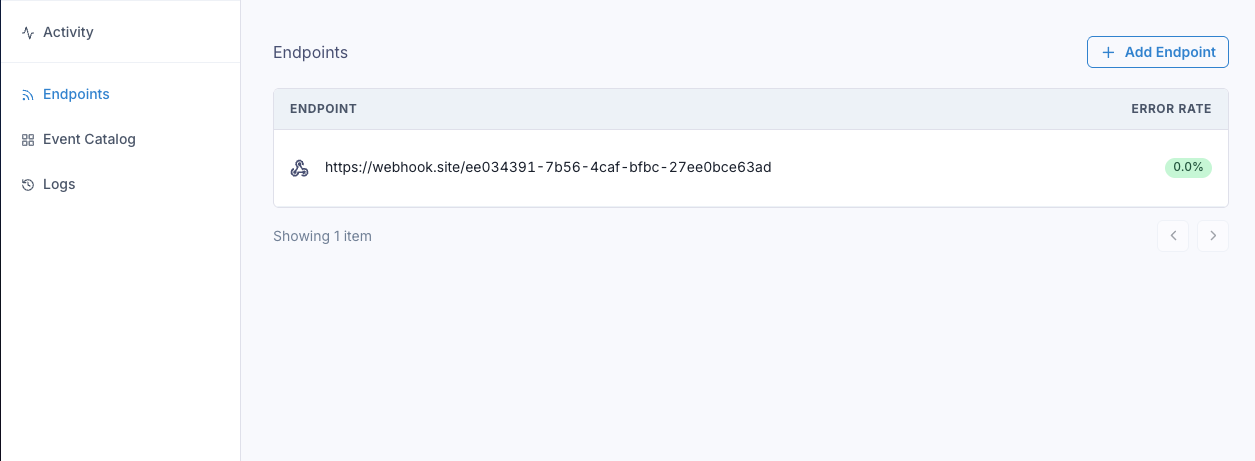
Enter your endpoint URL (must be HTTPS for production). You can use webhook.site for testing. Once added, you’ll see your endpoint in the list:
Svix endpoints list

Submitting jobs with webhooks

When submitting async jobs, include the webhook configuration:
from reducto import Reducto

client = Reducto()

job = client.parse.run_job(
    input="https://example.com/document.pdf",
    async_={
        "webhook": {
            "mode": "svix",
            "channels": []  # Optional: route to specific endpoints
        },
        "metadata": {
            "user_id": "123",
            "document_type": "invoice"
        }
    }
)
print(f"Job ID: {job.job_id}")
Works with all async endpoints: /parse_async, /extract_async, /split_async, /pipeline_async.

Viewing deliveries

When a job completes, Reducto sends an async.update event to Svix, which delivers it to your endpoint. You can monitor deliveries in the dashboard:
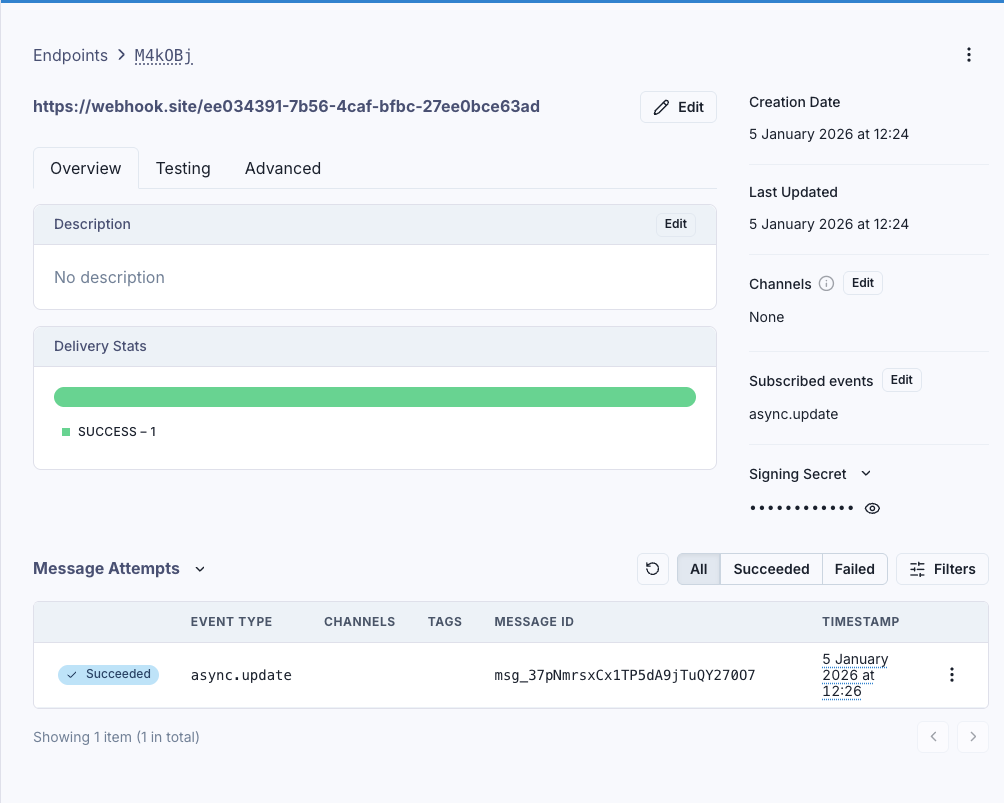
Successful webhook delivery in Svix
The dashboard shows:
  • Delivery stats: Success/failure rates
  • Message attempts: Each delivery with timestamp and status
  • Signing secret: For verifying webhooks in your handler

Webhook payload

Your endpoint receives:
{
  "status": "Completed",
  "job_id": "a1b9090e-c9ae-420b-9726-f658afbbe338",
  "metadata": {
    "user_id": "123",
    "document_type": "invoice"
  }
}
The status is either Completed or Failed. Use job_id to retrieve results.

Handling webhooks with signature verification

Always verify webhook signatures in production. Get your signing secret from the Svix dashboard (starts with whsec_):
from flask import Flask, request, jsonify
from reducto import Reducto
from svix.webhooks import Webhook, WebhookVerificationError

app = Flask(__name__)
client = Reducto()
WEBHOOK_SECRET = "whsec_your_secret"  # From Svix dashboard

@app.route('/webhook', methods=['POST'])
def handle_webhook():
    # Verify signature
    wh = Webhook(WEBHOOK_SECRET)
    try:
        payload = wh.verify(request.data, {
            'svix-id': request.headers.get('svix-id'),
            'svix-timestamp': request.headers.get('svix-timestamp'),
            'svix-signature': request.headers.get('svix-signature')
        })
    except WebhookVerificationError:
        return jsonify({"error": "Invalid signature"}), 401
    
    # Process webhook
    if payload['status'] == "Completed":
        job = client.job.get(payload['job_id'])
        # Use job.result
    
    return jsonify({"received": True}), 200

Channel routing

Use channels to route webhooks to different endpoints (e.g., production vs development):
# Production endpoint receives this
client.parse.run_job(
    input="https://example.com/document.pdf",
    async_={"webhook": {"mode": "svix", "channels": ["production"]}}
)

# Development endpoint receives this
client.parse.run_job(
    input="https://example.com/test.pdf",
    async_={"webhook": {"mode": "svix", "channels": ["development"]}}
)
Configure which channels each endpoint listens to in the Svix dashboard under endpoint settings.

Troubleshooting

  1. Check the Svix dashboard “Message Attempts” for delivery status
  2. Verify your endpoint URL is publicly accessible
  3. Ensure your endpoint returns 2xx status codes within 15 seconds
  1. Verify you’re using the correct secret from the Svix dashboard
  2. Pass the raw request body (not parsed JSON) to verification
  3. Check all three headers are present: svix-id, svix-timestamp, svix-signature
Return 2xx immediately and process results asynchronously. Svix expects responses within 15 seconds.
In the Svix dashboard, click on a failed message attempt and use the “Resend” button to replay it.

Best practices

  1. Always verify signatures in production
  2. Return quickly (within 15 seconds), process results asynchronously
  3. Be idempotent: Svix may retry, use svix-id header as idempotency key
  4. Use HTTPS for your webhook endpoint
For simpler use cases or prototyping, see Direct Webhooks.