

AsyncReducto with progress tracking and error handling.
Sample Dataset
We’ll use the Northwind Invoices dataset from Hugging Face, which contains 831 PDF invoices. Each invoice includes customer information, line items, and totals.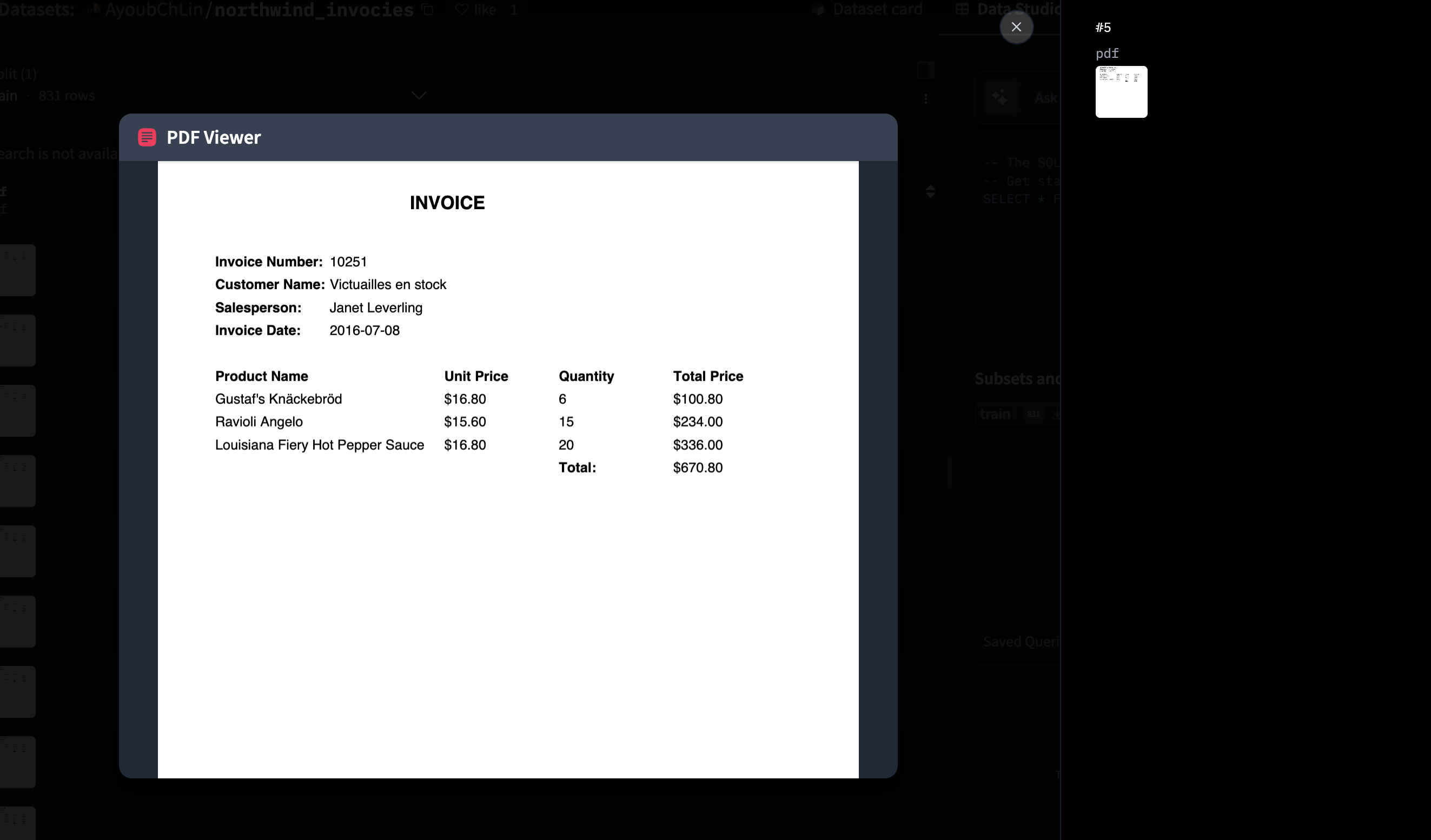
Create API Key
1
Open Studio
Go to studio.reducto.ai and sign in. From the home page, click API Keys in the left sidebar.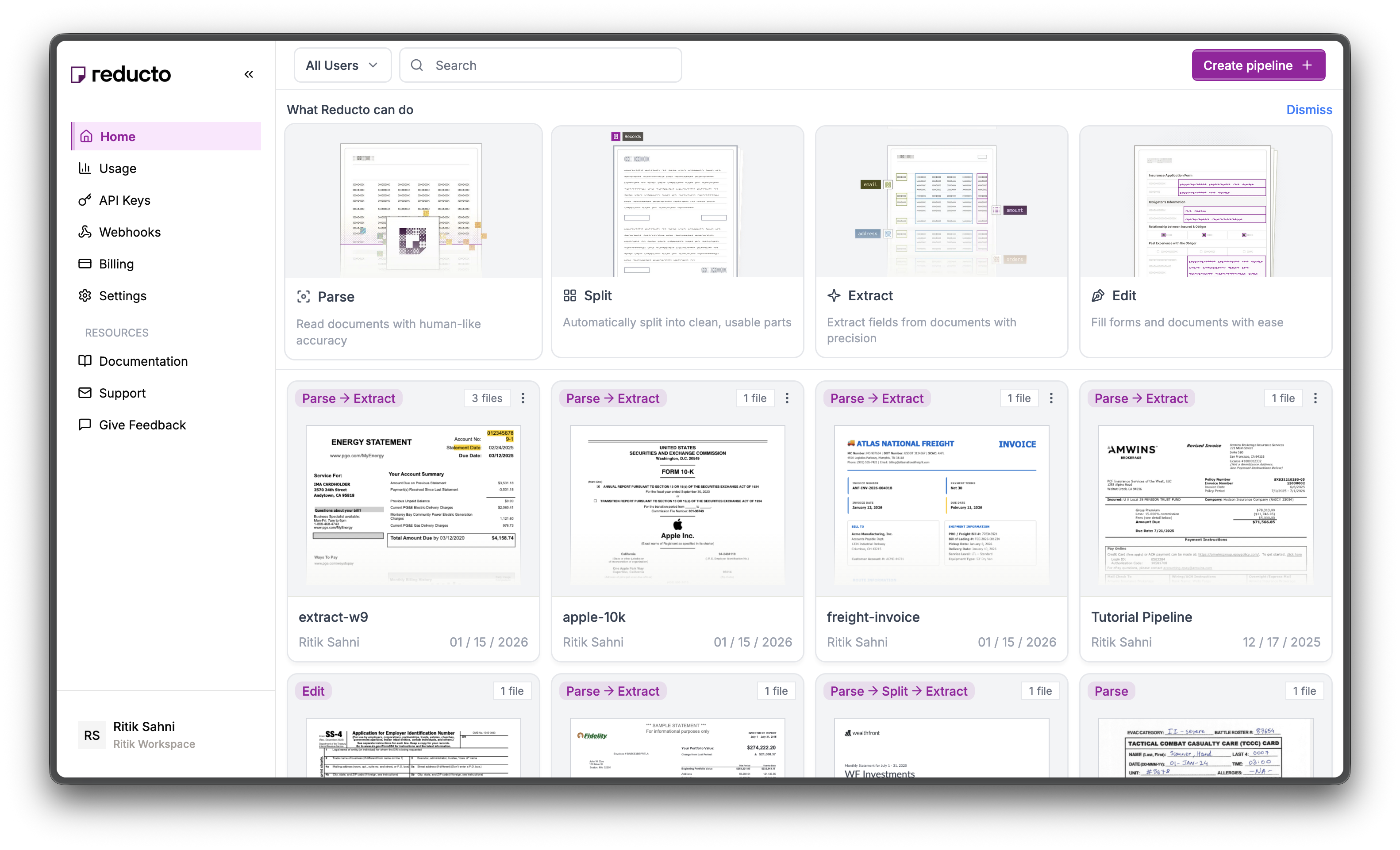
2
View API Keys
The API Keys page shows your existing keys. Click Create API Key in the top right corner.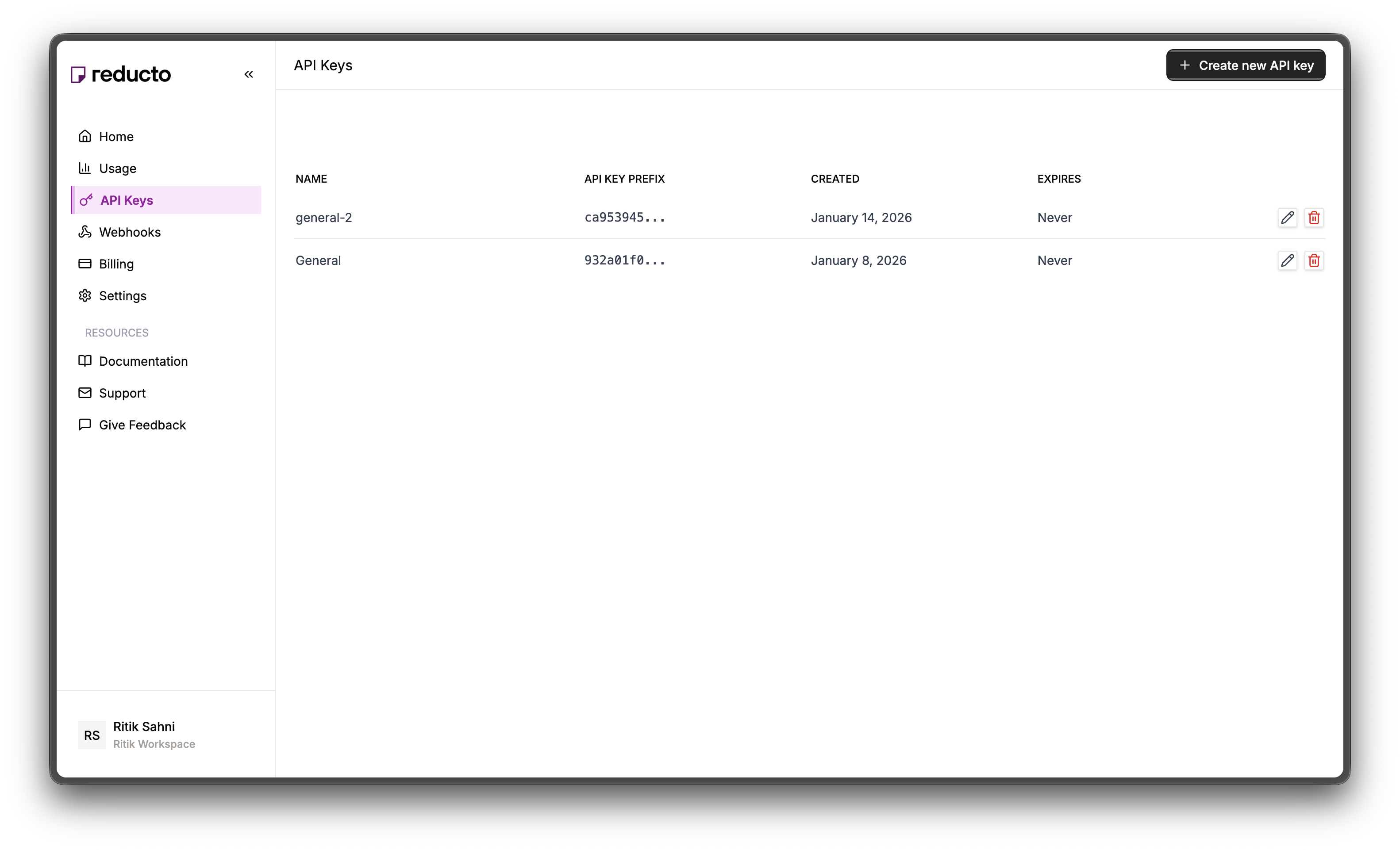
3
Configure Key
In the modal, enter a name for your key and set an expiration policy (or select “Never” for no expiration). Click Create.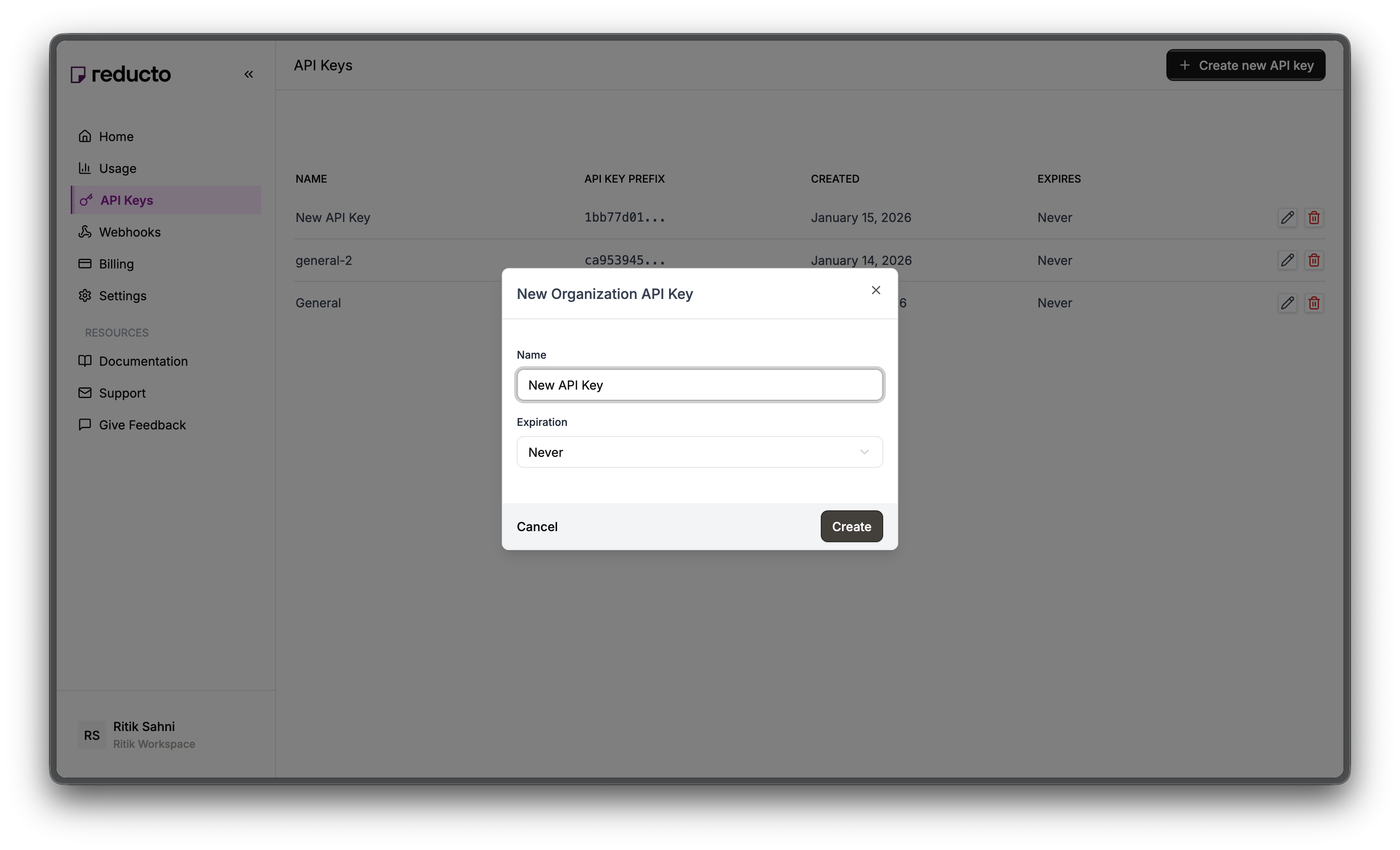
4
Copy Your Key
Copy your new API key and store it securely. You won’t be able to see it again after closing this dialog.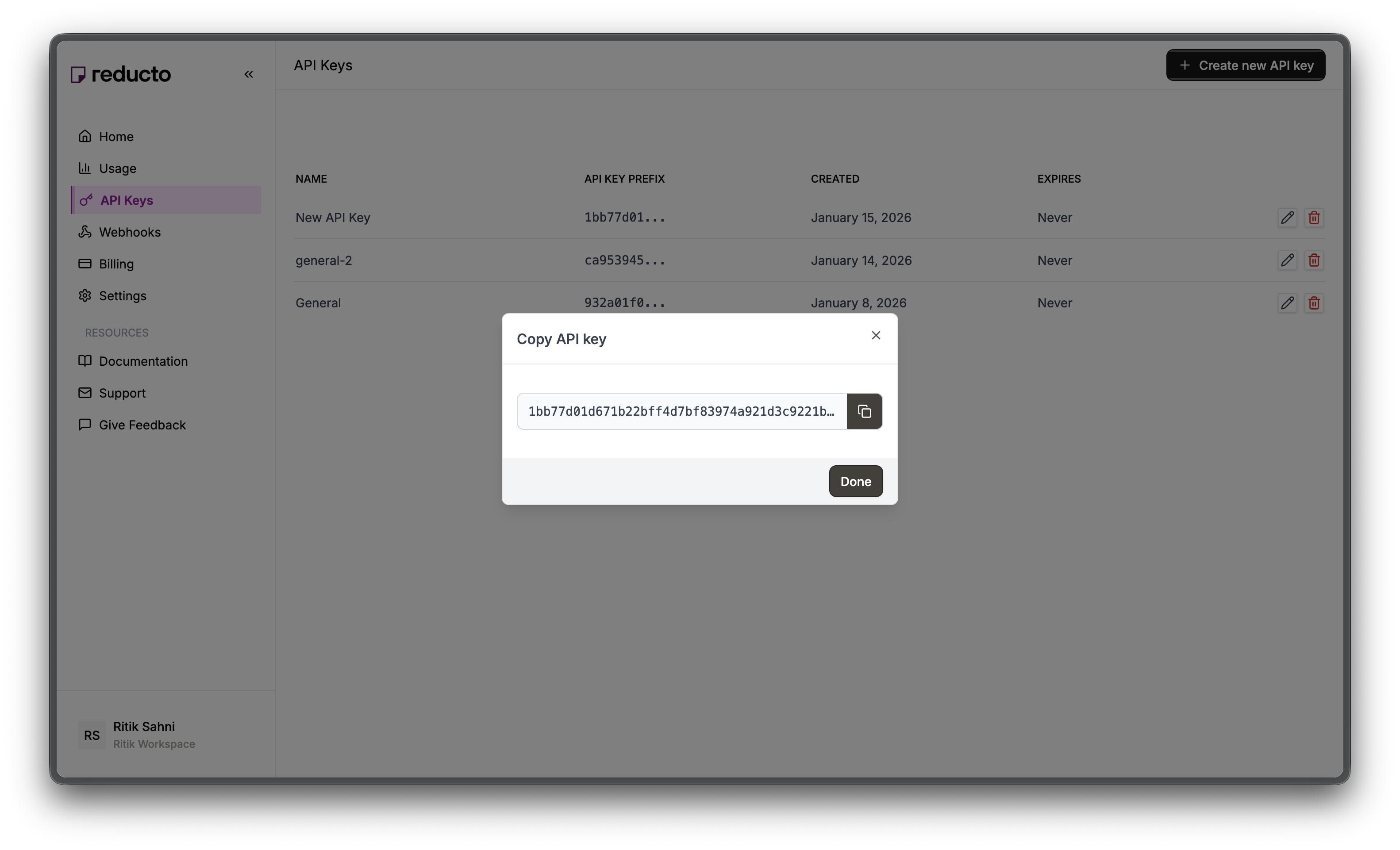
export REDUCTO_API_KEY="your-api-key-here"
Download the Dataset
First, download the Northwind invoices dataset using the Hugging Face libraries:pip install datasets
npm install @huggingface/hub
from datasets import load_dataset
from pathlib import Path

# Load the dataset
dataset = load_dataset("AyoubChLin/northwind_invocies")

# Create output directory
output_dir = Path("./northwind_invoices")
output_dir.mkdir(exist_ok=True)

# Save PDFs to disk
for i, sample in enumerate(dataset["train"]):
    pdf_path = output_dir / f"invoice_{i:04d}.pdf"
    pdf = sample["pdf"]
    pdf.stream.seek(0)
    with open(pdf_path, "wb") as f:
        f.write(pdf.stream.read())

print(f"Downloaded {len(dataset['train'])} invoices to {output_dir}")
import { listFiles, downloadFile } from "@huggingface/hub";
import fs from "fs";
import path from "path";

// Load the dataset
const repo = { type: "dataset", name: "AyoubChLin/northwind_invocies" };

// Create output directory
const outputDir = "./northwind_invoices";
fs.mkdirSync(outputDir, { recursive: true });

// List and download PDF files
let count = 0;
for await (const fileInfo of listFiles({ repo })) {
  if (fileInfo.path.endsWith(".pdf")) {
    const response = await downloadFile({ repo, path: fileInfo.path });
    const buffer = Buffer.from(await response.arrayBuffer());
    const outputPath = path.join(outputDir, `invoice_${String(count).padStart(4, "0")}.pdf`);
    fs.writeFileSync(outputPath, buffer);
    count++;
    if (count % 100 === 0) console.log(`Downloaded ${count} invoices...`);
  }
}

console.log(`Downloaded ${count} invoices to ${outputDir}`);
Downloaded 831 invoices to ./northwind_invoices
Process the Batch
Document processing is network-bound, not CPU-bound. While your code waits for one API response, it could be uploading and processing other documents. Python usesAsyncReducto with asyncio, while JavaScript uses Promise.all() with the p-limit package for concurrency control.
import asyncio
import json
from pathlib import Path
from reducto import AsyncReducto
from tqdm.asyncio import tqdm

client = AsyncReducto()

async def process_invoices(
    input_dir: Path,
    output_dir: Path,
    max_concurrency: int = 50
):
    """Process all invoices concurrently with progress tracking."""
    output_dir.mkdir(exist_ok=True)
    files = list(input_dir.glob("*.pdf"))
    print(f"Found {len(files)} invoices to process")

    # Semaphore limits concurrent requests
    sem = asyncio.Semaphore(max_concurrency)

    async def process(path: Path):
        async with sem:
            try:
                upload = await client.upload(file=path)
                result = await client.parse.run(input=upload.file_id)

                # Save result immediately
                output_path = output_dir / f"{path.stem}.json"
                output_path.write_text(json.dumps({
                    "source": path.name,
                    "pages": result.usage.num_pages,
                    "content": [c.content for c in result.result.chunks]
                }, indent=2))

                return {"file": path.name, "success": True, "pages": result.usage.num_pages}
            except Exception as e:
                return {"file": path.name, "success": False, "error": str(e)}

    # Process all files with progress bar
    tasks = [process(f) for f in files]
    results = await tqdm.gather(*tasks, desc="Processing invoices")

    # Summary
    successes = [r for r in results if r["success"]]
    failures = [r for r in results if not r["success"]]
    total_pages = sum(r["pages"] for r in successes)

    print(f"\nCompleted: {len(successes)} succeeded, {len(failures)} failed")
    print(f"Total pages processed: {total_pages}")

    if failures:
        print("\nFailed files:")
        for f in failures[:5]:  # Show first 5 failures
            print(f"  - {f['file']}: {f['error']}")

    return results

# Run the batch
results = asyncio.run(process_invoices(
    input_dir=Path("./northwind_invoices"),
    output_dir=Path("./parsed_invoices")
))
import Reducto from "reductoai";
import fs from "fs";
import path from "path";
import pLimit from "p-limit";  // npm install p-limit

const client = new Reducto();

async function processInvoices(inputDir, outputDir, maxConcurrency = 50) {
  fs.mkdirSync(outputDir, { recursive: true });
  const files = fs.readdirSync(inputDir)
    .filter(f => f.endsWith(".pdf"))
    .map(f => path.join(inputDir, f));
  console.log(`Found ${files.length} invoices to process`);

  // p-limit controls concurrency (like Python's Semaphore)
  const limit = pLimit(maxConcurrency);

  async function processFile(filePath) {
    try {
      const upload = await client.upload({ file: fs.createReadStream(filePath) });
      const result = await client.parse.run({ input: upload.file_id });

      // Save result immediately
      const outputPath = path.join(outputDir, `${path.basename(filePath, ".pdf")}.json`);
      fs.writeFileSync(outputPath, JSON.stringify({
        source: path.basename(filePath),
        pages: result.usage.num_pages,
        content: result.result.chunks.map(c => c.content)
      }, null, 2));

      return { file: path.basename(filePath), success: true, pages: result.usage.num_pages };
    } catch (e) {
      return { file: path.basename(filePath), success: false, error: e.message };
    }
  }

  // Process all files with concurrency limit
  const results = await Promise.all(files.map(f => limit(() => processFile(f))));

  // Summary
  const successes = results.filter(r => r.success);
  const failures = results.filter(r => !r.success);
  const totalPages = successes.reduce((sum, r) => sum + r.pages, 0);

  console.log(`\nCompleted: ${successes.length} succeeded, ${failures.length} failed`);
  console.log(`Total pages processed: ${totalPages}`);

  if (failures.length > 0) {
    console.log("\nFailed files:");
    failures.slice(0, 5).forEach(f => console.log(`  - ${f.file}: ${f.error}`));
  }

  return results;
}

// Run the batch
const results = await processInvoices("./northwind_invoices", "./parsed_invoices");
Found 831 invoices to process
Processing invoices: 100%|██████████| 831/831 [03:42<00:00,  3.73it/s]

Completed: 831 succeeded, 0 failed
Total pages processed: 831
Extract Structured Data
To extract specific fields like invoice numbers, totals, and line items, use the Extract API with a schema:import asyncio
import json
from pathlib import Path
from reducto import AsyncReducto
from tqdm.asyncio import tqdm
client = AsyncReducto()
# Schema for Northwind invoices
invoice_schema = {
"type": "object",
"properties": {
"order_id": {"type": "string", "description": "Order ID at top of invoice"},
"customer_name": {"type": "string", "description": "Ship To customer name"},
"order_date": {"type": "string", "description": "Order date"},
"shipped_date": {"type": "string", "description": "Shipped date"},
"ship_address": {"type": "string", "description": "Full shipping address"},
"line_items": {
"type": "array",
"description": "Products ordered",
"items": {
"type": "object",
"properties": {
"product": {"type": "string"},
"quantity": {"type": "number"},
"unit_price": {"type": "number"},
"discount": {"type": "number"},
"extended_price": {"type": "number"}
}
}
},
"subtotal": {"type": "number"},
"freight": {"type": "number"},
"total": {"type": "number"}
}
}
async def extract_invoices(
input_dir: Path,
output_dir: Path,
max_concurrency: int = 30
):
"""Extract structured data from invoices."""
output_dir.mkdir(exist_ok=True)
files = list(input_dir.glob("*.pdf"))[:100] # Process first 100 for demo
print(f"Extracting from {len(files)} invoices")
sem = asyncio.Semaphore(max_concurrency)
async def extract(path: Path):
async with sem:
try:
upload = await client.upload(file=path)
result = await client.extract.run(
input=upload.file_id,
instructions={"schema": invoice_schema}
)
output_path = output_dir / f"{path.stem}.json"
output_path.write_text(json.dumps(result.result, indent=2))
return {"file": path.name, "success": True, "data": result.result}
except Exception as e:
return {"file": path.name, "success": False, "error": str(e)}
tasks = [extract(f) for f in files]
results = await tqdm.gather(*tasks, desc="Extracting")
successes = [r for r in results if r["success"]]
print(f"\nExtracted {len(successes)} invoices")
# Calculate totals across all invoices
grand_total = sum(r["data"].get("total", 0) or 0 for r in successes)
print(f"Grand total across invoices: ${grand_total:,.2f}")
return results
results = asyncio.run(extract_invoices(
input_dir=Path("./northwind_invoices"),
output_dir=Path("./extracted_invoices")
))
import Reducto from "reductoai";
import fs from "fs";
import path from "path";
import pLimit from "p-limit";

const client = new Reducto();

// Schema for Northwind invoices
const invoiceSchema = {
  type: "object",
  properties: {
    order_id: { type: "string", description: "Order ID at top of invoice" },
    customer_name: { type: "string", description: "Ship To customer name" },
    order_date: { type: "string", description: "Order date" },
    shipped_date: { type: "string", description: "Shipped date" },
    ship_address: { type: "string", description: "Full shipping address" },
    line_items: {
      type: "array",
      description: "Products ordered",
      items: {
        type: "object",
        properties: {
          product: { type: "string" },
          quantity: { type: "number" },
          unit_price: { type: "number" },
          discount: { type: "number" },
          extended_price: { type: "number" }
        }
      }
    },
    subtotal: { type: "number" },
    freight: { type: "number" },
    total: { type: "number" }
  }
};

async function extractInvoices(inputDir, outputDir, maxConcurrency = 30) {
  fs.mkdirSync(outputDir, { recursive: true });
  const files = fs.readdirSync(inputDir)
    .filter(f => f.endsWith(".pdf"))
    .slice(0, 100);  // Process first 100 for demo
  console.log(`Extracting from ${files.length} invoices`);

  const limit = pLimit(maxConcurrency);

  async function extractFile(fileName) {
    const filePath = path.join(inputDir, fileName);
    try {
      const upload = await client.upload({ file: fs.createReadStream(filePath) });
      const result = await client.extract.run({
        input: upload.file_id,
        instructions: { schema: invoiceSchema }
      });

      const outputPath = path.join(outputDir, `${path.basename(fileName, ".pdf")}.json`);
      fs.writeFileSync(outputPath, JSON.stringify(result.result, null, 2));

      return { file: fileName, success: true, data: result.result[0] };
    } catch (e) {
      return { file: fileName, success: false, error: e.message };
    }
  }

  const results = await Promise.all(files.map(f => limit(() => extractFile(f))));

  const successes = results.filter(r => r.success);
  console.log(`\nExtracted ${successes.length} invoices`);

  // Calculate totals across all invoices
  const grandTotal = successes.reduce((sum, r) => sum + (r.data?.total || 0), 0);
  console.log(`Grand total across invoices: $${grandTotal.toFixed(2)}`);

  return results;
}

const results = await extractInvoices("./northwind_invoices", "./extracted_invoices");
Extracting from 100 invoices
Extracting: 100%|██████████| 100/100 [01:45<00:00,  1.05s/it]

Extracted 100 invoices
Grand total across invoices: $128,347.52
Cost Optimization with Job Chaining
Parse once, extract multiple times. When you need different extractions from the same documents, reuse the parse job ID to avoid re-parsing:import asyncio
from pathlib import Path
from reducto import AsyncReducto
client = AsyncReducto()
async def extract_multiple_schemas(files: list[Path]):
"""Parse once, extract with multiple schemas."""
results = []
for path in files:
# Parse once
upload = await client.upload(file=path)
parse_result = await client.parse.run(input=upload.file_id)
job_id = parse_result.job_id
# Extract headers (reuses parse)
header_result = await client.extract.run(
input=f"jobid://{job_id}",
instructions={"schema": {
"type": "object",
"properties": {
"invoice_number": {"type": "string"},
"customer_name": {"type": "string"},
"date": {"type": "string"}
}
}}
)
# Extract line items (still reuses parse - no extra parse cost!)
items_result = await client.extract.run(
input=f"jobid://{job_id}",
instructions={"schema": {
"type": "object",
"properties": {
"line_items": {
"type": "array",
"items": {
"type": "object",
"properties": {
"product": {"type": "string"},
"quantity": {"type": "number"},
"price": {"type": "number"}
}
}
},
"total": {"type": "number"}
}
}}
)
results.append({
"file": path.name,
"header": header_result.result,
"items": items_result.result
})
return results
import Reducto from "reductoai";
import fs from "fs";

const client = new Reducto();

async function extractMultipleSchemas(files) {
  const results = [];

  for (const filePath of files) {
    // Parse once
    const upload = await client.upload({ file: fs.createReadStream(filePath) });
    const parseResult = await client.parse.run({ input: upload.file_id });
    const jobId = parseResult.job_id;

    // Extract headers (reuses parse)
    const headerResult = await client.extract.run({
      input: `jobid://${jobId}`,
      instructions: {
        schema: {
          type: "object",
          properties: {
            invoice_number: { type: "string" },
            customer_name: { type: "string" },
            date: { type: "string" }
          }
        }
      }
    });

    // Extract line items (still reuses parse - no extra parse cost!)
    const itemsResult = await client.extract.run({
      input: `jobid://${jobId}`,
      instructions: {
        schema: {
          type: "object",
          properties: {
            line_items: {
              type: "array",
              items: {
                type: "object",
                properties: {
                  product: { type: "string" },
                  quantity: { type: "number" },
                  price: { type: "number" }
                }
              }
            },
            total: { type: "number" }
          }
        }
      }
    });

    results.push({
      file: filePath,
      header: headerResult.result[0],
      items: itemsResult.result[0]
    });
  }

  return results;
}
The
jobid:// prefix tells Reducto to reuse an existing parse result. You only pay for parsing once, regardless of how many extractions you run.Handling Failures
Add retry logic with exponential backoff to handle transient network errors:import asyncio
import random
from pathlib import Path
from reducto import AsyncReducto
client = AsyncReducto()
async def process_with_retry(path: Path, max_retries: int = 3):
"""Process a document with exponential backoff on failures."""
for attempt in range(max_retries):
try:
upload = await client.upload(file=path)
result = await client.parse.run(input=upload.file_id)
return {"file": path.name, "success": True, "pages": result.usage.num_pages}
except Exception as e:
if attempt == max_retries - 1:
return {"file": path.name, "success": False, "error": str(e)}
wait_time = (2 ** attempt) + random.uniform(0, 1)
await asyncio.sleep(wait_time)
async def process_batch_with_retries(input_dir: Path, max_concurrency: int = 50):
"""Process a batch with automatic retries."""
files = list(input_dir.glob("*.pdf"))
sem = asyncio.Semaphore(max_concurrency)
async def process(path):
async with sem:
return await process_with_retry(path)
tasks = [process(f) for f in files]
results = await asyncio.gather(*tasks)
successes = [r for r in results if r["success"]]
failures = [r for r in results if not r["success"]]
print(f"Completed: {len(successes)} succeeded, {len(failures)} failed")
if failures:
print("Failed files:")
for f in failures:
print(f" - {f['file']}: {f['error']}")
return results
import Reducto from "reductoai";
import fs from "fs";
import pLimit from "p-limit";

const client = new Reducto();

async function processWithRetry(filePath, maxRetries = 3) {
  for (let attempt = 0; attempt < maxRetries; attempt++) {
    try {
      const upload = await client.upload({ file: fs.createReadStream(filePath) });
      const result = await client.parse.run({ input: upload.file_id });
      return { file: filePath, success: true, pages: result.usage.num_pages };
    } catch (e) {
      if (attempt === maxRetries - 1) {
        return { file: filePath, success: false, error: e.message };
      }
      const waitTime = Math.pow(2, attempt) * 1000 + Math.random() * 1000;
      await new Promise(r => setTimeout(r, waitTime));
    }
  }
}

async function processBatchWithRetries(inputDir, maxConcurrency = 50) {
  const files = fs.readdirSync(inputDir)
    .filter(f => f.endsWith(".pdf"))
    .map(f => `${inputDir}/${f}`);

  const limit = pLimit(maxConcurrency);
  const results = await Promise.all(files.map(f => limit(() => processWithRetry(f))));

  const successes = results.filter(r => r.success);
  const failures = results.filter(r => !r.success);

  console.log(`Completed: ${successes.length} succeeded, ${failures.length} failed`);

  if (failures.length > 0) {
    console.log("Failed files:");
    failures.forEach(f => console.log(`  - ${f.file}: ${f.error}`));
  }

  return results;
}
Monitoring Job Status
When using webhooks or async jobs, you can poll for job status:import asyncio
from reducto import AsyncReducto
client = AsyncReducto()
async def wait_for_job(job_id: str, timeout: int = 300):
"""Poll until job completes or times out."""
for _ in range(timeout):
status = await client.job.get(job_id)
if status.status == "Completed":
return {"success": True, "status": status}
elif status.status == "Failed":
return {"success": False, "status": status}
await asyncio.sleep(1)
return {"success": False, "error": "Timeout"}
# Example: Submit job and wait
async def submit_and_wait(path):
upload = await client.upload(file=path)
job = await client.parse.run_job(input=upload.file_id)
print(f"Submitted job {job.job_id}, waiting...")
result = await wait_for_job(job.job_id)
if result["success"]:
print(f"Job completed!")
else:
print(f"Job failed or timed out")
return result
import Reducto from "reductoai";
import fs from "fs";

const client = new Reducto();

async function waitForJob(jobId, timeout = 300) {
  for (let i = 0; i < timeout; i++) {
    const status = await client.job.retrieve(jobId);

    if (status.status === "Completed") {
      return { success: true, status };
    } else if (status.status === "Failed") {
      return { success: false, status };
    }

    await new Promise(r => setTimeout(r, 1000));
  }

  return { success: false, error: "Timeout" };
}

// Example: Submit job and wait
async function submitAndWait(filePath) {
  const upload = await client.upload({ file: fs.createReadStream(filePath) });
  const job = await client.parse.runJob({ input: upload.file_id });

  console.log(`Submitted job ${job.job_id}, waiting...`);
  const result = await waitForJob(job.job_id);

  if (result.success) {
    console.log("Job completed!");
  } else {
    console.log("Job failed or timed out");
  }

  return result;
}
For production workloads, prefer webhooks over polling. Webhooks are more efficient and don’t require keeping connections open.
Why Concurrency Control?
The semaphore (asyncio.Semaphore in Python, p-limit in JavaScript) limits how many requests run simultaneously. Without it, submitting 831 files would create 831 concurrent connections, overwhelming both your system and the API. The concurrency limiter acts as a queue, letting only max_concurrency requests proceed at once.
| File Size | Recommended Concurrency |
|---|---|
| Small (< 5 pages) | 50-100 |
| Medium (5-50 pages) | 20-50 |
| Large (50+ pages) | 10-20 |
Fire-and-Forget with Webhooks
For very large batches where you don’t want to wait for results, use webhooks. Submit all jobs immediately and receive results as they complete via HTTP callbacks.import asyncio
from pathlib import Path
from reducto import AsyncReducto
client = AsyncReducto()
async def submit_with_webhooks(
input_dir: Path,
webhook_url: str,
max_concurrency: int = 100
):
"""Submit documents for processing with webhook notifications."""
files = list(input_dir.glob("*.pdf"))
sem = asyncio.Semaphore(max_concurrency)
async def submit(path: Path):
async with sem:
upload = await client.upload(file=path)
job = await client.parse.run_job(
input=upload.file_id,
async_={
"webhook": {"mode": "direct", "url": webhook_url},
"metadata": {"filename": path.name}
}
)
return {"file": path.name, "job_id": job.job_id}
tasks = [submit(f) for f in files]
submissions = await asyncio.gather(*tasks)
print(f"Submitted {len(submissions)} jobs - results will arrive via webhook")
return submissions
# Submit batch
asyncio.run(submit_with_webhooks(
input_dir=Path("./northwind_invoices"),
webhook_url="https://your-app.com/webhook/reducto"
))
import Reducto from "reductoai";
import fs from "fs";
import path from "path";
import pLimit from "p-limit";

const client = new Reducto();

async function submitWithWebhooks(inputDir, webhookUrl, maxConcurrency = 100) {
  const files = fs.readdirSync(inputDir)
    .filter(f => f.endsWith(".pdf"))
    .map(f => path.join(inputDir, f));

  const limit = pLimit(maxConcurrency);

  async function submitFile(filePath) {
    const upload = await client.upload({ file: fs.createReadStream(filePath) });
    const job = await client.parse.runJob({
      input: upload.file_id,
      async_: {
        webhook: { mode: "direct", url: webhookUrl },
        metadata: { filename: path.basename(filePath) }
      }
    });
    return { file: path.basename(filePath), job_id: job.job_id };
  }

  const submissions = await Promise.all(files.map(f => limit(() => submitFile(f))));
  console.log(`Submitted ${submissions.length} jobs - results will arrive via webhook`);
  return submissions;
}

// Submit batch
await submitWithWebhooks("./northwind_invoices", "https://your-app.com/webhook/reducto");
{
  "status": "Completed",
  "job_id": "abc123",
  "metadata": {"filename": "invoice_0001.pdf"}
}
client.job.get(job_id).
Sync Alternative (Python)
If you can’t use async in Python, use threading with the synchronousReducto client.
This section is Python-specific. The JavaScript SDK is async by default—all methods return Promises and work naturally with
async/await and Promise.all(). No threading is needed in JavaScript.from concurrent.futures import ThreadPoolExecutor, as_completed
from pathlib import Path
from reducto import Reducto
client = Reducto()
def process_sync(input_dir: Path, max_workers: int = 10):
files = list(input_dir.glob("*.pdf"))
def process(path: Path):
upload = client.upload(file=path)
result = client.parse.run(input=upload.file_id)
return {"file": path.name, "pages": result.usage.num_pages}
results = []
with ThreadPoolExecutor(max_workers=max_workers) as executor:
futures = {executor.submit(process, f): f for f in files}
for future in as_completed(futures):
try:
results.append(future.result())
except Exception as e:
results.append({"file": futures[future].name, "error": str(e)})
return results
Next Steps
Async Processing
Deep dive into async jobs and job lifecycle
Webhooks
Production webhook setup with Svix
Concurrency Throttle
Understand per-account concurrency limits for batch sizing
Job Management
Monitor and manage async jobs