KYC verification requires cross-checking identity across multiple documents: government IDs, utility bills, tax forms. Names appear differently (“IMA” vs “Ima”), addresses vary (“Street” vs “St”). This cookbook extracts identity fields from mixed document formats and builds verification logic to match them.

Sample Documents

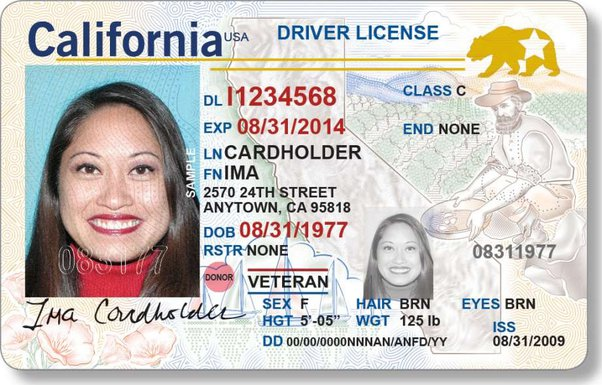
California Driver License
California Driver License showing:
  • Name: IMA CARDHOLDER
  • Address: 2570 24TH STREET, ANYTOWN, CA 95818
  • DOB: 08/31/1977
  • DL Number: 11234568
Notice the variations already visible:
  • Name case: “IMA CARDHOLDER” (ID) vs “Ima Cardholder” (W-9)
  • City spelling: “ANYTOWN” (ID) vs “Andytown” (utility bill)
  • Street format: “24TH STREET” vs “24th Street”
These are the same person, same address. Our verification code needs to handle these variations.

Create API Key

1

Open Studio

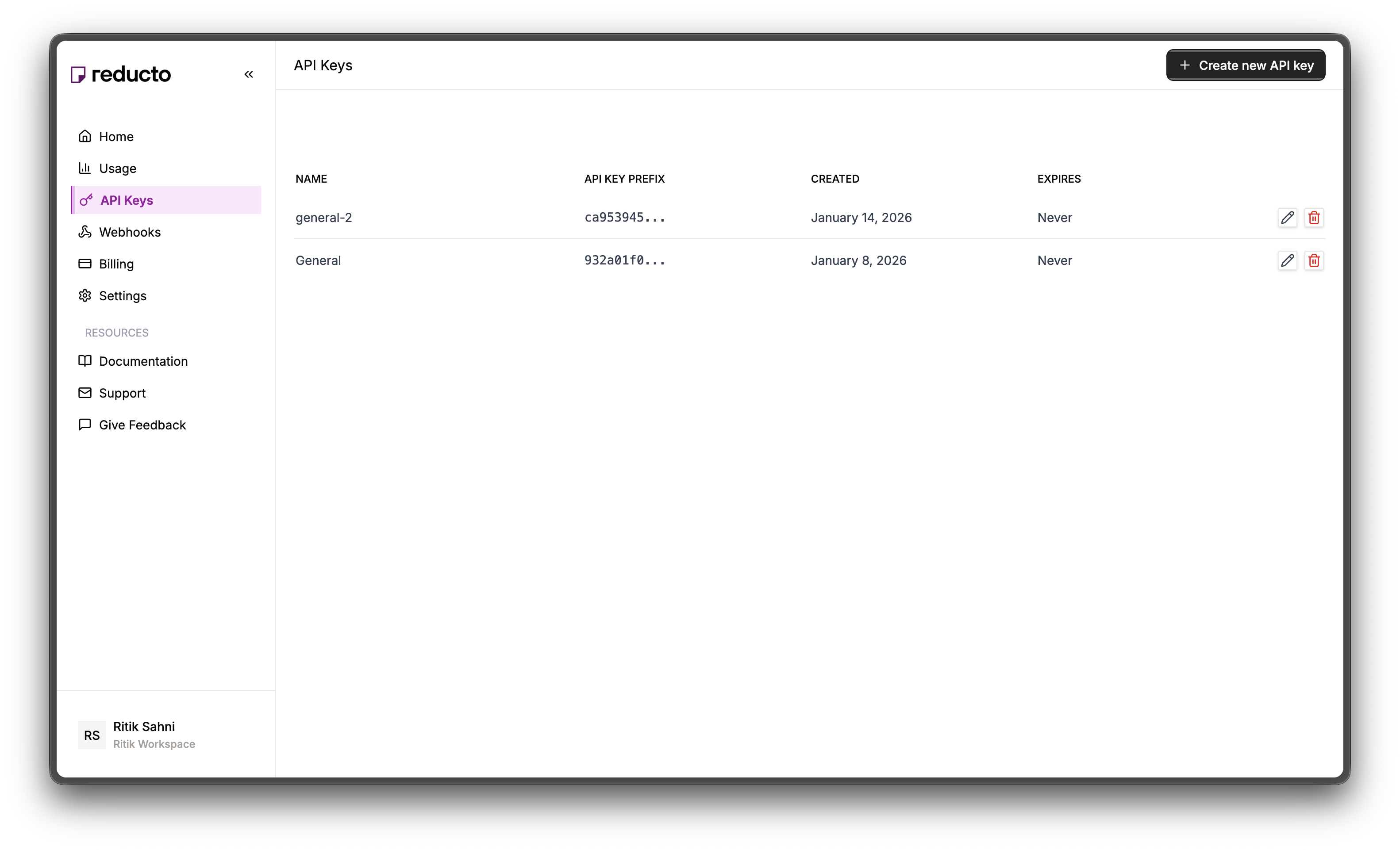
Go to studio.reducto.ai and sign in. From the home page, click API Keys in the left sidebar.
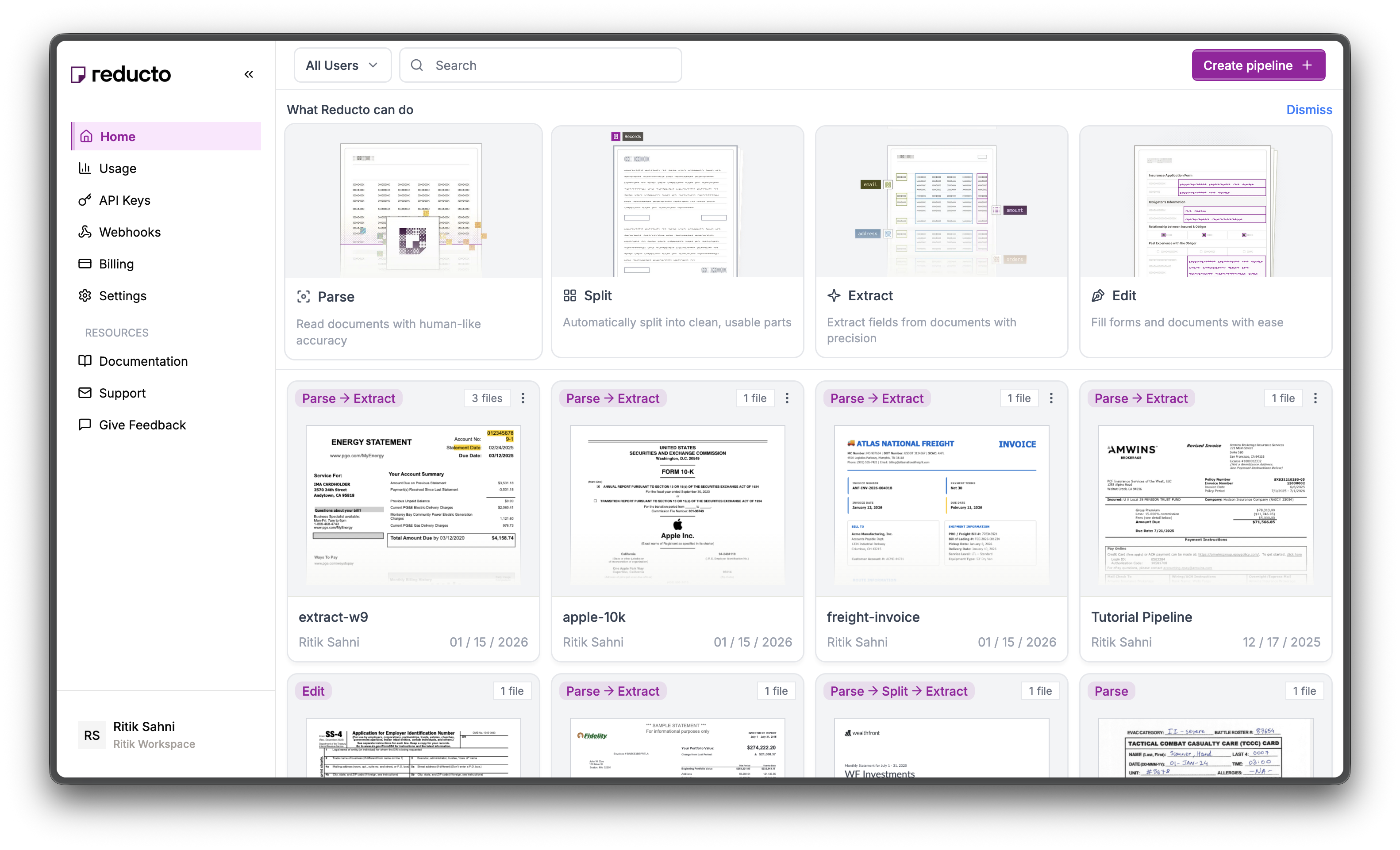
Studio home page with API Keys in sidebar
2

View API Keys

The API Keys page shows your existing keys. Click + Create new API key in the top right corner.
API Keys page with Create button
3

Configure Key

In the modal, enter a name for your key and set an expiration policy (or select “Never” for no expiration). Click Create.
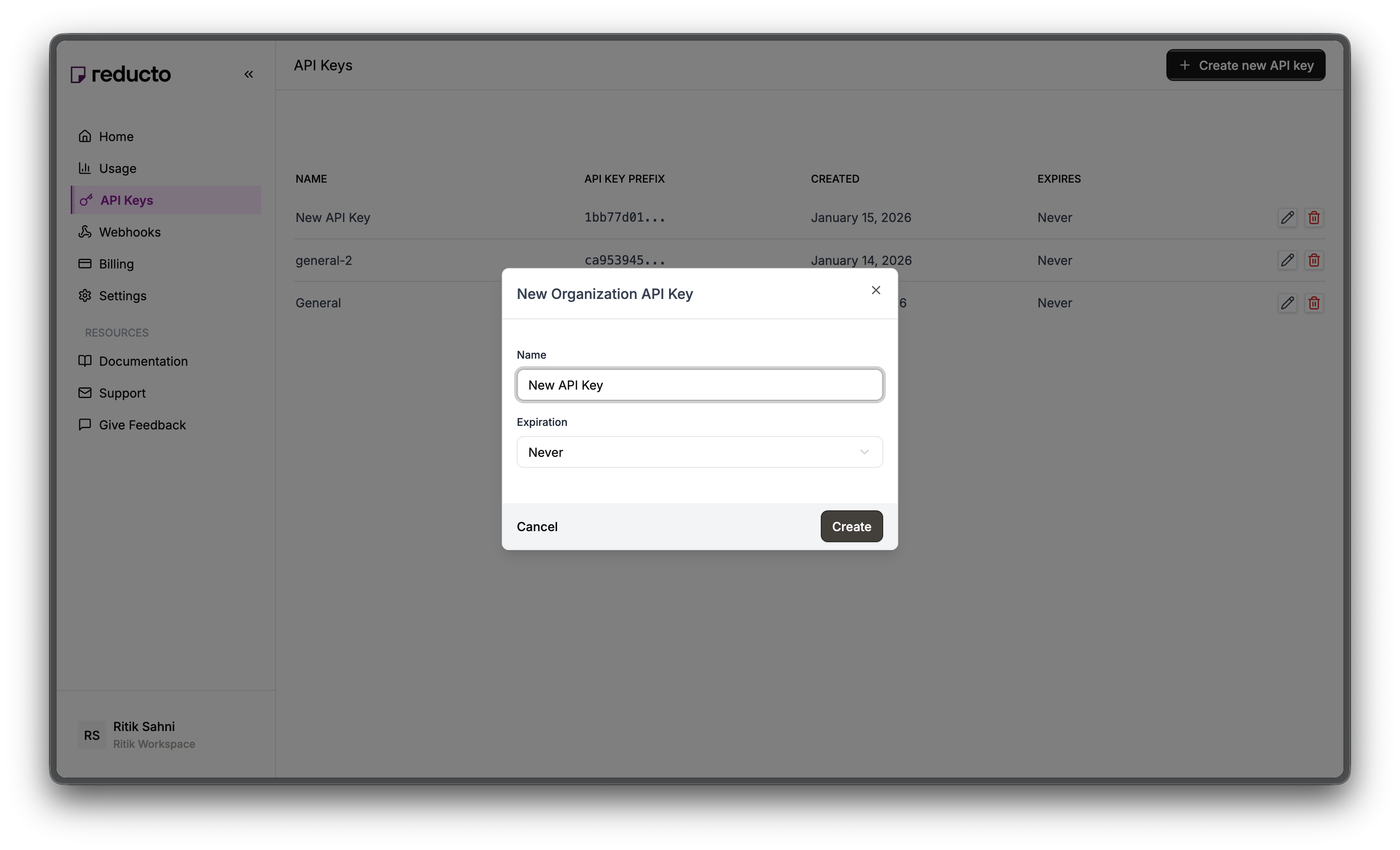
New API Key modal with name and expiration fields
4

Copy Your Key

Copy your new API key and store it securely. You won’t be able to see it again after closing this dialog.
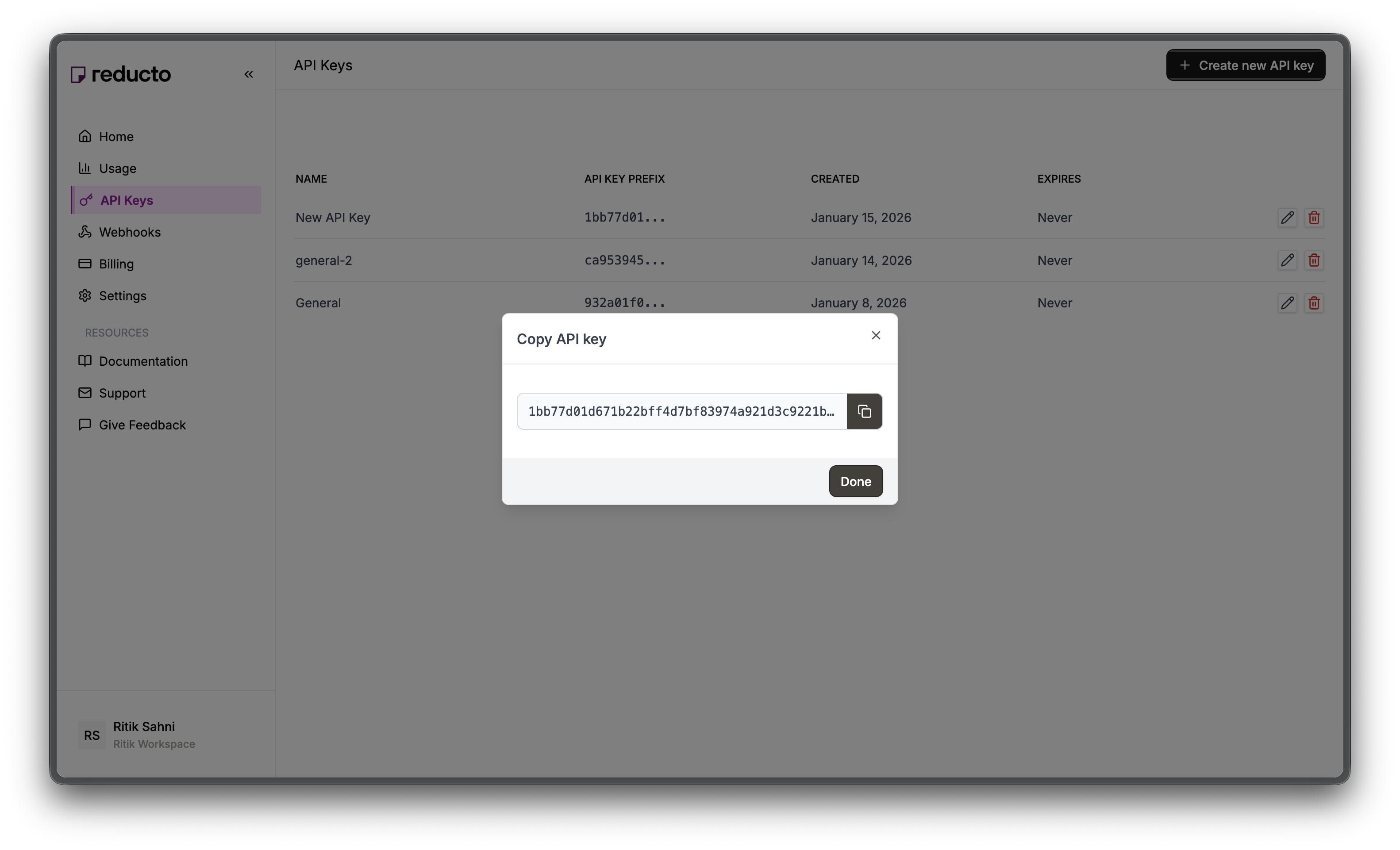
Copy API key dialog
Set the key as an environment variable:
export REDUCTO_API_KEY="your-api-key-here"

Verification Workflow

1

Upload Documents

User submits ID card, utility bill, and W-9 form
2

Extract Data

Reducto extracts name, address, and identifiers from each document
3

Normalize Fields

Standardize names and addresses for comparison
4

Cross-Match

Compare fields across documents to verify consistency
5

Return Result

Pass or fail based on matching criteria

Step 1: Define Extraction Schemas

Each document type needs a tailored schema. The key is writing good field descriptions that tell the LLM where to find each value.

ID Card Schema

Government IDs have structured layouts with clear field labels. We extract both identity fields and the ID’s validity period.
{
  "type": "object",
  "properties": {
    "document_type": {
      "type": "string",
      "description": "Type of ID: driver_license, passport, state_id"
    },
    "full_name": {
      "type": "string",
      "description": "Full legal name as shown on ID"
    },
    "first_name": {
      "type": "string",
      "description": "First name"
    },
    "last_name": {
      "type": "string",
      "description": "Last name / surname"
    },
    "address": {
      "type": "string",
      "description": "Street address on ID"
    },
    "city": {
      "type": "string",
      "description": "City"
    },
    "state": {
      "type": "string",
      "description": "State abbreviation (e.g., CA, NY)"
    },
    "zip_code": {
      "type": "string",
      "description": "ZIP code"
    },
    "date_of_birth": {
      "type": "string",
      "description": "Date of birth in YYYY-MM-DD format"
    },
    "id_number": {
      "type": "string",
      "description": "License or ID number"
    },
    "expiration_date": {
      "type": "string",
      "description": "ID expiration date in YYYY-MM-DD format"
    }
  }
}
Design decisions:
  • full_name and first_name/last_name: Extract both because other documents may format names differently
  • date_of_birth format: Request YYYY-MM-DD for consistent date handling in code
  • expiration_date: Critical for checking if the ID is still valid

Utility Bill Schema

Utility bills prove current address. They vary more in layout than IDs, so field descriptions need to be more specific about what to extract.
{
  "type": "object",
  "properties": {
    "provider": {
      "type": "string",
      "description": "Utility company name"
    },
    "account_holder": {
      "type": "string",
      "description": "Name on the account"
    },
    "service_address": {
      "type": "string",
      "description": "Full service address including street"
    },
    "city": {
      "type": "string",
      "description": "City"
    },
    "state": {
      "type": "string",
      "description": "State"
    },
    "zip_code": {
      "type": "string",
      "description": "ZIP code"
    },
    "account_number": {
      "type": "string",
      "description": "Account number"
    },
    "statement_date": {
      "type": "string",
      "description": "Statement date in YYYY-MM-DD format"
    },
    "amount_due": {
      "type": "number",
      "description": "Total amount due"
    }
  }
}
Design decisions:
  • account_holder: This is what we match against the ID name
  • service_address (not mailing address): The service address proves residence
  • statement_date: Bills must be recent (typically within 90 days)

W-9 Tax Form Schema

W-9s have a fixed IRS layout. Field descriptions reference specific line numbers to help the LLM locate values.
{
  "type": "object",
  "properties": {
    "name": {
      "type": "string",
      "description": "Name on Line 1"
    },
    "business_name": {
      "type": "string",
      "description": "Business name on Line 2, if any"
    },
    "address": {
      "type": "string",
      "description": "Street address from Line 5"
    },
    "city_state_zip": {
      "type": "string",
      "description": "City, state, ZIP from Line 6"
    },
    "ssn": {
      "type": "string",
      "description": "Social Security Number (XXX-XX-XXXX)"
    },
    "ein": {
      "type": "string",
      "description": "Employer Identification Number"
    },
    "tax_classification": {
      "type": "string",
      "description": "Federal tax classification"
    }
  }
}
Design decisions:
  • city_state_zip as one field: W-9 Line 6 combines these, so we extract them together and parse later
  • Line number references: “Line 1”, “Line 5”, “Line 6” help the LLM find the right fields on the standardized IRS form

Step 2: Extract from All Documents

Upload each document and run extraction with the appropriate schema. Reducto handles both image files (ID card) and PDFs (utility bill, W-9) with the same API.
from reducto import Reducto

client = Reducto()

def extract_from_documents(id_card_path, utility_bill_path, w9_path):
    """Extract data from all three verification documents."""
    results = {}

    # Extract from ID card (supports images!)
    with open(id_card_path, "rb") as f:
        id_upload = client.upload(file=f)

    id_result = client.extract.run(
        input=id_upload.file_id,
        instructions={"schema": id_card_schema}
    )
    results["id_card"] = id_result.result

    # Extract from utility bill
    with open(utility_bill_path, "rb") as f:
        bill_upload = client.upload(file=f)

    bill_result = client.extract.run(
        input=bill_upload.file_id,
        instructions={"schema": utility_bill_schema}
    )
    results["utility_bill"] = bill_result.result

    # Extract from W-9
    with open(w9_path, "rb") as f:
        w9_upload = client.upload(file=f)

    w9_result = client.extract.run(
        input=w9_upload.file_id,
        instructions={"schema": w9_schema}
    )
    results["w9"] = w9_result.result

    return results

# Run extraction
extracted = extract_from_documents(
    "id-card.png",
    "sample-utility-bill.pdf",
    "w9-sample.pdf"
)

Extraction Results

From our sample documents:
{
  "id_card": {
    "document_type": "driver_license",
    "full_name": "IMA CARDHOLDER",
    "first_name": "IMA",
    "last_name": "CARDHOLDER",
    "address": "2570 24TH STREET",
    "city": "ANYTOWN",
    "state": "CA",
    "zip_code": "95818",
    "date_of_birth": "1977-08-31",
    "id_number": "11234568",
    "expiration_date": "2014-08-31"
  },
  "utility_bill": {
    "provider": "PG&E",
    "account_holder": "IMA CARDHOLDER",
    "service_address": "2570 24th Street",
    "city": "Andytown",
    "state": "CA",
    "zip_code": "95818",
    "account_number": "0123456789-1",
    "statement_date": "2025-02-24",
    "amount_due": 4158.74
  },
  "w9": {
    "name": "Ima Cardholder",
    "business_name": null,
    "address": "2570 24th Street",
    "city_state_zip": "Andytown, CA 95818",
    "ssn": "012-34-5678",
    "ein": null,
    "tax_classification": "Individual/sole proprietor"
  }
}
Look at the variations:
  • Name: “IMA CARDHOLDER” vs “Ima Cardholder” (case difference)
  • City: “ANYTOWN” vs “Andytown” (case + typo)
  • Street: “24TH STREET” vs “24th Street” (case + abbreviation)
An exact string match would fail. We need normalization.

Step 3: Normalize and Compare

Extracted data won’t match exactly across documents. Here’s what we see:
FieldID CardUtility BillW-9
NameIMA CARDHOLDERIMA CARDHOLDERIma Cardholder
CityANYTOWNAndytownAndytown
Street2570 24TH STREET2570 24th Street2570 24th Street
These are clearly the same person at the same address, but string comparison would fail.

Normalization Functions

Normalization standardizes these variations:
  • Uppercase everything
  • Convert abbreviations (“STREET” → “ST”)
  • Remove punctuation
  • Collapse extra whitespace
import re

def normalize_name(name):
    """Normalize name for comparison."""
    if not name:
        return ""
    # Uppercase, remove extra spaces, remove punctuation
    name = name.upper().strip()
    name = re.sub(r'[^\w\s]', '', name)
    name = re.sub(r'\s+', ' ', name)
    return name

def normalize_address(address):
    """Normalize address for comparison."""
    if not address:
        return ""
    address = address.upper().strip()
    # Standardize common abbreviations
    replacements = {
        'STREET': 'ST',
        'AVENUE': 'AVE',
        'BOULEVARD': 'BLVD',
        'DRIVE': 'DR',
        'ROAD': 'RD',
        'LANE': 'LN',
        'COURT': 'CT',
    }
    for full, abbrev in replacements.items():
        address = address.replace(full, abbrev)
    address = re.sub(r'[^\w\s]', '', address)
    address = re.sub(r'\s+', ' ', address)
    return address

def parse_city_state_zip(city_state_zip):
    """Parse 'City, ST 12345' format into components."""
    if not city_state_zip:
        return "", "", ""
    # Pattern: City, State ZIP
    match = re.match(r'(.+),\s*([A-Z]{2})\s*(\d{5})', city_state_zip.upper())
    if match:
        return match.group(1).strip(), match.group(2), match.group(3)
    return city_state_zip, "", ""
After normalization:
  • “IMA CARDHOLDER” → “IMA CARDHOLDER”
  • “Ima Cardholder” → “IMA CARDHOLDER” ✓ Match!
  • “2570 24TH STREET” → “2570 24TH ST”
  • “2570 24th Street” → “2570 24TH ST” ✓ Match!

Why Fuzzy Matching?

Even after normalization, OCR errors and typos happen. “ANYTOWN” vs “ANDYTOWN” is a single character difference. It’s likely the same city, not a fraudulent mismatch. Fuzzy matching with an 85% similarity threshold catches these while rejecting genuine mismatches:
def fuzzy_match(str1, str2, threshold=0.85):
    """Check if two strings match above threshold."""
    if not str1 or not str2:
        return False
    str1, str2 = str1.upper(), str2.upper()
    if str1 == str2:
        return True
    # Simple character-level similarity
    matches = sum(c1 == c2 for c1, c2 in zip(str1, str2))
    max_len = max(len(str1), len(str2))
    similarity = matches / max_len if max_len > 0 else 0
    return similarity >= threshold

Step 4: Verification Strategy

Our verification uses two tiers of checks: Critical checks (must pass):
  1. Name match - Name must match across all three documents
  2. Address match - Address must match (street, state, ZIP)
Warning checks (informational): 3. ID not expired - Government ID should be valid 4. Recent bill - Utility bill should be within 90 days If critical checks pass, verification succeeds even with warnings. This matches real-world KYC where an expired ID triggers re-verification but doesn’t necessarily block the user.

Implementing Name Matching

Compare normalized names across all document pairs. All three must match:
def check_name_match(extracted):
    """Check if names match across all documents."""
    id_name = normalize_name(extracted["id_card"].get("full_name", ""))
    bill_name = normalize_name(extracted["utility_bill"].get("account_holder", ""))
    w9_name = normalize_name(extracted["w9"].get("name", ""))

    id_vs_bill = fuzzy_match(id_name, bill_name)
    id_vs_w9 = fuzzy_match(id_name, w9_name)
    bill_vs_w9 = fuzzy_match(bill_name, w9_name)

    passed = id_vs_bill and id_vs_w9 and bill_vs_w9

    return {
        "check": "name_match",
        "passed": passed,
        "details": {
            "id_card": id_name,
            "utility_bill": bill_name,
            "w9": w9_name,
            "id_vs_bill": id_vs_bill,
            "id_vs_w9": id_vs_w9,
            "bill_vs_w9": bill_vs_w9
        }
    }

Implementing Address Matching

Address matching is trickier. We check street, state, and ZIP separately. The W-9 combines city/state/zip into one field, so we parse it first.
def check_address_match(extracted):
    """Check if addresses match across all documents."""
    # ID card address
    id_address = normalize_address(extracted["id_card"].get("address", ""))
    id_state = extracted["id_card"].get("state", "").upper()
    id_zip = extracted["id_card"].get("zip_code", "")

    # Utility bill address
    bill_address = normalize_address(extracted["utility_bill"].get("service_address", ""))
    bill_state = extracted["utility_bill"].get("state", "").upper()
    bill_zip = extracted["utility_bill"].get("zip_code", "")

    # W-9 address (parse city_state_zip)
    w9_address = normalize_address(extracted["w9"].get("address", ""))
    w9_city, w9_state, w9_zip = parse_city_state_zip(
        extracted["w9"].get("city_state_zip", "")
    )

    # Compare components
    street_match = fuzzy_match(id_address, bill_address) and fuzzy_match(id_address, w9_address)
    state_match = id_state == bill_state == w9_state
    zip_match = id_zip == bill_zip == w9_zip

    passed = street_match and state_match and zip_match

    return {
        "check": "address_match",
        "passed": passed,
        "details": {
            "street_match": street_match,
            "state_match": state_match,
            "zip_match": zip_match,
            "id_card": f"{id_address}, {id_state} {id_zip}",
            "utility_bill": f"{bill_address}, {bill_state} {bill_zip}",
            "w9": f"{w9_address}, {w9_state} {w9_zip}"
        }
    }

Document Validity Checks

These are warnings, not blockers. An expired ID or old utility bill should be flagged but may not fail verification outright.
from datetime import datetime

def check_id_not_expired(extracted):
    """Check if the ID card is still valid."""
    exp_date_str = extracted["id_card"].get("expiration_date", "")
    is_valid = False

    if exp_date_str:
        try:
            exp_date = datetime.strptime(exp_date_str, "%Y-%m-%d")
            is_valid = exp_date > datetime.now()
        except ValueError:
            pass

    return {
        "check": "id_not_expired",
        "passed": is_valid,
        "details": {
            "expiration_date": exp_date_str,
            "is_valid": is_valid
        }
    }

def check_recent_utility_bill(extracted, max_days=90):
    """Check if the utility bill is recent (within max_days)."""
    statement_date_str = extracted["utility_bill"].get("statement_date", "")
    is_recent = False

    if statement_date_str:
        try:
            statement_date = datetime.strptime(statement_date_str, "%Y-%m-%d")
            days_old = (datetime.now() - statement_date).days
            is_recent = days_old <= max_days
        except ValueError:
            pass

    return {
        "check": "recent_utility_bill",
        "passed": is_recent,
        "details": {
            "statement_date": statement_date_str,
            "is_recent": is_recent
        }
    }

Complete Verification Function

Combine all checks and calculate the result:
def verify_identity(extracted):
    """
    Run all verification checks and return result.

    Returns success if critical checks (name + address) pass.
    Warning checks (expiry, recency) are informational.
    """
    checks = []
    errors = []

    # Critical checks
    name_check = check_name_match(extracted)
    checks.append(name_check)
    if not name_check["passed"]:
        errors.append("Name mismatch detected across documents")

    address_check = check_address_match(extracted)
    checks.append(address_check)
    if not address_check["passed"]:
        errors.append("Address mismatch detected across documents")

    # Warning checks
    id_check = check_id_not_expired(extracted)
    checks.append(id_check)
    if not id_check["passed"]:
        errors.append("ID card is expired")

    bill_check = check_recent_utility_bill(extracted)
    checks.append(bill_check)
    if not bill_check["passed"]:
        errors.append("Utility bill is older than 90 days")

    # Calculate result
    critical_passed = name_check["passed"] and address_check["passed"]
    passed_count = sum(1 for check in checks if check["passed"])
    confidence = passed_count / len(checks)

    return {
        "success": critical_passed,
        "confidence": confidence,
        "checks": checks,
        "errors": errors
    }

Step 5: Run Verification

# Complete verification flow
extracted = extract_from_documents(
    "id-card.png",
    "sample-utility-bill.pdf",
    "w9-sample.pdf"
)

result = verify_identity(extracted)

print("=" * 50)
print(f"VERIFICATION {'PASSED ✓' if result['success'] else 'FAILED ✗'}")
print(f"Confidence: {result['confidence']:.0%}")
print("=" * 50)

for check in result["checks"]:
    status = "✓" if check["passed"] else "✗"
    print(f"\n{status} {check['check']}")
    for key, value in check["details"].items():
        print(f"    {key}: {value}")

if result["errors"]:
    print("\n⚠ Issues Found:")
    for error in result["errors"]:
        print(f"  - {error}")

Verification Output (Sample Documents)

==================================================
VERIFICATION PASSED ✓
Confidence: 50%
==================================================

✓ name_match
    id_card: IMA CARDHOLDER
    utility_bill: IMA CARDHOLDER
    w9: IMA CARDHOLDER
    id_vs_bill: True
    id_vs_w9: True
    bill_vs_w9: True

✓ address_match
    street_match: True
    state_match: True
    zip_match: True
    id_card: 2570 24TH ST, CA 95818
    utility_bill: 2570 24TH ST, CA 95818
    w9: 2570 24TH ST, CA 95818

✗ id_not_expired
    expiration_date: 2014-08-31
    is_valid: False

✗ recent_utility_bill
    statement_date: 2025-02-24
    is_recent: False

⚠ Issues Found:
  - ID card is expired
  - Utility bill is older than 90 days
The name and address match across all documents (critical checks pass), but the ID is expired and the bill date doesn’t pass the recency check. In production, you’d decide which checks are blocking vs. warnings based on your compliance requirements.

Complete Example

from reducto import Reducto

client = Reducto()

def run_kyc_verification(id_path, bill_path, w9_path):
    """
    Complete KYC verification workflow.

    Returns verification result with detailed checks.
    """
    # Step 1: Extract from all documents
    extracted = extract_from_documents(id_path, bill_path, w9_path)

    # Step 2: Verify identity
    result = verify_identity(extracted)

    # Step 3: Return structured result
    return {
        "verified": result["success"],
        "confidence": result["confidence"],
        "extracted_data": {
            "name": extracted["id_card"].get("full_name"),
            "address": extracted["utility_bill"].get("service_address"),
            "ssn_last_four": extracted["w9"].get("ssn", "")[-4:] if extracted["w9"].get("ssn") else None
        },
        "checks": result["checks"],
        "errors": result["errors"]
    }

# Run verification
kyc_result = run_kyc_verification(
    "id-card.png",
    "sample-utility-bill.pdf",
    "w9-sample.pdf"
)

if kyc_result["verified"]:
    print(f"✓ Identity verified for {kyc_result['extracted_data']['name']}")
else:
    print(f"✗ Verification failed: {kyc_result['errors']}")

Tips

Handling verification failures

Build user-friendly error messages that tell users exactly what to fix:
ERROR_MESSAGES = {
    "name_match": "The name on your documents doesn't match. Please ensure all documents show the same legal name.",
    "address_match": "Your address doesn't match across documents. Please provide documents with your current address.",
    "id_not_expired": "Your ID has expired. Please provide a valid, non-expired government ID.",
    "recent_utility_bill": "Your utility bill is too old. Please provide a bill from the last 90 days."
}

def get_user_friendly_errors(result):
    return [
        ERROR_MESSAGES.get(check["check"], "Verification check failed")
        for check in result["checks"]
        if not check["passed"]
    ]

Async processing for scale

For high-volume verification, use async extraction to process documents in parallel:
import asyncio
from reducto import AsyncReducto

async_client = AsyncReducto()

async def extract_all_async(id_path, bill_path, w9_path):
    """Extract from all documents concurrently."""
    async def extract_one(path, schema):
        with open(path, "rb") as f:
            upload = await async_client.upload(file=f)
        result = await async_client.extract.run(
            input=upload.file_id,
            instructions={"schema": schema}
        )
        return result.result

    results = await asyncio.gather(
        extract_one(id_path, id_card_schema),
        extract_one(bill_path, utility_bill_schema),
        extract_one(w9_path, w9_schema)
    )

    return {
        "id_card": results[0],
        "utility_bill": results[1],
        "w9": results[2]
    }

Compliance considerations

Data Privacy: Identity documents contain sensitive PII. Ensure your implementation:
  • Encrypts data in transit and at rest
  • Follows data retention policies
  • Complies with regulations (GDPR, CCPA, KYC/AML)
  • Logs access for audit purposes

Next Steps