Reducto’s change_tracking feature extracts strikethroughs, underlines, and annotations from redlined contracts as structured HTML tags—making it easy to list changes programmatically, categorize by type, and build approval workflows.

What you’ll build

By the end of this cookbook, you’ll have a pipeline that parses any redlined contract and extracts every revision as structured data.
Redlined Contract (PDF/DOCX)
        |
        v
Reducto Parse (change_tracking enabled)
        |
        v
Structured output with <change>, <s>, <u> tags
        |
        v
Python extraction → List of all changes

Create API Key

1

Open Studio

Go to studio.reducto.ai and sign in. From the home page, click API Keys in the left sidebar.
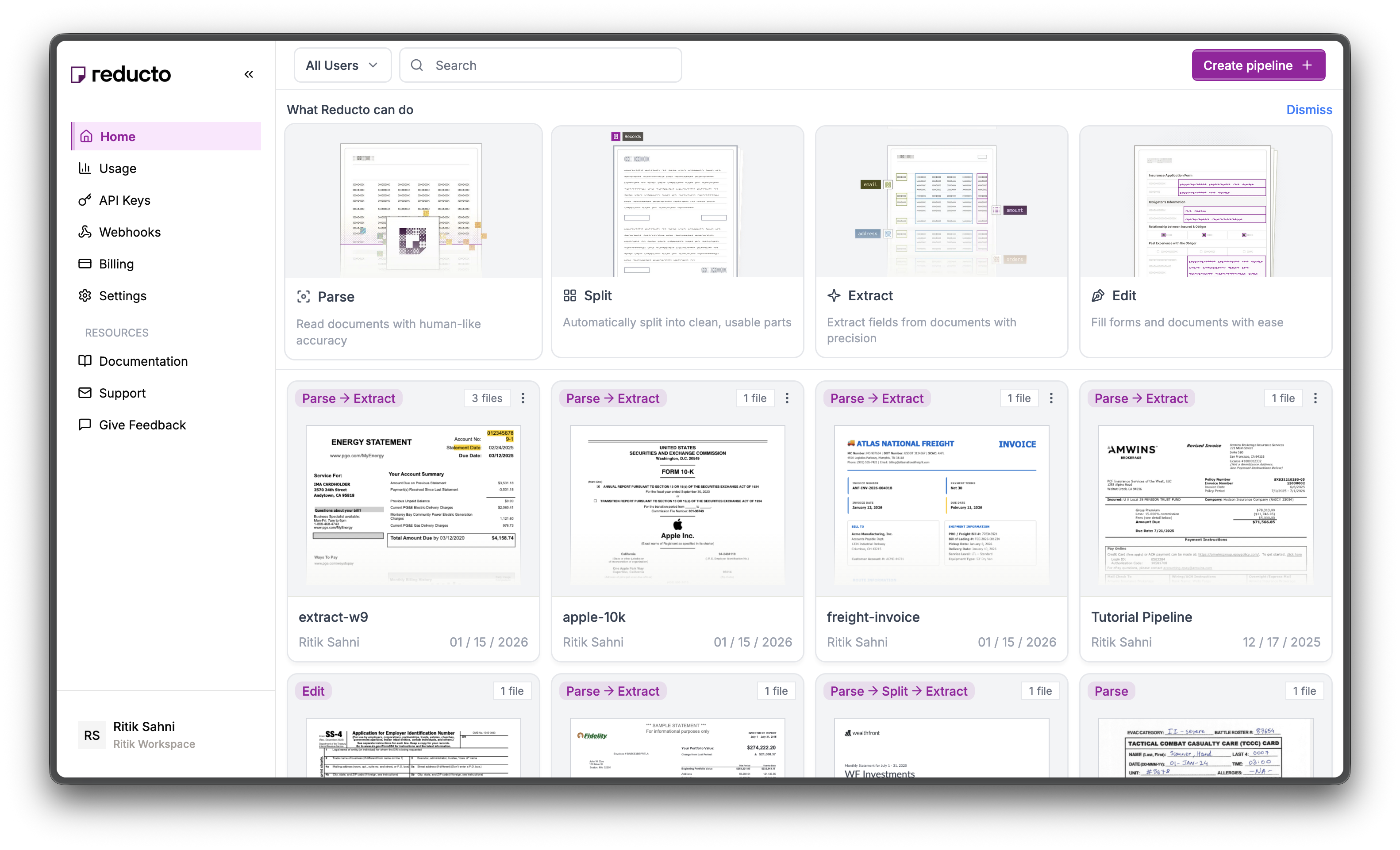
Studio home page with API Keys in sidebar
2

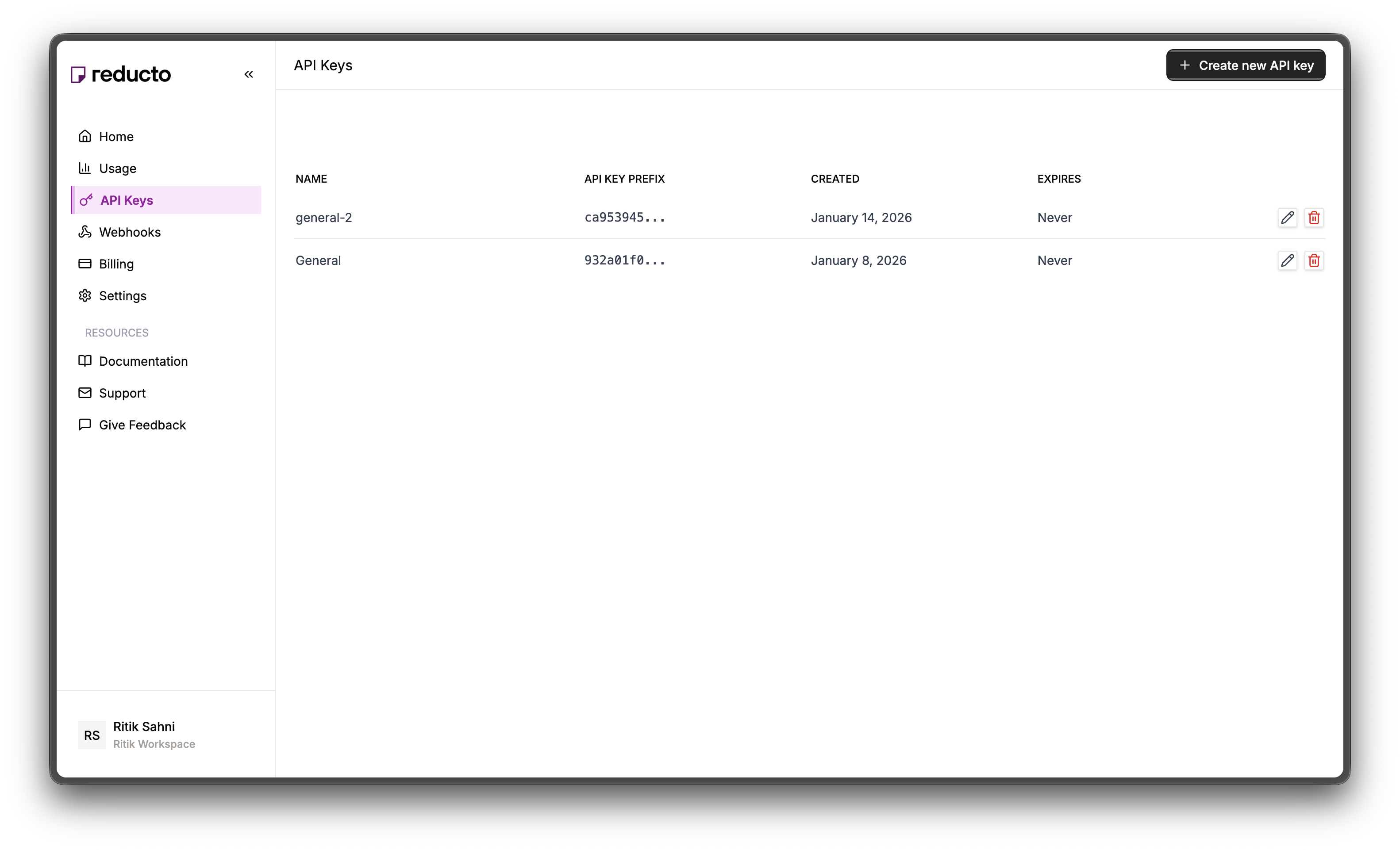
View API Keys

The API Keys page shows your existing keys. Click + Create new API key in the top right corner.
API Keys page with Create button
3

Configure Key

In the modal, enter a name for your key and set an expiration policy (or select “Never” for no expiration). Click Create.
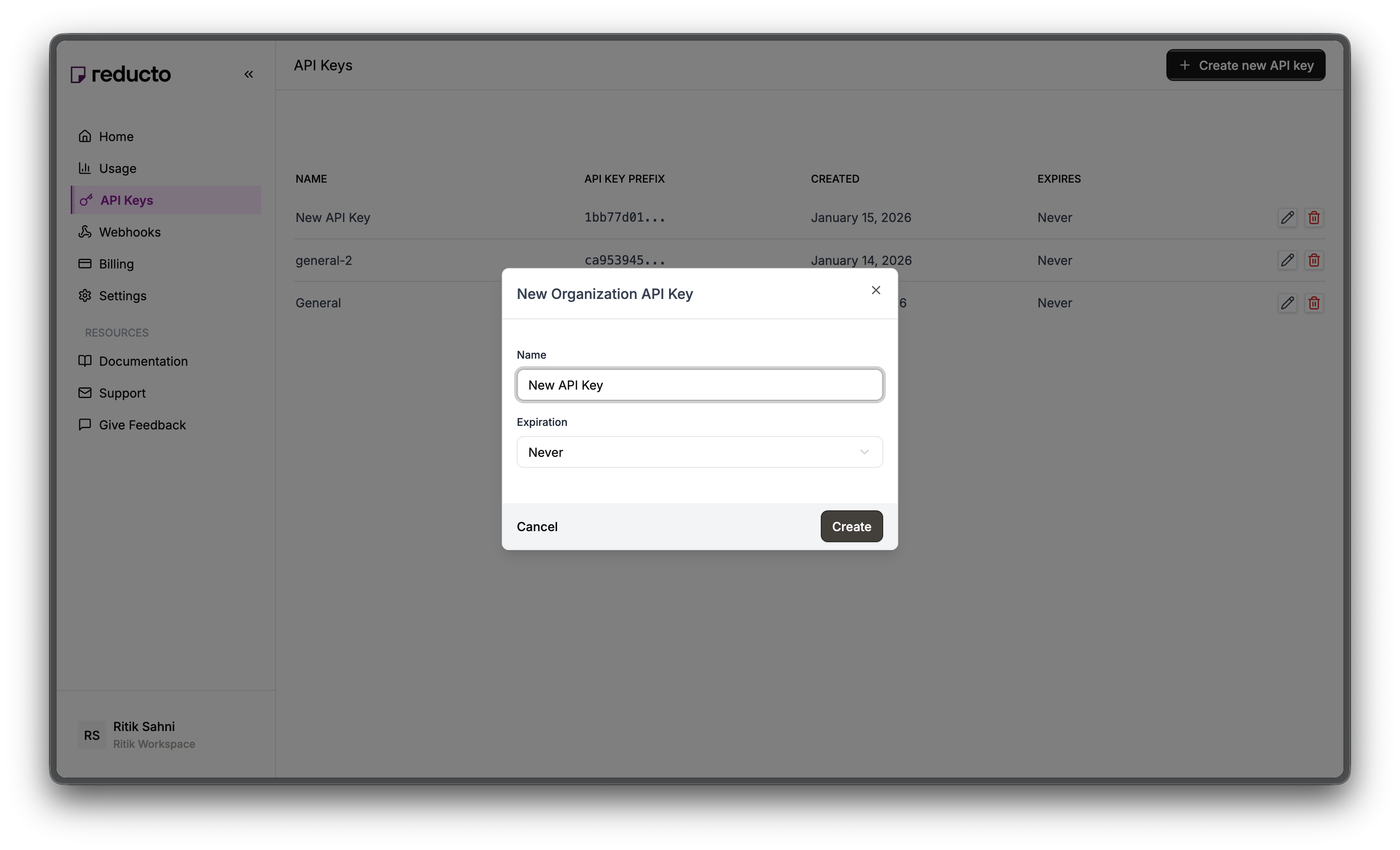
New API Key modal with name and expiration fields
4

Copy Your Key

Copy your new API key and store it securely. You won’t be able to see it again after closing this dialog.
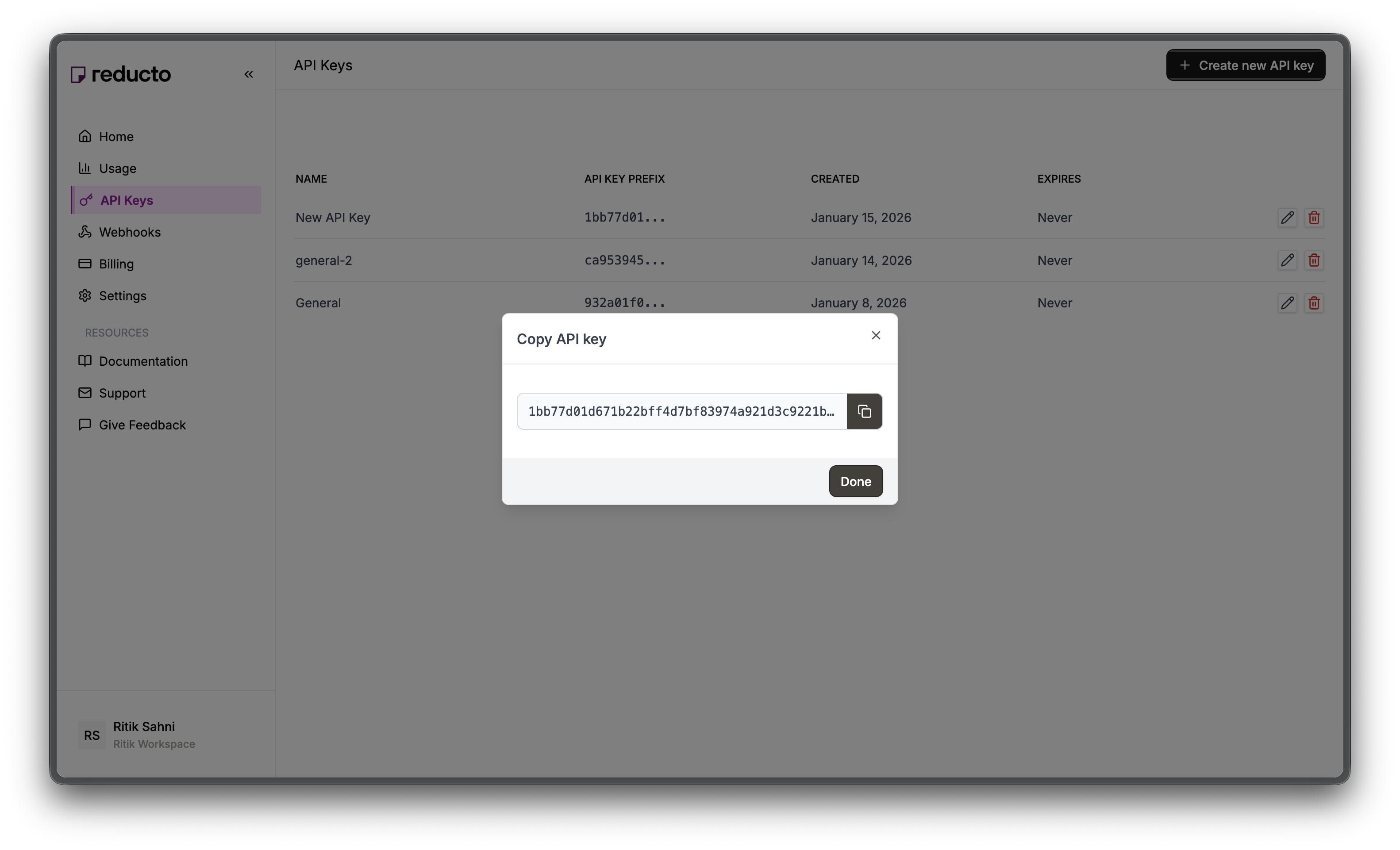
Copy API key dialog
Set the key as an environment variable:
export REDUCTO_API_KEY="your-api-key-here"
Install the SDK:
pip install reductoai requests

Sample document

For this cookbook, we use a 165-page union labor agreement (AFSCME Local 328 vs. Oregon Health & Science University) with extensive redlines showing proposed contract changes. The document includes:
  • Strikethroughs for deleted clauses
  • Underlines for new language
  • Inline annotations explaining changes
Download the sample:
https://static1.squarespace.com/static/5cee0f8eb1a76b0001ca1d78/t/5e45817fe03fd3048a4b1792/1581613498729/Redline+Contract+with+Annotation.pdf
Reducto works with both Word documents (which have native track changes metadata) and PDFs (where it visually detects underlines and strikethroughs). Word documents give the best results since the change metadata is embedded in the file.

Step 1: Parse with change tracking

Upload the document

First, upload your redlined contract to Reducto:
from reducto import Reducto

client = Reducto()

with open("redlined_contract.pdf", "rb") as f:
    upload = client.upload(file=f)

print(f"File ID: {upload.file_id}")
File ID: reducto://e1894955-d89d-42ef-a118-f08d61ee890d.pdf

Parse with change tracking enabled

The key setting is formatting.include: ["change_tracking"]. This tells Reducto to detect underlines and strikethroughs and wrap them in HTML tags.
result = client.parse.run(
    input=upload.file_id,
    formatting={
        "include": ["change_tracking"]
    }
)

print(f"Pages: {result.usage.num_pages}")
print(f"Credits: {result.usage.credits}")
Pages: 165
Credits: 188.0
Why change_tracking? Without this option, Reducto returns plain text. With it enabled, revisions appear as HTML tags that you can parse programmatically:
  • <s> wraps strikethrough text (deletions)
  • <u> wraps underlined text (insertions)
  • <change> groups related revisions together

Step 2: Handle large documents

For large documents like our 165-page contract, Reducto returns results as a URL rather than inline data. This keeps response sizes manageable.
import requests

# Check if result is a URL
if hasattr(result.result, 'url'):
    print(f"Result URL: {result.result.url[:80]}...")
    response = requests.get(result.result.url)
    data = response.json()
    chunks = data.get('chunks', [])
    full_content = "\n".join([c.get('content', '') for c in chunks])
else:
    full_content = "\n".join([c.content for c in result.result.chunks])

print(f"Content length: {len(full_content)} characters")
Result URL: https://prod-storage20241010144745140900000001.s3.amazonaws.com/ac80631f...
Content length: 365675 characters

Step 3: Understand the output

With change tracking enabled, revisions appear as HTML markup in the content. Here’s what we found in our sample contract:
<change> tags found: 554
<s> (strikethrough) tags found: 289
<u> (underline) tags found: 438

Real examples from the document

Simple insertion (new language added):
<change><u>and any PEOPLE deduction</u></change>
Clause deletion (entire section removed):
<change><s>a. An employee's chosen form of dues or payment in lieu of dues
shall recommence upon reinstatement following a period of layoff or
extended leave.</s></change>
Replacement (old language replaced with new):
<change><s>forty-eight (48)</s> <u>fifty (50)</u></change>

Tag meanings

TagMeaningVisual in document
<s>Strikethroughdeleted text
<u>Underlineinserted text
<change>Revision regionGroups related deletions/insertions
A single <change> block can contain:
  • Just a deletion: <change><s>removed text</s></change>
  • Just an insertion: <change><u>new text</u></change>
  • Both: <change><s>old</s> <u>new</u></change>

Step 4: Extract changes programmatically

Now we parse the HTML tags to get a structured list of all changes. This function uses regex to find every <change> block and extract the deletions and insertions within it.
import re

def extract_changes(content):
    """Extract all revision regions from parsed content."""
    changes = []

    pattern = r'<change>(.*?)</change>'
    for match in re.finditer(pattern, content, re.DOTALL):
        change_text = match.group(1)

        # Extract deletions (strikethrough)
        deletions = re.findall(r'<s>(.*?)</s>', change_text, re.DOTALL)

        # Extract insertions (underline)
        insertions = re.findall(r'<u>(.*?)</u>', change_text, re.DOTALL)

        changes.append({
            "deleted": deletions,
            "inserted": insertions,
        })

    return changes
Why regex? The HTML tags are simple and well-structured. For basic extraction, regex is fast and sufficient. For documents with complex nested changes, consider using an HTML parser like BeautifulSoup.

Run the extraction

changes = extract_changes(full_content)

print(f"Found {len(changes)} revisions")
for i, change in enumerate(changes[:5]):
    print(f"\nRevision {i+1}:")
    if change["deleted"]:
        print(f"  Deleted: {change['deleted'][0][:60]}...")
    if change["inserted"]:
        print(f"  Inserted: {change['inserted'][0][:60]}...")
Output from our sample contract:
Found 555 revisions

Revision 1:
  Deleted: Employees in the bargaining unit are required either to b...

Revision 2:
  Deleted: a. An employee's chosen form of dues or payment in lieu o...

Revision 3:
  Deleted: b. Dues and payments in-lieu-of dues for employees workin...

Revision 4:
  Inserted: Employees covered by this Agreement shall have the right...

Revision 5:
  Inserted: 1.2.2 Holder of Record. During the life of this Agreemen...

Step 5: Categorize changes

Not all changes are equal. Some are pure deletions (language removed), some are pure insertions (new language added), and some are replacements (old swapped for new). Categorizing helps prioritize review.
deletions_only = sum(1 for c in changes if c["deleted"] and not c["inserted"])
insertions_only = sum(1 for c in changes if c["inserted"] and not c["deleted"])
replacements = sum(1 for c in changes if c["deleted"] and c["inserted"])

print(f"Total revisions: {len(changes)}")
print(f"  - Deletions only: {deletions_only}")
print(f"  - Insertions only: {insertions_only}")
print(f"  - Replacements: {replacements}")
Output:
Total revisions: 555
  - Deletions only: 191
  - Insertions only: 270
  - Replacements: 94
This contract has 191 sections removed entirely, 270 new sections added, and 94 places where language was swapped.

Using Studio

You can also extract changes visually in Reducto Studio without writing code.
1

Upload your document

Go to studio.reducto.ai and upload your redlined contract.
2

Enable change tracking

In the Configurations tab, switch to Advanced mode. Expand the Formatting section and check change_tracking.
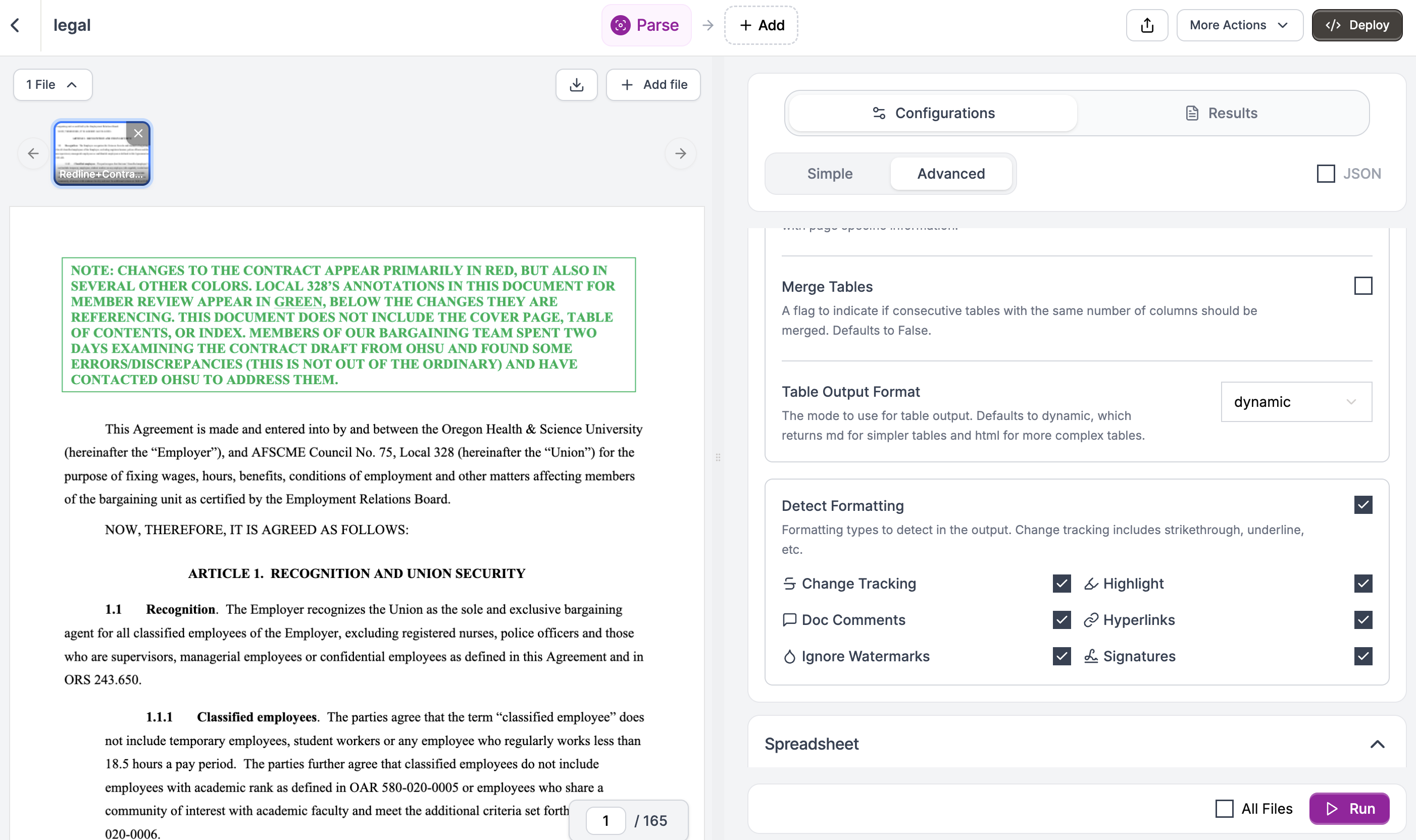
3

Run and review

Click Run. The results show the parsed content with <change>, <s>, and <u> tags visible in the output. You can search for specific changes using Ctrl+F.
4

Export or deploy

Copy the results, download as JSON, or deploy the pipeline with these settings for repeated use on similar documents.

Complete example

Here’s a full script that parses a redlined contract and generates a change summary:
import re
import requests
from reducto import Reducto

def extract_changes(content):
    """Extract revision regions from content."""
    changes = []
    pattern = r'<change>(.*?)</change>'

    for match in re.finditer(pattern, content, re.DOTALL):
        change_text = match.group(1)
        deletions = re.findall(r'<s>(.*?)</s>', change_text, re.DOTALL)
        insertions = re.findall(r'<u>(.*?)</u>', change_text, re.DOTALL)
        changes.append({"deleted": deletions, "inserted": insertions})

    return changes

# Parse the document
client = Reducto()

with open("redlined_contract.pdf", "rb") as f:
    upload = client.upload(file=f)

result = client.parse.run(
    input=upload.file_id,
    formatting={"include": ["change_tracking"]}
)

# Handle URL result for large documents
if hasattr(result.result, 'url'):
    response = requests.get(result.result.url)
    data = response.json()
    chunks = data.get('chunks', [])
    full_content = "\n".join([c.get('content', '') for c in chunks])
else:
    full_content = "\n".join([c.content for c in result.result.chunks])

# Extract and categorize
changes = extract_changes(full_content)

deletions_only = sum(1 for c in changes if c["deleted"] and not c["inserted"])
insertions_only = sum(1 for c in changes if c["inserted"] and not c["deleted"])
replacements = sum(1 for c in changes if c["deleted"] and c["inserted"])

# Print summary
print(f"Document: {result.usage.num_pages} pages")
print(f"Total revisions: {len(changes)}")
print(f"  - Deletions only: {deletions_only}")
print(f"  - Insertions only: {insertions_only}")
print(f"  - Replacements: {replacements}")
Output from our sample contract:
Document: 165 pages
Total revisions: 555
  - Deletions only: 191
  - Insertions only: 270
  - Replacements: 94

How change tracking works

Reducto uses different detection methods depending on document type:
Document typeDetection method
Word (.docx)Reads native track changes metadata. Most accurate.
PDF (digital)Detects colored text and formatting via embedded character data.
PDF (scanned)Uses ML models to visually identify underlines and strikethroughs.
For best results, use Word documents with Track Changes enabled. The metadata is preserved natively. PDFs require visual detection, which works well but depends on clear formatting.

Best practices

Word’s native Track Changes stores revision metadata directly in the file. This gives Reducto exact information about what was added or removed, including author and timestamp. PDFs require visual detection.
Replacements (where old text is swapped for new) often need careful review. Pure insertions may be less risky. Route different categories to appropriate reviewers.
Use Parse with change tracking to get the revisions, then pipe specific clauses through Extract to pull structured fields like dates, amounts, or party names.
Some documents have nested revisions (changes within changes). The regex patterns above handle simple cases. For complex documents, consider using an HTML parser like BeautifulSoup.

Use cases

Extract all changes from incoming redlines and route them to the appropriate reviewer based on clause type. Send indemnification changes to legal, pricing changes to finance.
Build approval queues where each revision must be explicitly accepted or rejected before finalizing the agreement. Track who approved what.
Monitor changes to policies and procedures. Flag modifications to critical sections for compliance review before they go into effect.
Generate executive summaries showing what the counterparty changed. Brief stakeholders without requiring them to read a 165-page document.

Next steps