

Parse vs Extract
Both endpoints process documents, but they answer different questions. Parse answers: “What’s in this document?” It returns all content as structured chunks with positions and types. Use Parse for RAG pipelines, document viewers, or when you need to feed full content to an LLM. Extract answers: “What is the value of X?” It returns only the specific fields you request. Extract runs Parse internally, then uses AI to pull out values matching your schema. The key insight is that Extract can only return what Parse sees. If a value doesn’t appear in the Parse output (perhaps due to OCR issues or a table format problem), no amount of schema tweaking will extract it.Quick Start
Given this investment statement, we’ll extract the portfolio value change, total income, and top holdings: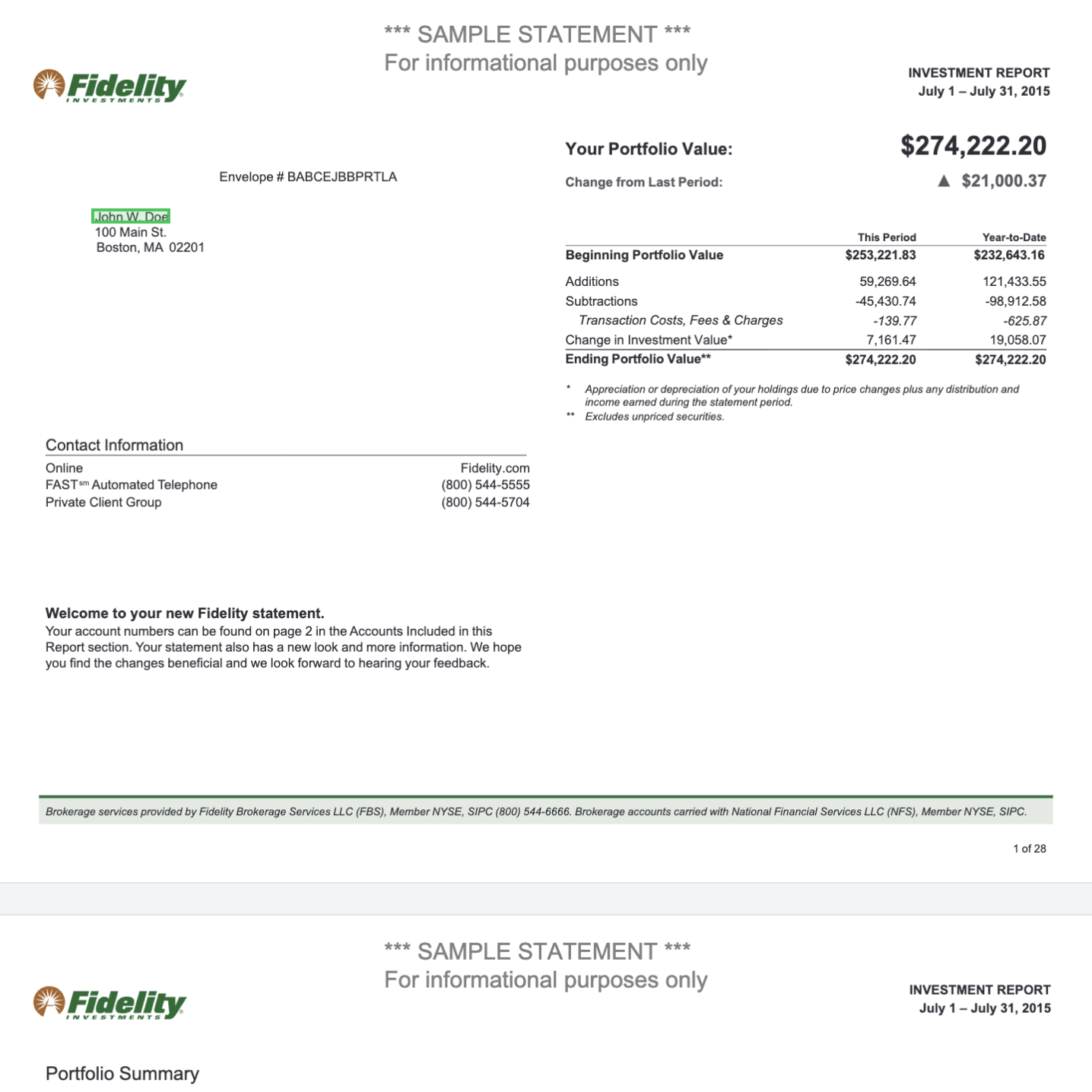
- Upload the PDF to get a
file_id Call /extractwith the file reference and a JSON schema defining the three fields you want- Get back JSON with exactly those fields populated from the document
result is an array containing objects matching your schema. When you enable citations, the response format changes to wrap each value with its source location.
Response Format Details
Full breakdown of result structure, citations, and usage fields.
Request Parameters
input (required)
The document to process. Accepts several formats:
Using
jobid:// skips the parsing step entirely, which is useful when you want to try different extraction schemas on the same document without re-parsing, or when combining data from multiple documents into a single extraction.
instructions
settings
parsing
Since Extract runs Parse internally, you can configure how parsing works. These options are ignored if yourinput is a jobid:// reference.
Common options:
Parse Configuration
All available parsing options.
Schema vs Schemaless
Extract supports two modes of operation: schema-based extraction (the default) and schemaless extraction. Schema-based extraction is what most users need. You define a JSON schema specifying exactly which fields to extract and their types. The model returns data matching your schema structure. This gives you predictable, typed output that integrates cleanly with your application code.Schema Best Practices
Detailed guidance on schema design, naming conventions, and descriptions.
Array Extraction
Standard extraction works well for short documents, but for documents with many repeating items (hundreds of transactions, long invoice line items), you need array extraction. The problem: LLMs have context limits. When a document is too long, items toward the end may be truncated or missed. Array extraction solves this by segmenting the document, extracting from each segment, and merging the results.Array extraction requires at least one top-level property of type
array in your schema. If your schema has no arrays, the endpoint returns an error.Array Extraction Guide
Detailed configuration and algorithm options.
Citations
Citations link each extracted value back to its source location in the document. Enable them when you need to verify extractions or show users where values came from.value and citations:
- Page number where the value was found
- Bounding box coordinates (normalized 0-1)
- Confidence as
"high"or"low" - Source text the original text that was extracted from
Citations Guide
Working with bounding boxes and confidence scores.
Troubleshooting
Outputs differ between runs
Outputs differ between runs
LLM outputs are inherently non-deterministic. Small variations are normal. To reduce variance:
- Use enums to constrain possible values
- Make field descriptions more specific
- Add examples in your system prompt
Only the first pages are processed
Only the first pages are processed
This typically happens with long documents containing arrays. Enable You can also add guidance in your system prompt: “Process all pages in the document, not just the beginning.”
array_extract to process the full document:Missing values from schema
Missing values from schema
When expected fields come back empty:
- Check the Parse output first. Extract can only find what Parse sees. Run
client.parse.run(input=upload.file_id)and verify the value appears in the content. - If it’s in Parse output, refine your schema. Add better field descriptions that match how the value appears in the document.
- If it’s not in Parse output, adjust your parsing configuration. Try enabling agentic mode for tables, or changing the table output format to HTML.
array_extract.Hallucinated or computed values
Hallucinated or computed values
Extract returns only what’s on the document. If you request calculated fields (like “annual cost” when only monthly appears), the model may fabricate values.Solution: Extract raw values and compute in your code:Enable citations to verify source locations for any suspicious values.
Schema is too large
Schema is too large
Very large schemas may exceed LLM token limits and fail with a 422 error. Solutions:
- Flatten deeply nested structures
- Remove unnecessary fields
- Split into multiple extraction calls
Citations and chunking error
Citations and chunking error
If you see “Citations and chunking cannot be enabled at the same time”, you have conflicting options.When citations are enabled, chunking is automatically disabled in the parsing step. If you’re explicitly setting chunking options in
parsing.retrieval.chunking, either remove them or disable citations.Password-protected PDF
Password-protected PDF
Pass the document password in parsing settings:
Next Steps
Response Format
Full breakdown of the response structure.
Best Practices
Schema design and prompt writing tips.
Array Extraction
Handle long documents with repeating data.
Citations
Trace values back to source locations.
Comparing extraction tools
How extraction tools differ on complex PDFs, scans, and document packets.
Enterprise extraction requirements
What to check when extraction runs on long documents and complex tables.