> ## Documentation Index
> Fetch the complete documentation index at: https://docs.reducto.ai/llms.txt
> Use this file to discover all available pages before exploring further.
# Svix Webhooks
> Enterprise-grade webhook delivery with signing, retries, and dashboard
Svix webhooks provide cryptographic request signing, automatic retries with exponential backoff, and a delivery dashboard for debugging. Use Svix for production applications.
## Accessing the Svix dashboard
You can access your Svix webhook dashboard in two ways:
In [Reducto Studio](https://studio.reducto.ai), go to **Account → Webhooks**. This opens your Svix dashboard directly.
Call the `/configure_webhook` endpoint to get a dashboard URL:
```python Python theme={null}
import requests
response = requests.post(
"https://platform.reducto.ai/configure_webhook",
headers={"Authorization": "Bearer YOUR_API_KEY"},
)
print(response.text) # Returns Svix dashboard URL
```
```typescript TypeScript theme={null}
const response = await fetch("https://platform.reducto.ai/configure_webhook", {
method: "POST",
headers: { "Authorization": "Bearer YOUR_API_KEY" }
});
console.log(await response.text());
```
```bash cURL theme={null}
curl -X POST https://platform.reducto.ai/configure_webhook \
-H "Authorization: Bearer $REDUCTO_API_KEY"
```
## Adding an endpoint
In the Svix dashboard, click **+ Add Endpoint** to configure where webhooks are delivered:
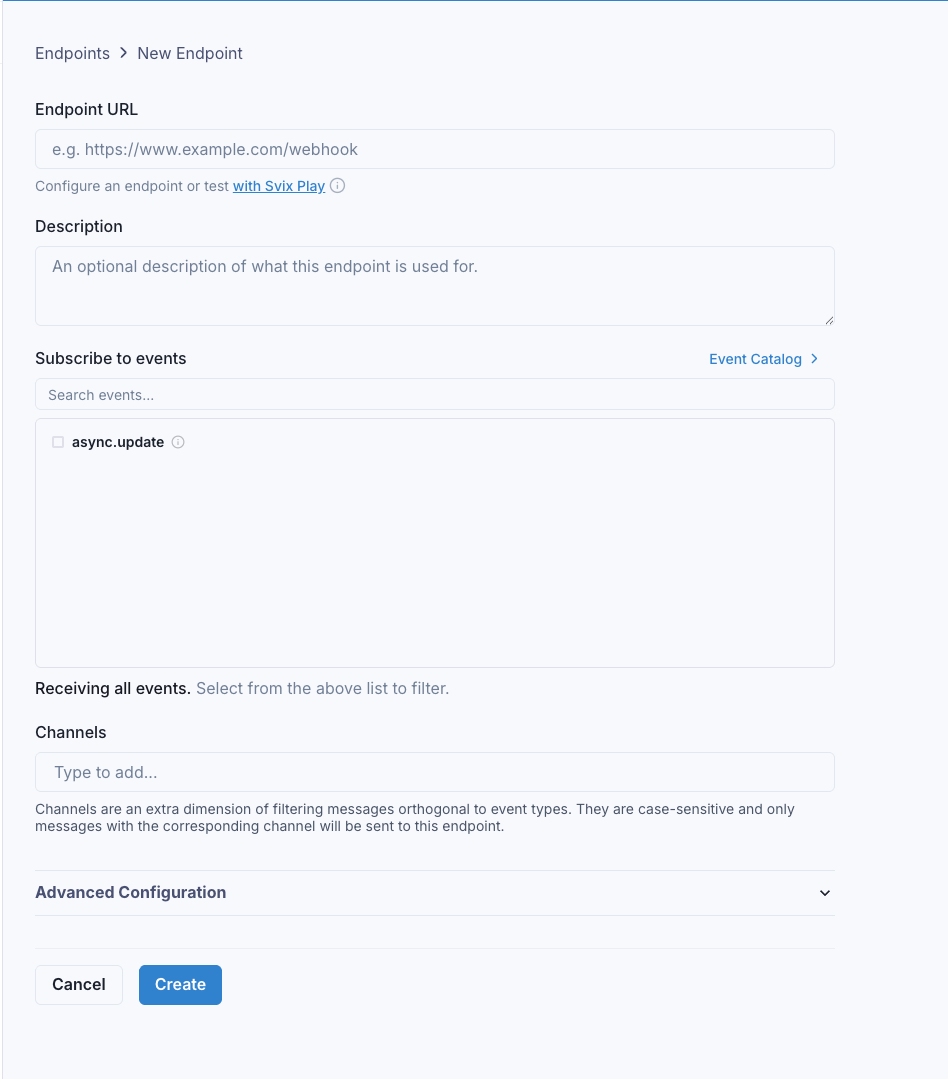 Enter your endpoint URL (must be HTTPS for production). You can use [webhook.site](https://webhook.site) for testing.
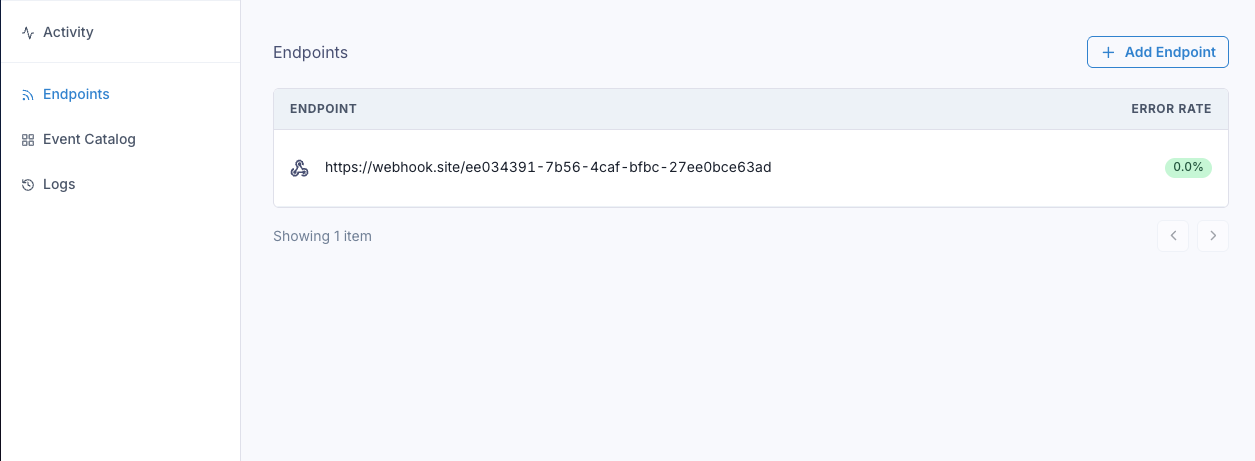
Once added, you'll see your endpoint in the list:
Enter your endpoint URL (must be HTTPS for production). You can use [webhook.site](https://webhook.site) for testing.
Once added, you'll see your endpoint in the list:
 ## Submitting jobs with webhooks
When submitting async jobs, include the webhook configuration:
```python Python theme={null}
from reducto import Reducto
client = Reducto()
job = client.parse.run_job(
input="https://example.com/document.pdf",
async_={
"webhook": {
"mode": "svix",
"channels": [] # Optional: route to specific endpoints
},
"metadata": {
"user_id": "123",
"document_type": "invoice"
}
}
)
print(f"Job ID: {job.job_id}")
```
```typescript TypeScript theme={null}
import Reducto from "reductoai";
const client = new Reducto();
const job = await client.parse.runJob({
input: "https://example.com/document.pdf",
async: {
webhook: {
mode: "svix",
channels: []
},
metadata: { userId: "123", documentType: "invoice" }
}
});
```
```bash cURL theme={null}
curl -X POST https://platform.reducto.ai/parse_async \
-H "Authorization: Bearer $REDUCTO_API_KEY" \
-H "Content-Type: application/json" \
-d '{
"input": "https://example.com/document.pdf",
"async": {
"webhook": {"mode": "svix", "channels": []},
"metadata": {"user_id": "123"}
}
}'
```
Works with all async endpoints: `/parse_async`, `/extract_async`, `/split_async`, `/pipeline_async`.
## Viewing deliveries
When a job completes, Reducto sends an `async.update` event to Svix, which delivers it to your endpoint. You can monitor deliveries in the dashboard:
## Submitting jobs with webhooks
When submitting async jobs, include the webhook configuration:
```python Python theme={null}
from reducto import Reducto
client = Reducto()
job = client.parse.run_job(
input="https://example.com/document.pdf",
async_={
"webhook": {
"mode": "svix",
"channels": [] # Optional: route to specific endpoints
},
"metadata": {
"user_id": "123",
"document_type": "invoice"
}
}
)
print(f"Job ID: {job.job_id}")
```
```typescript TypeScript theme={null}
import Reducto from "reductoai";
const client = new Reducto();
const job = await client.parse.runJob({
input: "https://example.com/document.pdf",
async: {
webhook: {
mode: "svix",
channels: []
},
metadata: { userId: "123", documentType: "invoice" }
}
});
```
```bash cURL theme={null}
curl -X POST https://platform.reducto.ai/parse_async \
-H "Authorization: Bearer $REDUCTO_API_KEY" \
-H "Content-Type: application/json" \
-d '{
"input": "https://example.com/document.pdf",
"async": {
"webhook": {"mode": "svix", "channels": []},
"metadata": {"user_id": "123"}
}
}'
```
Works with all async endpoints: `/parse_async`, `/extract_async`, `/split_async`, `/pipeline_async`.
## Viewing deliveries
When a job completes, Reducto sends an `async.update` event to Svix, which delivers it to your endpoint. You can monitor deliveries in the dashboard:
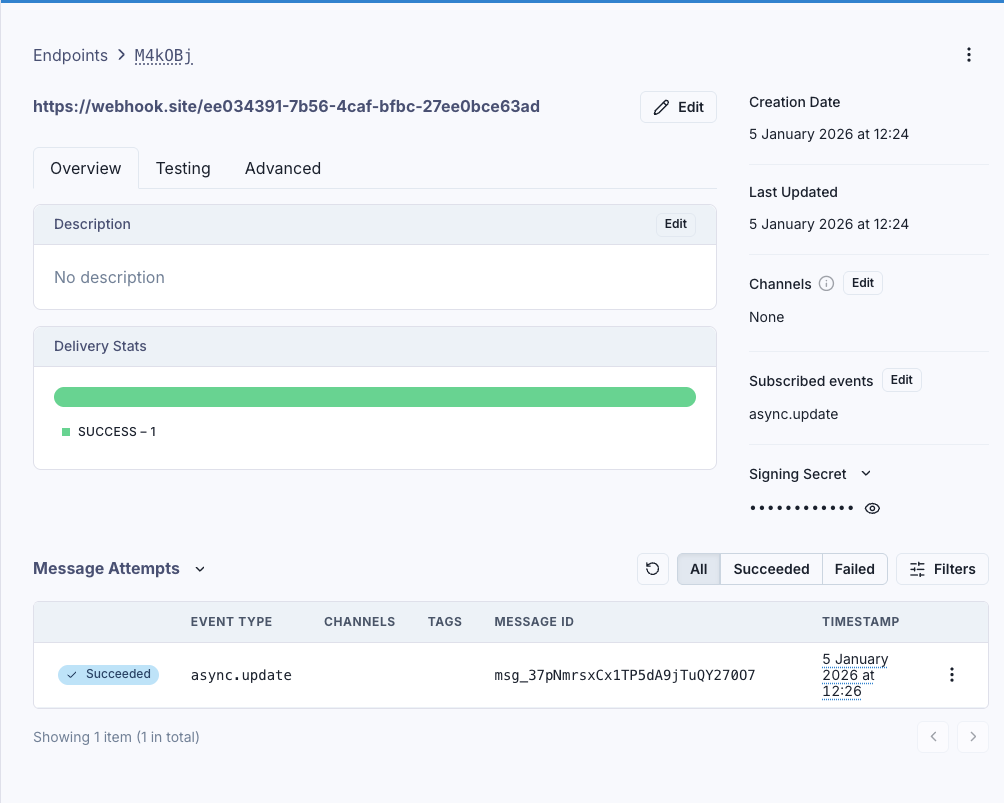 The dashboard shows:
* **Delivery stats**: Success/failure rates
* **Message attempts**: Each delivery with timestamp and status
* **Signing secret**: For verifying webhooks in your handler
## Webhook payload
Your endpoint receives:
```json theme={null}
{
"status": "Completed",
"job_id": "a1b9090e-c9ae-420b-9726-f658afbbe338",
"metadata": {
"user_id": "123",
"document_type": "invoice"
}
}
```
The `status` is either `Completed` or `Failed`. Use `job_id` to retrieve results.
## Handling webhooks with signature verification
Always verify webhook signatures in production. Get your signing secret from the Svix dashboard (starts with `whsec_`):
```python Python theme={null}
from flask import Flask, request, jsonify
from reducto import Reducto
from svix.webhooks import Webhook, WebhookVerificationError
app = Flask(__name__)
client = Reducto()
WEBHOOK_SECRET = "whsec_your_secret" # From Svix dashboard
@app.route('/webhook', methods=['POST'])
def handle_webhook():
# Verify signature
wh = Webhook(WEBHOOK_SECRET)
try:
payload = wh.verify(request.data, {
'svix-id': request.headers.get('svix-id'),
'svix-timestamp': request.headers.get('svix-timestamp'),
'svix-signature': request.headers.get('svix-signature')
})
except WebhookVerificationError:
return jsonify({"error": "Invalid signature"}), 401
# Process webhook
if payload['status'] == "Completed":
job = client.job.get(payload['job_id'])
# Use job.result
return jsonify({"received": True}), 200
```
```typescript TypeScript theme={null}
import express from 'express';
import Reducto from "reductoai";
import { Webhook } from "svix";
const app = express();
const client = new Reducto();
const WEBHOOK_SECRET = "whsec_your_secret"; // From Svix dashboard
app.post('/webhook', express.raw({ type: 'application/json' }), async (req, res) => {
const wh = new Webhook(WEBHOOK_SECRET);
let payload;
try {
payload = wh.verify(req.body, {
'svix-id': req.headers['svix-id'] as string,
'svix-timestamp': req.headers['svix-timestamp'] as string,
'svix-signature': req.headers['svix-signature'] as string
});
} catch {
return res.status(401).json({ error: "Invalid signature" });
}
if (payload.status === "Completed") {
const job = await client.job.retrieve(payload.job_id);
// Use job.result
}
res.status(200).json({ received: true });
});
```
## Channel routing
Use channels to route webhooks to different endpoints (e.g., production vs development):
```python theme={null}
# Production endpoint receives this
client.parse.run_job(
input="https://example.com/document.pdf",
async_={"webhook": {"mode": "svix", "channels": ["production"]}}
)
# Development endpoint receives this
client.parse.run_job(
input="https://example.com/test.pdf",
async_={"webhook": {"mode": "svix", "channels": ["development"]}}
)
```
Configure which channels each endpoint listens to in the Svix dashboard under endpoint settings.
## Troubleshooting
1. Check the Svix dashboard "Message Attempts" for delivery status
2. Verify your endpoint URL is publicly accessible
3. Ensure your endpoint returns 2xx status codes within 15 seconds
1. Verify you're using the correct secret from the Svix dashboard
2. Pass the raw request body (not parsed JSON) to verification
3. Check all three headers are present: `svix-id`, `svix-timestamp`, `svix-signature`
Return 2xx immediately and process results asynchronously. Svix expects responses within 15 seconds.
In the Svix dashboard, click on a failed message attempt and use the "Resend" button to replay it.
## Best practices
1. **Always verify signatures** in production
2. **Return quickly** (within 15 seconds), process results asynchronously
3. **Be idempotent**: Svix may retry, use `svix-id` header as idempotency key
4. **Use HTTPS** for your webhook endpoint
For simpler use cases or prototyping, see [Direct Webhooks](/workflows/direct-webhooks).
The dashboard shows:
* **Delivery stats**: Success/failure rates
* **Message attempts**: Each delivery with timestamp and status
* **Signing secret**: For verifying webhooks in your handler
## Webhook payload
Your endpoint receives:
```json theme={null}
{
"status": "Completed",
"job_id": "a1b9090e-c9ae-420b-9726-f658afbbe338",
"metadata": {
"user_id": "123",
"document_type": "invoice"
}
}
```
The `status` is either `Completed` or `Failed`. Use `job_id` to retrieve results.
## Handling webhooks with signature verification
Always verify webhook signatures in production. Get your signing secret from the Svix dashboard (starts with `whsec_`):
```python Python theme={null}
from flask import Flask, request, jsonify
from reducto import Reducto
from svix.webhooks import Webhook, WebhookVerificationError
app = Flask(__name__)
client = Reducto()
WEBHOOK_SECRET = "whsec_your_secret" # From Svix dashboard
@app.route('/webhook', methods=['POST'])
def handle_webhook():
# Verify signature
wh = Webhook(WEBHOOK_SECRET)
try:
payload = wh.verify(request.data, {
'svix-id': request.headers.get('svix-id'),
'svix-timestamp': request.headers.get('svix-timestamp'),
'svix-signature': request.headers.get('svix-signature')
})
except WebhookVerificationError:
return jsonify({"error": "Invalid signature"}), 401
# Process webhook
if payload['status'] == "Completed":
job = client.job.get(payload['job_id'])
# Use job.result
return jsonify({"received": True}), 200
```
```typescript TypeScript theme={null}
import express from 'express';
import Reducto from "reductoai";
import { Webhook } from "svix";
const app = express();
const client = new Reducto();
const WEBHOOK_SECRET = "whsec_your_secret"; // From Svix dashboard
app.post('/webhook', express.raw({ type: 'application/json' }), async (req, res) => {
const wh = new Webhook(WEBHOOK_SECRET);
let payload;
try {
payload = wh.verify(req.body, {
'svix-id': req.headers['svix-id'] as string,
'svix-timestamp': req.headers['svix-timestamp'] as string,
'svix-signature': req.headers['svix-signature'] as string
});
} catch {
return res.status(401).json({ error: "Invalid signature" });
}
if (payload.status === "Completed") {
const job = await client.job.retrieve(payload.job_id);
// Use job.result
}
res.status(200).json({ received: true });
});
```
## Channel routing
Use channels to route webhooks to different endpoints (e.g., production vs development):
```python theme={null}
# Production endpoint receives this
client.parse.run_job(
input="https://example.com/document.pdf",
async_={"webhook": {"mode": "svix", "channels": ["production"]}}
)
# Development endpoint receives this
client.parse.run_job(
input="https://example.com/test.pdf",
async_={"webhook": {"mode": "svix", "channels": ["development"]}}
)
```
Configure which channels each endpoint listens to in the Svix dashboard under endpoint settings.
## Troubleshooting
1. Check the Svix dashboard "Message Attempts" for delivery status
2. Verify your endpoint URL is publicly accessible
3. Ensure your endpoint returns 2xx status codes within 15 seconds
1. Verify you're using the correct secret from the Svix dashboard
2. Pass the raw request body (not parsed JSON) to verification
3. Check all three headers are present: `svix-id`, `svix-timestamp`, `svix-signature`
Return 2xx immediately and process results asynchronously. Svix expects responses within 15 seconds.
In the Svix dashboard, click on a failed message attempt and use the "Resend" button to replay it.
## Best practices
1. **Always verify signatures** in production
2. **Return quickly** (within 15 seconds), process results asynchronously
3. **Be idempotent**: Svix may retry, use `svix-id` header as idempotency key
4. **Use HTTPS** for your webhook endpoint
For simpler use cases or prototyping, see [Direct Webhooks](/workflows/direct-webhooks).