> ## Documentation Index
> Fetch the complete documentation index at: https://docs.reducto.ai/llms.txt
> Use this file to discover all available pages before exploring further.
# Extract
> Pull specific data from documents into structured JSON
Extract pulls specific fields from documents as structured JSON. You define a schema describing the data you need, and Reducto returns values matching that schema, handling OCR, layout detection, and LLM-based field location under the hood.
Extract builds on [Parse](/parse/overview), which processes the document first, then uses AI to locate and return the specified fields accurately, even across complex layouts.
***
## Parse vs Extract
Both endpoints process documents, but they answer different questions.
**Parse** answers: "What's in this document?" It returns all content as structured chunks with positions and types. Use Parse for RAG pipelines, document viewers, or when you need to feed full content to an LLM.
**Extract** answers: "What is the value of X?" It returns only the specific fields you request. Extract runs Parse internally, then uses AI to pull out values matching your schema.
The key insight is that **Extract can only return what Parse sees**. If a value doesn't appear in the Parse output (perhaps due to OCR issues or a table format problem), no amount of schema tweaking will extract it.
When debugging extraction issues, always verify the data exists in the Parse result first.
***
## Quick Start
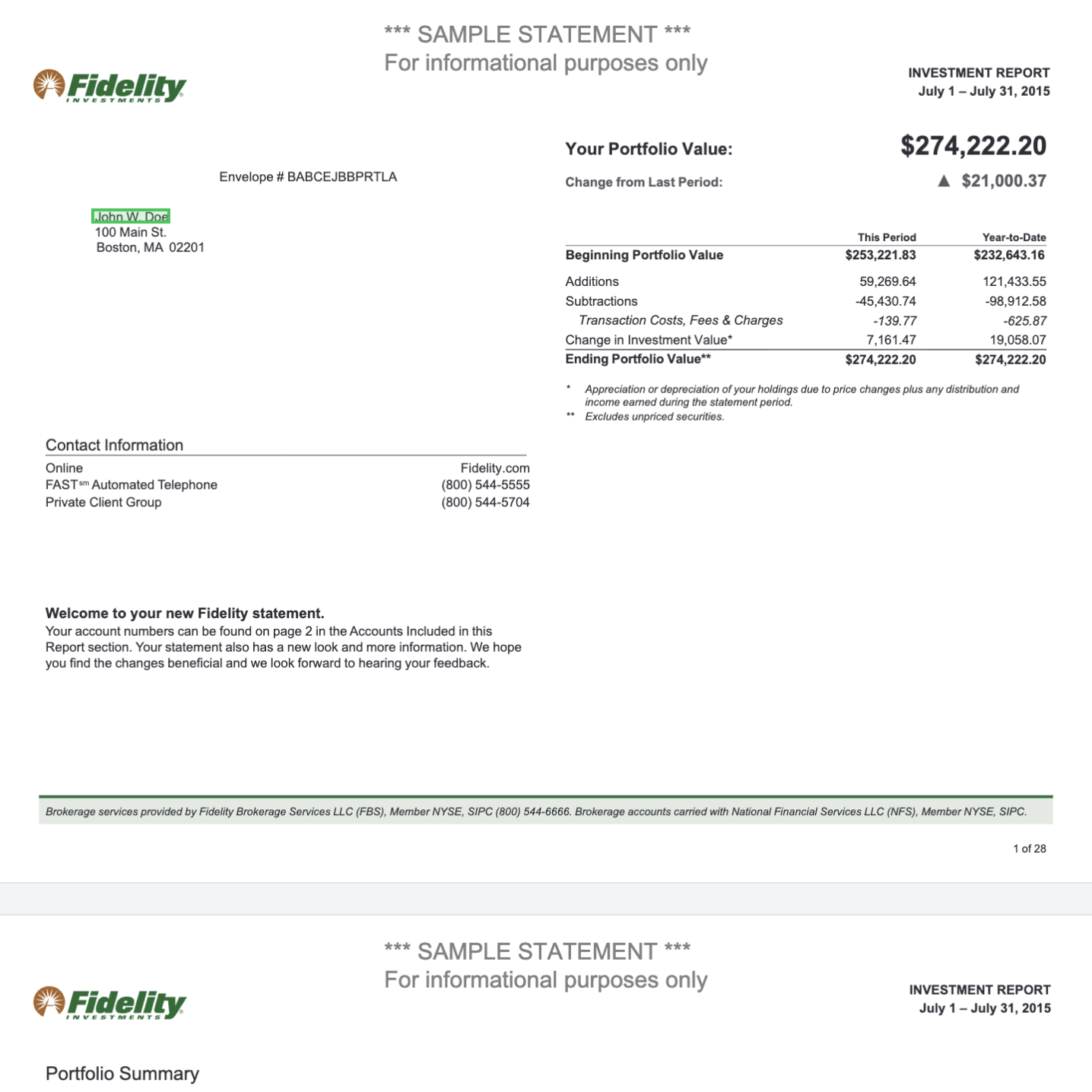
Given [this investment statement](https://studio.reducto.ai/share/md726aw3w7mfs46659ttkqry0s7se3pd?processor=kh7c9e30evkfb5a4h80dq4xke17sfwck\&fileId=js7e4hrtnh2tsyjqdbz114ceyn7sf1v1), we'll extract the portfolio value change, total income, and top holdings:
 ```python Python theme={null}
from pathlib import Path
from reducto import Reducto
client = Reducto()
upload = client.upload(file=Path("fidelity-example.pdf"))
result = client.extract.run(
input=upload.file_id,
instructions={
"schema": {
"type": "object",
"properties": {
"portfolio_increase": {
"type": "number",
"description": "Increase in total portfolio value"
},
"total_income_ytd": {
"type": "number",
"description": "Total income year-to-date"
},
"top_holdings": {
"type": "array",
"items": {"type": "string"},
"description": "Names of top holdings"
}
}
},
"system_prompt": "Extract financial data from this investment statement."
}
)
print(result.result)
```
```javascript Node.js theme={null}
import Reducto from 'reductoai';
import fs from 'fs';
const client = new Reducto();
const upload = await client.upload({
file: fs.createReadStream('fidelity-example.pdf'),
});
const result = await client.extract.run({
input: upload.file_id,
instructions: {
schema: {
type: 'object',
properties: {
portfolio_increase: {
type: 'number',
description: 'Increase in total portfolio value'
},
total_income_ytd: {
type: 'number',
description: 'Total income year-to-date'
},
top_holdings: {
type: 'array',
items: { type: 'string' },
description: 'Names of top holdings'
}
}
},
system_prompt: 'Extract financial data from this investment statement.'
}
});
console.log(result.result);
```
```go Go theme={null}
package main
import (
"context"
"fmt"
"io"
"os"
reducto "github.com/reductoai/reducto-go-sdk"
"github.com/reductoai/reducto-go-sdk/option"
"github.com/reductoai/reducto-go-sdk/shared"
)
func main() {
client := reducto.NewClient(option.WithAPIKey(os.Getenv("REDUCTO_API_KEY")))
file, _ := os.Open("fidelity-example.pdf")
defer file.Close()
upload, _ := client.Upload(context.Background(), reducto.UploadParams{
File: reducto.F[io.Reader](file),
})
schema := map[string]interface{}{
"type": "object",
"properties": map[string]interface{}{
"portfolio_increase": map[string]interface{}{
"type": "number",
"description": "Increase in total portfolio value",
},
"total_income_ytd": map[string]interface{}{
"type": "number",
"description": "Total income year-to-date",
},
"top_holdings": map[string]interface{}{
"type": "array",
"items": map[string]interface{}{"type": "string"},
"description": "Names of top holdings",
},
},
}
result, _ := client.Extract.Run(context.Background(), reducto.ExtractRunParams{
ExtractConfig: reducto.ExtractConfigParam{
DocumentURL: reducto.F[reducto.ExtractConfigDocumentURLUnionParam](
shared.UnionString(upload.FileID),
),
Schema: reducto.F[interface{}](schema),
SystemPrompt: reducto.F("Extract financial data from this investment statement."),
},
})
fmt.Printf("%+v\n", result.Result)
}
```
```bash cURL theme={null}
# First upload the file
FILE_ID=$(curl -s -X POST https://platform.reducto.ai/upload \
-H "Authorization: Bearer $REDUCTO_API_KEY" \
-F "file=@fidelity-example.pdf" | jq -r '.file_id')
# Then extract with schema
curl -X POST https://platform.reducto.ai/extract \
-H "Authorization: Bearer $REDUCTO_API_KEY" \
-H "Content-Type: application/json" \
-d '{
"input": "'$FILE_ID'",
"instructions": {
"schema": {
"type": "object",
"properties": {
"portfolio_increase": {
"type": "number",
"description": "Increase in total portfolio value"
},
"total_income_ytd": {
"type": "number",
"description": "Total income year-to-date"
},
"top_holdings": {
"type": "array",
"items": {"type": "string"},
"description": "Names of top holdings"
}
}
},
"system_prompt": "Extract financial data from this investment statement."
}
}'
```
**What this does:**
1. **Upload** the PDF to get a `file_id`
2. **`Call /extract`** with the file reference and a JSON schema defining the three fields you want
3. **Get back** JSON with exactly those fields populated from the document
```json theme={null}
{
"result": [
{
"portfolio_increase": 21000.37,
"total_income_ytd": 23278.62,
"top_holdings": [
"Johnson & Johnson (JNJ)",
"Apple Inc (AAPL)",
"NH Portfolio 2015 Delphi",
"Corp Jr Sb Nt Slm Corp",
"Spi Lkd Nt (OSM)"
]
}
],
"job_id": "9531166f-9725-4854-8096-459785a33972",
"usage": {"num_fields": 7, "num_pages": 3, "credits": 10.0},
"studio_link": "https://studio.reducto.ai/job/9531166f-..."
}
```
The `result` is an array containing objects matching your schema. When you enable citations, the response format changes to wrap each value with its source location.
Full breakdown of result structure, citations, and usage fields.
***
## Request Parameters
```python theme={null}
result = client.extract.run(
input="...", # Required: file_id, jobid://, or URL
instructions={
"schema": {...}, # JSON schema defining fields to extract
"system_prompt": "..." # Context for the LLM about the document
},
settings={
"array_extract": False, # Segment document for long arrays
"citations": {
"enabled": False, # Return source locations
"numerical_confidence": True
},
"include_images": False,
"optimize_for_latency": False
},
parsing={...} # Parse options (ignored if using jobid://)
)
```
### input (required)
The document to process. Accepts several formats:
| Format | Example | When to use |
| --------------- | ---------------------------------------- | ---------------------------------- |
| Upload response | `reducto://abc123` | Local files uploaded via `/upload` |
| Public URL | `https://example.com/doc.pdf` | Publicly accessible documents |
| Presigned URL | `https://bucket.s3.../doc.pdf?X-Amz-...` | Files in your cloud storage |
| Job ID | `jobid://7600c8c5-...` | Reuse a previous Parse result |
| Job ID list | `["jobid://...", "jobid://..."]` | Combine multiple parsed documents |
Using `jobid://` skips the parsing step entirely, which is useful when you want to try different extraction schemas on the same document without re-parsing, or when combining data from multiple documents into a single extraction.
```python Python theme={null}
# Combine multiple parsed documents
result = client.extract.run(
input=["jobid://job-1", "jobid://job-2", "jobid://job-3"],
instructions={"schema": schema}
)
```
```javascript Node.js theme={null}
// Combine multiple parsed documents
const result = await client.extract.run({
input: ['jobid://job-1', 'jobid://job-2', 'jobid://job-3'],
instructions: { schema }
});
```
```go Go theme={null}
// Combine multiple parsed documents
result, _ := client.Extract.Run(context.Background(), reducto.ExtractRunParams{
ExtractConfig: reducto.ExtractConfigParam{
DocumentURL: reducto.F[reducto.ExtractConfigDocumentURLUnionParam](
reducto.ExtractConfigDocumentURLArrayParam{
shared.UnionString("jobid://job-1"),
shared.UnionString("jobid://job-2"),
shared.UnionString("jobid://job-3"),
},
),
Schema: reducto.F[interface{}](schema),
},
})
```
```bash cURL theme={null}
curl -X POST https://platform.reducto.ai/extract \
-H "Authorization: Bearer $REDUCTO_API_KEY" \
-H "Content-Type: application/json" \
-d '{
"input": ["jobid://job-1", "jobid://job-2", "jobid://job-3"],
"instructions": {"schema": {...}}
}'
```
### instructions
| Field | Purpose |
| --------------- | --------------------------------------------------------------------------------------------------------------------------------------------------------------------------------------------------------------------------------------------------------------------------------------------------------------------------- |
| `schema` | JSON schema defining target fields and types. Field names and descriptions directly influence extraction quality because the LLM uses them to locate values. A field called `invoice_total` with description `"The total amount due, typically at the bottom of the invoice"` performs better than a generic `total` field. |
| `system_prompt` | Document-level context. Describe what kind of document this is or highlight edge cases. Field-specific instructions belong in schema descriptions, not here. |
### settings
| Field | Default | Purpose |
| -------------------------------- | ------- | ------------------------------------------------------------------------------------------------------------------------------------------------------------------------------------------------------- |
| `array_extract` | `false` | For documents with repeating data (line items, transactions). Segments the document, extracts from each segment, and merges results. Required when you need complete arrays from long documents. |
| `deep_extract` | `false` | Agentic extraction mode that iteratively refines its output to achieve near-perfect accuracy. Best for complex documents where accuracy is critical. See [Deep Extract](/configs/extract/deep-extract). |
| `citations.enabled` | `false` | Return page number, bounding box, and source text for each extracted value. Useful for verification and debugging. |
| `citations.numerical_confidence` | `true` | When citations are enabled, include a 0-1 confidence score instead of just "high"/"low". |
| `include_images` | `false` | Include page images in the extraction context. Can help with visually complex documents but increases cost. |
| `optimize_for_latency` | `false` | Prioritize speed at 2x credit cost. Jobs get higher priority in the processing queue. |
Citations cannot be used with chunking. If you enable `settings.citations.enabled`, the parsing step automatically disables chunking. This is because citations require knowing exactly where each piece of content came from, which chunking obscures.
### parsing
Since Extract runs Parse internally, you can configure how parsing works. These options are ignored if your `input` is a `jobid://` reference.
Common options:
```python Python theme={null}
result = client.extract.run(
input=upload.file_id,
instructions={"schema": schema},
parsing={
"enhance": {
"agentic": [{"scope": "table"}] # LLM correction for tables
},
"formatting": {
"table_output_format": "html" # Better for complex tables
},
"settings": {
"page_range": {"start": 1, "end": 10}, # Process specific pages
"document_password": "secret" # For encrypted PDFs
}
}
)
```
```javascript Node.js theme={null}
const result = await client.extract.run({
input: upload.file_id,
instructions: { schema },
parsing: {
enhance: {
agentic: [{ scope: 'table' }] // LLM correction for tables
},
formatting: {
table_output_format: 'html' // Better for complex tables
},
settings: {
page_range: { start: 1, end: 10 }, // Process specific pages
document_password: 'secret' // For encrypted PDFs
}
}
});
```
```go Go theme={null}
result, _ := client.Extract.Run(context.Background(), reducto.ExtractRunParams{
ExtractConfig: reducto.ExtractConfigParam{
DocumentURL: reducto.F[reducto.ExtractConfigDocumentURLUnionParam](
shared.UnionString(upload.FileID),
),
Schema: reducto.F[interface{}](schema),
Options: reducto.F(shared.BaseProcessingOptionsParam{
TableOutputFormat: reducto.F(shared.BaseProcessingOptionsTableOutputFormatHTML),
PageRange: reducto.F(shared.PageRangeParam{
Start: reducto.F(int64(1)),
End: reducto.F(int64(10)),
}),
DocumentPassword: reducto.F("secret"),
}),
AdvancedOptions: reducto.F(shared.AdvancedProcessingOptionsParam{
Agentic: reducto.F([]shared.AgenticModeConfigParam{
{Scope: reducto.F(shared.AgenticModeConfigScopeTable)},
}),
}),
},
})
```
```bash cURL theme={null}
curl -X POST https://platform.reducto.ai/extract \
-H "Authorization: Bearer $REDUCTO_API_KEY" \
-H "Content-Type: application/json" \
-d '{
"input": "reducto://your-file-id",
"instructions": {"schema": {...}},
"parsing": {
"enhance": {
"agentic": [{"scope": "table"}]
},
"formatting": {
"table_output_format": "html"
},
"settings": {
"page_range": {"start": 1, "end": 10},
"document_password": "secret"
}
}
}'
```
All available parsing options.
***
## Schema vs Schemaless
Extract supports two modes of operation: schema-based extraction (the default) and schemaless extraction.
**Schema-based extraction** is what most users need. You define a JSON schema specifying exactly which fields to extract and their types. The model returns data matching your schema structure. This gives you predictable, typed output that integrates cleanly with your application code.
```python Python theme={null}
# Schema-based: you define the exact structure
result = client.extract.run(
input=upload.file_id,
instructions={
"schema": {
"type": "object",
"properties": {
"invoice_number": {"type": "string"},
"total": {"type": "number"}
}
}
}
)
```
```javascript Node.js theme={null}
// Schema-based: you define the exact structure
const result = await client.extract.run({
input: upload.file_id,
instructions: {
schema: {
type: 'object',
properties: {
invoice_number: { type: 'string' },
total: { type: 'number' }
}
}
}
});
```
```go Go theme={null}
// Schema-based: you define the exact structure
schema := map[string]interface{}{
"type": "object",
"properties": map[string]interface{}{
"invoice_number": map[string]interface{}{"type": "string"},
"total": map[string]interface{}{"type": "number"},
},
}
result, _ := client.Extract.Run(context.Background(), reducto.ExtractRunParams{
ExtractConfig: reducto.ExtractConfigParam{
DocumentURL: reducto.F[reducto.ExtractConfigDocumentURLUnionParam](
shared.UnionString(upload.FileID),
),
Schema: reducto.F[interface{}](schema),
},
})
```
```bash cURL theme={null}
curl -X POST https://platform.reducto.ai/extract \
-H "Authorization: Bearer $REDUCTO_API_KEY" \
-H "Content-Type: application/json" \
-d '{
"input": "reducto://your-file-id",
"instructions": {
"schema": {
"type": "object",
"properties": {
"invoice_number": {"type": "string"},
"total": {"type": "number"}
}
}
}
}'
```
**Schemaless extraction** lets the model decide what to extract based on a natural language prompt. Instead of providing a schema, you describe what you want in plain English. The model analyzes the document and returns whatever it deems relevant. This is useful for exploration or when you don't know the document structure in advance.
```python Python theme={null}
# Schemaless: the model decides what to extract
result = client.extract.run(
input=upload.file_id,
instructions={
"system_prompt": "Extract all the key financial information from this invoice"
}
)
```
```javascript Node.js theme={null}
// Schemaless: the model decides what to extract
const result = await client.extract.run({
input: upload.file_id,
instructions: {
system_prompt: 'Extract all the key financial information from this invoice'
}
});
```
```bash cURL theme={null}
curl -X POST https://platform.reducto.ai/extract \
-H "Authorization: Bearer $REDUCTO_API_KEY" \
-H "Content-Type: application/json" \
-d '{
"input": "reducto://your-file-id",
"instructions": {
"system_prompt": "Extract all the key financial information from this invoice"
}
}'
```
Use schema-based extraction for production workflows where you need consistent output structure. Use schemaless extraction when exploring new document types or building prototypes.
Detailed guidance on schema design, naming conventions, and descriptions.
***
## Array Extraction
Standard extraction works well for short documents, but for documents with many repeating items (hundreds of transactions, long invoice line items), you need array extraction.
The problem: LLMs have context limits. When a document is too long, items toward the end may be truncated or missed. Array extraction solves this by segmenting the document, extracting from each segment, and merging the results.
```python Python theme={null}
result = client.extract.run(
input=upload.file_id,
instructions={
"schema": {
"type": "object",
"properties": {
"transactions": {
"type": "array",
"items": {
"type": "object",
"properties": {
"date": {"type": "string"},
"description": {"type": "string"},
"amount": {"type": "number"}
}
}
}
}
}
},
settings={"array_extract": True}
)
```
```javascript Node.js theme={null}
const result = await client.extract.run({
input: upload.file_id,
instructions: {
schema: {
type: 'object',
properties: {
transactions: {
type: 'array',
items: {
type: 'object',
properties: {
date: { type: 'string' },
description: { type: 'string' },
amount: { type: 'number' }
}
}
}
}
}
},
settings: { array_extract: true }
});
```
```go Go theme={null}
schema := map[string]interface{}{
"type": "object",
"properties": map[string]interface{}{
"transactions": map[string]interface{}{
"type": "array",
"items": map[string]interface{}{
"type": "object",
"properties": map[string]interface{}{
"date": map[string]interface{}{"type": "string"},
"description": map[string]interface{}{"type": "string"},
"amount": map[string]interface{}{"type": "number"},
},
},
},
},
}
result, _ := client.Extract.Run(context.Background(), reducto.ExtractRunParams{
ExtractConfig: reducto.ExtractConfigParam{
DocumentURL: reducto.F[reducto.ExtractConfigDocumentURLUnionParam](
shared.UnionString(upload.FileID),
),
Schema: reducto.F[interface{}](schema),
ArrayExtract: reducto.F(shared.ArrayExtractConfigParam{
Enabled: reducto.F(true),
}),
},
})
```
```bash cURL theme={null}
curl -X POST https://platform.reducto.ai/extract \
-H "Authorization: Bearer $REDUCTO_API_KEY" \
-H "Content-Type: application/json" \
-d '{
"input": "reducto://your-file-id",
"instructions": {
"schema": {
"type": "object",
"properties": {
"transactions": {
"type": "array",
"items": {
"type": "object",
"properties": {
"date": {"type": "string"},
"description": {"type": "string"},
"amount": {"type": "number"}
}
}
}
}
}
},
"settings": {"array_extract": true}
}'
```
Array extraction requires at least one top-level property of type `array` in your schema. If your schema has no arrays, the endpoint returns an error.
Detailed configuration and algorithm options.
***
## Citations
Citations link each extracted value back to its source location in the document. Enable them when you need to verify extractions or show users where values came from.
```python Python theme={null}
result = client.extract.run(
input=upload.file_id,
instructions={"schema": schema},
settings={
"citations": {
"enabled": True
}
}
)
# With citations enabled, result is a dict with wrapped values
field = result.result["total_amount"]
print(f"Value: {field.value}")
print(f"Found on page {field.citations[0].bbox.page}")
print(f"Confidence: {field.citations[0].confidence}")
```
```javascript Node.js theme={null}
const result = await client.extract.run({
input: upload.file_id,
instructions: { schema },
settings: {
citations: {
enabled: true
}
}
});
// With citations enabled, result is an object with wrapped values
const field = result.result.total_amount;
console.log(`Value: ${field.value}`);
console.log(`Found on page ${field.citations[0].bbox.page}`);
console.log(`Confidence: ${field.citations[0].confidence}`);
```
```go Go theme={null}
result, _ := client.Extract.Run(context.Background(), reducto.ExtractRunParams{
ExtractConfig: reducto.ExtractConfigParam{
DocumentURL: reducto.F[reducto.ExtractConfigDocumentURLUnionParam](
shared.UnionString(upload.FileID),
),
Schema: reducto.F[interface{}](schema),
GenerateCitations: reducto.F(true),
},
})
// With citations enabled, access wrapped values
resultMap := result.Result.(map[string]interface{})
field := resultMap["total_amount"].(map[string]interface{})
fmt.Printf("Value: %v\n", field["value"])
citations := field["citations"].([]interface{})
bbox := citations[0].(map[string]interface{})["bbox"].(map[string]interface{})
fmt.Printf("Found on page %v\n", bbox["page"])
```
```bash cURL theme={null}
curl -X POST https://platform.reducto.ai/extract \
-H "Authorization: Bearer $REDUCTO_API_KEY" \
-H "Content-Type: application/json" \
-d '{
"input": "reducto://your-file-id",
"instructions": {"schema": {...}},
"settings": {
"citations": {
"enabled": true
}
}
}'
```
When citations are enabled, the response format changes. Each value is wrapped in an object containing `value` and `citations`:
```json theme={null}
{
"result": {
"total_amount": {
"value": 23278.62,
"citations": [
{
"type": "Table",
"content": "Total: $23,278.62",
"bbox": {"left": 0.04, "top": 0.26, "width": 0.45, "height": 0.50, "page": 3},
"confidence": "high"
}
]
}
}
}
```
Each citation includes:
* **Page number** where the value was found
* **Bounding box** coordinates (normalized 0-1)
* **Confidence** as `"high"` or `"low"`
* **Source text** the original text that was extracted from
Working with bounding boxes and confidence scores.
***
## Troubleshooting
LLM outputs are inherently non-deterministic. Small variations are normal. To reduce variance:
1. Use enums to constrain possible values
2. Make field descriptions more specific
3. Add examples in your system prompt
If you need identical outputs for identical inputs, consider caching results by document hash.
This typically happens with long documents containing arrays. Enable `array_extract` to process the full document:
```python Python theme={null}
result = client.extract.run(
input=upload.file_id,
instructions={"schema": schema},
settings={"array_extract": True}
)
```
```javascript Node.js theme={null}
const result = await client.extract.run({
input: upload.file_id,
instructions: { schema },
settings: { array_extract: true }
});
```
```go Go theme={null}
result, _ := client.Extract.Run(context.Background(), reducto.ExtractRunParams{
ExtractConfig: reducto.ExtractConfigParam{
DocumentURL: reducto.F[reducto.ExtractConfigDocumentURLUnionParam](
shared.UnionString(upload.FileID),
),
Schema: reducto.F[interface{}](schema),
ArrayExtract: reducto.F(shared.ArrayExtractConfigParam{
Enabled: reducto.F(true),
}),
},
})
```
```bash cURL theme={null}
curl -X POST https://platform.reducto.ai/extract \
-H "Authorization: Bearer $REDUCTO_API_KEY" \
-H "Content-Type: application/json" \
-d '{
"input": "reducto://your-file-id",
"instructions": {"schema": {...}},
"settings": {"array_extract": true}
}'
```
You can also add guidance in your system prompt: "Process all pages in the document, not just the beginning."
When expected fields come back empty:
1. **Check the Parse output first.** Extract can only find what Parse sees. Run `client.parse.run(input=upload.file_id)` and verify the value appears in the content.
2. **If it's in Parse output**, refine your schema. Add better field descriptions that match how the value appears in the document.
3. **If it's not in Parse output**, adjust your parsing configuration. Try enabling agentic mode for tables, or changing the table output format to HTML.
For long arrays, also try enabling `array_extract`.
Extract returns only what's on the document. If you request calculated fields (like "annual cost" when only monthly appears), the model may fabricate values.
**Solution**: Extract raw values and compute in your code:
```python Python theme={null}
monthly_cost = result.result["monthly_cost"].value
annual_cost = monthly_cost * 12 # Compute yourself
```
```javascript Node.js theme={null}
const monthlyCost = result.result.monthly_cost.value;
const annualCost = monthlyCost * 12; // Compute yourself
```
```go Go theme={null}
resultMap := result.Result.(map[string]interface{})
monthlyCost := resultMap["monthly_cost"].(map[string]interface{})["value"].(float64)
annualCost := monthlyCost * 12 // Compute yourself
```
Enable citations to verify source locations for any suspicious values.
Very large schemas may exceed LLM token limits and fail with a 422 error. Solutions:
1. Flatten deeply nested structures
2. Remove unnecessary fields
3. Split into multiple extraction calls
As a rule of thumb, keep schemas under 50 fields. If you need more, consider breaking the extraction into logical groups.
If you see "Citations and chunking cannot be enabled at the same time", you have conflicting options.
When citations are enabled, chunking is automatically disabled in the parsing step. If you're explicitly setting chunking options in `parsing.retrieval.chunking`, either remove them or disable citations.
Pass the document password in parsing settings:
```python Python theme={null}
result = client.extract.run(
input=upload.file_id,
instructions={"schema": schema},
parsing={
"settings": {"document_password": "your-password"}
}
)
```
```javascript Node.js theme={null}
const result = await client.extract.run({
input: upload.file_id,
instructions: { schema },
parsing: {
settings: { document_password: 'your-password' }
}
});
```
```go Go theme={null}
result, _ := client.Extract.Run(context.Background(), reducto.ExtractRunParams{
ExtractConfig: reducto.ExtractConfigParam{
DocumentURL: reducto.F[reducto.ExtractConfigDocumentURLUnionParam](
shared.UnionString(upload.FileID),
),
Schema: reducto.F[interface{}](schema),
Options: reducto.F(shared.BaseProcessingOptionsParam{
DocumentPassword: reducto.F("your-password"),
}),
},
})
```
```bash cURL theme={null}
curl -X POST https://platform.reducto.ai/extract \
-H "Authorization: Bearer $REDUCTO_API_KEY" \
-H "Content-Type: application/json" \
-d '{
"input": "reducto://your-file-id",
"instructions": {"schema": {...}},
"parsing": {
"settings": {"document_password": "your-password"}
}
}'
```
***
## Next Steps
Full breakdown of the response structure.
Schema design and prompt writing tips.
Handle long documents with repeating data.
Trace values back to source locations.
```python Python theme={null}
from pathlib import Path
from reducto import Reducto
client = Reducto()
upload = client.upload(file=Path("fidelity-example.pdf"))
result = client.extract.run(
input=upload.file_id,
instructions={
"schema": {
"type": "object",
"properties": {
"portfolio_increase": {
"type": "number",
"description": "Increase in total portfolio value"
},
"total_income_ytd": {
"type": "number",
"description": "Total income year-to-date"
},
"top_holdings": {
"type": "array",
"items": {"type": "string"},
"description": "Names of top holdings"
}
}
},
"system_prompt": "Extract financial data from this investment statement."
}
)
print(result.result)
```
```javascript Node.js theme={null}
import Reducto from 'reductoai';
import fs from 'fs';
const client = new Reducto();
const upload = await client.upload({
file: fs.createReadStream('fidelity-example.pdf'),
});
const result = await client.extract.run({
input: upload.file_id,
instructions: {
schema: {
type: 'object',
properties: {
portfolio_increase: {
type: 'number',
description: 'Increase in total portfolio value'
},
total_income_ytd: {
type: 'number',
description: 'Total income year-to-date'
},
top_holdings: {
type: 'array',
items: { type: 'string' },
description: 'Names of top holdings'
}
}
},
system_prompt: 'Extract financial data from this investment statement.'
}
});
console.log(result.result);
```
```go Go theme={null}
package main
import (
"context"
"fmt"
"io"
"os"
reducto "github.com/reductoai/reducto-go-sdk"
"github.com/reductoai/reducto-go-sdk/option"
"github.com/reductoai/reducto-go-sdk/shared"
)
func main() {
client := reducto.NewClient(option.WithAPIKey(os.Getenv("REDUCTO_API_KEY")))
file, _ := os.Open("fidelity-example.pdf")
defer file.Close()
upload, _ := client.Upload(context.Background(), reducto.UploadParams{
File: reducto.F[io.Reader](file),
})
schema := map[string]interface{}{
"type": "object",
"properties": map[string]interface{}{
"portfolio_increase": map[string]interface{}{
"type": "number",
"description": "Increase in total portfolio value",
},
"total_income_ytd": map[string]interface{}{
"type": "number",
"description": "Total income year-to-date",
},
"top_holdings": map[string]interface{}{
"type": "array",
"items": map[string]interface{}{"type": "string"},
"description": "Names of top holdings",
},
},
}
result, _ := client.Extract.Run(context.Background(), reducto.ExtractRunParams{
ExtractConfig: reducto.ExtractConfigParam{
DocumentURL: reducto.F[reducto.ExtractConfigDocumentURLUnionParam](
shared.UnionString(upload.FileID),
),
Schema: reducto.F[interface{}](schema),
SystemPrompt: reducto.F("Extract financial data from this investment statement."),
},
})
fmt.Printf("%+v\n", result.Result)
}
```
```bash cURL theme={null}
# First upload the file
FILE_ID=$(curl -s -X POST https://platform.reducto.ai/upload \
-H "Authorization: Bearer $REDUCTO_API_KEY" \
-F "file=@fidelity-example.pdf" | jq -r '.file_id')
# Then extract with schema
curl -X POST https://platform.reducto.ai/extract \
-H "Authorization: Bearer $REDUCTO_API_KEY" \
-H "Content-Type: application/json" \
-d '{
"input": "'$FILE_ID'",
"instructions": {
"schema": {
"type": "object",
"properties": {
"portfolio_increase": {
"type": "number",
"description": "Increase in total portfolio value"
},
"total_income_ytd": {
"type": "number",
"description": "Total income year-to-date"
},
"top_holdings": {
"type": "array",
"items": {"type": "string"},
"description": "Names of top holdings"
}
}
},
"system_prompt": "Extract financial data from this investment statement."
}
}'
```
**What this does:**
1. **Upload** the PDF to get a `file_id`
2. **`Call /extract`** with the file reference and a JSON schema defining the three fields you want
3. **Get back** JSON with exactly those fields populated from the document
```json theme={null}
{
"result": [
{
"portfolio_increase": 21000.37,
"total_income_ytd": 23278.62,
"top_holdings": [
"Johnson & Johnson (JNJ)",
"Apple Inc (AAPL)",
"NH Portfolio 2015 Delphi",
"Corp Jr Sb Nt Slm Corp",
"Spi Lkd Nt (OSM)"
]
}
],
"job_id": "9531166f-9725-4854-8096-459785a33972",
"usage": {"num_fields": 7, "num_pages": 3, "credits": 10.0},
"studio_link": "https://studio.reducto.ai/job/9531166f-..."
}
```
The `result` is an array containing objects matching your schema. When you enable citations, the response format changes to wrap each value with its source location.
Full breakdown of result structure, citations, and usage fields.
***
## Request Parameters
```python theme={null}
result = client.extract.run(
input="...", # Required: file_id, jobid://, or URL
instructions={
"schema": {...}, # JSON schema defining fields to extract
"system_prompt": "..." # Context for the LLM about the document
},
settings={
"array_extract": False, # Segment document for long arrays
"citations": {
"enabled": False, # Return source locations
"numerical_confidence": True
},
"include_images": False,
"optimize_for_latency": False
},
parsing={...} # Parse options (ignored if using jobid://)
)
```
### input (required)
The document to process. Accepts several formats:
| Format | Example | When to use |
| --------------- | ---------------------------------------- | ---------------------------------- |
| Upload response | `reducto://abc123` | Local files uploaded via `/upload` |
| Public URL | `https://example.com/doc.pdf` | Publicly accessible documents |
| Presigned URL | `https://bucket.s3.../doc.pdf?X-Amz-...` | Files in your cloud storage |
| Job ID | `jobid://7600c8c5-...` | Reuse a previous Parse result |
| Job ID list | `["jobid://...", "jobid://..."]` | Combine multiple parsed documents |
Using `jobid://` skips the parsing step entirely, which is useful when you want to try different extraction schemas on the same document without re-parsing, or when combining data from multiple documents into a single extraction.
```python Python theme={null}
# Combine multiple parsed documents
result = client.extract.run(
input=["jobid://job-1", "jobid://job-2", "jobid://job-3"],
instructions={"schema": schema}
)
```
```javascript Node.js theme={null}
// Combine multiple parsed documents
const result = await client.extract.run({
input: ['jobid://job-1', 'jobid://job-2', 'jobid://job-3'],
instructions: { schema }
});
```
```go Go theme={null}
// Combine multiple parsed documents
result, _ := client.Extract.Run(context.Background(), reducto.ExtractRunParams{
ExtractConfig: reducto.ExtractConfigParam{
DocumentURL: reducto.F[reducto.ExtractConfigDocumentURLUnionParam](
reducto.ExtractConfigDocumentURLArrayParam{
shared.UnionString("jobid://job-1"),
shared.UnionString("jobid://job-2"),
shared.UnionString("jobid://job-3"),
},
),
Schema: reducto.F[interface{}](schema),
},
})
```
```bash cURL theme={null}
curl -X POST https://platform.reducto.ai/extract \
-H "Authorization: Bearer $REDUCTO_API_KEY" \
-H "Content-Type: application/json" \
-d '{
"input": ["jobid://job-1", "jobid://job-2", "jobid://job-3"],
"instructions": {"schema": {...}}
}'
```
### instructions
| Field | Purpose |
| --------------- | --------------------------------------------------------------------------------------------------------------------------------------------------------------------------------------------------------------------------------------------------------------------------------------------------------------------------- |
| `schema` | JSON schema defining target fields and types. Field names and descriptions directly influence extraction quality because the LLM uses them to locate values. A field called `invoice_total` with description `"The total amount due, typically at the bottom of the invoice"` performs better than a generic `total` field. |
| `system_prompt` | Document-level context. Describe what kind of document this is or highlight edge cases. Field-specific instructions belong in schema descriptions, not here. |
### settings
| Field | Default | Purpose |
| -------------------------------- | ------- | ------------------------------------------------------------------------------------------------------------------------------------------------------------------------------------------------------- |
| `array_extract` | `false` | For documents with repeating data (line items, transactions). Segments the document, extracts from each segment, and merges results. Required when you need complete arrays from long documents. |
| `deep_extract` | `false` | Agentic extraction mode that iteratively refines its output to achieve near-perfect accuracy. Best for complex documents where accuracy is critical. See [Deep Extract](/configs/extract/deep-extract). |
| `citations.enabled` | `false` | Return page number, bounding box, and source text for each extracted value. Useful for verification and debugging. |
| `citations.numerical_confidence` | `true` | When citations are enabled, include a 0-1 confidence score instead of just "high"/"low". |
| `include_images` | `false` | Include page images in the extraction context. Can help with visually complex documents but increases cost. |
| `optimize_for_latency` | `false` | Prioritize speed at 2x credit cost. Jobs get higher priority in the processing queue. |
Citations cannot be used with chunking. If you enable `settings.citations.enabled`, the parsing step automatically disables chunking. This is because citations require knowing exactly where each piece of content came from, which chunking obscures.
### parsing
Since Extract runs Parse internally, you can configure how parsing works. These options are ignored if your `input` is a `jobid://` reference.
Common options:
```python Python theme={null}
result = client.extract.run(
input=upload.file_id,
instructions={"schema": schema},
parsing={
"enhance": {
"agentic": [{"scope": "table"}] # LLM correction for tables
},
"formatting": {
"table_output_format": "html" # Better for complex tables
},
"settings": {
"page_range": {"start": 1, "end": 10}, # Process specific pages
"document_password": "secret" # For encrypted PDFs
}
}
)
```
```javascript Node.js theme={null}
const result = await client.extract.run({
input: upload.file_id,
instructions: { schema },
parsing: {
enhance: {
agentic: [{ scope: 'table' }] // LLM correction for tables
},
formatting: {
table_output_format: 'html' // Better for complex tables
},
settings: {
page_range: { start: 1, end: 10 }, // Process specific pages
document_password: 'secret' // For encrypted PDFs
}
}
});
```
```go Go theme={null}
result, _ := client.Extract.Run(context.Background(), reducto.ExtractRunParams{
ExtractConfig: reducto.ExtractConfigParam{
DocumentURL: reducto.F[reducto.ExtractConfigDocumentURLUnionParam](
shared.UnionString(upload.FileID),
),
Schema: reducto.F[interface{}](schema),
Options: reducto.F(shared.BaseProcessingOptionsParam{
TableOutputFormat: reducto.F(shared.BaseProcessingOptionsTableOutputFormatHTML),
PageRange: reducto.F(shared.PageRangeParam{
Start: reducto.F(int64(1)),
End: reducto.F(int64(10)),
}),
DocumentPassword: reducto.F("secret"),
}),
AdvancedOptions: reducto.F(shared.AdvancedProcessingOptionsParam{
Agentic: reducto.F([]shared.AgenticModeConfigParam{
{Scope: reducto.F(shared.AgenticModeConfigScopeTable)},
}),
}),
},
})
```
```bash cURL theme={null}
curl -X POST https://platform.reducto.ai/extract \
-H "Authorization: Bearer $REDUCTO_API_KEY" \
-H "Content-Type: application/json" \
-d '{
"input": "reducto://your-file-id",
"instructions": {"schema": {...}},
"parsing": {
"enhance": {
"agentic": [{"scope": "table"}]
},
"formatting": {
"table_output_format": "html"
},
"settings": {
"page_range": {"start": 1, "end": 10},
"document_password": "secret"
}
}
}'
```
All available parsing options.
***
## Schema vs Schemaless
Extract supports two modes of operation: schema-based extraction (the default) and schemaless extraction.
**Schema-based extraction** is what most users need. You define a JSON schema specifying exactly which fields to extract and their types. The model returns data matching your schema structure. This gives you predictable, typed output that integrates cleanly with your application code.
```python Python theme={null}
# Schema-based: you define the exact structure
result = client.extract.run(
input=upload.file_id,
instructions={
"schema": {
"type": "object",
"properties": {
"invoice_number": {"type": "string"},
"total": {"type": "number"}
}
}
}
)
```
```javascript Node.js theme={null}
// Schema-based: you define the exact structure
const result = await client.extract.run({
input: upload.file_id,
instructions: {
schema: {
type: 'object',
properties: {
invoice_number: { type: 'string' },
total: { type: 'number' }
}
}
}
});
```
```go Go theme={null}
// Schema-based: you define the exact structure
schema := map[string]interface{}{
"type": "object",
"properties": map[string]interface{}{
"invoice_number": map[string]interface{}{"type": "string"},
"total": map[string]interface{}{"type": "number"},
},
}
result, _ := client.Extract.Run(context.Background(), reducto.ExtractRunParams{
ExtractConfig: reducto.ExtractConfigParam{
DocumentURL: reducto.F[reducto.ExtractConfigDocumentURLUnionParam](
shared.UnionString(upload.FileID),
),
Schema: reducto.F[interface{}](schema),
},
})
```
```bash cURL theme={null}
curl -X POST https://platform.reducto.ai/extract \
-H "Authorization: Bearer $REDUCTO_API_KEY" \
-H "Content-Type: application/json" \
-d '{
"input": "reducto://your-file-id",
"instructions": {
"schema": {
"type": "object",
"properties": {
"invoice_number": {"type": "string"},
"total": {"type": "number"}
}
}
}
}'
```
**Schemaless extraction** lets the model decide what to extract based on a natural language prompt. Instead of providing a schema, you describe what you want in plain English. The model analyzes the document and returns whatever it deems relevant. This is useful for exploration or when you don't know the document structure in advance.
```python Python theme={null}
# Schemaless: the model decides what to extract
result = client.extract.run(
input=upload.file_id,
instructions={
"system_prompt": "Extract all the key financial information from this invoice"
}
)
```
```javascript Node.js theme={null}
// Schemaless: the model decides what to extract
const result = await client.extract.run({
input: upload.file_id,
instructions: {
system_prompt: 'Extract all the key financial information from this invoice'
}
});
```
```bash cURL theme={null}
curl -X POST https://platform.reducto.ai/extract \
-H "Authorization: Bearer $REDUCTO_API_KEY" \
-H "Content-Type: application/json" \
-d '{
"input": "reducto://your-file-id",
"instructions": {
"system_prompt": "Extract all the key financial information from this invoice"
}
}'
```
Use schema-based extraction for production workflows where you need consistent output structure. Use schemaless extraction when exploring new document types or building prototypes.
Detailed guidance on schema design, naming conventions, and descriptions.
***
## Array Extraction
Standard extraction works well for short documents, but for documents with many repeating items (hundreds of transactions, long invoice line items), you need array extraction.
The problem: LLMs have context limits. When a document is too long, items toward the end may be truncated or missed. Array extraction solves this by segmenting the document, extracting from each segment, and merging the results.
```python Python theme={null}
result = client.extract.run(
input=upload.file_id,
instructions={
"schema": {
"type": "object",
"properties": {
"transactions": {
"type": "array",
"items": {
"type": "object",
"properties": {
"date": {"type": "string"},
"description": {"type": "string"},
"amount": {"type": "number"}
}
}
}
}
}
},
settings={"array_extract": True}
)
```
```javascript Node.js theme={null}
const result = await client.extract.run({
input: upload.file_id,
instructions: {
schema: {
type: 'object',
properties: {
transactions: {
type: 'array',
items: {
type: 'object',
properties: {
date: { type: 'string' },
description: { type: 'string' },
amount: { type: 'number' }
}
}
}
}
}
},
settings: { array_extract: true }
});
```
```go Go theme={null}
schema := map[string]interface{}{
"type": "object",
"properties": map[string]interface{}{
"transactions": map[string]interface{}{
"type": "array",
"items": map[string]interface{}{
"type": "object",
"properties": map[string]interface{}{
"date": map[string]interface{}{"type": "string"},
"description": map[string]interface{}{"type": "string"},
"amount": map[string]interface{}{"type": "number"},
},
},
},
},
}
result, _ := client.Extract.Run(context.Background(), reducto.ExtractRunParams{
ExtractConfig: reducto.ExtractConfigParam{
DocumentURL: reducto.F[reducto.ExtractConfigDocumentURLUnionParam](
shared.UnionString(upload.FileID),
),
Schema: reducto.F[interface{}](schema),
ArrayExtract: reducto.F(shared.ArrayExtractConfigParam{
Enabled: reducto.F(true),
}),
},
})
```
```bash cURL theme={null}
curl -X POST https://platform.reducto.ai/extract \
-H "Authorization: Bearer $REDUCTO_API_KEY" \
-H "Content-Type: application/json" \
-d '{
"input": "reducto://your-file-id",
"instructions": {
"schema": {
"type": "object",
"properties": {
"transactions": {
"type": "array",
"items": {
"type": "object",
"properties": {
"date": {"type": "string"},
"description": {"type": "string"},
"amount": {"type": "number"}
}
}
}
}
}
},
"settings": {"array_extract": true}
}'
```
Array extraction requires at least one top-level property of type `array` in your schema. If your schema has no arrays, the endpoint returns an error.
Detailed configuration and algorithm options.
***
## Citations
Citations link each extracted value back to its source location in the document. Enable them when you need to verify extractions or show users where values came from.
```python Python theme={null}
result = client.extract.run(
input=upload.file_id,
instructions={"schema": schema},
settings={
"citations": {
"enabled": True
}
}
)
# With citations enabled, result is a dict with wrapped values
field = result.result["total_amount"]
print(f"Value: {field.value}")
print(f"Found on page {field.citations[0].bbox.page}")
print(f"Confidence: {field.citations[0].confidence}")
```
```javascript Node.js theme={null}
const result = await client.extract.run({
input: upload.file_id,
instructions: { schema },
settings: {
citations: {
enabled: true
}
}
});
// With citations enabled, result is an object with wrapped values
const field = result.result.total_amount;
console.log(`Value: ${field.value}`);
console.log(`Found on page ${field.citations[0].bbox.page}`);
console.log(`Confidence: ${field.citations[0].confidence}`);
```
```go Go theme={null}
result, _ := client.Extract.Run(context.Background(), reducto.ExtractRunParams{
ExtractConfig: reducto.ExtractConfigParam{
DocumentURL: reducto.F[reducto.ExtractConfigDocumentURLUnionParam](
shared.UnionString(upload.FileID),
),
Schema: reducto.F[interface{}](schema),
GenerateCitations: reducto.F(true),
},
})
// With citations enabled, access wrapped values
resultMap := result.Result.(map[string]interface{})
field := resultMap["total_amount"].(map[string]interface{})
fmt.Printf("Value: %v\n", field["value"])
citations := field["citations"].([]interface{})
bbox := citations[0].(map[string]interface{})["bbox"].(map[string]interface{})
fmt.Printf("Found on page %v\n", bbox["page"])
```
```bash cURL theme={null}
curl -X POST https://platform.reducto.ai/extract \
-H "Authorization: Bearer $REDUCTO_API_KEY" \
-H "Content-Type: application/json" \
-d '{
"input": "reducto://your-file-id",
"instructions": {"schema": {...}},
"settings": {
"citations": {
"enabled": true
}
}
}'
```
When citations are enabled, the response format changes. Each value is wrapped in an object containing `value` and `citations`:
```json theme={null}
{
"result": {
"total_amount": {
"value": 23278.62,
"citations": [
{
"type": "Table",
"content": "Total: $23,278.62",
"bbox": {"left": 0.04, "top": 0.26, "width": 0.45, "height": 0.50, "page": 3},
"confidence": "high"
}
]
}
}
}
```
Each citation includes:
* **Page number** where the value was found
* **Bounding box** coordinates (normalized 0-1)
* **Confidence** as `"high"` or `"low"`
* **Source text** the original text that was extracted from
Working with bounding boxes and confidence scores.
***
## Troubleshooting
LLM outputs are inherently non-deterministic. Small variations are normal. To reduce variance:
1. Use enums to constrain possible values
2. Make field descriptions more specific
3. Add examples in your system prompt
If you need identical outputs for identical inputs, consider caching results by document hash.
This typically happens with long documents containing arrays. Enable `array_extract` to process the full document:
```python Python theme={null}
result = client.extract.run(
input=upload.file_id,
instructions={"schema": schema},
settings={"array_extract": True}
)
```
```javascript Node.js theme={null}
const result = await client.extract.run({
input: upload.file_id,
instructions: { schema },
settings: { array_extract: true }
});
```
```go Go theme={null}
result, _ := client.Extract.Run(context.Background(), reducto.ExtractRunParams{
ExtractConfig: reducto.ExtractConfigParam{
DocumentURL: reducto.F[reducto.ExtractConfigDocumentURLUnionParam](
shared.UnionString(upload.FileID),
),
Schema: reducto.F[interface{}](schema),
ArrayExtract: reducto.F(shared.ArrayExtractConfigParam{
Enabled: reducto.F(true),
}),
},
})
```
```bash cURL theme={null}
curl -X POST https://platform.reducto.ai/extract \
-H "Authorization: Bearer $REDUCTO_API_KEY" \
-H "Content-Type: application/json" \
-d '{
"input": "reducto://your-file-id",
"instructions": {"schema": {...}},
"settings": {"array_extract": true}
}'
```
You can also add guidance in your system prompt: "Process all pages in the document, not just the beginning."
When expected fields come back empty:
1. **Check the Parse output first.** Extract can only find what Parse sees. Run `client.parse.run(input=upload.file_id)` and verify the value appears in the content.
2. **If it's in Parse output**, refine your schema. Add better field descriptions that match how the value appears in the document.
3. **If it's not in Parse output**, adjust your parsing configuration. Try enabling agentic mode for tables, or changing the table output format to HTML.
For long arrays, also try enabling `array_extract`.
Extract returns only what's on the document. If you request calculated fields (like "annual cost" when only monthly appears), the model may fabricate values.
**Solution**: Extract raw values and compute in your code:
```python Python theme={null}
monthly_cost = result.result["monthly_cost"].value
annual_cost = monthly_cost * 12 # Compute yourself
```
```javascript Node.js theme={null}
const monthlyCost = result.result.monthly_cost.value;
const annualCost = monthlyCost * 12; // Compute yourself
```
```go Go theme={null}
resultMap := result.Result.(map[string]interface{})
monthlyCost := resultMap["monthly_cost"].(map[string]interface{})["value"].(float64)
annualCost := monthlyCost * 12 // Compute yourself
```
Enable citations to verify source locations for any suspicious values.
Very large schemas may exceed LLM token limits and fail with a 422 error. Solutions:
1. Flatten deeply nested structures
2. Remove unnecessary fields
3. Split into multiple extraction calls
As a rule of thumb, keep schemas under 50 fields. If you need more, consider breaking the extraction into logical groups.
If you see "Citations and chunking cannot be enabled at the same time", you have conflicting options.
When citations are enabled, chunking is automatically disabled in the parsing step. If you're explicitly setting chunking options in `parsing.retrieval.chunking`, either remove them or disable citations.
Pass the document password in parsing settings:
```python Python theme={null}
result = client.extract.run(
input=upload.file_id,
instructions={"schema": schema},
parsing={
"settings": {"document_password": "your-password"}
}
)
```
```javascript Node.js theme={null}
const result = await client.extract.run({
input: upload.file_id,
instructions: { schema },
parsing: {
settings: { document_password: 'your-password' }
}
});
```
```go Go theme={null}
result, _ := client.Extract.Run(context.Background(), reducto.ExtractRunParams{
ExtractConfig: reducto.ExtractConfigParam{
DocumentURL: reducto.F[reducto.ExtractConfigDocumentURLUnionParam](
shared.UnionString(upload.FileID),
),
Schema: reducto.F[interface{}](schema),
Options: reducto.F(shared.BaseProcessingOptionsParam{
DocumentPassword: reducto.F("your-password"),
}),
},
})
```
```bash cURL theme={null}
curl -X POST https://platform.reducto.ai/extract \
-H "Authorization: Bearer $REDUCTO_API_KEY" \
-H "Content-Type: application/json" \
-d '{
"input": "reducto://your-file-id",
"instructions": {"schema": {...}},
"parsing": {
"settings": {"document_password": "your-password"}
}
}'
```
***
## Next Steps
Full breakdown of the response structure.
Schema design and prompt writing tips.
Handle long documents with repeating data.
Trace values back to source locations.