> ## Documentation Index
> Fetch the complete documentation index at: https://docs.reducto.ai/llms.txt
> Use this file to discover all available pages before exploring further.
# Invoice & Accounts Payable Automation
> Extract structured data from freight invoices using Reducto's Extract API with array extraction and citations
11
Freight invoices combine fixed fields (invoice number, dates, addresses) with variable-length data (charges). One invoice might have 3 line items, another might have 12. Defining `charge_1`, `charge_2`, `charge_3` fails when the count varies.
Reducto's Extract API handles both patterns: fixed fields use schema properties, variable charges use array extraction. This cookbook shows how to extract a freight invoice into structured JSON.
***
## Sample Document
Download the sample: [freight-invoice.pdf](/samples/freight-invoice.pdf)
This Atlas National Freight invoice contains:
* Invoice header (number, date, payment terms)
* Bill-to and ship-to addresses
* Shipment details table (items, weight, NMFC class)
* Freight charges breakdown (linehaul, fuel surcharge, accessorials)
* Payment instructions
***
## Create API Key
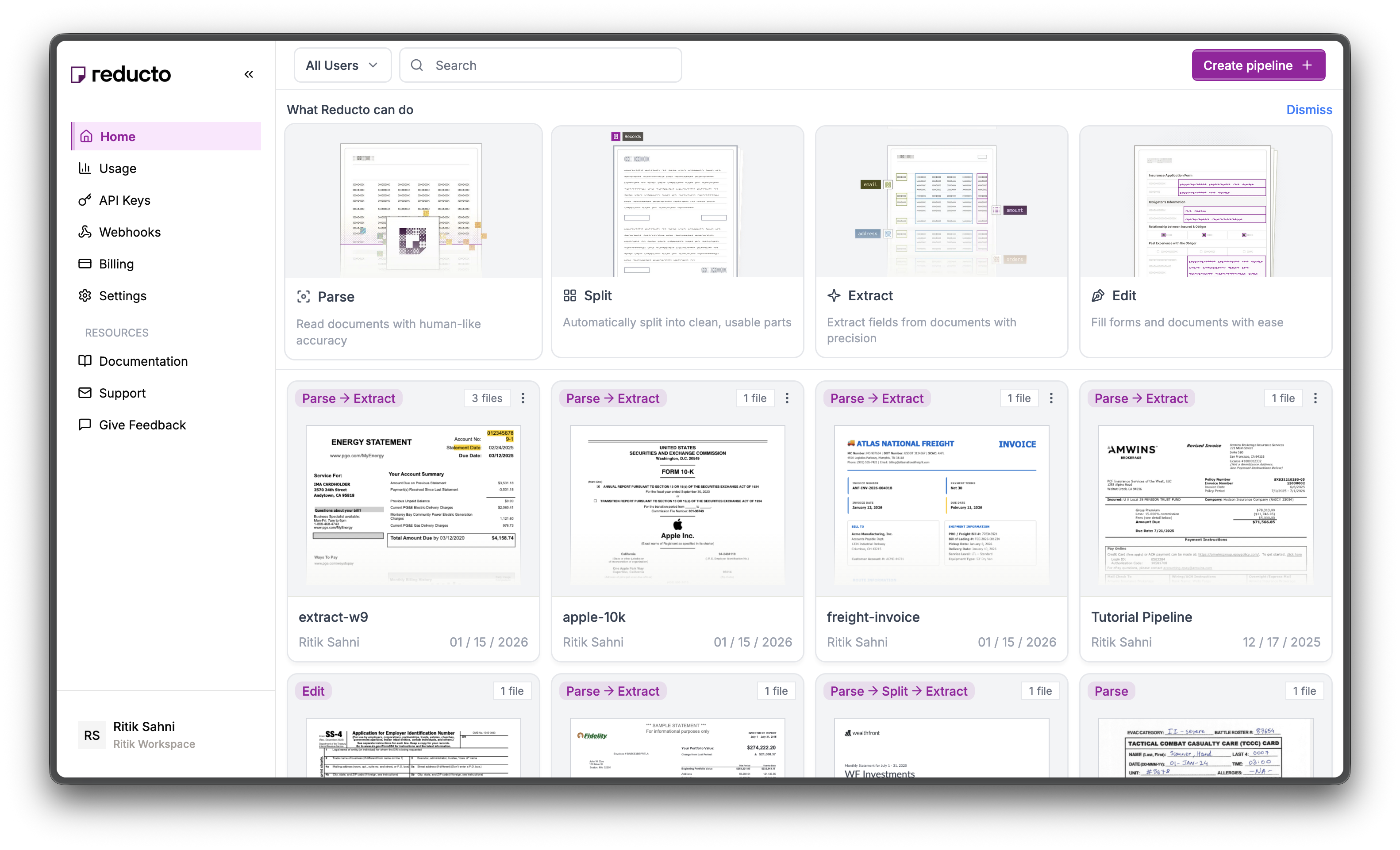
Go to [studio.reducto.ai](https://studio.reducto.ai) and sign in. From the home page, click **API Keys** in the left sidebar.
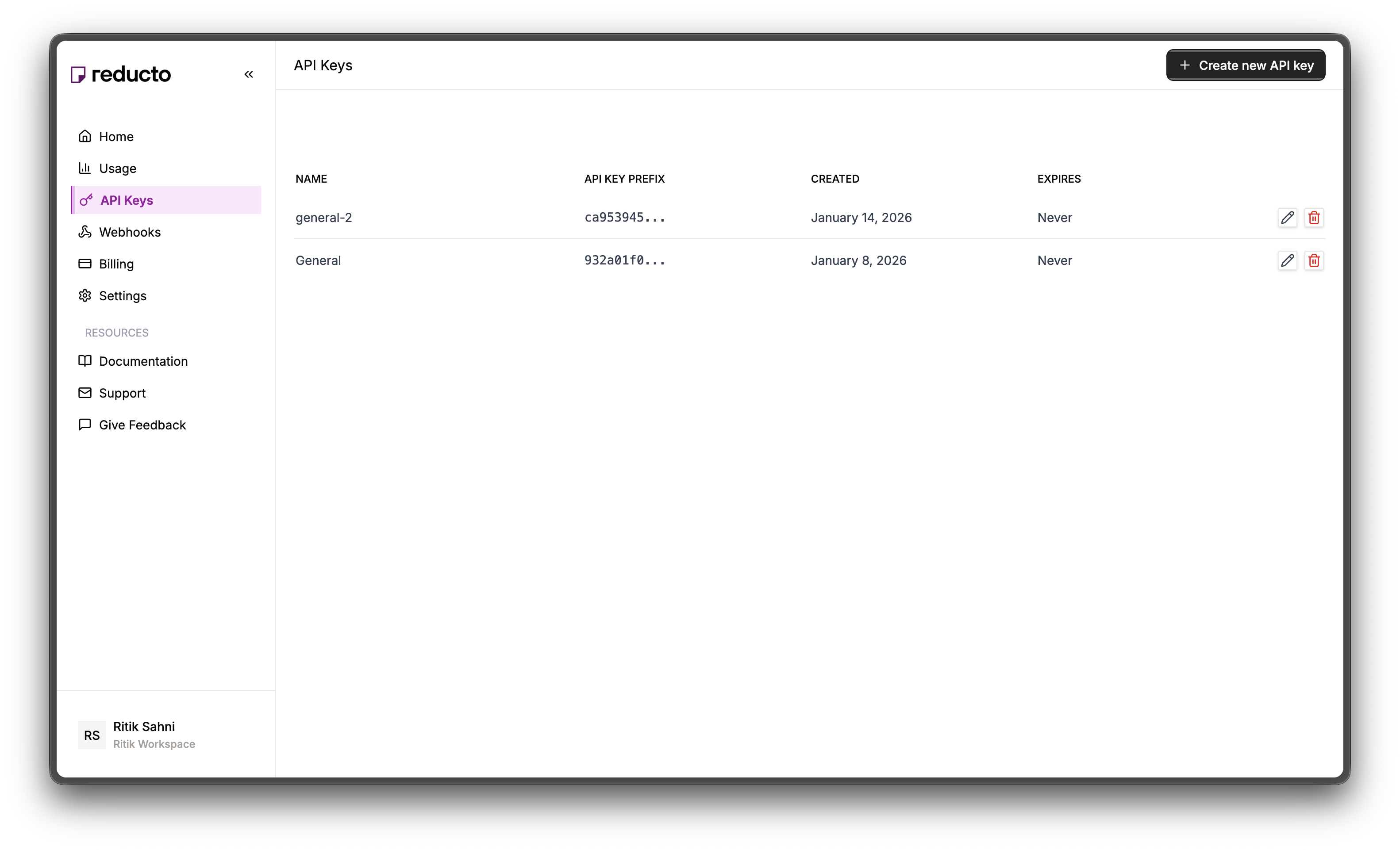
 The API Keys page shows your existing keys. Click **+ Create new API key** in the top right corner.
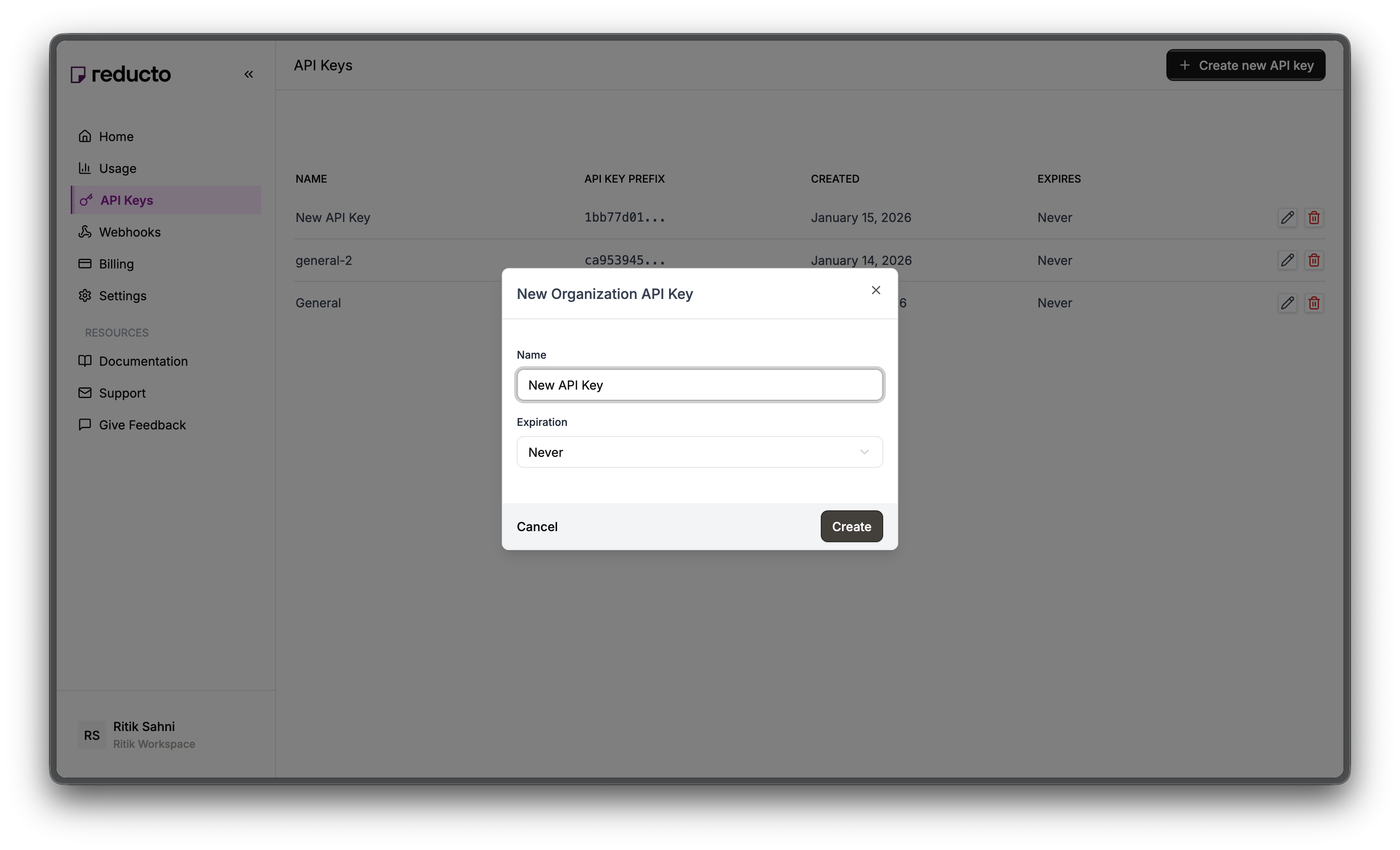
 In the modal, enter a name for your key and set an expiration policy (or select "Never" for no expiration). Click **Create**.
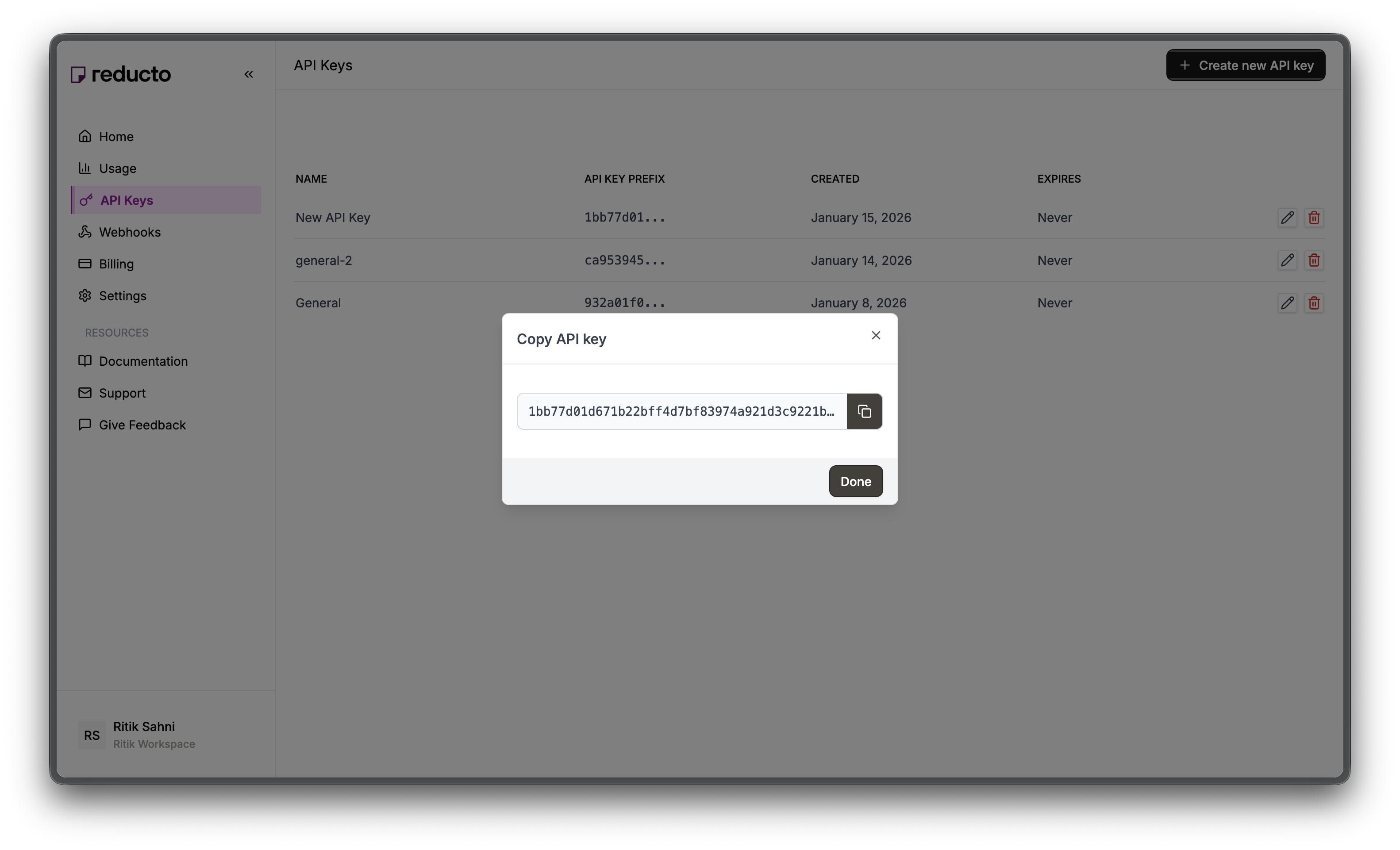
 Copy your new API key and store it securely. You won't be able to see it again after closing this dialog.
 Set the key as an environment variable:
```bash theme={null}
export REDUCTO_API_KEY="your-api-key-here"
```
***
## Studio Walkthrough
Go to [studio.reducto.ai](https://studio.reducto.ai) and click **Extract** on the homepage to start a new extraction workflow. Upload the freight invoice PDF.
After upload, you'll see the **Parse** view showing how Reducto structures the document. The right panel displays extracted text content.
Set the key as an environment variable:
```bash theme={null}
export REDUCTO_API_KEY="your-api-key-here"
```
***
## Studio Walkthrough
Go to [studio.reducto.ai](https://studio.reducto.ai) and click **Extract** on the homepage to start a new extraction workflow. Upload the freight invoice PDF.
After upload, you'll see the **Parse** view showing how Reducto structures the document. The right panel displays extracted text content.
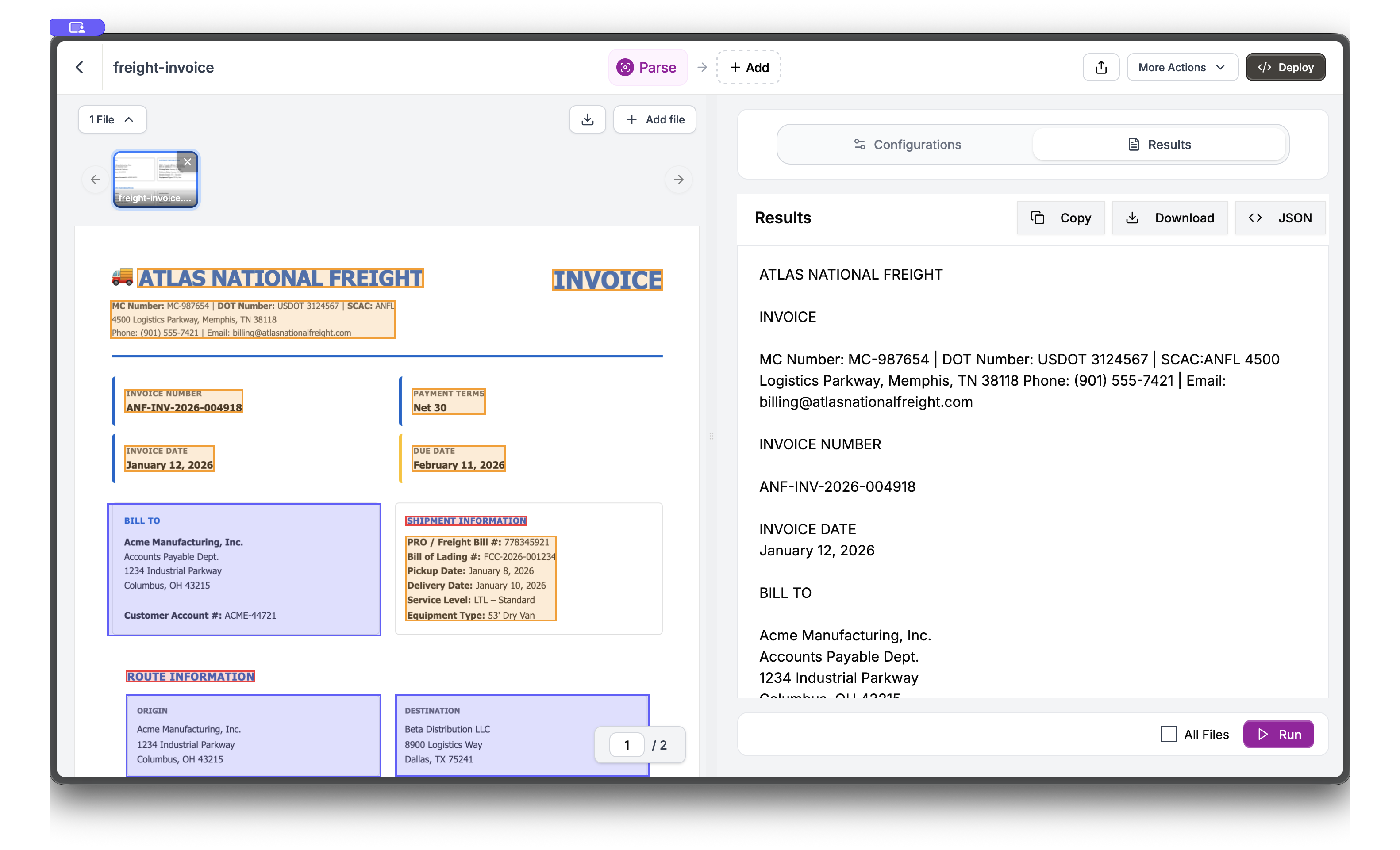 This confirms Reducto can read the invoice header, addresses, shipment details, and freight charges.
Click **Extract** in the top navigation to switch views. In the **Schema Builder**, add fields by entering a name, selecting a type, and providing a description. Start with `invoice_number`.
This confirms Reducto can read the invoice header, addresses, shipment details, and freight charges.
Click **Extract** in the top navigation to switch views. In the **Schema Builder**, add fields by entering a name, selecting a type, and providing a description. Start with `invoice_number`.
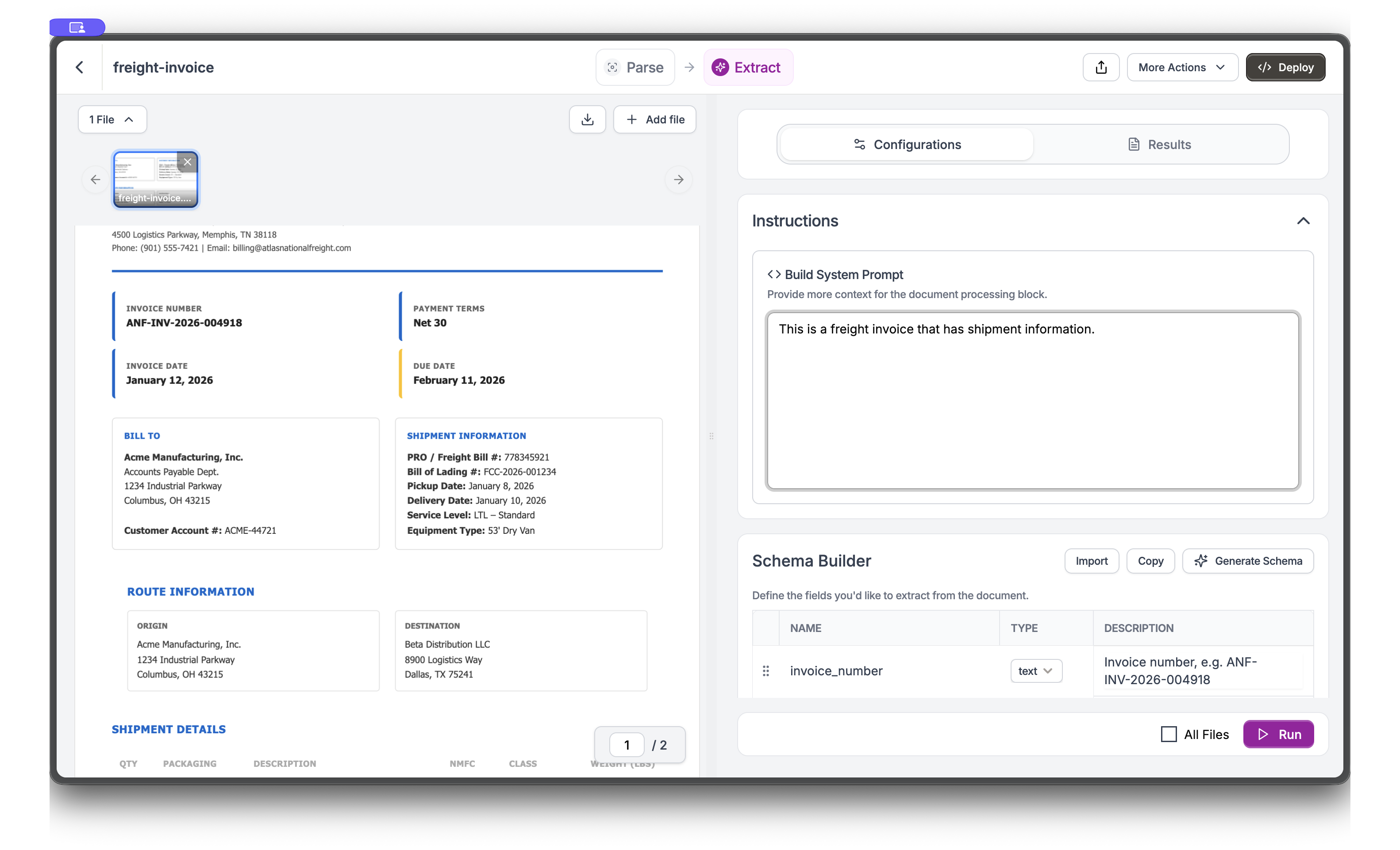 You can add a **System Prompt** in the Instructions section for context like "This is a freight invoice with shipment information."
Add more fields including nested objects and arrays. For shipment information, create an `array` type field called `shipment_info` with nested fields like `bill_of_lading`, `service_level`, and `equipment_type`.
You can add a **System Prompt** in the Instructions section for context like "This is a freight invoice with shipment information."
Add more fields including nested objects and arrays. For shipment information, create an `array` type field called `shipment_info` with nested fields like `bill_of_lading`, `service_level`, and `equipment_type`.
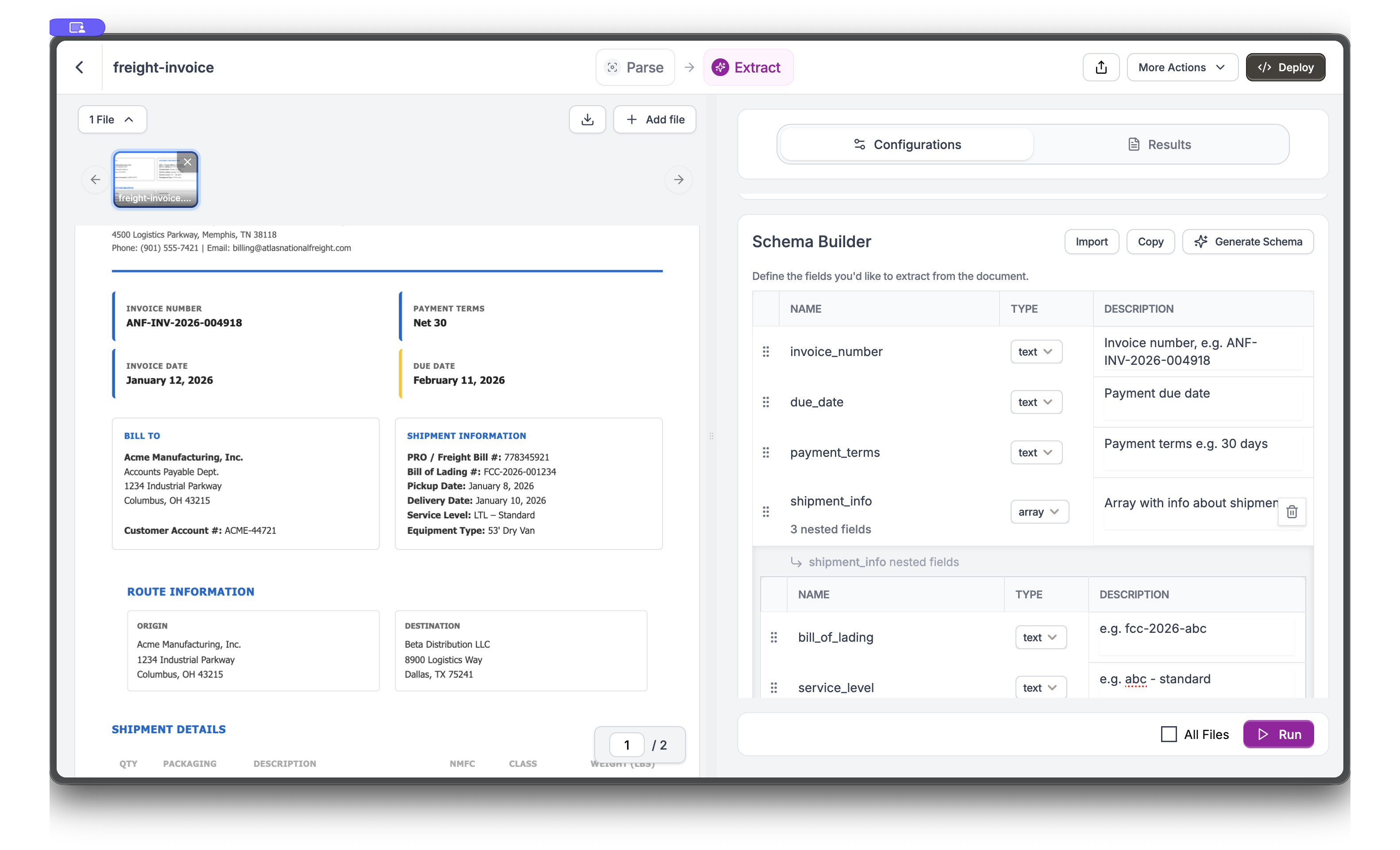 The Schema Builder supports nested fields - click the arrow to expand and define child fields within objects and arrays.
Click **Run** to execute the extraction. Switch to the **Results** tab to see extracted values. The document highlights where each value was found.
The Schema Builder supports nested fields - click the arrow to expand and define child fields within objects and arrays.
Click **Run** to execute the extraction. Switch to the **Results** tab to see extracted values. The document highlights where each value was found.
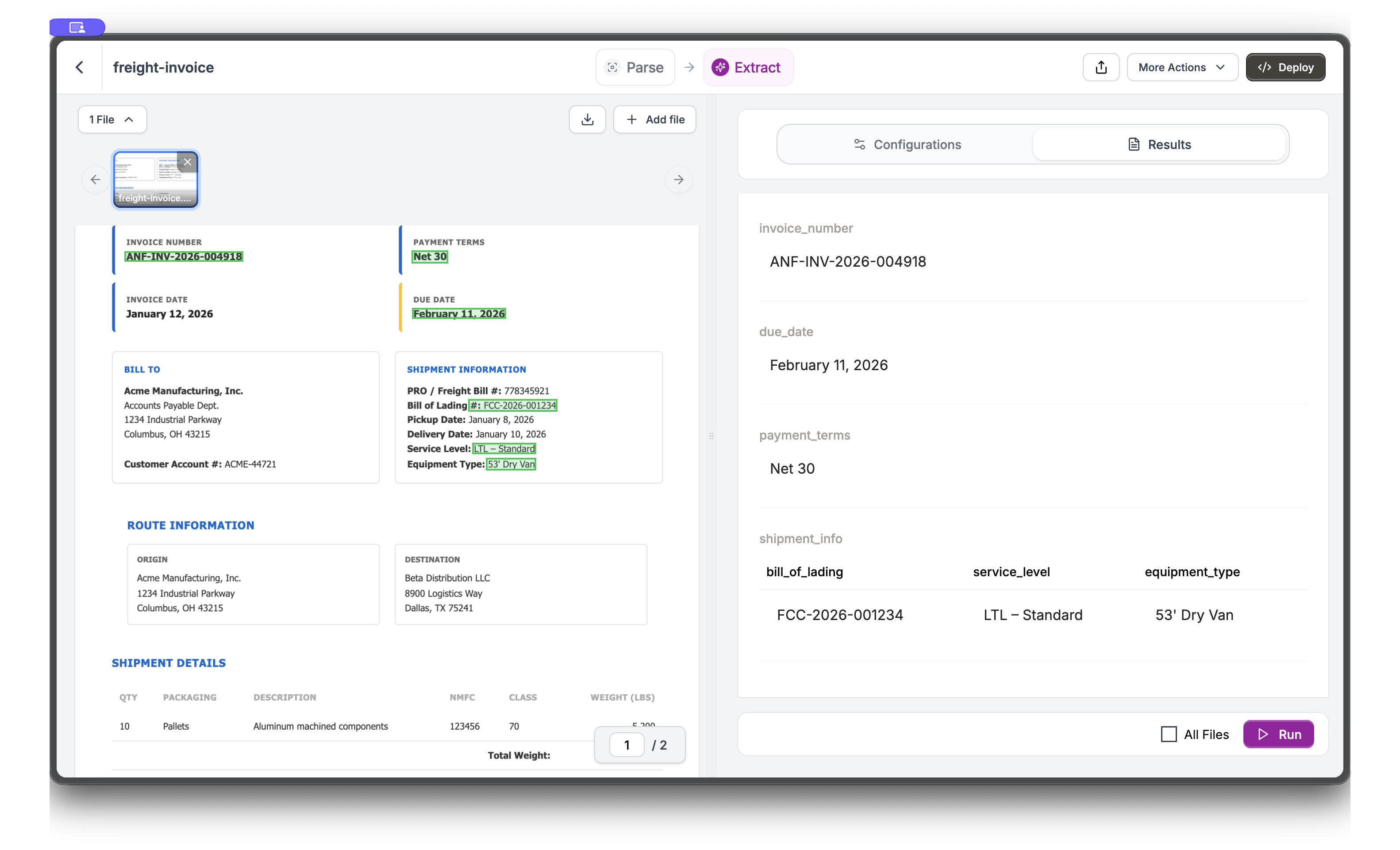 Notice how the extracted values (ANF-INV-2026-004918, February 11, 2026, Net 30) are highlighted directly on the document, showing exactly where Reducto found each piece of data.
***
## API Implementation
### Building the Schema
A good extraction schema mirrors the invoice structure. We'll build it incrementally, explaining design decisions along the way.
#### Invoice Header
Every invoice has fixed header fields. Request dates in ISO format (YYYY-MM-DD) for consistent parsing and date math.
```python Python theme={null}
header_schema = {
"invoice_number": {
"type": "string",
"description": "Invoice number from the header"
},
"invoice_date": {
"type": "string",
"description": "Invoice date in YYYY-MM-DD format"
},
"due_date": {
"type": "string",
"description": "Payment due date in YYYY-MM-DD format"
},
"payment_terms": {
"type": "string",
"description": "Payment terms like Net 30"
}
}
```
```javascript JavaScript theme={null}
const headerSchema = {
invoice_number: {
type: "string",
description: "Invoice number from the header"
},
invoice_date: {
type: "string",
description: "Invoice date in YYYY-MM-DD format"
},
due_date: {
type: "string",
description: "Payment due date in YYYY-MM-DD format"
},
payment_terms: {
type: "string",
description: "Payment terms like Net 30"
}
};
```
**Design decisions:**
* `invoice_date` and `due_date`: ISO format enables date calculations (days until due, overdue checks)
* `payment_terms`: Keep as string, not parsed days. Terms vary widely ("Net 30", "2/10 Net 30", "Due on Receipt")
#### Parties (Vendor and Bill-To)
Invoices involve two parties: the vendor (carrier) and the customer (bill-to). Nested objects keep fields organized and separate.
```python Python theme={null}
parties_schema = {
"vendor": {
"type": "object",
"properties": {
"name": {"type": "string"},
"address": {"type": "string"},
"phone": {"type": "string"},
"email": {"type": "string"}
}
},
"bill_to": {
"type": "object",
"properties": {
"company": {"type": "string"},
"department": {"type": "string"},
"address": {"type": "string"},
"city_state_zip": {"type": "string"},
"account_number": {"type": "string"}
}
}
}
```
```javascript JavaScript theme={null}
const partiesSchema = {
vendor: {
type: "object",
properties: {
name: { type: "string" },
address: { type: "string" },
phone: { type: "string" },
email: { type: "string" }
}
},
bill_to: {
type: "object",
properties: {
company: { type: "string" },
department: { type: "string" },
address: { type: "string" },
city_state_zip: { type: "string" },
account_number: { type: "string" }
}
}
};
```
#### Shipment Details
Shipment metadata links the invoice to physical freight movement. Use number types for fields you'll calculate with.
```python Python theme={null}
shipment_schema = {
"shipment": {
"type": "object",
"properties": {
"pro_number": {"type": "string"},
"bol_number": {"type": "string"},
"pickup_date": {"type": "string"},
"delivery_date": {"type": "string"},
"service_level": {"type": "string"},
"total_weight_lbs": {"type": "number"}
}
}
}
```
```javascript JavaScript theme={null}
const shipmentSchema = {
shipment: {
type: "object",
properties: {
pro_number: { type: "string" },
bol_number: { type: "string" },
pickup_date: { type: "string" },
delivery_date: { type: "string" },
service_level: { type: "string" },
total_weight_lbs: { type: "number" }
}
}
};
```
**Why these fields:**
* `pro_number`: Carrier's tracking number, the primary identifier for freight
* `bol_number`: Customer's bill of lading, for matching invoices to purchase orders
* `total_weight_lbs`: Number type enables rate-per-pound calculations
#### Charges Array
Here's the key insight for invoice extraction: charges are a variable-length array. One invoice might have 3 charges (linehaul, fuel, one accessorial), another might have 12 (multiple accessorials, adjustments, fees).
```python Python theme={null}
charges_schema = {
"charges": {
"type": "array",
"description": "All freight charges including linehaul, fuel, and accessorials",
"items": {
"type": "object",
"properties": {
"charge_type": {"type": "string"},
"description": {"type": "string"},
"amount": {"type": "number"}
}
}
},
"subtotal": {"type": "number"},
"tax": {"type": "number"},
"total_amount": {"type": "number"}
}
```
```javascript JavaScript theme={null}
const chargesSchema = {
charges: {
type: "array",
description: "All freight charges including linehaul, fuel, and accessorials",
items: {
type: "object",
properties: {
charge_type: { type: "string" },
description: { type: "string" },
amount: { type: "number" }
}
}
},
subtotal: { type: "number" },
tax: { type: "number" },
total_amount: { type: "number" }
};
```
**Why array extraction matters:**
Without array extraction, you'd define `charge_1`, `charge_2`, `charge_3` and hope you have enough fields. If the invoice has 5 charges, you miss two. If it has 2 charges, you have empty fields.
Array extraction identifies the repeating pattern (charge rows in a table) and extracts all instances automatically. Enable it with `array_extract: True` in settings.
### Complete Extraction
Combine all schema sections and run extraction:
```python Python theme={null}
from pathlib import Path
from reducto import Reducto
client = Reducto()
# Upload the invoice
upload = client.upload(file=Path("freight-invoice.pdf"))
# Complete schema combining all sections
invoice_schema = {
"type": "object",
"properties": {
"invoice_number": {
"type": "string",
"description": "Invoice number from the header"
},
"invoice_date": {
"type": "string",
"description": "Invoice date in YYYY-MM-DD format"
},
"due_date": {
"type": "string",
"description": "Payment due date"
},
"payment_terms": {
"type": "string",
"description": "Payment terms like Net 30"
},
"vendor": {
"type": "object",
"properties": {
"name": {"type": "string"},
"address": {"type": "string"},
"phone": {"type": "string"},
"email": {"type": "string"}
}
},
"bill_to": {
"type": "object",
"properties": {
"company": {"type": "string"},
"department": {"type": "string"},
"address": {"type": "string"},
"city_state_zip": {"type": "string"},
"account_number": {"type": "string"}
}
},
"shipment": {
"type": "object",
"properties": {
"pro_number": {"type": "string"},
"bol_number": {"type": "string"},
"pickup_date": {"type": "string"},
"delivery_date": {"type": "string"},
"service_level": {"type": "string"},
"total_weight_lbs": {"type": "number"}
}
},
"charges": {
"type": "array",
"description": "All freight charges including linehaul, fuel, and accessorials",
"items": {
"type": "object",
"properties": {
"charge_type": {"type": "string"},
"description": {"type": "string"},
"amount": {"type": "number"}
}
}
},
"subtotal": {"type": "number"},
"tax": {"type": "number"},
"total_amount": {"type": "number"}
}
}
# Extract with array extraction enabled
result = client.extract.run(
input=upload.file_id,
instructions={"schema": invoice_schema},
settings={"array_extract": True}
)
invoice_data = result.result[0]
print(f"Invoice: {invoice_data['invoice_number']}")
print(f"Total: ${invoice_data['total_amount']}")
```
```javascript JavaScript theme={null}
import Reducto from "reductoai";
import fs from "fs";
const client = new Reducto();
async function extractInvoice() {
// Upload
const upload = await client.upload({
file: fs.createReadStream("freight-invoice.pdf"),
});
// Complete schema
const invoiceSchema = {
type: "object",
properties: {
invoice_number: { type: "string", description: "Invoice number from the header" },
invoice_date: { type: "string", description: "Invoice date in YYYY-MM-DD format" },
due_date: { type: "string", description: "Payment due date" },
payment_terms: { type: "string", description: "Payment terms like Net 30" },
vendor: {
type: "object",
properties: {
name: { type: "string" },
address: { type: "string" },
phone: { type: "string" },
email: { type: "string" }
}
},
bill_to: {
type: "object",
properties: {
company: { type: "string" },
department: { type: "string" },
address: { type: "string" },
city_state_zip: { type: "string" },
account_number: { type: "string" }
}
},
shipment: {
type: "object",
properties: {
pro_number: { type: "string" },
bol_number: { type: "string" },
pickup_date: { type: "string" },
delivery_date: { type: "string" },
service_level: { type: "string" },
total_weight_lbs: { type: "number" }
}
},
charges: {
type: "array",
description: "All freight charges including linehaul, fuel, and accessorials",
items: {
type: "object",
properties: {
charge_type: { type: "string" },
description: { type: "string" },
amount: { type: "number" }
}
}
},
subtotal: { type: "number" },
tax: { type: "number" },
total_amount: { type: "number" }
}
};
// Extract with array extraction enabled
const result = await client.extract.run({
input: upload.file_id,
instructions: { schema: invoiceSchema },
settings: { array_extract: true }
});
console.log(JSON.stringify(result.result[0], null, 2));
}
extractInvoice();
```
The `array_extract: True` setting optimizes extraction for documents with repeating structures like invoice line items. It improves accuracy and ensures all charges are captured regardless of how many appear.
### Extraction Results
When you run extraction on the sample invoice, you get:
```json theme={null}
{
"invoice_number": "ANF-INV-2026-004918",
"invoice_date": "2026-01-12",
"due_date": "2026-02-11",
"payment_terms": "Net 30",
"vendor": {
"name": "Atlas National Freight",
"address": "4500 Logistics Parkway, Memphis, TN 38118",
"phone": "(901) 555-7421",
"email": "billing@atlasnationalfreight.com"
},
"bill_to": {
"company": "Acme Manufacturing, Inc.",
"department": "Accounts Payable Dept.",
"address": "1234 Industrial Parkway",
"city_state_zip": "Columbus, OH 43215",
"account_number": "ACME-44721"
},
"shipment": {
"pro_number": "778345921",
"bol_number": "FCC-2026-001234",
"pickup_date": "2026-01-08",
"delivery_date": "2026-01-10",
"service_level": "LTL – Standard",
"total_weight_lbs": 5200
},
"charges": [
{
"charge_type": "Linehaul",
"description": "LTL Freight – OH → TX",
"amount": 1425.00
},
{
"charge_type": "Fuel Surcharge",
"description": "Based on DOE Index (18%)",
"amount": 256.50
},
{
"charge_type": "Accessorial",
"description": "Liftgate Pickup",
"amount": 75.00
},
{
"charge_type": "Accessorial",
"description": "Appointment Delivery",
"amount": 45.00
},
{
"charge_type": "Accessorial",
"description": "Limited Access – Warehouse",
"amount": 85.00
}
],
"subtotal": 1886.50,
"tax": 0.00,
"total_amount": 1886.50
}
```
***
## Tracing Values with Citations
In accounts payable, disputes arise: "Where did this \$256.50 fuel surcharge come from?" Citations let you point to the exact location in the source document.
Enable citations via the `settings` parameter:
```python Python theme={null}
result = client.extract.run(
input=upload.file_id,
instructions={"schema": invoice_schema},
settings={
"array_extract": True,
"citations": {"enabled": True}
}
)
# Each field includes citation info
invoice_data = result.result[0]
for field, data in invoice_data.items():
if isinstance(data, dict) and "citation" in data:
print(f"{field}: {data['value']} (page {data['citation']['page']})")
```
```javascript JavaScript theme={null}
const result = await client.extract.run({
input: upload.file_id,
instructions: { schema: invoiceSchema },
settings: {
array_extract: true,
citations: { enabled: true }
}
});
// Each field includes citation info
const invoiceData = result.result[0];
for (const [field, data] of Object.entries(invoiceData)) {
if (data && typeof data === 'object' && 'citation' in data) {
console.log(`${field}: ${data.value} (page ${data.citation.page})`);
}
}
```
Each extracted value includes its source location:
```json theme={null}
{
"invoice_number": {
"value": "ANF-INV-2026-004918",
"citation": {
"page": 1,
"bbox": [0.12, 0.08, 0.35, 0.11]
}
}
}
```
**When to use citations:**
* **Audit trails**: Show auditors exactly where each charge originated
* **Dispute resolution**: Link a questioned fee back to its source location
* **Quality validation**: Spot-check extractions by comparing values to their highlighted source
***
## Best Practices
### Handle Multiple Invoice Formats
Different carriers use different invoice layouts. Make your schema robust with descriptive field hints:
```python Python theme={null}
# Use descriptions that guide extraction across formats
schema = {
"type": "object",
"properties": {
"total_amount": {
"type": "number",
"description": "Total amount due, usually at bottom of invoice near payment instructions"
},
"invoice_number": {
"type": "string",
"description": "Invoice number or invoice ID from the header area"
}
}
}
# Add a system prompt for extra context
result = client.extract.run(
input=upload.file_id,
instructions={
"schema": schema,
"system_prompt": "This is a freight invoice. Extract billing and shipment details."
}
)
```
```javascript JavaScript theme={null}
// Use descriptions that guide extraction across formats
const schema = {
type: "object",
properties: {
total_amount: {
type: "number",
description: "Total amount due, usually at bottom of invoice near payment instructions"
},
invoice_number: {
type: "string",
description: "Invoice number or invoice ID from the header area"
}
}
};
// Add a system prompt for extra context
const result = await client.extract.run({
input: upload.file_id,
instructions: {
schema,
system_prompt: "This is a freight invoice. Extract billing and shipment details."
}
});
```
### Validate Extracted Totals
Invoices have internal consistency: line items should sum to the subtotal. Use this for quality checks:
```python Python theme={null}
invoice_data = result.result[0]
# Sum all charges
calculated_total = sum(charge["amount"] for charge in invoice_data["charges"])
# Compare to extracted subtotal
if abs(calculated_total - invoice_data["subtotal"]) > 0.01:
print(f"Warning: Charges sum to ${calculated_total:.2f}, but subtotal is ${invoice_data['subtotal']:.2f}")
else:
print("Validation passed: charges match subtotal")
```
```javascript JavaScript theme={null}
const invoiceData = result.result[0];
// Sum all charges
const calculatedTotal = invoiceData.charges.reduce((sum, charge) => sum + charge.amount, 0);
// Compare to extracted subtotal
if (Math.abs(calculatedTotal - invoiceData.subtotal) > 0.01) {
console.log(`Warning: Charges sum to $${calculatedTotal.toFixed(2)}, but subtotal is $${invoiceData.subtotal.toFixed(2)}`);
} else {
console.log("Validation passed: charges match subtotal");
}
```
A mismatch might indicate:
* Missing charges in extraction (increase specificity in descriptions)
* OCR errors on amounts (check the source document)
* Hidden fees not in the main charges table
***
## Next Steps
Configure extraction for repeating items
Track where extracted values come from
Schema design tips
Process thousands of invoices
Notice how the extracted values (ANF-INV-2026-004918, February 11, 2026, Net 30) are highlighted directly on the document, showing exactly where Reducto found each piece of data.
***
## API Implementation
### Building the Schema
A good extraction schema mirrors the invoice structure. We'll build it incrementally, explaining design decisions along the way.
#### Invoice Header
Every invoice has fixed header fields. Request dates in ISO format (YYYY-MM-DD) for consistent parsing and date math.
```python Python theme={null}
header_schema = {
"invoice_number": {
"type": "string",
"description": "Invoice number from the header"
},
"invoice_date": {
"type": "string",
"description": "Invoice date in YYYY-MM-DD format"
},
"due_date": {
"type": "string",
"description": "Payment due date in YYYY-MM-DD format"
},
"payment_terms": {
"type": "string",
"description": "Payment terms like Net 30"
}
}
```
```javascript JavaScript theme={null}
const headerSchema = {
invoice_number: {
type: "string",
description: "Invoice number from the header"
},
invoice_date: {
type: "string",
description: "Invoice date in YYYY-MM-DD format"
},
due_date: {
type: "string",
description: "Payment due date in YYYY-MM-DD format"
},
payment_terms: {
type: "string",
description: "Payment terms like Net 30"
}
};
```
**Design decisions:**
* `invoice_date` and `due_date`: ISO format enables date calculations (days until due, overdue checks)
* `payment_terms`: Keep as string, not parsed days. Terms vary widely ("Net 30", "2/10 Net 30", "Due on Receipt")
#### Parties (Vendor and Bill-To)
Invoices involve two parties: the vendor (carrier) and the customer (bill-to). Nested objects keep fields organized and separate.
```python Python theme={null}
parties_schema = {
"vendor": {
"type": "object",
"properties": {
"name": {"type": "string"},
"address": {"type": "string"},
"phone": {"type": "string"},
"email": {"type": "string"}
}
},
"bill_to": {
"type": "object",
"properties": {
"company": {"type": "string"},
"department": {"type": "string"},
"address": {"type": "string"},
"city_state_zip": {"type": "string"},
"account_number": {"type": "string"}
}
}
}
```
```javascript JavaScript theme={null}
const partiesSchema = {
vendor: {
type: "object",
properties: {
name: { type: "string" },
address: { type: "string" },
phone: { type: "string" },
email: { type: "string" }
}
},
bill_to: {
type: "object",
properties: {
company: { type: "string" },
department: { type: "string" },
address: { type: "string" },
city_state_zip: { type: "string" },
account_number: { type: "string" }
}
}
};
```
#### Shipment Details
Shipment metadata links the invoice to physical freight movement. Use number types for fields you'll calculate with.
```python Python theme={null}
shipment_schema = {
"shipment": {
"type": "object",
"properties": {
"pro_number": {"type": "string"},
"bol_number": {"type": "string"},
"pickup_date": {"type": "string"},
"delivery_date": {"type": "string"},
"service_level": {"type": "string"},
"total_weight_lbs": {"type": "number"}
}
}
}
```
```javascript JavaScript theme={null}
const shipmentSchema = {
shipment: {
type: "object",
properties: {
pro_number: { type: "string" },
bol_number: { type: "string" },
pickup_date: { type: "string" },
delivery_date: { type: "string" },
service_level: { type: "string" },
total_weight_lbs: { type: "number" }
}
}
};
```
**Why these fields:**
* `pro_number`: Carrier's tracking number, the primary identifier for freight
* `bol_number`: Customer's bill of lading, for matching invoices to purchase orders
* `total_weight_lbs`: Number type enables rate-per-pound calculations
#### Charges Array
Here's the key insight for invoice extraction: charges are a variable-length array. One invoice might have 3 charges (linehaul, fuel, one accessorial), another might have 12 (multiple accessorials, adjustments, fees).
```python Python theme={null}
charges_schema = {
"charges": {
"type": "array",
"description": "All freight charges including linehaul, fuel, and accessorials",
"items": {
"type": "object",
"properties": {
"charge_type": {"type": "string"},
"description": {"type": "string"},
"amount": {"type": "number"}
}
}
},
"subtotal": {"type": "number"},
"tax": {"type": "number"},
"total_amount": {"type": "number"}
}
```
```javascript JavaScript theme={null}
const chargesSchema = {
charges: {
type: "array",
description: "All freight charges including linehaul, fuel, and accessorials",
items: {
type: "object",
properties: {
charge_type: { type: "string" },
description: { type: "string" },
amount: { type: "number" }
}
}
},
subtotal: { type: "number" },
tax: { type: "number" },
total_amount: { type: "number" }
};
```
**Why array extraction matters:**
Without array extraction, you'd define `charge_1`, `charge_2`, `charge_3` and hope you have enough fields. If the invoice has 5 charges, you miss two. If it has 2 charges, you have empty fields.
Array extraction identifies the repeating pattern (charge rows in a table) and extracts all instances automatically. Enable it with `array_extract: True` in settings.
### Complete Extraction
Combine all schema sections and run extraction:
```python Python theme={null}
from pathlib import Path
from reducto import Reducto
client = Reducto()
# Upload the invoice
upload = client.upload(file=Path("freight-invoice.pdf"))
# Complete schema combining all sections
invoice_schema = {
"type": "object",
"properties": {
"invoice_number": {
"type": "string",
"description": "Invoice number from the header"
},
"invoice_date": {
"type": "string",
"description": "Invoice date in YYYY-MM-DD format"
},
"due_date": {
"type": "string",
"description": "Payment due date"
},
"payment_terms": {
"type": "string",
"description": "Payment terms like Net 30"
},
"vendor": {
"type": "object",
"properties": {
"name": {"type": "string"},
"address": {"type": "string"},
"phone": {"type": "string"},
"email": {"type": "string"}
}
},
"bill_to": {
"type": "object",
"properties": {
"company": {"type": "string"},
"department": {"type": "string"},
"address": {"type": "string"},
"city_state_zip": {"type": "string"},
"account_number": {"type": "string"}
}
},
"shipment": {
"type": "object",
"properties": {
"pro_number": {"type": "string"},
"bol_number": {"type": "string"},
"pickup_date": {"type": "string"},
"delivery_date": {"type": "string"},
"service_level": {"type": "string"},
"total_weight_lbs": {"type": "number"}
}
},
"charges": {
"type": "array",
"description": "All freight charges including linehaul, fuel, and accessorials",
"items": {
"type": "object",
"properties": {
"charge_type": {"type": "string"},
"description": {"type": "string"},
"amount": {"type": "number"}
}
}
},
"subtotal": {"type": "number"},
"tax": {"type": "number"},
"total_amount": {"type": "number"}
}
}
# Extract with array extraction enabled
result = client.extract.run(
input=upload.file_id,
instructions={"schema": invoice_schema},
settings={"array_extract": True}
)
invoice_data = result.result[0]
print(f"Invoice: {invoice_data['invoice_number']}")
print(f"Total: ${invoice_data['total_amount']}")
```
```javascript JavaScript theme={null}
import Reducto from "reductoai";
import fs from "fs";
const client = new Reducto();
async function extractInvoice() {
// Upload
const upload = await client.upload({
file: fs.createReadStream("freight-invoice.pdf"),
});
// Complete schema
const invoiceSchema = {
type: "object",
properties: {
invoice_number: { type: "string", description: "Invoice number from the header" },
invoice_date: { type: "string", description: "Invoice date in YYYY-MM-DD format" },
due_date: { type: "string", description: "Payment due date" },
payment_terms: { type: "string", description: "Payment terms like Net 30" },
vendor: {
type: "object",
properties: {
name: { type: "string" },
address: { type: "string" },
phone: { type: "string" },
email: { type: "string" }
}
},
bill_to: {
type: "object",
properties: {
company: { type: "string" },
department: { type: "string" },
address: { type: "string" },
city_state_zip: { type: "string" },
account_number: { type: "string" }
}
},
shipment: {
type: "object",
properties: {
pro_number: { type: "string" },
bol_number: { type: "string" },
pickup_date: { type: "string" },
delivery_date: { type: "string" },
service_level: { type: "string" },
total_weight_lbs: { type: "number" }
}
},
charges: {
type: "array",
description: "All freight charges including linehaul, fuel, and accessorials",
items: {
type: "object",
properties: {
charge_type: { type: "string" },
description: { type: "string" },
amount: { type: "number" }
}
}
},
subtotal: { type: "number" },
tax: { type: "number" },
total_amount: { type: "number" }
}
};
// Extract with array extraction enabled
const result = await client.extract.run({
input: upload.file_id,
instructions: { schema: invoiceSchema },
settings: { array_extract: true }
});
console.log(JSON.stringify(result.result[0], null, 2));
}
extractInvoice();
```
The `array_extract: True` setting optimizes extraction for documents with repeating structures like invoice line items. It improves accuracy and ensures all charges are captured regardless of how many appear.
### Extraction Results
When you run extraction on the sample invoice, you get:
```json theme={null}
{
"invoice_number": "ANF-INV-2026-004918",
"invoice_date": "2026-01-12",
"due_date": "2026-02-11",
"payment_terms": "Net 30",
"vendor": {
"name": "Atlas National Freight",
"address": "4500 Logistics Parkway, Memphis, TN 38118",
"phone": "(901) 555-7421",
"email": "billing@atlasnationalfreight.com"
},
"bill_to": {
"company": "Acme Manufacturing, Inc.",
"department": "Accounts Payable Dept.",
"address": "1234 Industrial Parkway",
"city_state_zip": "Columbus, OH 43215",
"account_number": "ACME-44721"
},
"shipment": {
"pro_number": "778345921",
"bol_number": "FCC-2026-001234",
"pickup_date": "2026-01-08",
"delivery_date": "2026-01-10",
"service_level": "LTL – Standard",
"total_weight_lbs": 5200
},
"charges": [
{
"charge_type": "Linehaul",
"description": "LTL Freight – OH → TX",
"amount": 1425.00
},
{
"charge_type": "Fuel Surcharge",
"description": "Based on DOE Index (18%)",
"amount": 256.50
},
{
"charge_type": "Accessorial",
"description": "Liftgate Pickup",
"amount": 75.00
},
{
"charge_type": "Accessorial",
"description": "Appointment Delivery",
"amount": 45.00
},
{
"charge_type": "Accessorial",
"description": "Limited Access – Warehouse",
"amount": 85.00
}
],
"subtotal": 1886.50,
"tax": 0.00,
"total_amount": 1886.50
}
```
***
## Tracing Values with Citations
In accounts payable, disputes arise: "Where did this \$256.50 fuel surcharge come from?" Citations let you point to the exact location in the source document.
Enable citations via the `settings` parameter:
```python Python theme={null}
result = client.extract.run(
input=upload.file_id,
instructions={"schema": invoice_schema},
settings={
"array_extract": True,
"citations": {"enabled": True}
}
)
# Each field includes citation info
invoice_data = result.result[0]
for field, data in invoice_data.items():
if isinstance(data, dict) and "citation" in data:
print(f"{field}: {data['value']} (page {data['citation']['page']})")
```
```javascript JavaScript theme={null}
const result = await client.extract.run({
input: upload.file_id,
instructions: { schema: invoiceSchema },
settings: {
array_extract: true,
citations: { enabled: true }
}
});
// Each field includes citation info
const invoiceData = result.result[0];
for (const [field, data] of Object.entries(invoiceData)) {
if (data && typeof data === 'object' && 'citation' in data) {
console.log(`${field}: ${data.value} (page ${data.citation.page})`);
}
}
```
Each extracted value includes its source location:
```json theme={null}
{
"invoice_number": {
"value": "ANF-INV-2026-004918",
"citation": {
"page": 1,
"bbox": [0.12, 0.08, 0.35, 0.11]
}
}
}
```
**When to use citations:**
* **Audit trails**: Show auditors exactly where each charge originated
* **Dispute resolution**: Link a questioned fee back to its source location
* **Quality validation**: Spot-check extractions by comparing values to their highlighted source
***
## Best Practices
### Handle Multiple Invoice Formats
Different carriers use different invoice layouts. Make your schema robust with descriptive field hints:
```python Python theme={null}
# Use descriptions that guide extraction across formats
schema = {
"type": "object",
"properties": {
"total_amount": {
"type": "number",
"description": "Total amount due, usually at bottom of invoice near payment instructions"
},
"invoice_number": {
"type": "string",
"description": "Invoice number or invoice ID from the header area"
}
}
}
# Add a system prompt for extra context
result = client.extract.run(
input=upload.file_id,
instructions={
"schema": schema,
"system_prompt": "This is a freight invoice. Extract billing and shipment details."
}
)
```
```javascript JavaScript theme={null}
// Use descriptions that guide extraction across formats
const schema = {
type: "object",
properties: {
total_amount: {
type: "number",
description: "Total amount due, usually at bottom of invoice near payment instructions"
},
invoice_number: {
type: "string",
description: "Invoice number or invoice ID from the header area"
}
}
};
// Add a system prompt for extra context
const result = await client.extract.run({
input: upload.file_id,
instructions: {
schema,
system_prompt: "This is a freight invoice. Extract billing and shipment details."
}
});
```
### Validate Extracted Totals
Invoices have internal consistency: line items should sum to the subtotal. Use this for quality checks:
```python Python theme={null}
invoice_data = result.result[0]
# Sum all charges
calculated_total = sum(charge["amount"] for charge in invoice_data["charges"])
# Compare to extracted subtotal
if abs(calculated_total - invoice_data["subtotal"]) > 0.01:
print(f"Warning: Charges sum to ${calculated_total:.2f}, but subtotal is ${invoice_data['subtotal']:.2f}")
else:
print("Validation passed: charges match subtotal")
```
```javascript JavaScript theme={null}
const invoiceData = result.result[0];
// Sum all charges
const calculatedTotal = invoiceData.charges.reduce((sum, charge) => sum + charge.amount, 0);
// Compare to extracted subtotal
if (Math.abs(calculatedTotal - invoiceData.subtotal) > 0.01) {
console.log(`Warning: Charges sum to $${calculatedTotal.toFixed(2)}, but subtotal is $${invoiceData.subtotal.toFixed(2)}`);
} else {
console.log("Validation passed: charges match subtotal");
}
```
A mismatch might indicate:
* Missing charges in extraction (increase specificity in descriptions)
* OCR errors on amounts (check the source document)
* Hidden fees not in the main charges table
***
## Next Steps
Configure extraction for repeating items
Track where extracted values come from
Schema design tips
Process thousands of invoices