> ## Documentation Index
> Fetch the complete documentation index at: https://docs.reducto.ai/llms.txt
> Use this file to discover all available pages before exploring further.
# ID & Onboarding Documents
> Verify user identity by extracting and cross-matching data from ID cards, utility bills, and tax forms
KYC verification requires cross-checking identity across multiple documents: government IDs, utility bills, tax forms. Names appear differently ("IMA" vs "Ima"), addresses vary ("Street" vs "St"). This cookbook extracts identity fields from mixed document formats and builds verification logic to match them.
***
## Sample Documents
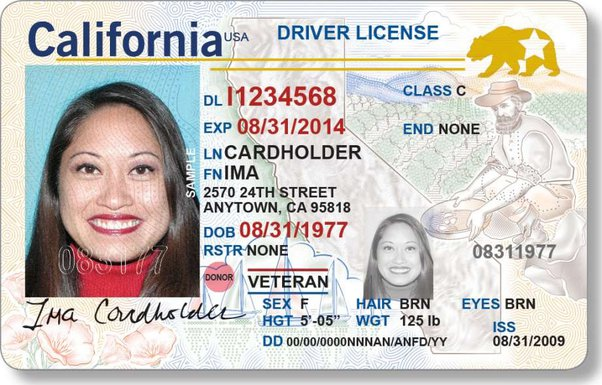 California Driver License showing:
* Name: IMA CARDHOLDER
* Address: 2570 24TH STREET, ANYTOWN, CA 95818
* DOB: 08/31/1977
* DL Number: 11234568
PG\&E Energy Statement showing:
* Name: IMA CARDHOLDER
* Address: 2570 24th Street, Andytown, CA 95818
* Account: 0123456789-1
IRS Form W-9 showing:
* Name: Ima Cardholder
* Address: 2570 24th Street, Andytown, CA 95818
* SSN: 012-34-5678
Download samples: [id-card.png](/samples/id-card.png) | [utility-bill.pdf](/samples/sample-utility-bill.pdf) | [w9-form.pdf](/samples/w9-sample.pdf)
Notice the variations already visible:
* **Name case**: "IMA CARDHOLDER" (ID) vs "Ima Cardholder" (W-9)
* **City spelling**: "ANYTOWN" (ID) vs "Andytown" (utility bill)
* **Street format**: "24TH STREET" vs "24th Street"
These are the same person, same address. Our verification code needs to handle these variations.
***
## Create API Key
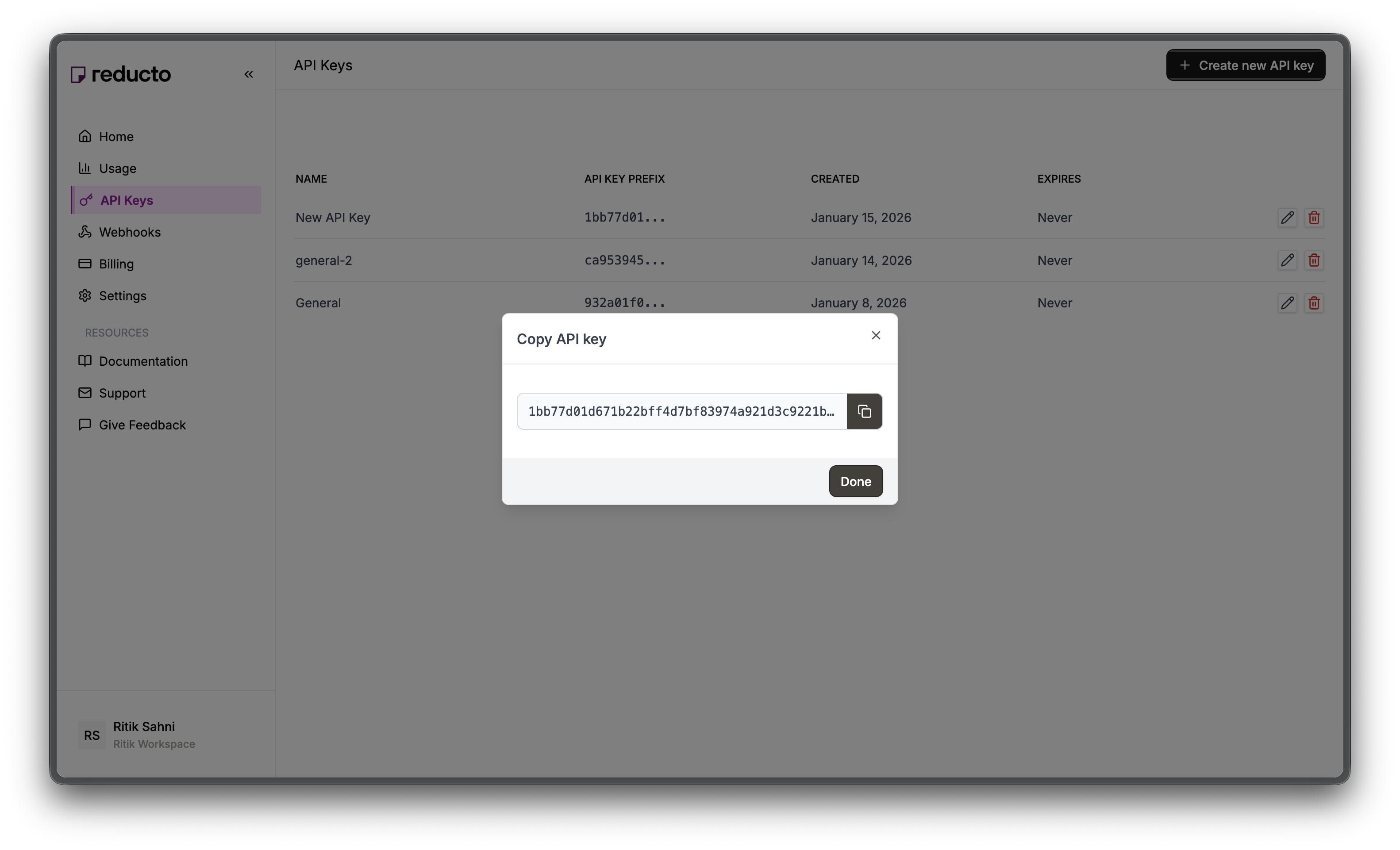
Go to [studio.reducto.ai](https://studio.reducto.ai) and sign in. From the home page, click **API Keys** in the left sidebar.
California Driver License showing:
* Name: IMA CARDHOLDER
* Address: 2570 24TH STREET, ANYTOWN, CA 95818
* DOB: 08/31/1977
* DL Number: 11234568
PG\&E Energy Statement showing:
* Name: IMA CARDHOLDER
* Address: 2570 24th Street, Andytown, CA 95818
* Account: 0123456789-1
IRS Form W-9 showing:
* Name: Ima Cardholder
* Address: 2570 24th Street, Andytown, CA 95818
* SSN: 012-34-5678
Download samples: [id-card.png](/samples/id-card.png) | [utility-bill.pdf](/samples/sample-utility-bill.pdf) | [w9-form.pdf](/samples/w9-sample.pdf)
Notice the variations already visible:
* **Name case**: "IMA CARDHOLDER" (ID) vs "Ima Cardholder" (W-9)
* **City spelling**: "ANYTOWN" (ID) vs "Andytown" (utility bill)
* **Street format**: "24TH STREET" vs "24th Street"
These are the same person, same address. Our verification code needs to handle these variations.
***
## Create API Key
Go to [studio.reducto.ai](https://studio.reducto.ai) and sign in. From the home page, click **API Keys** in the left sidebar.
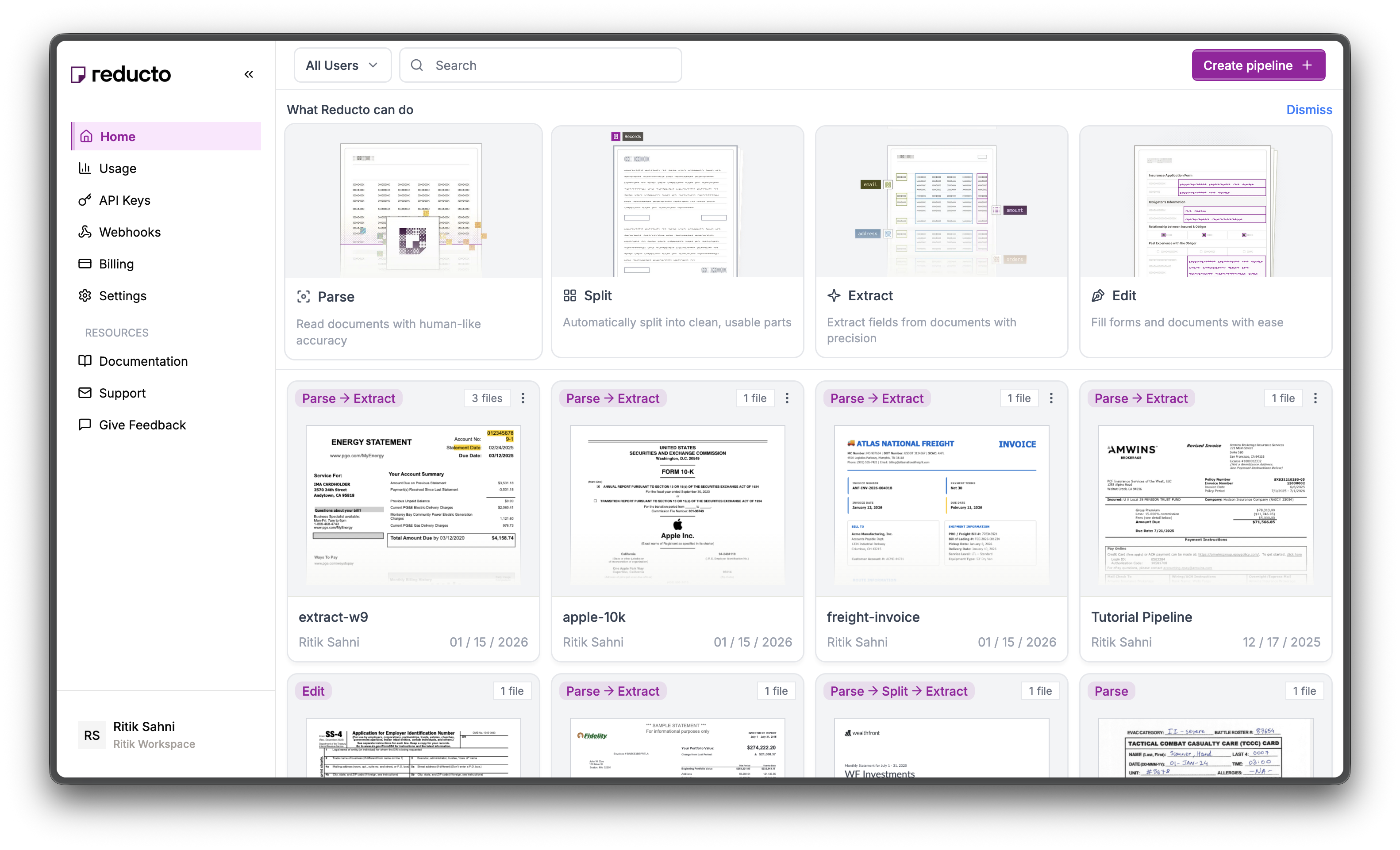 The API Keys page shows your existing keys. Click **+ Create new API key** in the top right corner.
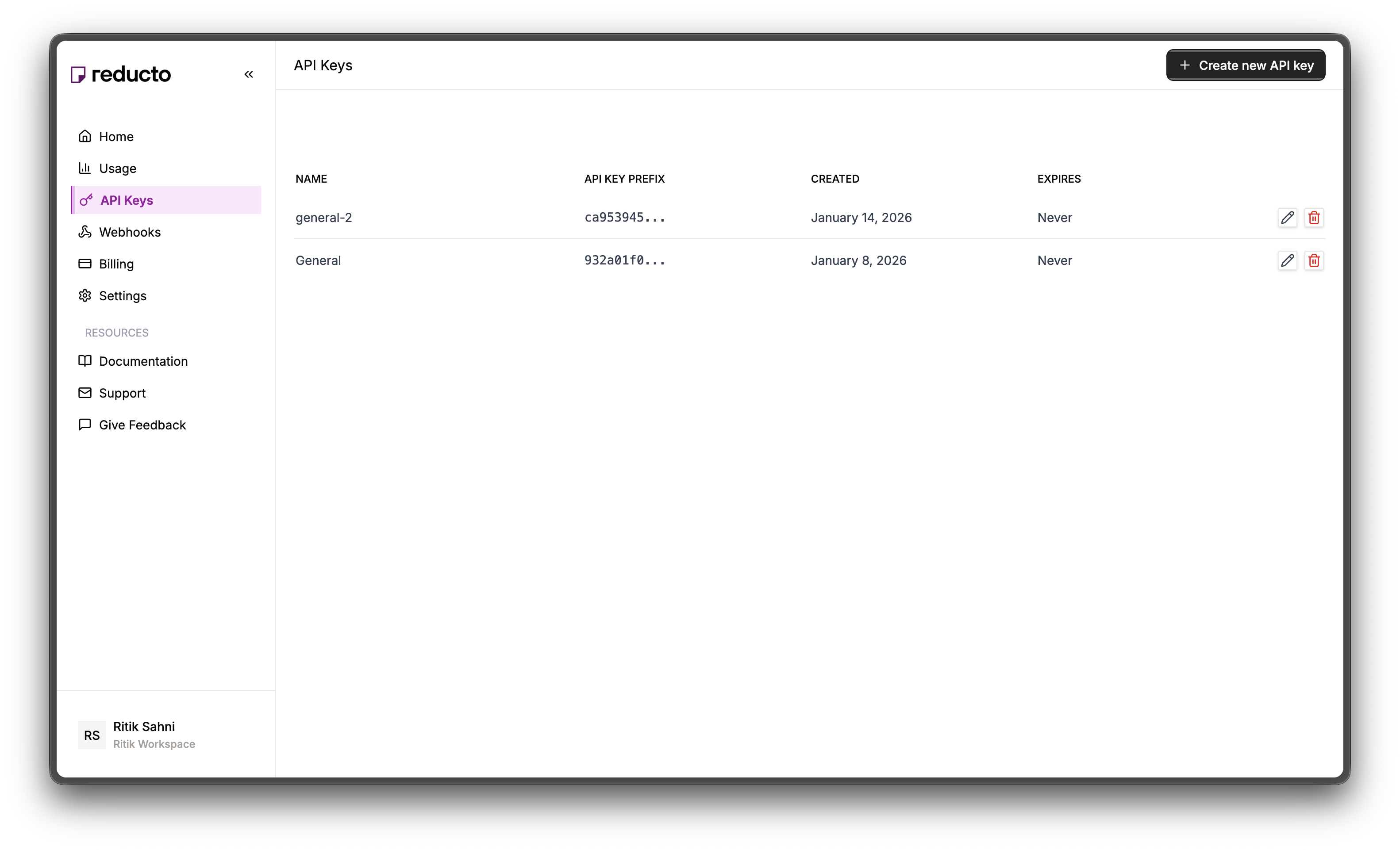 In the modal, enter a name for your key and set an expiration policy (or select "Never" for no expiration). Click **Create**.
 Copy your new API key and store it securely. You won't be able to see it again after closing this dialog.
 Set the key as an environment variable:
```bash theme={null}
export REDUCTO_API_KEY="your-api-key-here"
```
***
## Verification Workflow
User submits ID card, utility bill, and W-9 form
Reducto extracts name, address, and identifiers from each document
Standardize names and addresses for comparison
Compare fields across documents to verify consistency
Pass or fail based on matching criteria
***
## Step 1: Define Extraction Schemas
Each document type needs a tailored schema. The key is writing good field descriptions that tell the LLM where to find each value.
### ID Card Schema
Government IDs have structured layouts with clear field labels. We extract both identity fields and the ID's validity period.
```json JSON Schema theme={null}
{
"type": "object",
"properties": {
"document_type": {
"type": "string",
"description": "Type of ID: driver_license, passport, state_id"
},
"full_name": {
"type": "string",
"description": "Full legal name as shown on ID"
},
"first_name": {
"type": "string",
"description": "First name"
},
"last_name": {
"type": "string",
"description": "Last name / surname"
},
"address": {
"type": "string",
"description": "Street address on ID"
},
"city": {
"type": "string",
"description": "City"
},
"state": {
"type": "string",
"description": "State abbreviation (e.g., CA, NY)"
},
"zip_code": {
"type": "string",
"description": "ZIP code"
},
"date_of_birth": {
"type": "string",
"description": "Date of birth in YYYY-MM-DD format"
},
"id_number": {
"type": "string",
"description": "License or ID number"
},
"expiration_date": {
"type": "string",
"description": "ID expiration date in YYYY-MM-DD format"
}
}
}
```
```python Python theme={null}
id_card_schema = {
"type": "object",
"properties": {
"document_type": {
"type": "string",
"description": "Type of ID: driver_license, passport, state_id"
},
"full_name": {
"type": "string",
"description": "Full legal name as shown on ID"
},
"first_name": {
"type": "string",
"description": "First name"
},
"last_name": {
"type": "string",
"description": "Last name / surname"
},
"address": {
"type": "string",
"description": "Street address on ID"
},
"city": {
"type": "string",
"description": "City"
},
"state": {
"type": "string",
"description": "State abbreviation (e.g., CA, NY)"
},
"zip_code": {
"type": "string",
"description": "ZIP code"
},
"date_of_birth": {
"type": "string",
"description": "Date of birth in YYYY-MM-DD format"
},
"id_number": {
"type": "string",
"description": "License or ID number"
},
"expiration_date": {
"type": "string",
"description": "ID expiration date in YYYY-MM-DD format"
}
}
}
```
```javascript JavaScript theme={null}
const idCardSchema = {
type: "object",
properties: {
document_type: {
type: "string",
description: "Type of ID: driver_license, passport, state_id"
},
full_name: {
type: "string",
description: "Full legal name as shown on ID"
},
first_name: {
type: "string",
description: "First name"
},
last_name: {
type: "string",
description: "Last name / surname"
},
address: {
type: "string",
description: "Street address on ID"
},
city: {
type: "string",
description: "City"
},
state: {
type: "string",
description: "State abbreviation (e.g., CA, NY)"
},
zip_code: {
type: "string",
description: "ZIP code"
},
date_of_birth: {
type: "string",
description: "Date of birth in YYYY-MM-DD format"
},
id_number: {
type: "string",
description: "License or ID number"
},
expiration_date: {
type: "string",
description: "ID expiration date in YYYY-MM-DD format"
}
}
};
```
**Design decisions:**
* `full_name` **and** `first_name`/`last_name`: Extract both because other documents may format names differently
* `date_of_birth` format: Request YYYY-MM-DD for consistent date handling in code
* `expiration_date`: Critical for checking if the ID is still valid
### Utility Bill Schema
Utility bills prove current address. They vary more in layout than IDs, so field descriptions need to be more specific about what to extract.
```json JSON Schema theme={null}
{
"type": "object",
"properties": {
"provider": {
"type": "string",
"description": "Utility company name"
},
"account_holder": {
"type": "string",
"description": "Name on the account"
},
"service_address": {
"type": "string",
"description": "Full service address including street"
},
"city": {
"type": "string",
"description": "City"
},
"state": {
"type": "string",
"description": "State"
},
"zip_code": {
"type": "string",
"description": "ZIP code"
},
"account_number": {
"type": "string",
"description": "Account number"
},
"statement_date": {
"type": "string",
"description": "Statement date in YYYY-MM-DD format"
},
"amount_due": {
"type": "number",
"description": "Total amount due"
}
}
}
```
```python Python theme={null}
utility_bill_schema = {
"type": "object",
"properties": {
"provider": {
"type": "string",
"description": "Utility company name"
},
"account_holder": {
"type": "string",
"description": "Name on the account"
},
"service_address": {
"type": "string",
"description": "Full service address including street"
},
"city": {
"type": "string",
"description": "City"
},
"state": {
"type": "string",
"description": "State"
},
"zip_code": {
"type": "string",
"description": "ZIP code"
},
"account_number": {
"type": "string",
"description": "Account number"
},
"statement_date": {
"type": "string",
"description": "Statement date in YYYY-MM-DD format"
},
"amount_due": {
"type": "number",
"description": "Total amount due"
}
}
}
```
```javascript JavaScript theme={null}
const utilityBillSchema = {
type: "object",
properties: {
provider: {
type: "string",
description: "Utility company name"
},
account_holder: {
type: "string",
description: "Name on the account"
},
service_address: {
type: "string",
description: "Full service address including street"
},
city: {
type: "string",
description: "City"
},
state: {
type: "string",
description: "State"
},
zip_code: {
type: "string",
description: "ZIP code"
},
account_number: {
type: "string",
description: "Account number"
},
statement_date: {
type: "string",
description: "Statement date in YYYY-MM-DD format"
},
amount_due: {
type: "number",
description: "Total amount due"
}
}
};
```
**Design decisions:**
* `account_holder`: This is what we match against the ID name
* `service_address` (not mailing address): The service address proves residence
* `statement_date`: Bills must be recent (typically within 90 days)
### W-9 Tax Form Schema
W-9s have a fixed IRS layout. Field descriptions reference specific line numbers to help the LLM locate values.
```json JSON Schema theme={null}
{
"type": "object",
"properties": {
"name": {
"type": "string",
"description": "Name on Line 1"
},
"business_name": {
"type": "string",
"description": "Business name on Line 2, if any"
},
"address": {
"type": "string",
"description": "Street address from Line 5"
},
"city_state_zip": {
"type": "string",
"description": "City, state, ZIP from Line 6"
},
"ssn": {
"type": "string",
"description": "Social Security Number (XXX-XX-XXXX)"
},
"ein": {
"type": "string",
"description": "Employer Identification Number"
},
"tax_classification": {
"type": "string",
"description": "Federal tax classification"
}
}
}
```
```python Python theme={null}
w9_schema = {
"type": "object",
"properties": {
"name": {
"type": "string",
"description": "Name on Line 1"
},
"business_name": {
"type": "string",
"description": "Business name on Line 2, if any"
},
"address": {
"type": "string",
"description": "Street address from Line 5"
},
"city_state_zip": {
"type": "string",
"description": "City, state, ZIP from Line 6"
},
"ssn": {
"type": "string",
"description": "Social Security Number (XXX-XX-XXXX)"
},
"ein": {
"type": "string",
"description": "Employer Identification Number"
},
"tax_classification": {
"type": "string",
"description": "Federal tax classification"
}
}
}
```
```javascript JavaScript theme={null}
const w9Schema = {
type: "object",
properties: {
name: {
type: "string",
description: "Name on Line 1"
},
business_name: {
type: "string",
description: "Business name on Line 2, if any"
},
address: {
type: "string",
description: "Street address from Line 5"
},
city_state_zip: {
type: "string",
description: "City, state, ZIP from Line 6"
},
ssn: {
type: "string",
description: "Social Security Number (XXX-XX-XXXX)"
},
ein: {
type: "string",
description: "Employer Identification Number"
},
tax_classification: {
type: "string",
description: "Federal tax classification"
}
}
};
```
**Design decisions:**
* `city_state_zip` as one field: W-9 Line 6 combines these, so we extract them together and parse later
* Line number references: "Line 1", "Line 5", "Line 6" help the LLM find the right fields on the standardized IRS form
***
## Step 2: Extract from All Documents
Upload each document and run extraction with the appropriate schema. Reducto handles both image files (ID card) and PDFs (utility bill, W-9) with the same API.
```python Python theme={null}
from pathlib import Path
from reducto import Reducto
client = Reducto()
def extract_from_documents(id_card_path, utility_bill_path, w9_path):
"""Extract data from all three verification documents."""
results = {}
# Extract from ID card (supports images!)
id_upload = client.upload(file=Path(id_card_path))
id_result = client.extract.run(
input=id_upload.file_id,
instructions={"schema": id_card_schema}
)
results["id_card"] = id_result.result
# Extract from utility bill
bill_upload = client.upload(file=Path(utility_bill_path))
bill_result = client.extract.run(
input=bill_upload.file_id,
instructions={"schema": utility_bill_schema}
)
results["utility_bill"] = bill_result.result
# Extract from W-9
w9_upload = client.upload(file=Path(w9_path))
w9_result = client.extract.run(
input=w9_upload.file_id,
instructions={"schema": w9_schema}
)
results["w9"] = w9_result.result
return results
# Run extraction
extracted = extract_from_documents(
"id-card.png",
"sample-utility-bill.pdf",
"w9-sample.pdf"
)
```
```javascript JavaScript theme={null}
import Reducto from "reductoai";
import fs from "fs";
const client = new Reducto();
async function extractFromDocuments(idCardPath, utilityBillPath, w9Path) {
const results = {};
// Extract from ID card (images supported)
const idUpload = await client.upload({
file: fs.createReadStream(idCardPath),
});
const idResult = await client.extract.run({
input: idUpload.fileId,
instructions: { schema: idCardSchema },
});
results.idCard = idResult.result;
// Extract from utility bill
const billUpload = await client.upload({
file: fs.createReadStream(utilityBillPath),
});
const billResult = await client.extract.run({
input: billUpload.fileId,
instructions: { schema: utilityBillSchema },
});
results.utilityBill = billResult.result;
// Extract from W-9
const w9Upload = await client.upload({
file: fs.createReadStream(w9Path),
});
const w9Result = await client.extract.run({
input: w9Upload.fileId,
instructions: { schema: w9Schema },
});
results.w9 = w9Result.result;
return results;
}
// Run extraction
const extracted = await extractFromDocuments(
"id-card.png",
"sample-utility-bill.pdf",
"w9-sample.pdf"
);
```
### Extraction Results
From our sample documents:
```json theme={null}
{
"id_card": {
"document_type": "driver_license",
"full_name": "IMA CARDHOLDER",
"first_name": "IMA",
"last_name": "CARDHOLDER",
"address": "2570 24TH STREET",
"city": "ANYTOWN",
"state": "CA",
"zip_code": "95818",
"date_of_birth": "1977-08-31",
"id_number": "11234568",
"expiration_date": "2014-08-31"
},
"utility_bill": {
"provider": "PG&E",
"account_holder": "IMA CARDHOLDER",
"service_address": "2570 24th Street",
"city": "Andytown",
"state": "CA",
"zip_code": "95818",
"account_number": "0123456789-1",
"statement_date": "2025-02-24",
"amount_due": 4158.74
},
"w9": {
"name": "Ima Cardholder",
"business_name": null,
"address": "2570 24th Street",
"city_state_zip": "Andytown, CA 95818",
"ssn": "012-34-5678",
"ein": null,
"tax_classification": "Individual/sole proprietor"
}
}
```
Look at the variations:
* **Name**: "IMA CARDHOLDER" vs "Ima Cardholder" (case difference)
* **City**: "ANYTOWN" vs "Andytown" (case + typo)
* **Street**: "24TH STREET" vs "24th Street" (case + abbreviation)
An exact string match would fail. We need normalization.
***
## Step 3: Normalize and Compare
Extracted data won't match exactly across documents. Here's what we see:
| Field | ID Card | Utility Bill | W-9 |
| ------ | ---------------- | ---------------- | ---------------- |
| Name | IMA CARDHOLDER | IMA CARDHOLDER | Ima Cardholder |
| City | ANYTOWN | Andytown | Andytown |
| Street | 2570 24TH STREET | 2570 24th Street | 2570 24th Street |
These are clearly the same person at the same address, but string comparison would fail.
### Normalization Functions
Normalization standardizes these variations:
* Uppercase everything
* Convert abbreviations ("STREET" → "ST")
* Remove punctuation
* Collapse extra whitespace
```python Python theme={null}
import re
def normalize_name(name):
"""Normalize name for comparison."""
if not name:
return ""
# Uppercase, remove extra spaces, remove punctuation
name = name.upper().strip()
name = re.sub(r'[^\w\s]', '', name)
name = re.sub(r'\s+', ' ', name)
return name
def normalize_address(address):
"""Normalize address for comparison."""
if not address:
return ""
address = address.upper().strip()
# Standardize common abbreviations
replacements = {
'STREET': 'ST',
'AVENUE': 'AVE',
'BOULEVARD': 'BLVD',
'DRIVE': 'DR',
'ROAD': 'RD',
'LANE': 'LN',
'COURT': 'CT',
}
for full, abbrev in replacements.items():
address = address.replace(full, abbrev)
address = re.sub(r'[^\w\s]', '', address)
address = re.sub(r'\s+', ' ', address)
return address
def parse_city_state_zip(city_state_zip):
"""Parse 'City, ST 12345' format into components."""
if not city_state_zip:
return "", "", ""
# Pattern: City, State ZIP
match = re.match(r'(.+),\s*([A-Z]{2})\s*(\d{5})', city_state_zip.upper())
if match:
return match.group(1).strip(), match.group(2), match.group(3)
return city_state_zip, "", ""
```
```javascript JavaScript theme={null}
function normalizeName(name) {
if (!name) return "";
// Uppercase, remove extra spaces, remove punctuation
return name.toUpperCase().trim()
.replace(/[^\w\s]/g, '')
.replace(/\s+/g, ' ');
}
function normalizeAddress(address) {
if (!address) return "";
address = address.toUpperCase().trim();
// Standardize common abbreviations
const replacements = {
'STREET': 'ST',
'AVENUE': 'AVE',
'BOULEVARD': 'BLVD',
'DRIVE': 'DR',
'ROAD': 'RD',
'LANE': 'LN',
'COURT': 'CT',
};
for (const [full, abbrev] of Object.entries(replacements)) {
address = address.replace(new RegExp(full, 'g'), abbrev);
}
return address.replace(/[^\w\s]/g, '').replace(/\s+/g, ' ');
}
function parseCityStateZip(cityStateZip) {
if (!cityStateZip) return ["", "", ""];
// Pattern: City, State ZIP
const match = cityStateZip.toUpperCase().match(/(.+),\s*([A-Z]{2})\s*(\d{5})/);
if (match) {
return [match[1].trim(), match[2], match[3]];
}
return [cityStateZip, "", ""];
}
```
After normalization:
* "IMA CARDHOLDER" → "IMA CARDHOLDER"
* "Ima Cardholder" → "IMA CARDHOLDER" ✓ Match!
* "2570 24TH STREET" → "2570 24TH ST"
* "2570 24th Street" → "2570 24TH ST" ✓ Match!
### Why Fuzzy Matching?
Even after normalization, OCR errors and typos happen. "ANYTOWN" vs "ANDYTOWN" is a single character difference. It's likely the same city, not a fraudulent mismatch.
Fuzzy matching with an 85% similarity threshold catches these while rejecting genuine mismatches:
```python Python theme={null}
def fuzzy_match(str1, str2, threshold=0.85):
"""Check if two strings match above threshold."""
if not str1 or not str2:
return False
str1, str2 = str1.upper(), str2.upper()
if str1 == str2:
return True
# Simple character-level similarity
matches = sum(c1 == c2 for c1, c2 in zip(str1, str2))
max_len = max(len(str1), len(str2))
similarity = matches / max_len if max_len > 0 else 0
return similarity >= threshold
```
```javascript JavaScript theme={null}
function fuzzyMatch(str1, str2, threshold = 0.85) {
if (!str1 || !str2) return false;
str1 = str1.toUpperCase();
str2 = str2.toUpperCase();
if (str1 === str2) return true;
// Simple character-level similarity
const minLen = Math.min(str1.length, str2.length);
let matches = 0;
for (let i = 0; i < minLen; i++) {
if (str1[i] === str2[i]) matches++;
}
const maxLen = Math.max(str1.length, str2.length);
const similarity = maxLen > 0 ? matches / maxLen : 0;
return similarity >= threshold;
}
```
***
## Step 4: Verification Strategy
Our verification uses two tiers of checks:
**Critical checks (must pass):**
1. **Name match** - Name must match across all three documents
2. **Address match** - Address must match (street, state, ZIP)
**Warning checks (informational):**
3\. **ID not expired** - Government ID should be valid
4\. **Recent bill** - Utility bill should be within 90 days
If critical checks pass, verification succeeds even with warnings. This matches real-world KYC where an expired ID triggers re-verification but doesn't necessarily block the user.
### Implementing Name Matching
Compare normalized names across all document pairs. All three must match:
```python Python theme={null}
def check_name_match(extracted):
"""Check if names match across all documents."""
id_name = normalize_name(extracted["id_card"].get("full_name", ""))
bill_name = normalize_name(extracted["utility_bill"].get("account_holder", ""))
w9_name = normalize_name(extracted["w9"].get("name", ""))
id_vs_bill = fuzzy_match(id_name, bill_name)
id_vs_w9 = fuzzy_match(id_name, w9_name)
bill_vs_w9 = fuzzy_match(bill_name, w9_name)
passed = id_vs_bill and id_vs_w9 and bill_vs_w9
return {
"check": "name_match",
"passed": passed,
"details": {
"id_card": id_name,
"utility_bill": bill_name,
"w9": w9_name,
"id_vs_bill": id_vs_bill,
"id_vs_w9": id_vs_w9,
"bill_vs_w9": bill_vs_w9
}
}
```
```javascript JavaScript theme={null}
function checkNameMatch(extracted) {
const idName = normalizeName(extracted.idCard?.full_name || "");
const billName = normalizeName(extracted.utilityBill?.account_holder || "");
const w9Name = normalizeName(extracted.w9?.name || "");
const idVsBill = fuzzyMatch(idName, billName);
const idVsW9 = fuzzyMatch(idName, w9Name);
const billVsW9 = fuzzyMatch(billName, w9Name);
const passed = idVsBill && idVsW9 && billVsW9;
return {
check: "name_match",
passed,
details: {
id_card: idName,
utility_bill: billName,
w9: w9Name,
id_vs_bill: idVsBill,
id_vs_w9: idVsW9,
bill_vs_w9: billVsW9
}
};
}
```
### Implementing Address Matching
Address matching is trickier. We check street, state, and ZIP separately. The W-9 combines city/state/zip into one field, so we parse it first.
```python Python theme={null}
def check_address_match(extracted):
"""Check if addresses match across all documents."""
# ID card address
id_address = normalize_address(extracted["id_card"].get("address", ""))
id_state = extracted["id_card"].get("state", "").upper()
id_zip = extracted["id_card"].get("zip_code", "")
# Utility bill address
bill_address = normalize_address(extracted["utility_bill"].get("service_address", ""))
bill_state = extracted["utility_bill"].get("state", "").upper()
bill_zip = extracted["utility_bill"].get("zip_code", "")
# W-9 address (parse city_state_zip)
w9_address = normalize_address(extracted["w9"].get("address", ""))
w9_city, w9_state, w9_zip = parse_city_state_zip(
extracted["w9"].get("city_state_zip", "")
)
# Compare components
street_match = fuzzy_match(id_address, bill_address) and fuzzy_match(id_address, w9_address)
state_match = id_state == bill_state == w9_state
zip_match = id_zip == bill_zip == w9_zip
passed = street_match and state_match and zip_match
return {
"check": "address_match",
"passed": passed,
"details": {
"street_match": street_match,
"state_match": state_match,
"zip_match": zip_match,
"id_card": f"{id_address}, {id_state} {id_zip}",
"utility_bill": f"{bill_address}, {bill_state} {bill_zip}",
"w9": f"{w9_address}, {w9_state} {w9_zip}"
}
}
```
```javascript JavaScript theme={null}
function checkAddressMatch(extracted) {
// ID card address
const idAddress = normalizeAddress(extracted.idCard?.address || "");
const idState = (extracted.idCard?.state || "").toUpperCase();
const idZip = extracted.idCard?.zip_code || "";
// Utility bill address
const billAddress = normalizeAddress(extracted.utilityBill?.service_address || "");
const billState = (extracted.utilityBill?.state || "").toUpperCase();
const billZip = extracted.utilityBill?.zip_code || "";
// W-9 address (parse city_state_zip)
const w9Address = normalizeAddress(extracted.w9?.address || "");
const [w9City, w9State, w9Zip] = parseCityStateZip(extracted.w9?.city_state_zip || "");
// Compare components
const streetMatch = fuzzyMatch(idAddress, billAddress) && fuzzyMatch(idAddress, w9Address);
const stateMatch = idState === billState && billState === w9State;
const zipMatch = idZip === billZip && billZip === w9Zip;
const passed = streetMatch && stateMatch && zipMatch;
return {
check: "address_match",
passed,
details: {
street_match: streetMatch,
state_match: stateMatch,
zip_match: zipMatch,
id_card: `${idAddress}, ${idState} ${idZip}`,
utility_bill: `${billAddress}, ${billState} ${billZip}`,
w9: `${w9Address}, ${w9State} ${w9Zip}`
}
};
}
```
### Document Validity Checks
These are warnings, not blockers. An expired ID or old utility bill should be flagged but may not fail verification outright.
```python Python theme={null}
from datetime import datetime
def check_id_not_expired(extracted):
"""Check if the ID card is still valid."""
exp_date_str = extracted["id_card"].get("expiration_date", "")
is_valid = False
if exp_date_str:
try:
exp_date = datetime.strptime(exp_date_str, "%Y-%m-%d")
is_valid = exp_date > datetime.now()
except ValueError:
pass
return {
"check": "id_not_expired",
"passed": is_valid,
"details": {
"expiration_date": exp_date_str,
"is_valid": is_valid
}
}
def check_recent_utility_bill(extracted, max_days=90):
"""Check if the utility bill is recent (within max_days)."""
statement_date_str = extracted["utility_bill"].get("statement_date", "")
is_recent = False
if statement_date_str:
try:
statement_date = datetime.strptime(statement_date_str, "%Y-%m-%d")
days_old = (datetime.now() - statement_date).days
is_recent = days_old <= max_days
except ValueError:
pass
return {
"check": "recent_utility_bill",
"passed": is_recent,
"details": {
"statement_date": statement_date_str,
"is_recent": is_recent
}
}
```
```javascript JavaScript theme={null}
function checkIdNotExpired(extracted) {
const expDateStr = extracted.idCard?.expiration_date || "";
let isValid = false;
if (expDateStr) {
const expDate = new Date(expDateStr);
isValid = expDate > new Date();
}
return {
check: "id_not_expired",
passed: isValid,
details: {
expiration_date: expDateStr,
is_valid: isValid
}
};
}
function checkRecentUtilityBill(extracted, maxDays = 90) {
const statementDateStr = extracted.utilityBill?.statement_date || "";
let isRecent = false;
if (statementDateStr) {
const statementDate = new Date(statementDateStr);
const daysOld = Math.floor((Date.now() - statementDate) / (1000 * 60 * 60 * 24));
isRecent = daysOld <= maxDays;
}
return {
check: "recent_utility_bill",
passed: isRecent,
details: {
statement_date: statementDateStr,
is_recent: isRecent
}
};
}
```
### Complete Verification Function
Combine all checks and calculate the result:
```python Python theme={null}
def verify_identity(extracted):
"""
Run all verification checks and return result.
Returns success if critical checks (name + address) pass.
Warning checks (expiry, recency) are informational.
"""
checks = []
errors = []
# Critical checks
name_check = check_name_match(extracted)
checks.append(name_check)
if not name_check["passed"]:
errors.append("Name mismatch detected across documents")
address_check = check_address_match(extracted)
checks.append(address_check)
if not address_check["passed"]:
errors.append("Address mismatch detected across documents")
# Warning checks
id_check = check_id_not_expired(extracted)
checks.append(id_check)
if not id_check["passed"]:
errors.append("ID card is expired")
bill_check = check_recent_utility_bill(extracted)
checks.append(bill_check)
if not bill_check["passed"]:
errors.append("Utility bill is older than 90 days")
# Calculate result
critical_passed = name_check["passed"] and address_check["passed"]
passed_count = sum(1 for check in checks if check["passed"])
confidence = passed_count / len(checks)
return {
"success": critical_passed,
"confidence": confidence,
"checks": checks,
"errors": errors
}
```
```javascript JavaScript theme={null}
function verifyIdentity(extracted) {
const checks = [];
const errors = [];
// Critical checks
const nameCheck = checkNameMatch(extracted);
checks.push(nameCheck);
if (!nameCheck.passed) {
errors.push("Name mismatch detected across documents");
}
const addressCheck = checkAddressMatch(extracted);
checks.push(addressCheck);
if (!addressCheck.passed) {
errors.push("Address mismatch detected across documents");
}
// Warning checks
const idCheck = checkIdNotExpired(extracted);
checks.push(idCheck);
if (!idCheck.passed) {
errors.push("ID card is expired");
}
const billCheck = checkRecentUtilityBill(extracted);
checks.push(billCheck);
if (!billCheck.passed) {
errors.push("Utility bill is older than 90 days");
}
// Calculate result
const criticalPassed = nameCheck.passed && addressCheck.passed;
const passedCount = checks.filter(c => c.passed).length;
const confidence = passedCount / checks.length;
return {
success: criticalPassed,
confidence,
checks,
errors
};
}
```
***
## Step 5: Run Verification
```python Python theme={null}
# Complete verification flow
extracted = extract_from_documents(
"id-card.png",
"sample-utility-bill.pdf",
"w9-sample.pdf"
)
result = verify_identity(extracted)
print("=" * 50)
print(f"VERIFICATION {'PASSED ✓' if result['success'] else 'FAILED ✗'}")
print(f"Confidence: {result['confidence']:.0%}")
print("=" * 50)
for check in result["checks"]:
status = "✓" if check["passed"] else "✗"
print(f"\n{status} {check['check']}")
for key, value in check["details"].items():
print(f" {key}: {value}")
if result["errors"]:
print("\n⚠ Issues Found:")
for error in result["errors"]:
print(f" - {error}")
```
```javascript JavaScript theme={null}
// Complete verification flow
const extracted = await extractFromDocuments(
"id-card.png",
"sample-utility-bill.pdf",
"w9-sample.pdf"
);
const result = verifyIdentity(extracted);
console.log("=".repeat(50));
console.log(`VERIFICATION ${result.success ? 'PASSED ✓' : 'FAILED ✗'}`);
console.log(`Confidence: ${Math.round(result.confidence * 100)}%`);
console.log("=".repeat(50));
for (const check of result.checks) {
const status = check.passed ? "✓" : "✗";
console.log(`\n${status} ${check.check}`);
for (const [key, value] of Object.entries(check.details)) {
console.log(` ${key}: ${value}`);
}
}
if (result.errors.length > 0) {
console.log("\n⚠ Issues Found:");
for (const error of result.errors) {
console.log(` - ${error}`);
}
}
```
### Verification Output (Sample Documents)
```
==================================================
VERIFICATION PASSED ✓
Confidence: 50%
==================================================
✓ name_match
id_card: IMA CARDHOLDER
utility_bill: IMA CARDHOLDER
w9: IMA CARDHOLDER
id_vs_bill: True
id_vs_w9: True
bill_vs_w9: True
✓ address_match
street_match: True
state_match: True
zip_match: True
id_card: 2570 24TH ST, CA 95818
utility_bill: 2570 24TH ST, CA 95818
w9: 2570 24TH ST, CA 95818
✗ id_not_expired
expiration_date: 2014-08-31
is_valid: False
✗ recent_utility_bill
statement_date: 2025-02-24
is_recent: False
⚠ Issues Found:
- ID card is expired
- Utility bill is older than 90 days
```
The **name and address match** across all documents (critical checks pass), but the ID is expired and the bill date doesn't pass the recency check. In production, you'd decide which checks are blocking vs. warnings based on your compliance requirements.
***
## Complete Example
```python Python theme={null}
from reducto import Reducto
client = Reducto()
def run_kyc_verification(id_path, bill_path, w9_path):
"""
Complete KYC verification workflow.
Returns verification result with detailed checks.
"""
# Step 1: Extract from all documents
extracted = extract_from_documents(id_path, bill_path, w9_path)
# Step 2: Verify identity
result = verify_identity(extracted)
# Step 3: Return structured result
return {
"verified": result["success"],
"confidence": result["confidence"],
"extracted_data": {
"name": extracted["id_card"].get("full_name"),
"address": extracted["utility_bill"].get("service_address"),
"ssn_last_four": extracted["w9"].get("ssn", "")[-4:] if extracted["w9"].get("ssn") else None
},
"checks": result["checks"],
"errors": result["errors"]
}
# Run verification
kyc_result = run_kyc_verification(
"id-card.png",
"sample-utility-bill.pdf",
"w9-sample.pdf"
)
if kyc_result["verified"]:
print(f"✓ Identity verified for {kyc_result['extracted_data']['name']}")
else:
print(f"✗ Verification failed: {kyc_result['errors']}")
```
```javascript JavaScript theme={null}
import Reducto from "reductoai";
import fs from "fs";
const client = new Reducto();
async function runKycVerification(idPath, billPath, w9Path) {
// Step 1: Extract from all documents
const extracted = await extractFromDocuments(idPath, billPath, w9Path);
// Step 2: Verify identity
const result = verifyIdentity(extracted);
// Step 3: Return structured result
return {
verified: result.success,
confidence: result.confidence,
extractedData: {
name: extracted.idCard?.full_name,
address: extracted.utilityBill?.service_address,
ssnLastFour: extracted.w9?.ssn?.slice(-4) || null
},
checks: result.checks,
errors: result.errors
};
}
// Run verification
const kycResult = await runKycVerification(
"id-card.png",
"sample-utility-bill.pdf",
"w9-sample.pdf"
);
if (kycResult.verified) {
console.log(`✓ Identity verified for ${kycResult.extractedData.name}`);
} else {
console.log(`✗ Verification failed: ${kycResult.errors.join(", ")}`);
}
```
***
## Tips
### Handling verification failures
Build user-friendly error messages that tell users exactly what to fix:
```python Python theme={null}
ERROR_MESSAGES = {
"name_match": "The name on your documents doesn't match. Please ensure all documents show the same legal name.",
"address_match": "Your address doesn't match across documents. Please provide documents with your current address.",
"id_not_expired": "Your ID has expired. Please provide a valid, non-expired government ID.",
"recent_utility_bill": "Your utility bill is too old. Please provide a bill from the last 90 days."
}
def get_user_friendly_errors(result):
return [
ERROR_MESSAGES.get(check["check"], "Verification check failed")
for check in result["checks"]
if not check["passed"]
]
```
```javascript JavaScript theme={null}
const ERROR_MESSAGES = {
name_match: "The name on your documents doesn't match. Please ensure all documents show the same legal name.",
address_match: "Your address doesn't match across documents. Please provide documents with your current address.",
id_not_expired: "Your ID has expired. Please provide a valid, non-expired government ID.",
recent_utility_bill: "Your utility bill is too old. Please provide a bill from the last 90 days."
};
function getUserFriendlyErrors(result) {
return result.checks
.filter(check => !check.passed)
.map(check => ERROR_MESSAGES[check.check] || "Verification check failed");
}
```
### Async processing for scale
For high-volume verification, use async extraction to process documents in parallel:
```python Python theme={null}
import asyncio
from pathlib import Path
from reducto import AsyncReducto
async_client = AsyncReducto()
async def extract_all_async(id_path, bill_path, w9_path):
"""Extract from all documents concurrently."""
async def extract_one(path, schema):
upload = await async_client.upload(file=Path(path))
result = await async_client.extract.run(
input=upload.file_id,
instructions={"schema": schema}
)
return result.result
results = await asyncio.gather(
extract_one(id_path, id_card_schema),
extract_one(bill_path, utility_bill_schema),
extract_one(w9_path, w9_schema)
)
return {
"id_card": results[0],
"utility_bill": results[1],
"w9": results[2]
}
```
```javascript JavaScript theme={null}
import Reducto from "reductoai";
import fs from "fs";
const client = new Reducto();
async function extractAllAsync(idPath, billPath, w9Path) {
// Extract from all documents concurrently
const [idResult, billResult, w9Result] = await Promise.all([
(async () => {
const upload = await client.upload({ file: fs.createReadStream(idPath) });
const result = await client.extract.run({
input: upload.fileId,
instructions: { schema: idCardSchema }
});
return result.result;
})(),
(async () => {
const upload = await client.upload({ file: fs.createReadStream(billPath) });
const result = await client.extract.run({
input: upload.fileId,
instructions: { schema: utilityBillSchema }
});
return result.result;
})(),
(async () => {
const upload = await client.upload({ file: fs.createReadStream(w9Path) });
const result = await client.extract.run({
input: upload.fileId,
instructions: { schema: w9Schema }
});
return result.result;
})()
]);
return {
idCard: idResult,
utilityBill: billResult,
w9: w9Result
};
}
```
### Compliance considerations
**Data Privacy**: Identity documents contain sensitive PII. Ensure your implementation:
* Encrypts data in transit and at rest
* Follows data retention policies
* Complies with regulations (GDPR, CCPA, KYC/AML)
* Logs access for audit purposes
***
## Next Steps
Learn about structured extraction
Reducto supports images and PDFs
Scale to high volumes
Process many verifications
Set the key as an environment variable:
```bash theme={null}
export REDUCTO_API_KEY="your-api-key-here"
```
***
## Verification Workflow
User submits ID card, utility bill, and W-9 form
Reducto extracts name, address, and identifiers from each document
Standardize names and addresses for comparison
Compare fields across documents to verify consistency
Pass or fail based on matching criteria
***
## Step 1: Define Extraction Schemas
Each document type needs a tailored schema. The key is writing good field descriptions that tell the LLM where to find each value.
### ID Card Schema
Government IDs have structured layouts with clear field labels. We extract both identity fields and the ID's validity period.
```json JSON Schema theme={null}
{
"type": "object",
"properties": {
"document_type": {
"type": "string",
"description": "Type of ID: driver_license, passport, state_id"
},
"full_name": {
"type": "string",
"description": "Full legal name as shown on ID"
},
"first_name": {
"type": "string",
"description": "First name"
},
"last_name": {
"type": "string",
"description": "Last name / surname"
},
"address": {
"type": "string",
"description": "Street address on ID"
},
"city": {
"type": "string",
"description": "City"
},
"state": {
"type": "string",
"description": "State abbreviation (e.g., CA, NY)"
},
"zip_code": {
"type": "string",
"description": "ZIP code"
},
"date_of_birth": {
"type": "string",
"description": "Date of birth in YYYY-MM-DD format"
},
"id_number": {
"type": "string",
"description": "License or ID number"
},
"expiration_date": {
"type": "string",
"description": "ID expiration date in YYYY-MM-DD format"
}
}
}
```
```python Python theme={null}
id_card_schema = {
"type": "object",
"properties": {
"document_type": {
"type": "string",
"description": "Type of ID: driver_license, passport, state_id"
},
"full_name": {
"type": "string",
"description": "Full legal name as shown on ID"
},
"first_name": {
"type": "string",
"description": "First name"
},
"last_name": {
"type": "string",
"description": "Last name / surname"
},
"address": {
"type": "string",
"description": "Street address on ID"
},
"city": {
"type": "string",
"description": "City"
},
"state": {
"type": "string",
"description": "State abbreviation (e.g., CA, NY)"
},
"zip_code": {
"type": "string",
"description": "ZIP code"
},
"date_of_birth": {
"type": "string",
"description": "Date of birth in YYYY-MM-DD format"
},
"id_number": {
"type": "string",
"description": "License or ID number"
},
"expiration_date": {
"type": "string",
"description": "ID expiration date in YYYY-MM-DD format"
}
}
}
```
```javascript JavaScript theme={null}
const idCardSchema = {
type: "object",
properties: {
document_type: {
type: "string",
description: "Type of ID: driver_license, passport, state_id"
},
full_name: {
type: "string",
description: "Full legal name as shown on ID"
},
first_name: {
type: "string",
description: "First name"
},
last_name: {
type: "string",
description: "Last name / surname"
},
address: {
type: "string",
description: "Street address on ID"
},
city: {
type: "string",
description: "City"
},
state: {
type: "string",
description: "State abbreviation (e.g., CA, NY)"
},
zip_code: {
type: "string",
description: "ZIP code"
},
date_of_birth: {
type: "string",
description: "Date of birth in YYYY-MM-DD format"
},
id_number: {
type: "string",
description: "License or ID number"
},
expiration_date: {
type: "string",
description: "ID expiration date in YYYY-MM-DD format"
}
}
};
```
**Design decisions:**
* `full_name` **and** `first_name`/`last_name`: Extract both because other documents may format names differently
* `date_of_birth` format: Request YYYY-MM-DD for consistent date handling in code
* `expiration_date`: Critical for checking if the ID is still valid
### Utility Bill Schema
Utility bills prove current address. They vary more in layout than IDs, so field descriptions need to be more specific about what to extract.
```json JSON Schema theme={null}
{
"type": "object",
"properties": {
"provider": {
"type": "string",
"description": "Utility company name"
},
"account_holder": {
"type": "string",
"description": "Name on the account"
},
"service_address": {
"type": "string",
"description": "Full service address including street"
},
"city": {
"type": "string",
"description": "City"
},
"state": {
"type": "string",
"description": "State"
},
"zip_code": {
"type": "string",
"description": "ZIP code"
},
"account_number": {
"type": "string",
"description": "Account number"
},
"statement_date": {
"type": "string",
"description": "Statement date in YYYY-MM-DD format"
},
"amount_due": {
"type": "number",
"description": "Total amount due"
}
}
}
```
```python Python theme={null}
utility_bill_schema = {
"type": "object",
"properties": {
"provider": {
"type": "string",
"description": "Utility company name"
},
"account_holder": {
"type": "string",
"description": "Name on the account"
},
"service_address": {
"type": "string",
"description": "Full service address including street"
},
"city": {
"type": "string",
"description": "City"
},
"state": {
"type": "string",
"description": "State"
},
"zip_code": {
"type": "string",
"description": "ZIP code"
},
"account_number": {
"type": "string",
"description": "Account number"
},
"statement_date": {
"type": "string",
"description": "Statement date in YYYY-MM-DD format"
},
"amount_due": {
"type": "number",
"description": "Total amount due"
}
}
}
```
```javascript JavaScript theme={null}
const utilityBillSchema = {
type: "object",
properties: {
provider: {
type: "string",
description: "Utility company name"
},
account_holder: {
type: "string",
description: "Name on the account"
},
service_address: {
type: "string",
description: "Full service address including street"
},
city: {
type: "string",
description: "City"
},
state: {
type: "string",
description: "State"
},
zip_code: {
type: "string",
description: "ZIP code"
},
account_number: {
type: "string",
description: "Account number"
},
statement_date: {
type: "string",
description: "Statement date in YYYY-MM-DD format"
},
amount_due: {
type: "number",
description: "Total amount due"
}
}
};
```
**Design decisions:**
* `account_holder`: This is what we match against the ID name
* `service_address` (not mailing address): The service address proves residence
* `statement_date`: Bills must be recent (typically within 90 days)
### W-9 Tax Form Schema
W-9s have a fixed IRS layout. Field descriptions reference specific line numbers to help the LLM locate values.
```json JSON Schema theme={null}
{
"type": "object",
"properties": {
"name": {
"type": "string",
"description": "Name on Line 1"
},
"business_name": {
"type": "string",
"description": "Business name on Line 2, if any"
},
"address": {
"type": "string",
"description": "Street address from Line 5"
},
"city_state_zip": {
"type": "string",
"description": "City, state, ZIP from Line 6"
},
"ssn": {
"type": "string",
"description": "Social Security Number (XXX-XX-XXXX)"
},
"ein": {
"type": "string",
"description": "Employer Identification Number"
},
"tax_classification": {
"type": "string",
"description": "Federal tax classification"
}
}
}
```
```python Python theme={null}
w9_schema = {
"type": "object",
"properties": {
"name": {
"type": "string",
"description": "Name on Line 1"
},
"business_name": {
"type": "string",
"description": "Business name on Line 2, if any"
},
"address": {
"type": "string",
"description": "Street address from Line 5"
},
"city_state_zip": {
"type": "string",
"description": "City, state, ZIP from Line 6"
},
"ssn": {
"type": "string",
"description": "Social Security Number (XXX-XX-XXXX)"
},
"ein": {
"type": "string",
"description": "Employer Identification Number"
},
"tax_classification": {
"type": "string",
"description": "Federal tax classification"
}
}
}
```
```javascript JavaScript theme={null}
const w9Schema = {
type: "object",
properties: {
name: {
type: "string",
description: "Name on Line 1"
},
business_name: {
type: "string",
description: "Business name on Line 2, if any"
},
address: {
type: "string",
description: "Street address from Line 5"
},
city_state_zip: {
type: "string",
description: "City, state, ZIP from Line 6"
},
ssn: {
type: "string",
description: "Social Security Number (XXX-XX-XXXX)"
},
ein: {
type: "string",
description: "Employer Identification Number"
},
tax_classification: {
type: "string",
description: "Federal tax classification"
}
}
};
```
**Design decisions:**
* `city_state_zip` as one field: W-9 Line 6 combines these, so we extract them together and parse later
* Line number references: "Line 1", "Line 5", "Line 6" help the LLM find the right fields on the standardized IRS form
***
## Step 2: Extract from All Documents
Upload each document and run extraction with the appropriate schema. Reducto handles both image files (ID card) and PDFs (utility bill, W-9) with the same API.
```python Python theme={null}
from pathlib import Path
from reducto import Reducto
client = Reducto()
def extract_from_documents(id_card_path, utility_bill_path, w9_path):
"""Extract data from all three verification documents."""
results = {}
# Extract from ID card (supports images!)
id_upload = client.upload(file=Path(id_card_path))
id_result = client.extract.run(
input=id_upload.file_id,
instructions={"schema": id_card_schema}
)
results["id_card"] = id_result.result
# Extract from utility bill
bill_upload = client.upload(file=Path(utility_bill_path))
bill_result = client.extract.run(
input=bill_upload.file_id,
instructions={"schema": utility_bill_schema}
)
results["utility_bill"] = bill_result.result
# Extract from W-9
w9_upload = client.upload(file=Path(w9_path))
w9_result = client.extract.run(
input=w9_upload.file_id,
instructions={"schema": w9_schema}
)
results["w9"] = w9_result.result
return results
# Run extraction
extracted = extract_from_documents(
"id-card.png",
"sample-utility-bill.pdf",
"w9-sample.pdf"
)
```
```javascript JavaScript theme={null}
import Reducto from "reductoai";
import fs from "fs";
const client = new Reducto();
async function extractFromDocuments(idCardPath, utilityBillPath, w9Path) {
const results = {};
// Extract from ID card (images supported)
const idUpload = await client.upload({
file: fs.createReadStream(idCardPath),
});
const idResult = await client.extract.run({
input: idUpload.fileId,
instructions: { schema: idCardSchema },
});
results.idCard = idResult.result;
// Extract from utility bill
const billUpload = await client.upload({
file: fs.createReadStream(utilityBillPath),
});
const billResult = await client.extract.run({
input: billUpload.fileId,
instructions: { schema: utilityBillSchema },
});
results.utilityBill = billResult.result;
// Extract from W-9
const w9Upload = await client.upload({
file: fs.createReadStream(w9Path),
});
const w9Result = await client.extract.run({
input: w9Upload.fileId,
instructions: { schema: w9Schema },
});
results.w9 = w9Result.result;
return results;
}
// Run extraction
const extracted = await extractFromDocuments(
"id-card.png",
"sample-utility-bill.pdf",
"w9-sample.pdf"
);
```
### Extraction Results
From our sample documents:
```json theme={null}
{
"id_card": {
"document_type": "driver_license",
"full_name": "IMA CARDHOLDER",
"first_name": "IMA",
"last_name": "CARDHOLDER",
"address": "2570 24TH STREET",
"city": "ANYTOWN",
"state": "CA",
"zip_code": "95818",
"date_of_birth": "1977-08-31",
"id_number": "11234568",
"expiration_date": "2014-08-31"
},
"utility_bill": {
"provider": "PG&E",
"account_holder": "IMA CARDHOLDER",
"service_address": "2570 24th Street",
"city": "Andytown",
"state": "CA",
"zip_code": "95818",
"account_number": "0123456789-1",
"statement_date": "2025-02-24",
"amount_due": 4158.74
},
"w9": {
"name": "Ima Cardholder",
"business_name": null,
"address": "2570 24th Street",
"city_state_zip": "Andytown, CA 95818",
"ssn": "012-34-5678",
"ein": null,
"tax_classification": "Individual/sole proprietor"
}
}
```
Look at the variations:
* **Name**: "IMA CARDHOLDER" vs "Ima Cardholder" (case difference)
* **City**: "ANYTOWN" vs "Andytown" (case + typo)
* **Street**: "24TH STREET" vs "24th Street" (case + abbreviation)
An exact string match would fail. We need normalization.
***
## Step 3: Normalize and Compare
Extracted data won't match exactly across documents. Here's what we see:
| Field | ID Card | Utility Bill | W-9 |
| ------ | ---------------- | ---------------- | ---------------- |
| Name | IMA CARDHOLDER | IMA CARDHOLDER | Ima Cardholder |
| City | ANYTOWN | Andytown | Andytown |
| Street | 2570 24TH STREET | 2570 24th Street | 2570 24th Street |
These are clearly the same person at the same address, but string comparison would fail.
### Normalization Functions
Normalization standardizes these variations:
* Uppercase everything
* Convert abbreviations ("STREET" → "ST")
* Remove punctuation
* Collapse extra whitespace
```python Python theme={null}
import re
def normalize_name(name):
"""Normalize name for comparison."""
if not name:
return ""
# Uppercase, remove extra spaces, remove punctuation
name = name.upper().strip()
name = re.sub(r'[^\w\s]', '', name)
name = re.sub(r'\s+', ' ', name)
return name
def normalize_address(address):
"""Normalize address for comparison."""
if not address:
return ""
address = address.upper().strip()
# Standardize common abbreviations
replacements = {
'STREET': 'ST',
'AVENUE': 'AVE',
'BOULEVARD': 'BLVD',
'DRIVE': 'DR',
'ROAD': 'RD',
'LANE': 'LN',
'COURT': 'CT',
}
for full, abbrev in replacements.items():
address = address.replace(full, abbrev)
address = re.sub(r'[^\w\s]', '', address)
address = re.sub(r'\s+', ' ', address)
return address
def parse_city_state_zip(city_state_zip):
"""Parse 'City, ST 12345' format into components."""
if not city_state_zip:
return "", "", ""
# Pattern: City, State ZIP
match = re.match(r'(.+),\s*([A-Z]{2})\s*(\d{5})', city_state_zip.upper())
if match:
return match.group(1).strip(), match.group(2), match.group(3)
return city_state_zip, "", ""
```
```javascript JavaScript theme={null}
function normalizeName(name) {
if (!name) return "";
// Uppercase, remove extra spaces, remove punctuation
return name.toUpperCase().trim()
.replace(/[^\w\s]/g, '')
.replace(/\s+/g, ' ');
}
function normalizeAddress(address) {
if (!address) return "";
address = address.toUpperCase().trim();
// Standardize common abbreviations
const replacements = {
'STREET': 'ST',
'AVENUE': 'AVE',
'BOULEVARD': 'BLVD',
'DRIVE': 'DR',
'ROAD': 'RD',
'LANE': 'LN',
'COURT': 'CT',
};
for (const [full, abbrev] of Object.entries(replacements)) {
address = address.replace(new RegExp(full, 'g'), abbrev);
}
return address.replace(/[^\w\s]/g, '').replace(/\s+/g, ' ');
}
function parseCityStateZip(cityStateZip) {
if (!cityStateZip) return ["", "", ""];
// Pattern: City, State ZIP
const match = cityStateZip.toUpperCase().match(/(.+),\s*([A-Z]{2})\s*(\d{5})/);
if (match) {
return [match[1].trim(), match[2], match[3]];
}
return [cityStateZip, "", ""];
}
```
After normalization:
* "IMA CARDHOLDER" → "IMA CARDHOLDER"
* "Ima Cardholder" → "IMA CARDHOLDER" ✓ Match!
* "2570 24TH STREET" → "2570 24TH ST"
* "2570 24th Street" → "2570 24TH ST" ✓ Match!
### Why Fuzzy Matching?
Even after normalization, OCR errors and typos happen. "ANYTOWN" vs "ANDYTOWN" is a single character difference. It's likely the same city, not a fraudulent mismatch.
Fuzzy matching with an 85% similarity threshold catches these while rejecting genuine mismatches:
```python Python theme={null}
def fuzzy_match(str1, str2, threshold=0.85):
"""Check if two strings match above threshold."""
if not str1 or not str2:
return False
str1, str2 = str1.upper(), str2.upper()
if str1 == str2:
return True
# Simple character-level similarity
matches = sum(c1 == c2 for c1, c2 in zip(str1, str2))
max_len = max(len(str1), len(str2))
similarity = matches / max_len if max_len > 0 else 0
return similarity >= threshold
```
```javascript JavaScript theme={null}
function fuzzyMatch(str1, str2, threshold = 0.85) {
if (!str1 || !str2) return false;
str1 = str1.toUpperCase();
str2 = str2.toUpperCase();
if (str1 === str2) return true;
// Simple character-level similarity
const minLen = Math.min(str1.length, str2.length);
let matches = 0;
for (let i = 0; i < minLen; i++) {
if (str1[i] === str2[i]) matches++;
}
const maxLen = Math.max(str1.length, str2.length);
const similarity = maxLen > 0 ? matches / maxLen : 0;
return similarity >= threshold;
}
```
***
## Step 4: Verification Strategy
Our verification uses two tiers of checks:
**Critical checks (must pass):**
1. **Name match** - Name must match across all three documents
2. **Address match** - Address must match (street, state, ZIP)
**Warning checks (informational):**
3\. **ID not expired** - Government ID should be valid
4\. **Recent bill** - Utility bill should be within 90 days
If critical checks pass, verification succeeds even with warnings. This matches real-world KYC where an expired ID triggers re-verification but doesn't necessarily block the user.
### Implementing Name Matching
Compare normalized names across all document pairs. All three must match:
```python Python theme={null}
def check_name_match(extracted):
"""Check if names match across all documents."""
id_name = normalize_name(extracted["id_card"].get("full_name", ""))
bill_name = normalize_name(extracted["utility_bill"].get("account_holder", ""))
w9_name = normalize_name(extracted["w9"].get("name", ""))
id_vs_bill = fuzzy_match(id_name, bill_name)
id_vs_w9 = fuzzy_match(id_name, w9_name)
bill_vs_w9 = fuzzy_match(bill_name, w9_name)
passed = id_vs_bill and id_vs_w9 and bill_vs_w9
return {
"check": "name_match",
"passed": passed,
"details": {
"id_card": id_name,
"utility_bill": bill_name,
"w9": w9_name,
"id_vs_bill": id_vs_bill,
"id_vs_w9": id_vs_w9,
"bill_vs_w9": bill_vs_w9
}
}
```
```javascript JavaScript theme={null}
function checkNameMatch(extracted) {
const idName = normalizeName(extracted.idCard?.full_name || "");
const billName = normalizeName(extracted.utilityBill?.account_holder || "");
const w9Name = normalizeName(extracted.w9?.name || "");
const idVsBill = fuzzyMatch(idName, billName);
const idVsW9 = fuzzyMatch(idName, w9Name);
const billVsW9 = fuzzyMatch(billName, w9Name);
const passed = idVsBill && idVsW9 && billVsW9;
return {
check: "name_match",
passed,
details: {
id_card: idName,
utility_bill: billName,
w9: w9Name,
id_vs_bill: idVsBill,
id_vs_w9: idVsW9,
bill_vs_w9: billVsW9
}
};
}
```
### Implementing Address Matching
Address matching is trickier. We check street, state, and ZIP separately. The W-9 combines city/state/zip into one field, so we parse it first.
```python Python theme={null}
def check_address_match(extracted):
"""Check if addresses match across all documents."""
# ID card address
id_address = normalize_address(extracted["id_card"].get("address", ""))
id_state = extracted["id_card"].get("state", "").upper()
id_zip = extracted["id_card"].get("zip_code", "")
# Utility bill address
bill_address = normalize_address(extracted["utility_bill"].get("service_address", ""))
bill_state = extracted["utility_bill"].get("state", "").upper()
bill_zip = extracted["utility_bill"].get("zip_code", "")
# W-9 address (parse city_state_zip)
w9_address = normalize_address(extracted["w9"].get("address", ""))
w9_city, w9_state, w9_zip = parse_city_state_zip(
extracted["w9"].get("city_state_zip", "")
)
# Compare components
street_match = fuzzy_match(id_address, bill_address) and fuzzy_match(id_address, w9_address)
state_match = id_state == bill_state == w9_state
zip_match = id_zip == bill_zip == w9_zip
passed = street_match and state_match and zip_match
return {
"check": "address_match",
"passed": passed,
"details": {
"street_match": street_match,
"state_match": state_match,
"zip_match": zip_match,
"id_card": f"{id_address}, {id_state} {id_zip}",
"utility_bill": f"{bill_address}, {bill_state} {bill_zip}",
"w9": f"{w9_address}, {w9_state} {w9_zip}"
}
}
```
```javascript JavaScript theme={null}
function checkAddressMatch(extracted) {
// ID card address
const idAddress = normalizeAddress(extracted.idCard?.address || "");
const idState = (extracted.idCard?.state || "").toUpperCase();
const idZip = extracted.idCard?.zip_code || "";
// Utility bill address
const billAddress = normalizeAddress(extracted.utilityBill?.service_address || "");
const billState = (extracted.utilityBill?.state || "").toUpperCase();
const billZip = extracted.utilityBill?.zip_code || "";
// W-9 address (parse city_state_zip)
const w9Address = normalizeAddress(extracted.w9?.address || "");
const [w9City, w9State, w9Zip] = parseCityStateZip(extracted.w9?.city_state_zip || "");
// Compare components
const streetMatch = fuzzyMatch(idAddress, billAddress) && fuzzyMatch(idAddress, w9Address);
const stateMatch = idState === billState && billState === w9State;
const zipMatch = idZip === billZip && billZip === w9Zip;
const passed = streetMatch && stateMatch && zipMatch;
return {
check: "address_match",
passed,
details: {
street_match: streetMatch,
state_match: stateMatch,
zip_match: zipMatch,
id_card: `${idAddress}, ${idState} ${idZip}`,
utility_bill: `${billAddress}, ${billState} ${billZip}`,
w9: `${w9Address}, ${w9State} ${w9Zip}`
}
};
}
```
### Document Validity Checks
These are warnings, not blockers. An expired ID or old utility bill should be flagged but may not fail verification outright.
```python Python theme={null}
from datetime import datetime
def check_id_not_expired(extracted):
"""Check if the ID card is still valid."""
exp_date_str = extracted["id_card"].get("expiration_date", "")
is_valid = False
if exp_date_str:
try:
exp_date = datetime.strptime(exp_date_str, "%Y-%m-%d")
is_valid = exp_date > datetime.now()
except ValueError:
pass
return {
"check": "id_not_expired",
"passed": is_valid,
"details": {
"expiration_date": exp_date_str,
"is_valid": is_valid
}
}
def check_recent_utility_bill(extracted, max_days=90):
"""Check if the utility bill is recent (within max_days)."""
statement_date_str = extracted["utility_bill"].get("statement_date", "")
is_recent = False
if statement_date_str:
try:
statement_date = datetime.strptime(statement_date_str, "%Y-%m-%d")
days_old = (datetime.now() - statement_date).days
is_recent = days_old <= max_days
except ValueError:
pass
return {
"check": "recent_utility_bill",
"passed": is_recent,
"details": {
"statement_date": statement_date_str,
"is_recent": is_recent
}
}
```
```javascript JavaScript theme={null}
function checkIdNotExpired(extracted) {
const expDateStr = extracted.idCard?.expiration_date || "";
let isValid = false;
if (expDateStr) {
const expDate = new Date(expDateStr);
isValid = expDate > new Date();
}
return {
check: "id_not_expired",
passed: isValid,
details: {
expiration_date: expDateStr,
is_valid: isValid
}
};
}
function checkRecentUtilityBill(extracted, maxDays = 90) {
const statementDateStr = extracted.utilityBill?.statement_date || "";
let isRecent = false;
if (statementDateStr) {
const statementDate = new Date(statementDateStr);
const daysOld = Math.floor((Date.now() - statementDate) / (1000 * 60 * 60 * 24));
isRecent = daysOld <= maxDays;
}
return {
check: "recent_utility_bill",
passed: isRecent,
details: {
statement_date: statementDateStr,
is_recent: isRecent
}
};
}
```
### Complete Verification Function
Combine all checks and calculate the result:
```python Python theme={null}
def verify_identity(extracted):
"""
Run all verification checks and return result.
Returns success if critical checks (name + address) pass.
Warning checks (expiry, recency) are informational.
"""
checks = []
errors = []
# Critical checks
name_check = check_name_match(extracted)
checks.append(name_check)
if not name_check["passed"]:
errors.append("Name mismatch detected across documents")
address_check = check_address_match(extracted)
checks.append(address_check)
if not address_check["passed"]:
errors.append("Address mismatch detected across documents")
# Warning checks
id_check = check_id_not_expired(extracted)
checks.append(id_check)
if not id_check["passed"]:
errors.append("ID card is expired")
bill_check = check_recent_utility_bill(extracted)
checks.append(bill_check)
if not bill_check["passed"]:
errors.append("Utility bill is older than 90 days")
# Calculate result
critical_passed = name_check["passed"] and address_check["passed"]
passed_count = sum(1 for check in checks if check["passed"])
confidence = passed_count / len(checks)
return {
"success": critical_passed,
"confidence": confidence,
"checks": checks,
"errors": errors
}
```
```javascript JavaScript theme={null}
function verifyIdentity(extracted) {
const checks = [];
const errors = [];
// Critical checks
const nameCheck = checkNameMatch(extracted);
checks.push(nameCheck);
if (!nameCheck.passed) {
errors.push("Name mismatch detected across documents");
}
const addressCheck = checkAddressMatch(extracted);
checks.push(addressCheck);
if (!addressCheck.passed) {
errors.push("Address mismatch detected across documents");
}
// Warning checks
const idCheck = checkIdNotExpired(extracted);
checks.push(idCheck);
if (!idCheck.passed) {
errors.push("ID card is expired");
}
const billCheck = checkRecentUtilityBill(extracted);
checks.push(billCheck);
if (!billCheck.passed) {
errors.push("Utility bill is older than 90 days");
}
// Calculate result
const criticalPassed = nameCheck.passed && addressCheck.passed;
const passedCount = checks.filter(c => c.passed).length;
const confidence = passedCount / checks.length;
return {
success: criticalPassed,
confidence,
checks,
errors
};
}
```
***
## Step 5: Run Verification
```python Python theme={null}
# Complete verification flow
extracted = extract_from_documents(
"id-card.png",
"sample-utility-bill.pdf",
"w9-sample.pdf"
)
result = verify_identity(extracted)
print("=" * 50)
print(f"VERIFICATION {'PASSED ✓' if result['success'] else 'FAILED ✗'}")
print(f"Confidence: {result['confidence']:.0%}")
print("=" * 50)
for check in result["checks"]:
status = "✓" if check["passed"] else "✗"
print(f"\n{status} {check['check']}")
for key, value in check["details"].items():
print(f" {key}: {value}")
if result["errors"]:
print("\n⚠ Issues Found:")
for error in result["errors"]:
print(f" - {error}")
```
```javascript JavaScript theme={null}
// Complete verification flow
const extracted = await extractFromDocuments(
"id-card.png",
"sample-utility-bill.pdf",
"w9-sample.pdf"
);
const result = verifyIdentity(extracted);
console.log("=".repeat(50));
console.log(`VERIFICATION ${result.success ? 'PASSED ✓' : 'FAILED ✗'}`);
console.log(`Confidence: ${Math.round(result.confidence * 100)}%`);
console.log("=".repeat(50));
for (const check of result.checks) {
const status = check.passed ? "✓" : "✗";
console.log(`\n${status} ${check.check}`);
for (const [key, value] of Object.entries(check.details)) {
console.log(` ${key}: ${value}`);
}
}
if (result.errors.length > 0) {
console.log("\n⚠ Issues Found:");
for (const error of result.errors) {
console.log(` - ${error}`);
}
}
```
### Verification Output (Sample Documents)
```
==================================================
VERIFICATION PASSED ✓
Confidence: 50%
==================================================
✓ name_match
id_card: IMA CARDHOLDER
utility_bill: IMA CARDHOLDER
w9: IMA CARDHOLDER
id_vs_bill: True
id_vs_w9: True
bill_vs_w9: True
✓ address_match
street_match: True
state_match: True
zip_match: True
id_card: 2570 24TH ST, CA 95818
utility_bill: 2570 24TH ST, CA 95818
w9: 2570 24TH ST, CA 95818
✗ id_not_expired
expiration_date: 2014-08-31
is_valid: False
✗ recent_utility_bill
statement_date: 2025-02-24
is_recent: False
⚠ Issues Found:
- ID card is expired
- Utility bill is older than 90 days
```
The **name and address match** across all documents (critical checks pass), but the ID is expired and the bill date doesn't pass the recency check. In production, you'd decide which checks are blocking vs. warnings based on your compliance requirements.
***
## Complete Example
```python Python theme={null}
from reducto import Reducto
client = Reducto()
def run_kyc_verification(id_path, bill_path, w9_path):
"""
Complete KYC verification workflow.
Returns verification result with detailed checks.
"""
# Step 1: Extract from all documents
extracted = extract_from_documents(id_path, bill_path, w9_path)
# Step 2: Verify identity
result = verify_identity(extracted)
# Step 3: Return structured result
return {
"verified": result["success"],
"confidence": result["confidence"],
"extracted_data": {
"name": extracted["id_card"].get("full_name"),
"address": extracted["utility_bill"].get("service_address"),
"ssn_last_four": extracted["w9"].get("ssn", "")[-4:] if extracted["w9"].get("ssn") else None
},
"checks": result["checks"],
"errors": result["errors"]
}
# Run verification
kyc_result = run_kyc_verification(
"id-card.png",
"sample-utility-bill.pdf",
"w9-sample.pdf"
)
if kyc_result["verified"]:
print(f"✓ Identity verified for {kyc_result['extracted_data']['name']}")
else:
print(f"✗ Verification failed: {kyc_result['errors']}")
```
```javascript JavaScript theme={null}
import Reducto from "reductoai";
import fs from "fs";
const client = new Reducto();
async function runKycVerification(idPath, billPath, w9Path) {
// Step 1: Extract from all documents
const extracted = await extractFromDocuments(idPath, billPath, w9Path);
// Step 2: Verify identity
const result = verifyIdentity(extracted);
// Step 3: Return structured result
return {
verified: result.success,
confidence: result.confidence,
extractedData: {
name: extracted.idCard?.full_name,
address: extracted.utilityBill?.service_address,
ssnLastFour: extracted.w9?.ssn?.slice(-4) || null
},
checks: result.checks,
errors: result.errors
};
}
// Run verification
const kycResult = await runKycVerification(
"id-card.png",
"sample-utility-bill.pdf",
"w9-sample.pdf"
);
if (kycResult.verified) {
console.log(`✓ Identity verified for ${kycResult.extractedData.name}`);
} else {
console.log(`✗ Verification failed: ${kycResult.errors.join(", ")}`);
}
```
***
## Tips
### Handling verification failures
Build user-friendly error messages that tell users exactly what to fix:
```python Python theme={null}
ERROR_MESSAGES = {
"name_match": "The name on your documents doesn't match. Please ensure all documents show the same legal name.",
"address_match": "Your address doesn't match across documents. Please provide documents with your current address.",
"id_not_expired": "Your ID has expired. Please provide a valid, non-expired government ID.",
"recent_utility_bill": "Your utility bill is too old. Please provide a bill from the last 90 days."
}
def get_user_friendly_errors(result):
return [
ERROR_MESSAGES.get(check["check"], "Verification check failed")
for check in result["checks"]
if not check["passed"]
]
```
```javascript JavaScript theme={null}
const ERROR_MESSAGES = {
name_match: "The name on your documents doesn't match. Please ensure all documents show the same legal name.",
address_match: "Your address doesn't match across documents. Please provide documents with your current address.",
id_not_expired: "Your ID has expired. Please provide a valid, non-expired government ID.",
recent_utility_bill: "Your utility bill is too old. Please provide a bill from the last 90 days."
};
function getUserFriendlyErrors(result) {
return result.checks
.filter(check => !check.passed)
.map(check => ERROR_MESSAGES[check.check] || "Verification check failed");
}
```
### Async processing for scale
For high-volume verification, use async extraction to process documents in parallel:
```python Python theme={null}
import asyncio
from pathlib import Path
from reducto import AsyncReducto
async_client = AsyncReducto()
async def extract_all_async(id_path, bill_path, w9_path):
"""Extract from all documents concurrently."""
async def extract_one(path, schema):
upload = await async_client.upload(file=Path(path))
result = await async_client.extract.run(
input=upload.file_id,
instructions={"schema": schema}
)
return result.result
results = await asyncio.gather(
extract_one(id_path, id_card_schema),
extract_one(bill_path, utility_bill_schema),
extract_one(w9_path, w9_schema)
)
return {
"id_card": results[0],
"utility_bill": results[1],
"w9": results[2]
}
```
```javascript JavaScript theme={null}
import Reducto from "reductoai";
import fs from "fs";
const client = new Reducto();
async function extractAllAsync(idPath, billPath, w9Path) {
// Extract from all documents concurrently
const [idResult, billResult, w9Result] = await Promise.all([
(async () => {
const upload = await client.upload({ file: fs.createReadStream(idPath) });
const result = await client.extract.run({
input: upload.fileId,
instructions: { schema: idCardSchema }
});
return result.result;
})(),
(async () => {
const upload = await client.upload({ file: fs.createReadStream(billPath) });
const result = await client.extract.run({
input: upload.fileId,
instructions: { schema: utilityBillSchema }
});
return result.result;
})(),
(async () => {
const upload = await client.upload({ file: fs.createReadStream(w9Path) });
const result = await client.extract.run({
input: upload.fileId,
instructions: { schema: w9Schema }
});
return result.result;
})()
]);
return {
idCard: idResult,
utilityBill: billResult,
w9: w9Result
};
}
```
### Compliance considerations
**Data Privacy**: Identity documents contain sensitive PII. Ensure your implementation:
* Encrypts data in transit and at rest
* Follows data retention policies
* Complies with regulations (GDPR, CCPA, KYC/AML)
* Logs access for audit purposes
***
## Next Steps
Learn about structured extraction
Reducto supports images and PDFs
Scale to high volumes
Process many verifications