> ## Documentation Index
> Fetch the complete documentation index at: https://docs.reducto.ai/llms.txt
> Use this file to discover all available pages before exploring further.
# ACORD Insurance Forms
> Extract policy data from declarations pages and fill ACORD 25 certificates
ACORD 25 is the standard certificate of liability insurance in the US. Agencies issue hundreds daily, pulling data from policy declarations pages. This cookbook extracts declarations data and maps it to ACORD 25 fields.
***
## Sample Documents
### ACORD 25 Certificate
This is a blank ACORD 25 Certificate of Liability Insurance. We'll extract data from a declarations page and use it to fill this form.
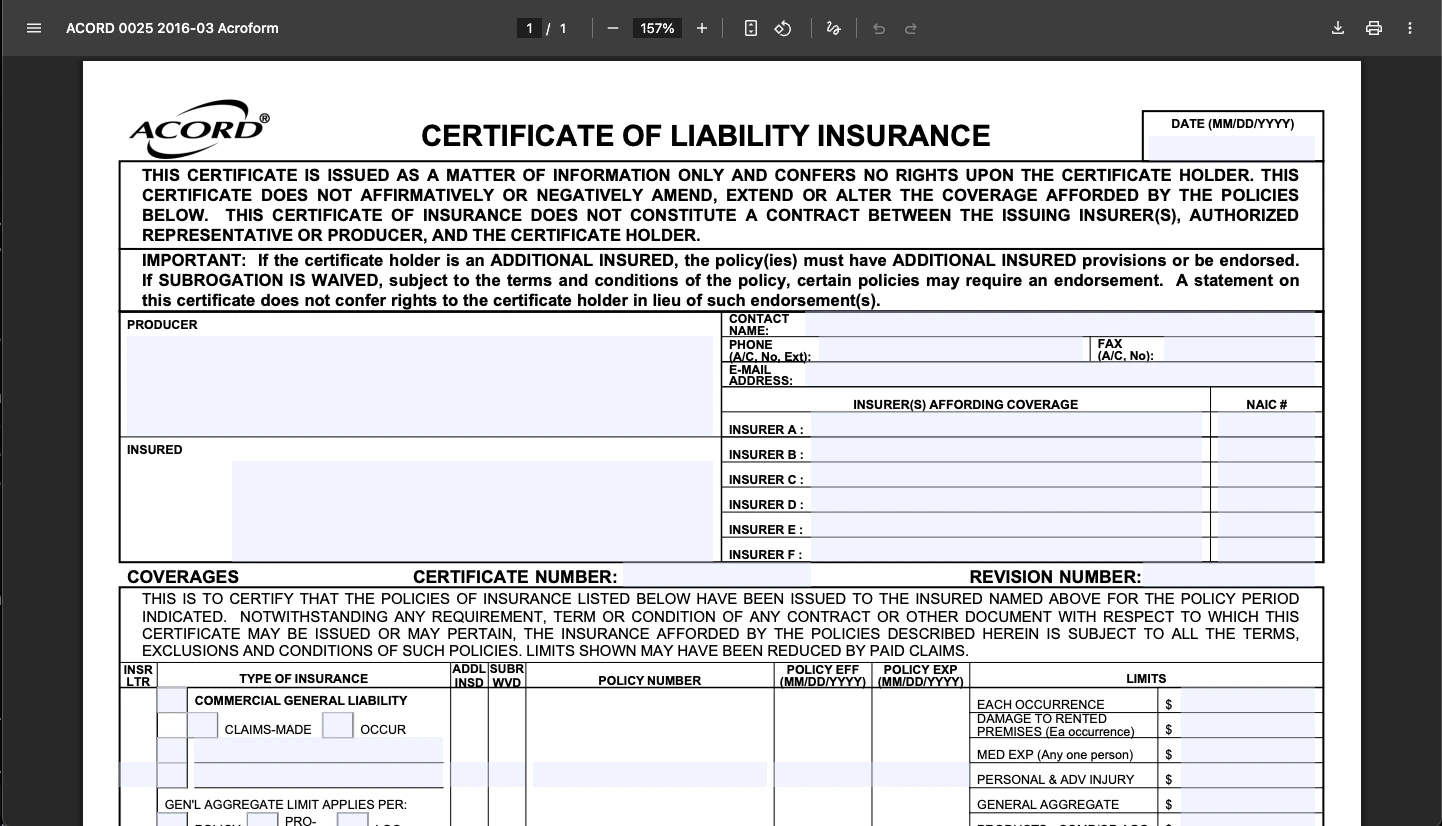 View the sample form: [ACORD 25 Certificate of Liability Insurance (PDF)](https://mykraftlake.btisinc.com/Portals/0/Users/011/11/11/25%20Certificate%20of%20Liability%20Insurance.pdf)
The ACORD 25 is a standardized form with specific field locations for policy numbers, coverage limits, and dates. The Edit API detects these fields automatically.
### Declarations Page (Source Data)
The declarations page contains all policy details: insured name, policy numbers, effective dates, and coverage limits. This is the source data we'll extract.
***
## Create API Key
Go to [studio.reducto.ai](https://studio.reducto.ai) and sign in. From the home page, click **API Keys** in the left sidebar.
View the sample form: [ACORD 25 Certificate of Liability Insurance (PDF)](https://mykraftlake.btisinc.com/Portals/0/Users/011/11/11/25%20Certificate%20of%20Liability%20Insurance.pdf)
The ACORD 25 is a standardized form with specific field locations for policy numbers, coverage limits, and dates. The Edit API detects these fields automatically.
### Declarations Page (Source Data)
The declarations page contains all policy details: insured name, policy numbers, effective dates, and coverage limits. This is the source data we'll extract.
***
## Create API Key
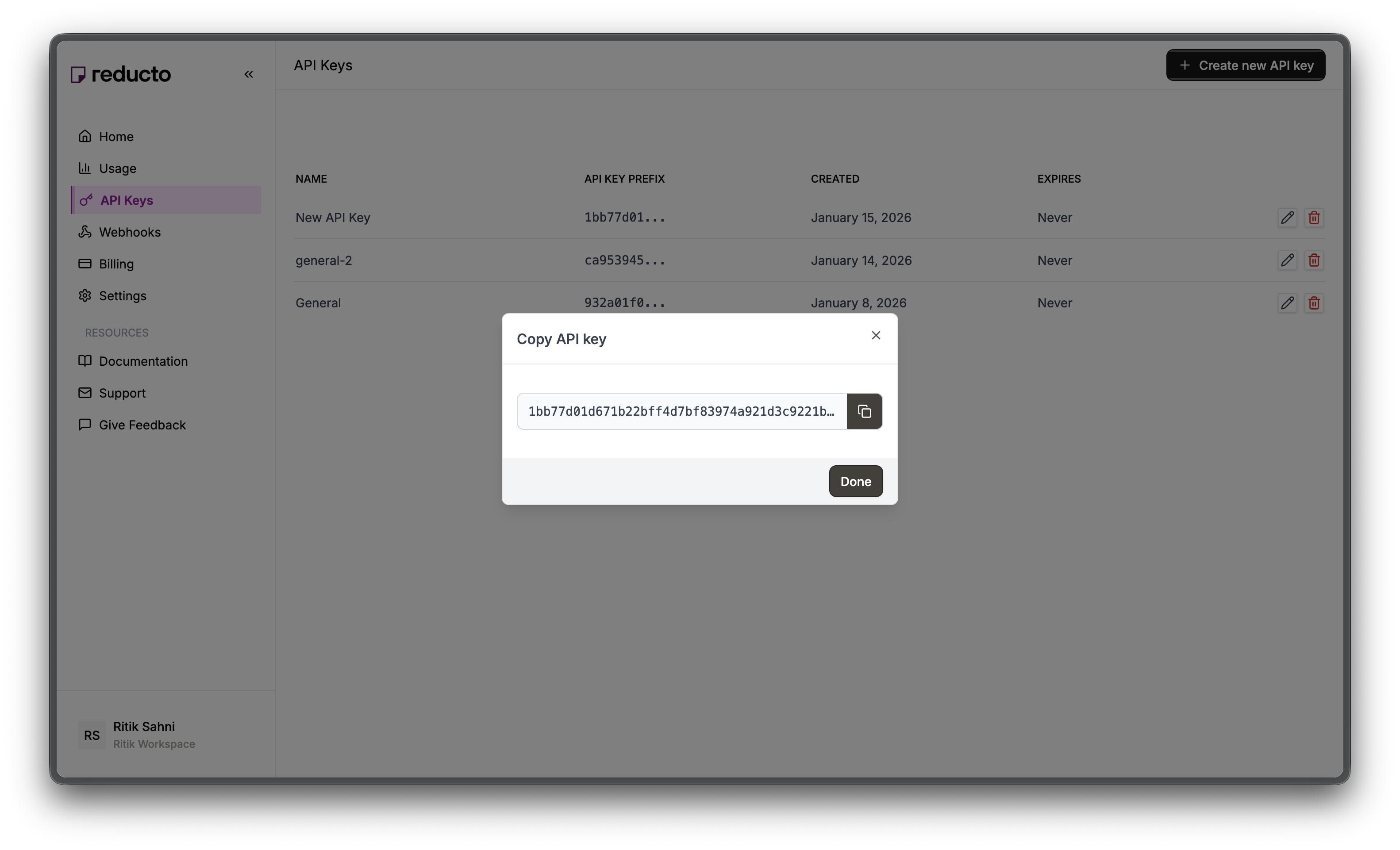
Go to [studio.reducto.ai](https://studio.reducto.ai) and sign in. From the home page, click **API Keys** in the left sidebar.
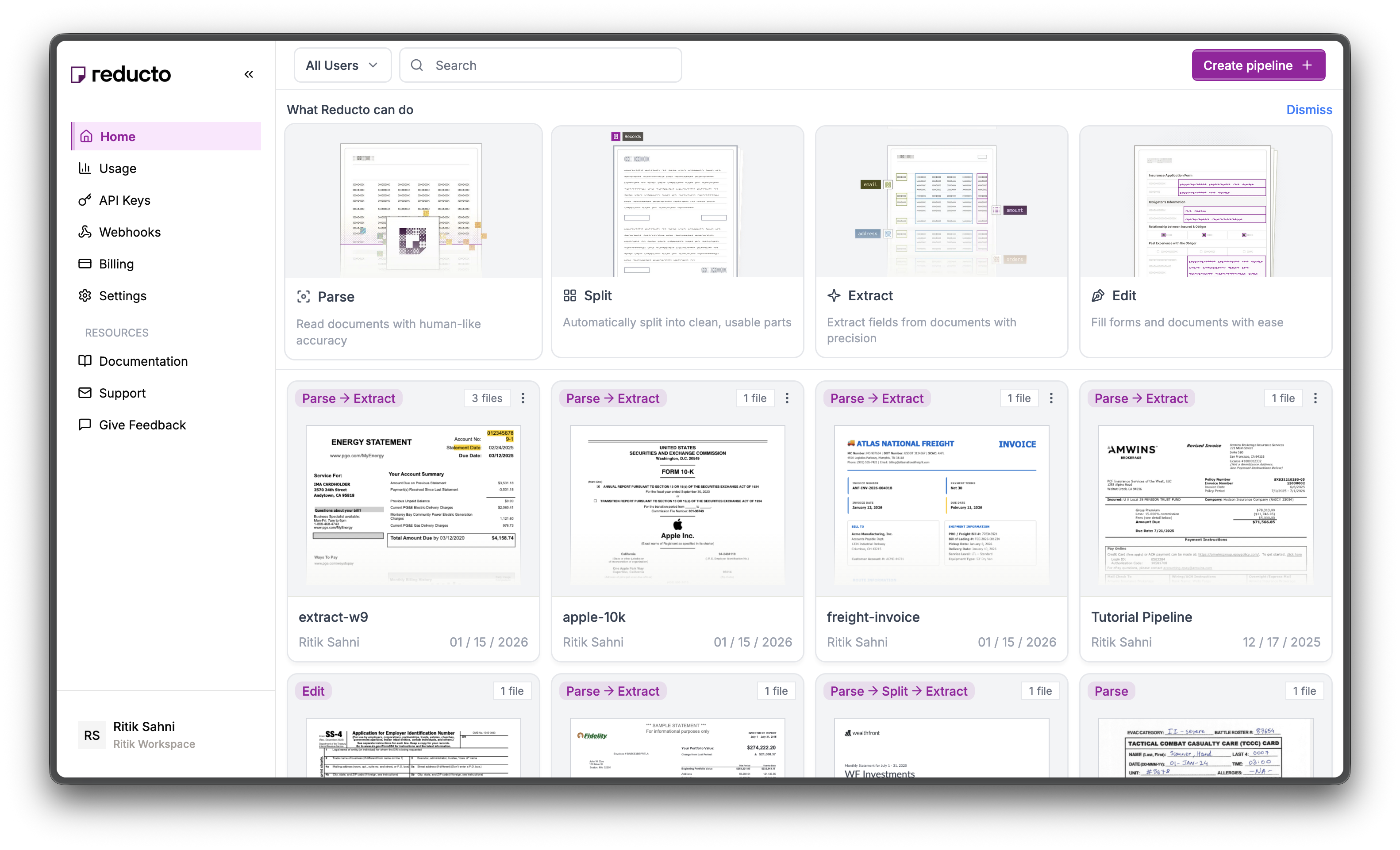 The API Keys page shows your existing keys. Click **+ Create new API key** in the top right corner.
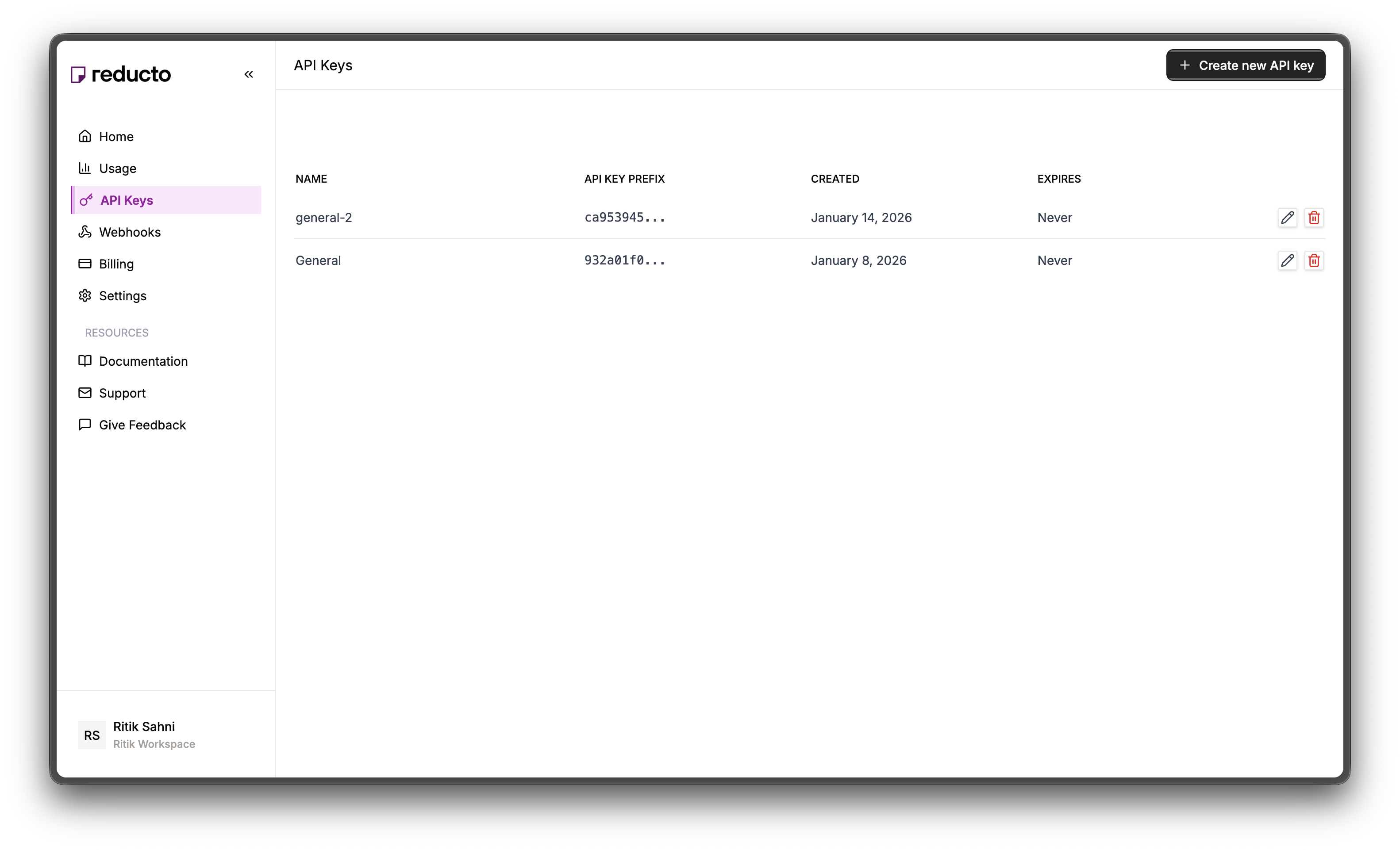 In the modal, enter a name for your key and set an expiration policy (or select "Never" for no expiration). Click **Create**.
 Copy your new API key and store it securely. You won't be able to see it again after closing this dialog.
 Set the key as an environment variable:
```bash theme={null}
export REDUCTO_API_KEY="your-api-key-here"
```
***
## Part 1: Extract from Declarations Page
The declarations page contains all the policy details needed to fill an ACORD 25: insured name, policy number, effective/expiration dates, and coverage limits.
### Studio Walkthrough
Go to [studio.reducto.ai](https://studio.reducto.ai) and create an **Extract** pipeline. Upload the declarations page PDF.
Extract reads the document and lets you define a schema to pull specific fields as structured JSON.
In the Schema Builder, define fields matching the declarations page structure. Click **Add Field** for each:
* `policy_number` (text) - "Policy number from the declarations page"
* `named_insured` (object) - "Policyholder information"
* `name` (text) - "Insured name"
* `address` (text) - "Mailing address"
* `effective_date` (text) - "Policy effective date"
* `expiration_date` (text) - "Policy expiration date"
* `insurer_name` (text) - "Insurance company name"
* `umbrella_occurrence_limit` (number) - "Each occurrence limit"
* `umbrella_aggregate_limit` (number) - "Aggregate limit"
Set the key as an environment variable:
```bash theme={null}
export REDUCTO_API_KEY="your-api-key-here"
```
***
## Part 1: Extract from Declarations Page
The declarations page contains all the policy details needed to fill an ACORD 25: insured name, policy number, effective/expiration dates, and coverage limits.
### Studio Walkthrough
Go to [studio.reducto.ai](https://studio.reducto.ai) and create an **Extract** pipeline. Upload the declarations page PDF.
Extract reads the document and lets you define a schema to pull specific fields as structured JSON.
In the Schema Builder, define fields matching the declarations page structure. Click **Add Field** for each:
* `policy_number` (text) - "Policy number from the declarations page"
* `named_insured` (object) - "Policyholder information"
* `name` (text) - "Insured name"
* `address` (text) - "Mailing address"
* `effective_date` (text) - "Policy effective date"
* `expiration_date` (text) - "Policy expiration date"
* `insurer_name` (text) - "Insurance company name"
* `umbrella_occurrence_limit` (number) - "Each occurrence limit"
* `umbrella_aggregate_limit` (number) - "Aggregate limit"
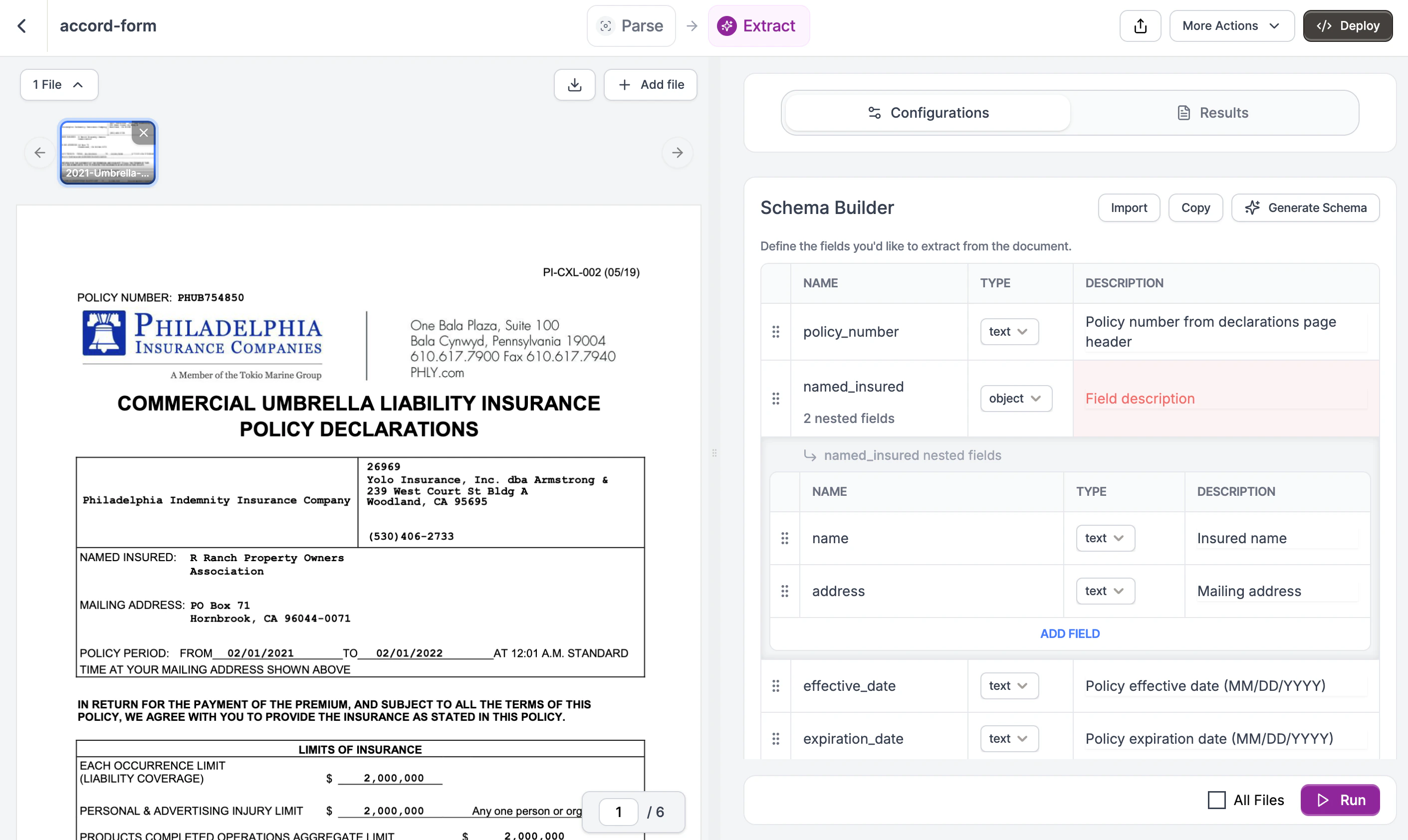 Field descriptions help the LLM locate the right values. Be specific about where each field appears. See the [Complete Schema](#complete-schema) below for a copy-paste version.
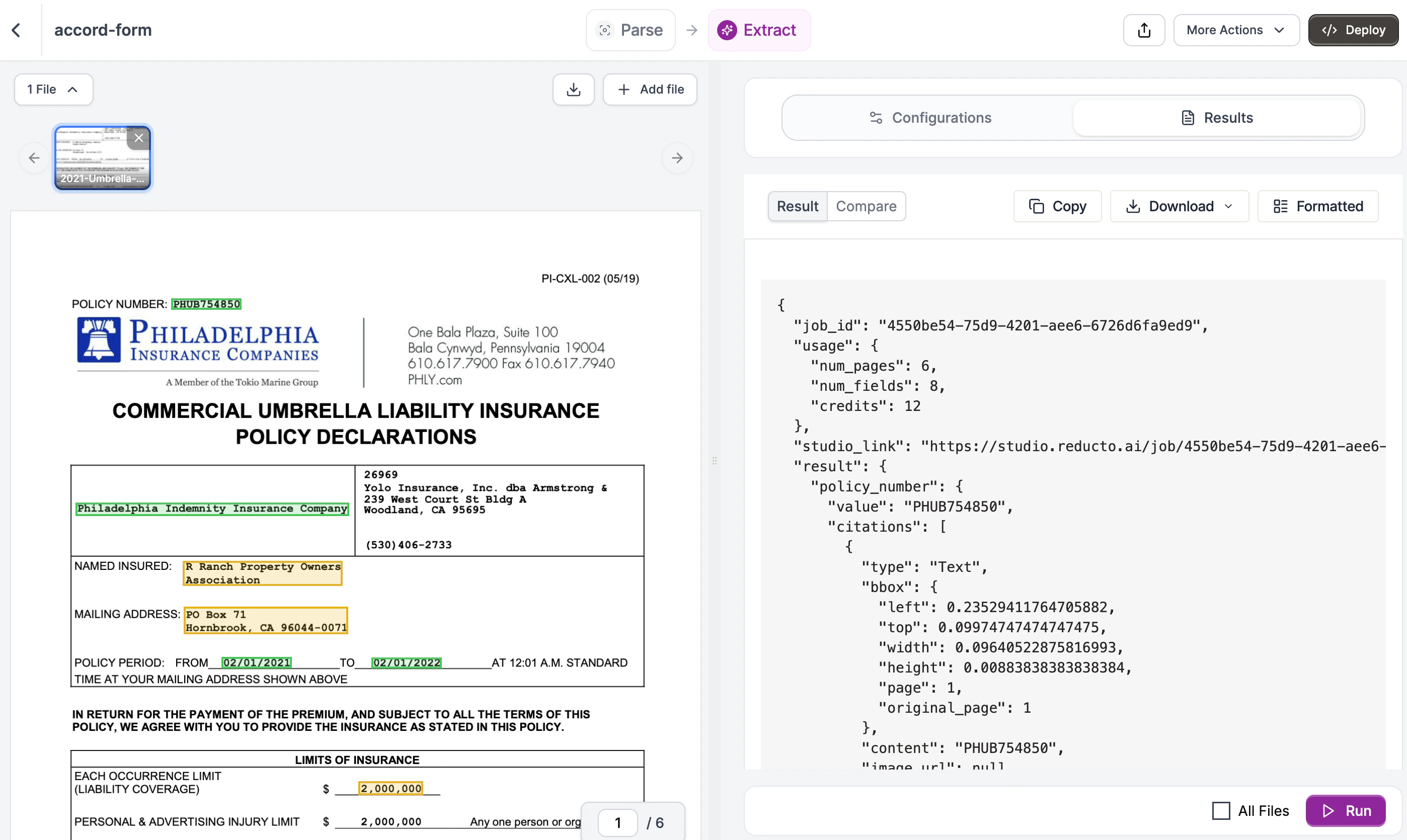
Click **Run**. The Results tab shows extracted data as JSON:
Field descriptions help the LLM locate the right values. Be specific about where each field appears. See the [Complete Schema](#complete-schema) below for a copy-paste version.
Click **Run**. The Results tab shows extracted data as JSON:
 ```json theme={null}
{
"policy_number": "PHUB754850",
"named_insured": {
"name": "R Ranch Property Owners Association",
"address": "PO Box 71, Hornbrook, CA 96044-0071"
},
"effective_date": "02/01/2021",
"expiration_date": "02/01/2022",
"insurer_name": "Philadelphia Indemnity Insurance Company",
"umbrella_occurrence_limit": 2000000,
"umbrella_aggregate_limit": 2000000
}
```
### Using the API
Let's walk through extracting policy data step by step.
#### Step 1: Initialize the client
Start by importing Reducto and creating a client. The client reads your API key from the `REDUCTO_API_KEY` environment variable automatically.
```python Python theme={null}
from reducto import Reducto
client = Reducto()
```
```javascript JavaScript theme={null}
import Reducto from "reductoai";
const client = new Reducto();
```
```bash cURL theme={null}
# Set your API key as an environment variable
export REDUCTO_API_KEY="your-api-key-here"
```
#### Step 2: Upload your document
Upload the declarations page PDF. This returns a `file_id` that you'll use for extraction. Reducto stores the file temporarily so you can process it without re-uploading.
```python Python theme={null}
from pathlib import Path
upload = client.upload(file=Path("declarations.pdf"))
print(f"Uploaded: {upload.file_id}")
```
```javascript JavaScript theme={null}
import fs from "fs";
const upload = await client.upload({
file: fs.createReadStream("declarations.pdf"),
});
console.log(`Uploaded: ${upload.file_id}`);
```
```bash cURL theme={null}
UPLOAD=$(curl -s -X POST "https://platform.reducto.ai/upload" \
-H "Authorization: Bearer $REDUCTO_API_KEY" \
-F "file=@declarations.pdf")
FILE_ID=$(echo $UPLOAD | jq -r '.file_id')
echo "Uploaded: $FILE_ID"
```
#### Step 3: Define the schema structure
The schema tells Reducto what fields to extract. Start with the basic structure:
```python Python theme={null}
declarations_schema = {
"type": "object",
"properties": {
# We'll add fields here
}
}
```
```javascript JavaScript theme={null}
const declarationsSchema = {
type: "object",
properties: {
// We'll add fields here
}
};
```
```json JSON Schema theme={null}
{
"type": "object",
"properties": {
}
}
```
Every extraction schema is an object with properties. Each property becomes a key in your JSON output.
#### Step 4: Add simple fields
Add the basic policy fields. Each field needs a `type` and a `description`. The description is important because it tells the LLM where to find the value.
```python Python theme={null}
declarations_schema = {
"type": "object",
"properties": {
"policy_number": {
"type": "string",
"description": "Policy number from declarations page header"
},
"effective_date": {
"type": "string",
"description": "Policy effective date (MM/DD/YYYY)"
},
"expiration_date": {
"type": "string",
"description": "Policy expiration date (MM/DD/YYYY)"
},
"insurer_name": {
"type": "string",
"description": "Insurance company name"
}
}
}
```
```javascript JavaScript theme={null}
const declarationsSchema = {
type: "object",
properties: {
policy_number: {
type: "string",
description: "Policy number from declarations page header"
},
effective_date: {
type: "string",
description: "Policy effective date (MM/DD/YYYY)"
},
expiration_date: {
type: "string",
description: "Policy expiration date (MM/DD/YYYY)"
},
insurer_name: {
type: "string",
description: "Insurance company name"
}
}
};
```
```json JSON Schema theme={null}
{
"type": "object",
"properties": {
"policy_number": {
"type": "string",
"description": "Policy number from declarations page header"
},
"effective_date": {
"type": "string",
"description": "Policy effective date (MM/DD/YYYY)"
},
"expiration_date": {
"type": "string",
"description": "Policy expiration date (MM/DD/YYYY)"
},
"insurer_name": {
"type": "string",
"description": "Insurance company name"
}
}
}
```
Why descriptions matter: "Policy number" alone is ambiguous if the page has multiple numbers. Adding "from declarations page header" helps the LLM find the right one.
#### Step 5: Add nested objects
For grouped information like the insured's details, use a nested object:
```python Python theme={null}
"named_insured": {
"type": "object",
"properties": {
"name": {
"type": "string",
"description": "Insured name"
},
"address": {
"type": "string",
"description": "Mailing address"
}
}
}
```
```javascript JavaScript theme={null}
named_insured: {
type: "object",
properties: {
name: {
type: "string",
description: "Insured name"
},
address: {
type: "string",
description: "Mailing address"
}
}
}
```
```json JSON Schema theme={null}
"named_insured": {
"type": "object",
"properties": {
"name": {
"type": "string",
"description": "Insured name"
},
"address": {
"type": "string",
"description": "Mailing address"
}
}
}
```
Nested objects keep related fields together in your output, making it easier to work with the data.
#### Step 6: Add coverage limits
For numeric values like coverage limits, use `type: "number"`. Reducto will return these as integers or floats, not strings.
```python Python theme={null}
"umbrella_occurrence_limit": {
"type": "number",
"description": "Each occurrence limit in dollars"
},
"umbrella_aggregate_limit": {
"type": "number",
"description": "Aggregate limit in dollars"
}
```
```javascript JavaScript theme={null}
umbrella_occurrence_limit: {
type: "number",
description: "Each occurrence limit in dollars"
},
umbrella_aggregate_limit: {
type: "number",
description: "Aggregate limit in dollars"
}
```
```json JSON Schema theme={null}
"umbrella_occurrence_limit": {
"type": "number",
"description": "Each occurrence limit in dollars"
},
"umbrella_aggregate_limit": {
"type": "number",
"description": "Aggregate limit in dollars"
}
```
### Complete Schema
Here's the complete schema you can copy and paste:
```json JSON Schema theme={null}
{
"type": "object",
"properties": {
"policy_number": {
"type": "string",
"description": "Policy number from declarations page header"
},
"named_insured": {
"type": "object",
"properties": {
"name": {
"type": "string",
"description": "Insured name"
},
"address": {
"type": "string",
"description": "Mailing address"
}
}
},
"effective_date": {
"type": "string",
"description": "Policy effective date (MM/DD/YYYY)"
},
"expiration_date": {
"type": "string",
"description": "Policy expiration date (MM/DD/YYYY)"
},
"insurer_name": {
"type": "string",
"description": "Insurance company name"
},
"umbrella_occurrence_limit": {
"type": "number",
"description": "Each occurrence limit in dollars"
},
"umbrella_aggregate_limit": {
"type": "number",
"description": "Aggregate limit in dollars"
}
}
}
```
```python Python theme={null}
declarations_schema = {
"type": "object",
"properties": {
"policy_number": {
"type": "string",
"description": "Policy number from declarations page header"
},
"named_insured": {
"type": "object",
"properties": {
"name": {"type": "string", "description": "Insured name"},
"address": {"type": "string", "description": "Mailing address"}
}
},
"effective_date": {
"type": "string",
"description": "Policy effective date (MM/DD/YYYY)"
},
"expiration_date": {
"type": "string",
"description": "Policy expiration date (MM/DD/YYYY)"
},
"insurer_name": {
"type": "string",
"description": "Insurance company name"
},
"umbrella_occurrence_limit": {
"type": "number",
"description": "Each occurrence limit in dollars"
},
"umbrella_aggregate_limit": {
"type": "number",
"description": "Aggregate limit in dollars"
}
}
}
```
```javascript JavaScript theme={null}
const declarationsSchema = {
type: "object",
properties: {
policy_number: {
type: "string",
description: "Policy number from declarations page header"
},
named_insured: {
type: "object",
properties: {
name: { type: "string", description: "Insured name" },
address: { type: "string", description: "Mailing address" }
}
},
effective_date: {
type: "string",
description: "Policy effective date (MM/DD/YYYY)"
},
expiration_date: {
type: "string",
description: "Policy expiration date (MM/DD/YYYY)"
},
insurer_name: {
type: "string",
description: "Insurance company name"
},
umbrella_occurrence_limit: {
type: "number",
description: "Each occurrence limit in dollars"
},
umbrella_aggregate_limit: {
type: "number",
description: "Aggregate limit in dollars"
}
}
};
```
#### Step 7: Run the extraction
Pass your schema to the Extract API using the `instructions` parameter:
```python Python theme={null}
result = client.extract.run(
input=upload.file_id,
instructions={"schema": declarations_schema}
)
```
```javascript JavaScript theme={null}
const result = await client.extract.run({
input: upload.file_id,
instructions: { schema: declarationsSchema }
});
```
```bash cURL theme={null}
curl -X POST "https://platform.reducto.ai/extract" \
-H "Authorization: Bearer $REDUCTO_API_KEY" \
-H "Content-Type: application/json" \
-d '{
"input": "'$FILE_ID'",
"instructions": {
"schema": {
"type": "object",
"properties": {
"policy_number": {"type": "string", "description": "Policy number"},
"named_insured": {
"type": "object",
"properties": {
"name": {"type": "string"},
"address": {"type": "string"}
}
},
"effective_date": {"type": "string"},
"expiration_date": {"type": "string"},
"insurer_name": {"type": "string"},
"umbrella_occurrence_limit": {"type": "number"},
"umbrella_aggregate_limit": {"type": "number"}
}
}
}
}'
```
The `instructions` parameter wraps your schema. This structure allows for additional options like system prompts.
#### Step 8: Access the results
The extracted data is in `result.result[0]` (the API returns an array for multi-document support). Each field from your schema becomes a key in the response:
```python Python theme={null}
policy_data = result.result[0]
print(f"Policy: {policy_data['policy_number']}")
print(f"Insured: {policy_data['named_insured']['name']}")
print(f"Coverage: ${policy_data['umbrella_occurrence_limit']:,}")
```
```javascript JavaScript theme={null}
const policyData = result.result[0];
console.log(`Policy: ${policyData.policy_number}`);
console.log(`Insured: ${policyData.named_insured.name}`);
console.log(`Coverage: $${policyData.umbrella_occurrence_limit.toLocaleString()}`);
```
```bash cURL theme={null}
# The response JSON contains the result field (an array):
# {
# "result": [{
# "policy_number": "PHUB754850",
# "named_insured": {
# "name": "R Ranch Property Owners Association",
# "address": "PO Box 71, Hornbrook, CA 96044-0071"
# },
# ...
# }]
# }
# Use jq to extract values:
echo $RESULT | jq '.result[0].policy_number'
echo $RESULT | jq '.result[0].named_insured.name'
```
**Output:**
```
Policy: PHUB754850
Insured: R Ranch Property Owners Association
Coverage: $2,000,000
```
***
## Part 2: Fill ACORD 25 Certificate
Use the extracted policy data to fill a blank ACORD 25 certificate. The Edit API detects form fields and fills them based on natural language instructions.
### Studio Walkthrough
Create an **Edit** pipeline in Studio. Upload a blank ACORD 25 PDF.
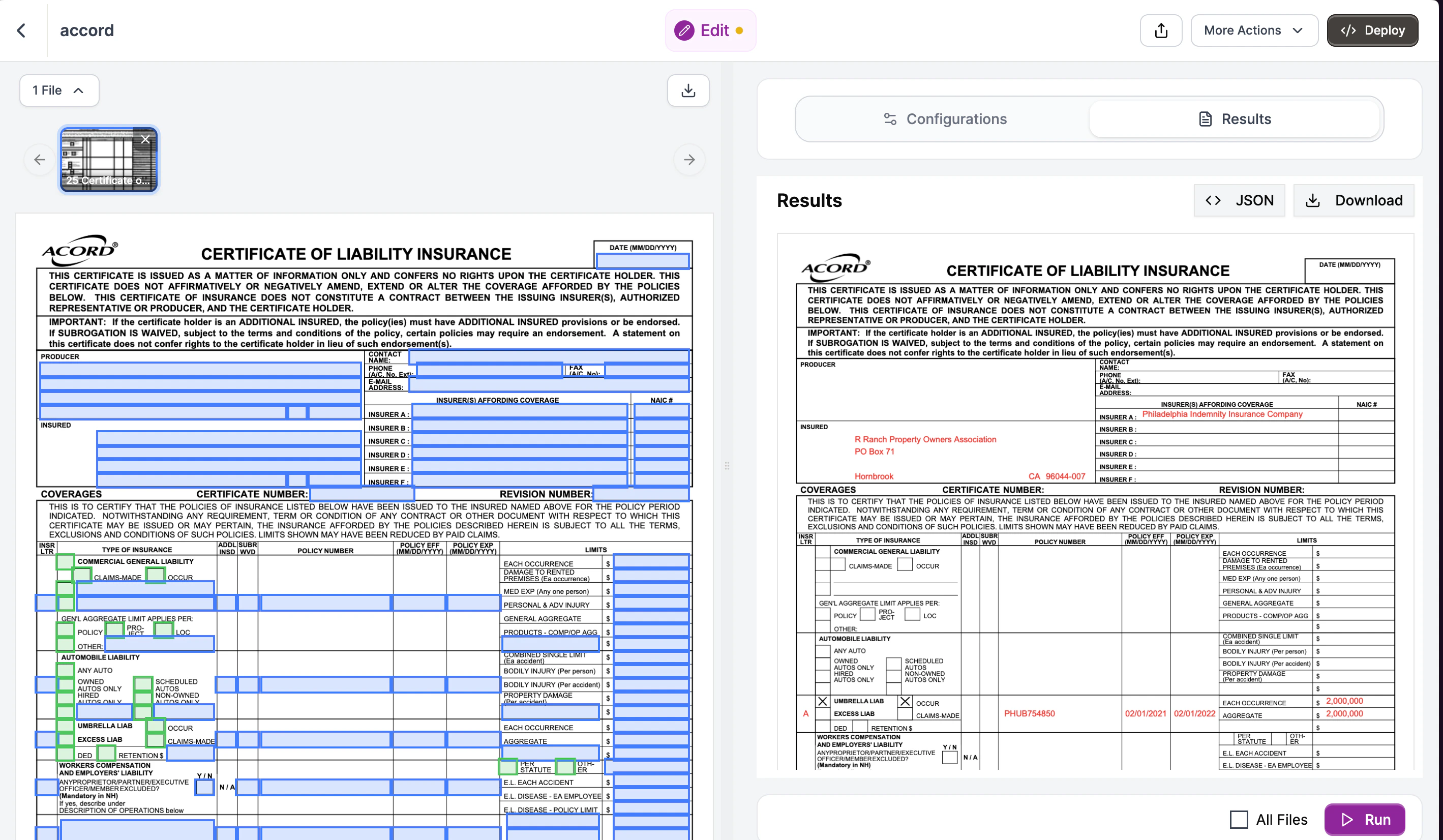
Edit detects all fillable fields in the form: text boxes, checkboxes, and dropdowns.
In the Edit Instructions panel, describe what values to fill. Reference the data you extracted:
```
Fill this ACORD 25 Certificate with:
INSURED:
- Name: R Ranch Property Owners Association
- Address: PO Box 71, Hornbrook, CA 96044-0071
INSURER A:
- Company: Philadelphia Indemnity Insurance Company
UMBRELLA LIABILITY:
- Policy Number: PHUB754850
- Effective: 02/01/2021
- Expiration: 02/01/2022
- Each Occurrence: $2,000,000
- Aggregate: $2,000,000
- Check "Occurrence" for policy type
```
Be explicit about field locations when the form has similar fields (e.g., multiple policy number boxes).
Click **Run**. Edit fills the form and returns a download link. The filled PDF has all your values in the correct fields.
```json theme={null}
{
"policy_number": "PHUB754850",
"named_insured": {
"name": "R Ranch Property Owners Association",
"address": "PO Box 71, Hornbrook, CA 96044-0071"
},
"effective_date": "02/01/2021",
"expiration_date": "02/01/2022",
"insurer_name": "Philadelphia Indemnity Insurance Company",
"umbrella_occurrence_limit": 2000000,
"umbrella_aggregate_limit": 2000000
}
```
### Using the API
Let's walk through extracting policy data step by step.
#### Step 1: Initialize the client
Start by importing Reducto and creating a client. The client reads your API key from the `REDUCTO_API_KEY` environment variable automatically.
```python Python theme={null}
from reducto import Reducto
client = Reducto()
```
```javascript JavaScript theme={null}
import Reducto from "reductoai";
const client = new Reducto();
```
```bash cURL theme={null}
# Set your API key as an environment variable
export REDUCTO_API_KEY="your-api-key-here"
```
#### Step 2: Upload your document
Upload the declarations page PDF. This returns a `file_id` that you'll use for extraction. Reducto stores the file temporarily so you can process it without re-uploading.
```python Python theme={null}
from pathlib import Path
upload = client.upload(file=Path("declarations.pdf"))
print(f"Uploaded: {upload.file_id}")
```
```javascript JavaScript theme={null}
import fs from "fs";
const upload = await client.upload({
file: fs.createReadStream("declarations.pdf"),
});
console.log(`Uploaded: ${upload.file_id}`);
```
```bash cURL theme={null}
UPLOAD=$(curl -s -X POST "https://platform.reducto.ai/upload" \
-H "Authorization: Bearer $REDUCTO_API_KEY" \
-F "file=@declarations.pdf")
FILE_ID=$(echo $UPLOAD | jq -r '.file_id')
echo "Uploaded: $FILE_ID"
```
#### Step 3: Define the schema structure
The schema tells Reducto what fields to extract. Start with the basic structure:
```python Python theme={null}
declarations_schema = {
"type": "object",
"properties": {
# We'll add fields here
}
}
```
```javascript JavaScript theme={null}
const declarationsSchema = {
type: "object",
properties: {
// We'll add fields here
}
};
```
```json JSON Schema theme={null}
{
"type": "object",
"properties": {
}
}
```
Every extraction schema is an object with properties. Each property becomes a key in your JSON output.
#### Step 4: Add simple fields
Add the basic policy fields. Each field needs a `type` and a `description`. The description is important because it tells the LLM where to find the value.
```python Python theme={null}
declarations_schema = {
"type": "object",
"properties": {
"policy_number": {
"type": "string",
"description": "Policy number from declarations page header"
},
"effective_date": {
"type": "string",
"description": "Policy effective date (MM/DD/YYYY)"
},
"expiration_date": {
"type": "string",
"description": "Policy expiration date (MM/DD/YYYY)"
},
"insurer_name": {
"type": "string",
"description": "Insurance company name"
}
}
}
```
```javascript JavaScript theme={null}
const declarationsSchema = {
type: "object",
properties: {
policy_number: {
type: "string",
description: "Policy number from declarations page header"
},
effective_date: {
type: "string",
description: "Policy effective date (MM/DD/YYYY)"
},
expiration_date: {
type: "string",
description: "Policy expiration date (MM/DD/YYYY)"
},
insurer_name: {
type: "string",
description: "Insurance company name"
}
}
};
```
```json JSON Schema theme={null}
{
"type": "object",
"properties": {
"policy_number": {
"type": "string",
"description": "Policy number from declarations page header"
},
"effective_date": {
"type": "string",
"description": "Policy effective date (MM/DD/YYYY)"
},
"expiration_date": {
"type": "string",
"description": "Policy expiration date (MM/DD/YYYY)"
},
"insurer_name": {
"type": "string",
"description": "Insurance company name"
}
}
}
```
Why descriptions matter: "Policy number" alone is ambiguous if the page has multiple numbers. Adding "from declarations page header" helps the LLM find the right one.
#### Step 5: Add nested objects
For grouped information like the insured's details, use a nested object:
```python Python theme={null}
"named_insured": {
"type": "object",
"properties": {
"name": {
"type": "string",
"description": "Insured name"
},
"address": {
"type": "string",
"description": "Mailing address"
}
}
}
```
```javascript JavaScript theme={null}
named_insured: {
type: "object",
properties: {
name: {
type: "string",
description: "Insured name"
},
address: {
type: "string",
description: "Mailing address"
}
}
}
```
```json JSON Schema theme={null}
"named_insured": {
"type": "object",
"properties": {
"name": {
"type": "string",
"description": "Insured name"
},
"address": {
"type": "string",
"description": "Mailing address"
}
}
}
```
Nested objects keep related fields together in your output, making it easier to work with the data.
#### Step 6: Add coverage limits
For numeric values like coverage limits, use `type: "number"`. Reducto will return these as integers or floats, not strings.
```python Python theme={null}
"umbrella_occurrence_limit": {
"type": "number",
"description": "Each occurrence limit in dollars"
},
"umbrella_aggregate_limit": {
"type": "number",
"description": "Aggregate limit in dollars"
}
```
```javascript JavaScript theme={null}
umbrella_occurrence_limit: {
type: "number",
description: "Each occurrence limit in dollars"
},
umbrella_aggregate_limit: {
type: "number",
description: "Aggregate limit in dollars"
}
```
```json JSON Schema theme={null}
"umbrella_occurrence_limit": {
"type": "number",
"description": "Each occurrence limit in dollars"
},
"umbrella_aggregate_limit": {
"type": "number",
"description": "Aggregate limit in dollars"
}
```
### Complete Schema
Here's the complete schema you can copy and paste:
```json JSON Schema theme={null}
{
"type": "object",
"properties": {
"policy_number": {
"type": "string",
"description": "Policy number from declarations page header"
},
"named_insured": {
"type": "object",
"properties": {
"name": {
"type": "string",
"description": "Insured name"
},
"address": {
"type": "string",
"description": "Mailing address"
}
}
},
"effective_date": {
"type": "string",
"description": "Policy effective date (MM/DD/YYYY)"
},
"expiration_date": {
"type": "string",
"description": "Policy expiration date (MM/DD/YYYY)"
},
"insurer_name": {
"type": "string",
"description": "Insurance company name"
},
"umbrella_occurrence_limit": {
"type": "number",
"description": "Each occurrence limit in dollars"
},
"umbrella_aggregate_limit": {
"type": "number",
"description": "Aggregate limit in dollars"
}
}
}
```
```python Python theme={null}
declarations_schema = {
"type": "object",
"properties": {
"policy_number": {
"type": "string",
"description": "Policy number from declarations page header"
},
"named_insured": {
"type": "object",
"properties": {
"name": {"type": "string", "description": "Insured name"},
"address": {"type": "string", "description": "Mailing address"}
}
},
"effective_date": {
"type": "string",
"description": "Policy effective date (MM/DD/YYYY)"
},
"expiration_date": {
"type": "string",
"description": "Policy expiration date (MM/DD/YYYY)"
},
"insurer_name": {
"type": "string",
"description": "Insurance company name"
},
"umbrella_occurrence_limit": {
"type": "number",
"description": "Each occurrence limit in dollars"
},
"umbrella_aggregate_limit": {
"type": "number",
"description": "Aggregate limit in dollars"
}
}
}
```
```javascript JavaScript theme={null}
const declarationsSchema = {
type: "object",
properties: {
policy_number: {
type: "string",
description: "Policy number from declarations page header"
},
named_insured: {
type: "object",
properties: {
name: { type: "string", description: "Insured name" },
address: { type: "string", description: "Mailing address" }
}
},
effective_date: {
type: "string",
description: "Policy effective date (MM/DD/YYYY)"
},
expiration_date: {
type: "string",
description: "Policy expiration date (MM/DD/YYYY)"
},
insurer_name: {
type: "string",
description: "Insurance company name"
},
umbrella_occurrence_limit: {
type: "number",
description: "Each occurrence limit in dollars"
},
umbrella_aggregate_limit: {
type: "number",
description: "Aggregate limit in dollars"
}
}
};
```
#### Step 7: Run the extraction
Pass your schema to the Extract API using the `instructions` parameter:
```python Python theme={null}
result = client.extract.run(
input=upload.file_id,
instructions={"schema": declarations_schema}
)
```
```javascript JavaScript theme={null}
const result = await client.extract.run({
input: upload.file_id,
instructions: { schema: declarationsSchema }
});
```
```bash cURL theme={null}
curl -X POST "https://platform.reducto.ai/extract" \
-H "Authorization: Bearer $REDUCTO_API_KEY" \
-H "Content-Type: application/json" \
-d '{
"input": "'$FILE_ID'",
"instructions": {
"schema": {
"type": "object",
"properties": {
"policy_number": {"type": "string", "description": "Policy number"},
"named_insured": {
"type": "object",
"properties": {
"name": {"type": "string"},
"address": {"type": "string"}
}
},
"effective_date": {"type": "string"},
"expiration_date": {"type": "string"},
"insurer_name": {"type": "string"},
"umbrella_occurrence_limit": {"type": "number"},
"umbrella_aggregate_limit": {"type": "number"}
}
}
}
}'
```
The `instructions` parameter wraps your schema. This structure allows for additional options like system prompts.
#### Step 8: Access the results
The extracted data is in `result.result[0]` (the API returns an array for multi-document support). Each field from your schema becomes a key in the response:
```python Python theme={null}
policy_data = result.result[0]
print(f"Policy: {policy_data['policy_number']}")
print(f"Insured: {policy_data['named_insured']['name']}")
print(f"Coverage: ${policy_data['umbrella_occurrence_limit']:,}")
```
```javascript JavaScript theme={null}
const policyData = result.result[0];
console.log(`Policy: ${policyData.policy_number}`);
console.log(`Insured: ${policyData.named_insured.name}`);
console.log(`Coverage: $${policyData.umbrella_occurrence_limit.toLocaleString()}`);
```
```bash cURL theme={null}
# The response JSON contains the result field (an array):
# {
# "result": [{
# "policy_number": "PHUB754850",
# "named_insured": {
# "name": "R Ranch Property Owners Association",
# "address": "PO Box 71, Hornbrook, CA 96044-0071"
# },
# ...
# }]
# }
# Use jq to extract values:
echo $RESULT | jq '.result[0].policy_number'
echo $RESULT | jq '.result[0].named_insured.name'
```
**Output:**
```
Policy: PHUB754850
Insured: R Ranch Property Owners Association
Coverage: $2,000,000
```
***
## Part 2: Fill ACORD 25 Certificate
Use the extracted policy data to fill a blank ACORD 25 certificate. The Edit API detects form fields and fills them based on natural language instructions.
### Studio Walkthrough
Create an **Edit** pipeline in Studio. Upload a blank ACORD 25 PDF.
Edit detects all fillable fields in the form: text boxes, checkboxes, and dropdowns.
In the Edit Instructions panel, describe what values to fill. Reference the data you extracted:
```
Fill this ACORD 25 Certificate with:
INSURED:
- Name: R Ranch Property Owners Association
- Address: PO Box 71, Hornbrook, CA 96044-0071
INSURER A:
- Company: Philadelphia Indemnity Insurance Company
UMBRELLA LIABILITY:
- Policy Number: PHUB754850
- Effective: 02/01/2021
- Expiration: 02/01/2022
- Each Occurrence: $2,000,000
- Aggregate: $2,000,000
- Check "Occurrence" for policy type
```
Be explicit about field locations when the form has similar fields (e.g., multiple policy number boxes).
Click **Run**. Edit fills the form and returns a download link. The filled PDF has all your values in the correct fields.
 ### Using the API
Now let's fill the ACORD 25 with the extracted data.
#### Step 1: Upload the blank form
Upload the blank ACORD 25 PDF. Edit uses the same upload mechanism as Extract.
```python Python theme={null}
from pathlib import Path
upload = client.upload(file=Path("acord-25-blank.pdf"))
```
```javascript JavaScript theme={null}
const upload = await client.upload({
file: fs.createReadStream("acord-25-blank.pdf"),
});
```
```bash cURL theme={null}
UPLOAD=$(curl -s -X POST "https://platform.reducto.ai/upload" \
-H "Authorization: Bearer $REDUCTO_API_KEY" \
-F "file=@acord-25-blank.pdf")
FILE_ID=$(echo $UPLOAD | jq -r '.file_id')
```
Edit uses `document_url` instead of `input`. This is because Edit modifies documents rather than reading them.
#### Step 2: Write fill instructions
Edit uses natural language instructions instead of a schema. Describe what values should go where. Reference the section names on the form to help Edit find the right fields.
```python Python theme={null}
instructions = f"""
Fill this ACORD 25 Certificate of Liability Insurance with:
INSURED:
- Name: {policy_data['named_insured']['name']}
- Address: {policy_data['named_insured']['address']}
INSURER A:
- Company: {policy_data['insurer_name']}
UMBRELLA LIABILITY SECTION:
- Policy Number: {policy_data['policy_number']}
- Effective Date: {policy_data['effective_date']}
- Expiration Date: {policy_data['expiration_date']}
- Each Occurrence limit: ${policy_data['umbrella_occurrence_limit']:,}
- Aggregate limit: ${policy_data['umbrella_aggregate_limit']:,}
- Check the "Occurrence" checkbox for umbrella policy type
"""
```
```javascript JavaScript theme={null}
const instructions = `
Fill this ACORD 25 Certificate of Liability Insurance with:
INSURED:
- Name: ${policyData.named_insured.name}
- Address: ${policyData.named_insured.address}
INSURER A:
- Company: ${policyData.insurer_name}
UMBRELLA LIABILITY SECTION:
- Policy Number: ${policyData.policy_number}
- Effective Date: ${policyData.effective_date}
- Expiration Date: ${policyData.expiration_date}
- Each Occurrence limit: $${policyData.umbrella_occurrence_limit.toLocaleString()}
- Aggregate limit: $${policyData.umbrella_aggregate_limit.toLocaleString()}
- Check the "Occurrence" checkbox for umbrella policy type
`;
```
```bash cURL theme={null}
# Build the instructions string with extracted values
INSTRUCTIONS="Fill this ACORD 25 with: INSURED Name: R Ranch Property Owners Association, Address: PO Box 71, Hornbrook, CA 96044-0071. INSURER A: Philadelphia Indemnity Insurance Company. UMBRELLA LIABILITY: Policy Number PHUB754850, Effective 02/01/2021, Expiration 02/01/2022, Each Occurrence \$2,000,000, Aggregate \$2,000,000, check Occurrence checkbox."
```
Why natural language? ACORD forms have cryptic field names like `topmostSubform[0].Page1[0].f1_1[0]`. Edit uses AI to understand context, so "Insured Name" works even if the PDF field is named something obscure.
#### Step 3: Run the Edit API
Pass your instructions to the Edit API:
```python Python theme={null}
result = client.edit.run(
document_url=upload.file_id,
edit_instructions=instructions
)
```
```javascript JavaScript theme={null}
const result = await client.edit.run({
document_url: upload.file_id,
edit_instructions: instructions
});
```
```bash cURL theme={null}
curl -X POST "https://platform.reducto.ai/edit" \
-H "Authorization: Bearer $REDUCTO_API_KEY" \
-H "Content-Type: application/json" \
-d '{
"document_url": "'$FILE_ID'",
"edit_instructions": "'"$INSTRUCTIONS"'"
}'
```
Edit:
1. Detects all fillable fields in the PDF
2. Reads surrounding context (labels, headers) to understand each field
3. Maps your instructions to the appropriate fields
4. Fills the values and returns the modified document
#### Step 4: Download the result
The response includes a URL to download the filled form:
```python Python theme={null}
print(f"Filled certificate: {result.document_url}")
```
```javascript JavaScript theme={null}
console.log(`Filled certificate: ${result.document_url}`);
```
```bash cURL theme={null}
# The response contains the document_url field:
# {
# "document_url": "https://storage.reducto.ai/filled-form.pdf?..."
# }
echo $RESULT | jq -r '.document_url'
```
This URL is a presigned link valid for 24 hours. Download or share it with the certificate recipient.
***
## Complete Workflow
The full pipeline extracts data from a declarations page and fills an ACORD 25:
```
Declarations PDF → Extract → policy_data → Edit → Filled ACORD 25
```
```python Python theme={null}
from pathlib import Path
from reducto import Reducto
client = Reducto()
# Schema for declarations extraction
declarations_schema = {
"type": "object",
"properties": {
"policy_number": {"type": "string", "description": "Policy number"},
"named_insured": {
"type": "object",
"properties": {
"name": {"type": "string"},
"address": {"type": "string"}
}
},
"effective_date": {"type": "string"},
"expiration_date": {"type": "string"},
"insurer_name": {"type": "string"},
"umbrella_occurrence_limit": {"type": "number"},
"umbrella_aggregate_limit": {"type": "number"}
}
}
# 1. Extract from declarations
dec_upload = client.upload(file=Path("declarations.pdf"))
extraction = client.extract.run(
input=dec_upload.file_id,
instructions={"schema": declarations_schema}
)
policy = extraction.result[0]
# 2. Fill ACORD 25
acord_upload = client.upload(file=Path("acord-25-blank.pdf"))
filled = client.edit.run(
document_url=acord_upload.file_id,
edit_instructions=f"""
Fill this ACORD 25 Certificate of Liability Insurance:
INSURED:
- Name: {policy['named_insured']['name']}
- Address: {policy['named_insured']['address']}
INSURER A: {policy['insurer_name']}
UMBRELLA LIABILITY:
- Policy Number: {policy['policy_number']}
- Effective: {policy['effective_date']}
- Expiration: {policy['expiration_date']}
- Each Occurrence: ${policy['umbrella_occurrence_limit']:,}
- Aggregate: ${policy['umbrella_aggregate_limit']:,}
- Check "Occurrence" for policy type
"""
)
# 3. Get the result
print(f"Certificate ready: {filled.document_url}")
```
```javascript JavaScript theme={null}
import Reducto from "reductoai";
import fs from "fs";
const client = new Reducto();
// Schema for declarations extraction
const declarationsSchema = {
type: "object",
properties: {
policy_number: { type: "string", description: "Policy number" },
named_insured: {
type: "object",
properties: {
name: { type: "string" },
address: { type: "string" }
}
},
effective_date: { type: "string" },
expiration_date: { type: "string" },
insurer_name: { type: "string" },
umbrella_occurrence_limit: { type: "number" },
umbrella_aggregate_limit: { type: "number" }
}
};
async function generateCertificate() {
// 1. Extract from declarations
const decUpload = await client.upload({
file: fs.createReadStream("declarations.pdf"),
});
const extraction = await client.extract.run({
input: decUpload.file_id,
instructions: { schema: declarationsSchema }
});
const policy = extraction.result[0];
// 2. Fill ACORD 25
const acordUpload = await client.upload({
file: fs.createReadStream("acord-25-blank.pdf"),
});
const filled = await client.edit.run({
document_url: acordUpload.file_id,
edit_instructions: `
Fill this ACORD 25 Certificate of Liability Insurance:
INSURED:
- Name: ${policy.named_insured.name}
- Address: ${policy.named_insured.address}
INSURER A: ${policy.insurer_name}
UMBRELLA LIABILITY:
- Policy Number: ${policy.policy_number}
- Effective: ${policy.effective_date}
- Expiration: ${policy.expiration_date}
- Each Occurrence: $${policy.umbrella_occurrence_limit.toLocaleString()}
- Aggregate: $${policy.umbrella_aggregate_limit.toLocaleString()}
- Check "Occurrence" for policy type
`
});
// 3. Get the result
console.log(`Certificate ready: ${filled.document_url}`);
}
generateCertificate();
```
```bash cURL theme={null}
#!/bin/bash
# 1. Upload declarations page
DEC_UPLOAD=$(curl -s -X POST "https://platform.reducto.ai/upload" \
-H "Authorization: Bearer $REDUCTO_API_KEY" \
-F "file=@declarations.pdf")
DEC_FILE_ID=$(echo $DEC_UPLOAD | jq -r '.file_id')
# 2. Extract policy data
EXTRACTION=$(curl -s -X POST "https://platform.reducto.ai/extract" \
-H "Authorization: Bearer $REDUCTO_API_KEY" \
-H "Content-Type: application/json" \
-d '{
"input": "'$DEC_FILE_ID'",
"instructions": {
"schema": {
"type": "object",
"properties": {
"policy_number": {"type": "string"},
"named_insured": {
"type": "object",
"properties": {
"name": {"type": "string"},
"address": {"type": "string"}
}
},
"effective_date": {"type": "string"},
"expiration_date": {"type": "string"},
"insurer_name": {"type": "string"},
"umbrella_occurrence_limit": {"type": "number"},
"umbrella_aggregate_limit": {"type": "number"}
}
}
}
}')
# 3. Upload blank ACORD 25
ACORD_UPLOAD=$(curl -s -X POST "https://platform.reducto.ai/upload" \
-H "Authorization: Bearer $REDUCTO_API_KEY" \
-F "file=@acord-25-blank.pdf")
ACORD_FILE_ID=$(echo $ACORD_UPLOAD | jq -r '.file_id')
# 4. Fill the form (using extracted values)
POLICY_NUM=$(echo $EXTRACTION | jq -r '.result[0].policy_number')
INSURED_NAME=$(echo $EXTRACTION | jq -r '.result[0].named_insured.name')
INSURED_ADDR=$(echo $EXTRACTION | jq -r '.result[0].named_insured.address')
INSURER=$(echo $EXTRACTION | jq -r '.result[0].insurer_name')
EFF_DATE=$(echo $EXTRACTION | jq -r '.result[0].effective_date')
EXP_DATE=$(echo $EXTRACTION | jq -r '.result[0].expiration_date')
OCC_LIMIT=$(echo $EXTRACTION | jq -r '.result[0].umbrella_occurrence_limit')
AGG_LIMIT=$(echo $EXTRACTION | jq -r '.result[0].umbrella_aggregate_limit')
FILLED=$(curl -s -X POST "https://platform.reducto.ai/edit" \
-H "Authorization: Bearer $REDUCTO_API_KEY" \
-H "Content-Type: application/json" \
-d '{
"document_url": "'$ACORD_FILE_ID'",
"edit_instructions": "Fill ACORD 25: INSURED Name: '"$INSURED_NAME"', Address: '"$INSURED_ADDR"'. INSURER A: '"$INSURER"'. UMBRELLA: Policy '"$POLICY_NUM"', Effective '"$EFF_DATE"', Expiration '"$EXP_DATE"', Each Occurrence $'"$OCC_LIMIT"', Aggregate $'"$AGG_LIMIT"', check Occurrence."
}')
# 5. Get the result
echo "Certificate ready: $(echo $FILLED | jq -r '.document_url')"
```
***
## Tips
### Handling checkboxes
ACORD 25 has multiple checkbox fields (policy types, coverage indicators). Be explicit in your instructions:
```python theme={null}
edit_instructions = """
Check the "Occurrence" checkbox in the Umbrella Liability section.
Check "Any Auto" in the Auto Liability section.
Leave all other checkboxes unchecked.
"""
```
### Form schema for production
For high-volume certificate generation, save the `form_schema` from your first Edit response. This skips field detection on subsequent calls.
```python Python theme={null}
# First call - Edit detects fields and returns schema
result = client.edit.run(document_url=upload.file_id, edit_instructions="...")
saved_schema = result.form_schema # Save this
# Subsequent calls - use saved schema (faster)
result = client.edit.run(
document_url=upload.file_id,
edit_instructions="...",
form_schema=saved_schema
)
```
```javascript JavaScript theme={null}
// First call - Edit detects fields and returns schema
const result = await client.edit.run({
document_url: upload.file_id,
edit_instructions: "..."
});
const savedSchema = result.form_schema; // Save this
// Subsequent calls - use saved schema (faster)
const result2 = await client.edit.run({
document_url: upload.file_id,
edit_instructions: "...",
form_schema: savedSchema
});
```
```bash cURL theme={null}
# First call returns form_schema in response
# Save it to a file:
echo $RESULT | jq '.form_schema' > saved_schema.json
# Subsequent calls - include form_schema parameter
curl -X POST "https://platform.reducto.ai/edit" \
-H "Authorization: Bearer $REDUCTO_API_KEY" \
-H "Content-Type: application/json" \
-d '{
"document_url": "'$FILE_ID'",
"edit_instructions": "...",
"form_schema": '"$(cat saved_schema.json)"'
}'
```
See [Form Schema](/configs/edit/form-schema) for details.
***
## Next Steps
Full Edit API documentation
Pre-define field locations for faster fills
Structured data extraction
Process many certificates at scale
### Using the API
Now let's fill the ACORD 25 with the extracted data.
#### Step 1: Upload the blank form
Upload the blank ACORD 25 PDF. Edit uses the same upload mechanism as Extract.
```python Python theme={null}
from pathlib import Path
upload = client.upload(file=Path("acord-25-blank.pdf"))
```
```javascript JavaScript theme={null}
const upload = await client.upload({
file: fs.createReadStream("acord-25-blank.pdf"),
});
```
```bash cURL theme={null}
UPLOAD=$(curl -s -X POST "https://platform.reducto.ai/upload" \
-H "Authorization: Bearer $REDUCTO_API_KEY" \
-F "file=@acord-25-blank.pdf")
FILE_ID=$(echo $UPLOAD | jq -r '.file_id')
```
Edit uses `document_url` instead of `input`. This is because Edit modifies documents rather than reading them.
#### Step 2: Write fill instructions
Edit uses natural language instructions instead of a schema. Describe what values should go where. Reference the section names on the form to help Edit find the right fields.
```python Python theme={null}
instructions = f"""
Fill this ACORD 25 Certificate of Liability Insurance with:
INSURED:
- Name: {policy_data['named_insured']['name']}
- Address: {policy_data['named_insured']['address']}
INSURER A:
- Company: {policy_data['insurer_name']}
UMBRELLA LIABILITY SECTION:
- Policy Number: {policy_data['policy_number']}
- Effective Date: {policy_data['effective_date']}
- Expiration Date: {policy_data['expiration_date']}
- Each Occurrence limit: ${policy_data['umbrella_occurrence_limit']:,}
- Aggregate limit: ${policy_data['umbrella_aggregate_limit']:,}
- Check the "Occurrence" checkbox for umbrella policy type
"""
```
```javascript JavaScript theme={null}
const instructions = `
Fill this ACORD 25 Certificate of Liability Insurance with:
INSURED:
- Name: ${policyData.named_insured.name}
- Address: ${policyData.named_insured.address}
INSURER A:
- Company: ${policyData.insurer_name}
UMBRELLA LIABILITY SECTION:
- Policy Number: ${policyData.policy_number}
- Effective Date: ${policyData.effective_date}
- Expiration Date: ${policyData.expiration_date}
- Each Occurrence limit: $${policyData.umbrella_occurrence_limit.toLocaleString()}
- Aggregate limit: $${policyData.umbrella_aggregate_limit.toLocaleString()}
- Check the "Occurrence" checkbox for umbrella policy type
`;
```
```bash cURL theme={null}
# Build the instructions string with extracted values
INSTRUCTIONS="Fill this ACORD 25 with: INSURED Name: R Ranch Property Owners Association, Address: PO Box 71, Hornbrook, CA 96044-0071. INSURER A: Philadelphia Indemnity Insurance Company. UMBRELLA LIABILITY: Policy Number PHUB754850, Effective 02/01/2021, Expiration 02/01/2022, Each Occurrence \$2,000,000, Aggregate \$2,000,000, check Occurrence checkbox."
```
Why natural language? ACORD forms have cryptic field names like `topmostSubform[0].Page1[0].f1_1[0]`. Edit uses AI to understand context, so "Insured Name" works even if the PDF field is named something obscure.
#### Step 3: Run the Edit API
Pass your instructions to the Edit API:
```python Python theme={null}
result = client.edit.run(
document_url=upload.file_id,
edit_instructions=instructions
)
```
```javascript JavaScript theme={null}
const result = await client.edit.run({
document_url: upload.file_id,
edit_instructions: instructions
});
```
```bash cURL theme={null}
curl -X POST "https://platform.reducto.ai/edit" \
-H "Authorization: Bearer $REDUCTO_API_KEY" \
-H "Content-Type: application/json" \
-d '{
"document_url": "'$FILE_ID'",
"edit_instructions": "'"$INSTRUCTIONS"'"
}'
```
Edit:
1. Detects all fillable fields in the PDF
2. Reads surrounding context (labels, headers) to understand each field
3. Maps your instructions to the appropriate fields
4. Fills the values and returns the modified document
#### Step 4: Download the result
The response includes a URL to download the filled form:
```python Python theme={null}
print(f"Filled certificate: {result.document_url}")
```
```javascript JavaScript theme={null}
console.log(`Filled certificate: ${result.document_url}`);
```
```bash cURL theme={null}
# The response contains the document_url field:
# {
# "document_url": "https://storage.reducto.ai/filled-form.pdf?..."
# }
echo $RESULT | jq -r '.document_url'
```
This URL is a presigned link valid for 24 hours. Download or share it with the certificate recipient.
***
## Complete Workflow
The full pipeline extracts data from a declarations page and fills an ACORD 25:
```
Declarations PDF → Extract → policy_data → Edit → Filled ACORD 25
```
```python Python theme={null}
from pathlib import Path
from reducto import Reducto
client = Reducto()
# Schema for declarations extraction
declarations_schema = {
"type": "object",
"properties": {
"policy_number": {"type": "string", "description": "Policy number"},
"named_insured": {
"type": "object",
"properties": {
"name": {"type": "string"},
"address": {"type": "string"}
}
},
"effective_date": {"type": "string"},
"expiration_date": {"type": "string"},
"insurer_name": {"type": "string"},
"umbrella_occurrence_limit": {"type": "number"},
"umbrella_aggregate_limit": {"type": "number"}
}
}
# 1. Extract from declarations
dec_upload = client.upload(file=Path("declarations.pdf"))
extraction = client.extract.run(
input=dec_upload.file_id,
instructions={"schema": declarations_schema}
)
policy = extraction.result[0]
# 2. Fill ACORD 25
acord_upload = client.upload(file=Path("acord-25-blank.pdf"))
filled = client.edit.run(
document_url=acord_upload.file_id,
edit_instructions=f"""
Fill this ACORD 25 Certificate of Liability Insurance:
INSURED:
- Name: {policy['named_insured']['name']}
- Address: {policy['named_insured']['address']}
INSURER A: {policy['insurer_name']}
UMBRELLA LIABILITY:
- Policy Number: {policy['policy_number']}
- Effective: {policy['effective_date']}
- Expiration: {policy['expiration_date']}
- Each Occurrence: ${policy['umbrella_occurrence_limit']:,}
- Aggregate: ${policy['umbrella_aggregate_limit']:,}
- Check "Occurrence" for policy type
"""
)
# 3. Get the result
print(f"Certificate ready: {filled.document_url}")
```
```javascript JavaScript theme={null}
import Reducto from "reductoai";
import fs from "fs";
const client = new Reducto();
// Schema for declarations extraction
const declarationsSchema = {
type: "object",
properties: {
policy_number: { type: "string", description: "Policy number" },
named_insured: {
type: "object",
properties: {
name: { type: "string" },
address: { type: "string" }
}
},
effective_date: { type: "string" },
expiration_date: { type: "string" },
insurer_name: { type: "string" },
umbrella_occurrence_limit: { type: "number" },
umbrella_aggregate_limit: { type: "number" }
}
};
async function generateCertificate() {
// 1. Extract from declarations
const decUpload = await client.upload({
file: fs.createReadStream("declarations.pdf"),
});
const extraction = await client.extract.run({
input: decUpload.file_id,
instructions: { schema: declarationsSchema }
});
const policy = extraction.result[0];
// 2. Fill ACORD 25
const acordUpload = await client.upload({
file: fs.createReadStream("acord-25-blank.pdf"),
});
const filled = await client.edit.run({
document_url: acordUpload.file_id,
edit_instructions: `
Fill this ACORD 25 Certificate of Liability Insurance:
INSURED:
- Name: ${policy.named_insured.name}
- Address: ${policy.named_insured.address}
INSURER A: ${policy.insurer_name}
UMBRELLA LIABILITY:
- Policy Number: ${policy.policy_number}
- Effective: ${policy.effective_date}
- Expiration: ${policy.expiration_date}
- Each Occurrence: $${policy.umbrella_occurrence_limit.toLocaleString()}
- Aggregate: $${policy.umbrella_aggregate_limit.toLocaleString()}
- Check "Occurrence" for policy type
`
});
// 3. Get the result
console.log(`Certificate ready: ${filled.document_url}`);
}
generateCertificate();
```
```bash cURL theme={null}
#!/bin/bash
# 1. Upload declarations page
DEC_UPLOAD=$(curl -s -X POST "https://platform.reducto.ai/upload" \
-H "Authorization: Bearer $REDUCTO_API_KEY" \
-F "file=@declarations.pdf")
DEC_FILE_ID=$(echo $DEC_UPLOAD | jq -r '.file_id')
# 2. Extract policy data
EXTRACTION=$(curl -s -X POST "https://platform.reducto.ai/extract" \
-H "Authorization: Bearer $REDUCTO_API_KEY" \
-H "Content-Type: application/json" \
-d '{
"input": "'$DEC_FILE_ID'",
"instructions": {
"schema": {
"type": "object",
"properties": {
"policy_number": {"type": "string"},
"named_insured": {
"type": "object",
"properties": {
"name": {"type": "string"},
"address": {"type": "string"}
}
},
"effective_date": {"type": "string"},
"expiration_date": {"type": "string"},
"insurer_name": {"type": "string"},
"umbrella_occurrence_limit": {"type": "number"},
"umbrella_aggregate_limit": {"type": "number"}
}
}
}
}')
# 3. Upload blank ACORD 25
ACORD_UPLOAD=$(curl -s -X POST "https://platform.reducto.ai/upload" \
-H "Authorization: Bearer $REDUCTO_API_KEY" \
-F "file=@acord-25-blank.pdf")
ACORD_FILE_ID=$(echo $ACORD_UPLOAD | jq -r '.file_id')
# 4. Fill the form (using extracted values)
POLICY_NUM=$(echo $EXTRACTION | jq -r '.result[0].policy_number')
INSURED_NAME=$(echo $EXTRACTION | jq -r '.result[0].named_insured.name')
INSURED_ADDR=$(echo $EXTRACTION | jq -r '.result[0].named_insured.address')
INSURER=$(echo $EXTRACTION | jq -r '.result[0].insurer_name')
EFF_DATE=$(echo $EXTRACTION | jq -r '.result[0].effective_date')
EXP_DATE=$(echo $EXTRACTION | jq -r '.result[0].expiration_date')
OCC_LIMIT=$(echo $EXTRACTION | jq -r '.result[0].umbrella_occurrence_limit')
AGG_LIMIT=$(echo $EXTRACTION | jq -r '.result[0].umbrella_aggregate_limit')
FILLED=$(curl -s -X POST "https://platform.reducto.ai/edit" \
-H "Authorization: Bearer $REDUCTO_API_KEY" \
-H "Content-Type: application/json" \
-d '{
"document_url": "'$ACORD_FILE_ID'",
"edit_instructions": "Fill ACORD 25: INSURED Name: '"$INSURED_NAME"', Address: '"$INSURED_ADDR"'. INSURER A: '"$INSURER"'. UMBRELLA: Policy '"$POLICY_NUM"', Effective '"$EFF_DATE"', Expiration '"$EXP_DATE"', Each Occurrence $'"$OCC_LIMIT"', Aggregate $'"$AGG_LIMIT"', check Occurrence."
}')
# 5. Get the result
echo "Certificate ready: $(echo $FILLED | jq -r '.document_url')"
```
***
## Tips
### Handling checkboxes
ACORD 25 has multiple checkbox fields (policy types, coverage indicators). Be explicit in your instructions:
```python theme={null}
edit_instructions = """
Check the "Occurrence" checkbox in the Umbrella Liability section.
Check "Any Auto" in the Auto Liability section.
Leave all other checkboxes unchecked.
"""
```
### Form schema for production
For high-volume certificate generation, save the `form_schema` from your first Edit response. This skips field detection on subsequent calls.
```python Python theme={null}
# First call - Edit detects fields and returns schema
result = client.edit.run(document_url=upload.file_id, edit_instructions="...")
saved_schema = result.form_schema # Save this
# Subsequent calls - use saved schema (faster)
result = client.edit.run(
document_url=upload.file_id,
edit_instructions="...",
form_schema=saved_schema
)
```
```javascript JavaScript theme={null}
// First call - Edit detects fields and returns schema
const result = await client.edit.run({
document_url: upload.file_id,
edit_instructions: "..."
});
const savedSchema = result.form_schema; // Save this
// Subsequent calls - use saved schema (faster)
const result2 = await client.edit.run({
document_url: upload.file_id,
edit_instructions: "...",
form_schema: savedSchema
});
```
```bash cURL theme={null}
# First call returns form_schema in response
# Save it to a file:
echo $RESULT | jq '.form_schema' > saved_schema.json
# Subsequent calls - include form_schema parameter
curl -X POST "https://platform.reducto.ai/edit" \
-H "Authorization: Bearer $REDUCTO_API_KEY" \
-H "Content-Type: application/json" \
-d '{
"document_url": "'$FILE_ID'",
"edit_instructions": "...",
"form_schema": '"$(cat saved_schema.json)"'
}'
```
See [Form Schema](/configs/edit/form-schema) for details.
***
## Next Steps
Full Edit API documentation
Pre-define field locations for faster fills
Structured data extraction
Process many certificates at scale