> ## Documentation Index
> Fetch the complete documentation index at: https://docs.reducto.ai/llms.txt
> Use this file to discover all available pages before exploring further.
# Parallel Document Processing
> Process hundreds of documents concurrently using AsyncReducto with progress tracking and error handling
Process a real invoice dataset from Hugging Face using `AsyncReducto` with progress tracking and error handling.
***
## Sample Dataset
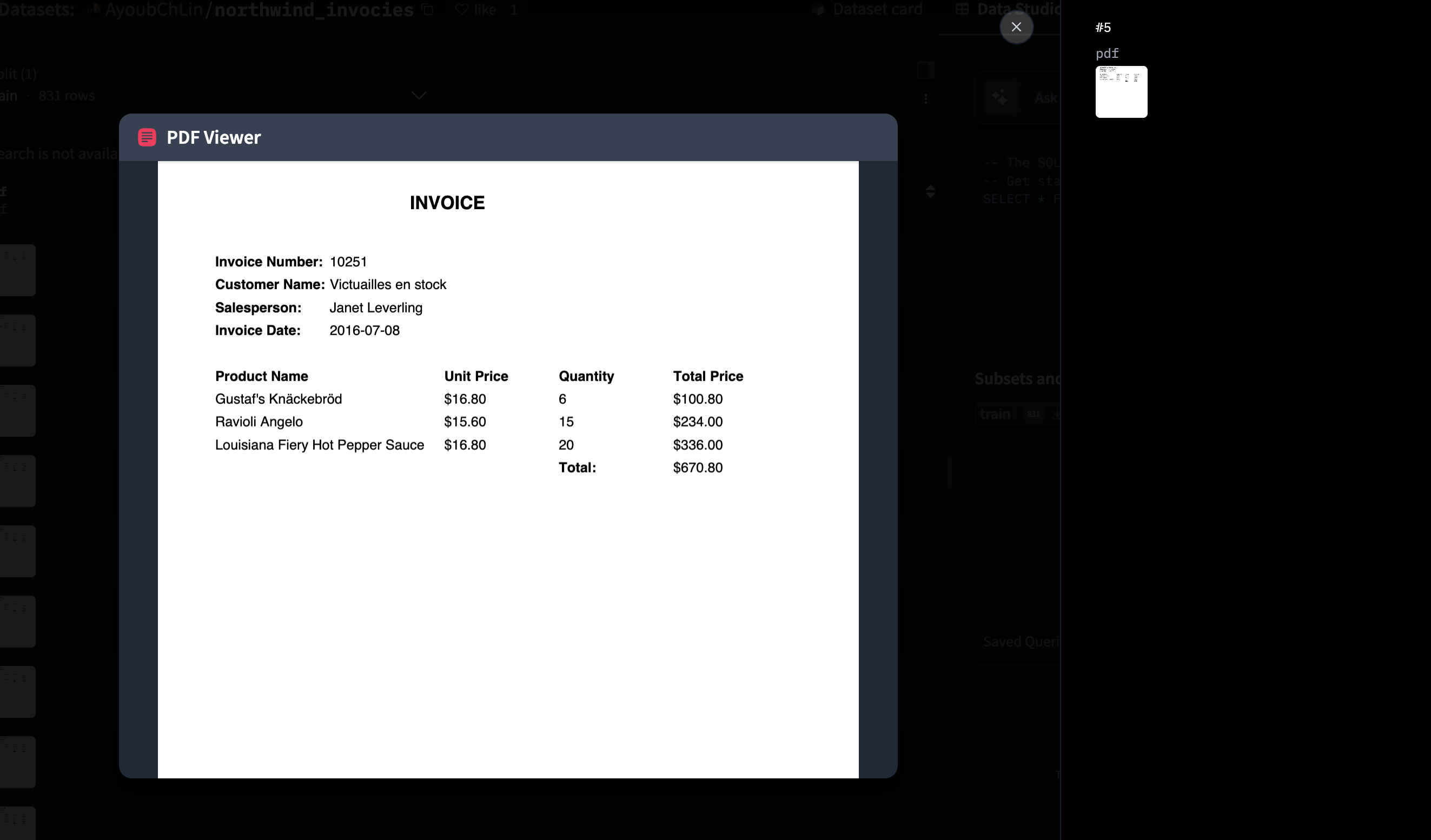
We'll use the [Northwind Invoices dataset](https://huggingface.co/datasets/AyoubChLin/northwind_invocies) from Hugging Face, which contains 831 PDF invoices. Each invoice includes customer information, line items, and totals.
 ***
## Create API Key
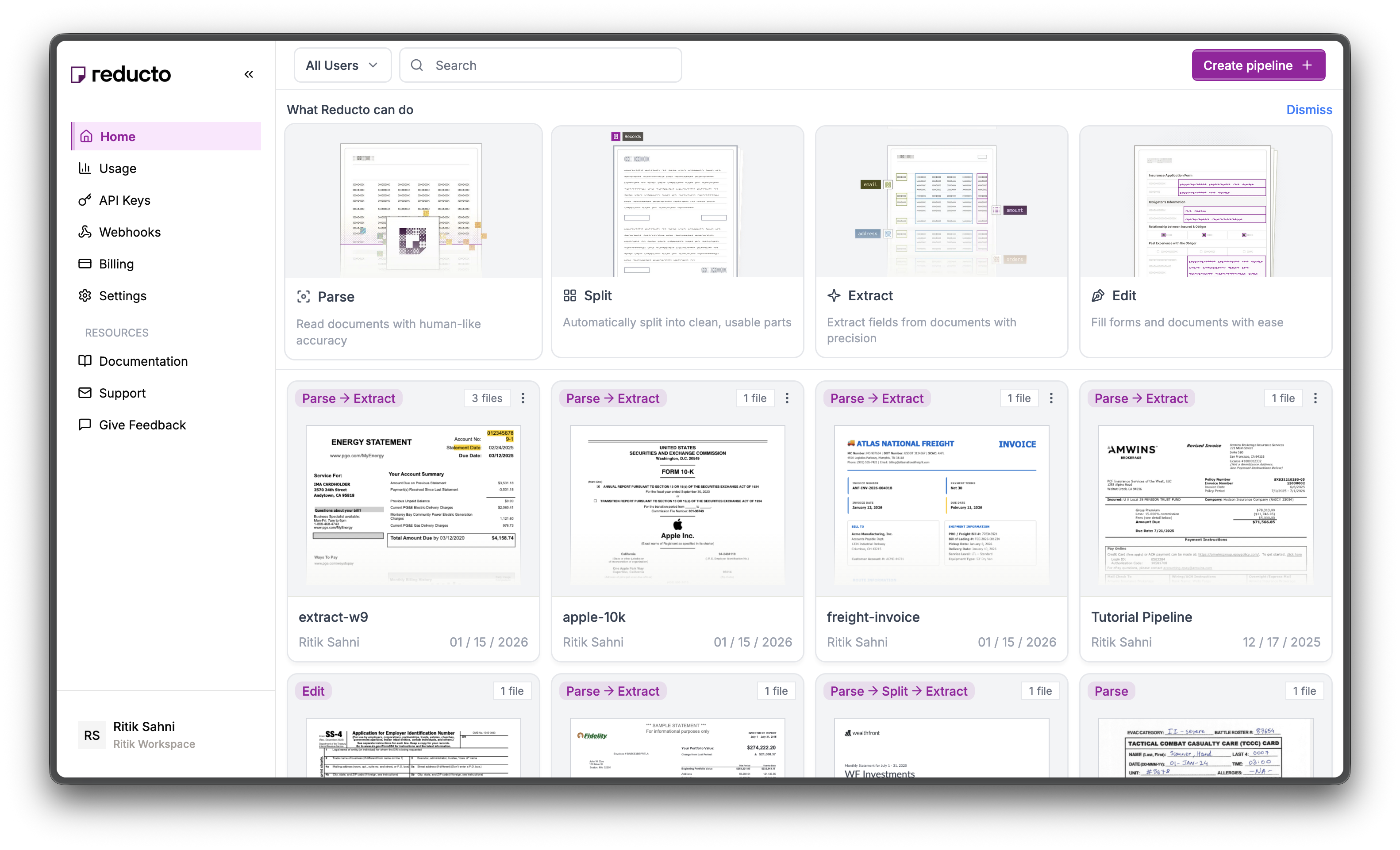
Go to [studio.reducto.ai](https://studio.reducto.ai) and sign in. From the home page, click **API Keys** in the left sidebar.
***
## Create API Key
Go to [studio.reducto.ai](https://studio.reducto.ai) and sign in. From the home page, click **API Keys** in the left sidebar.
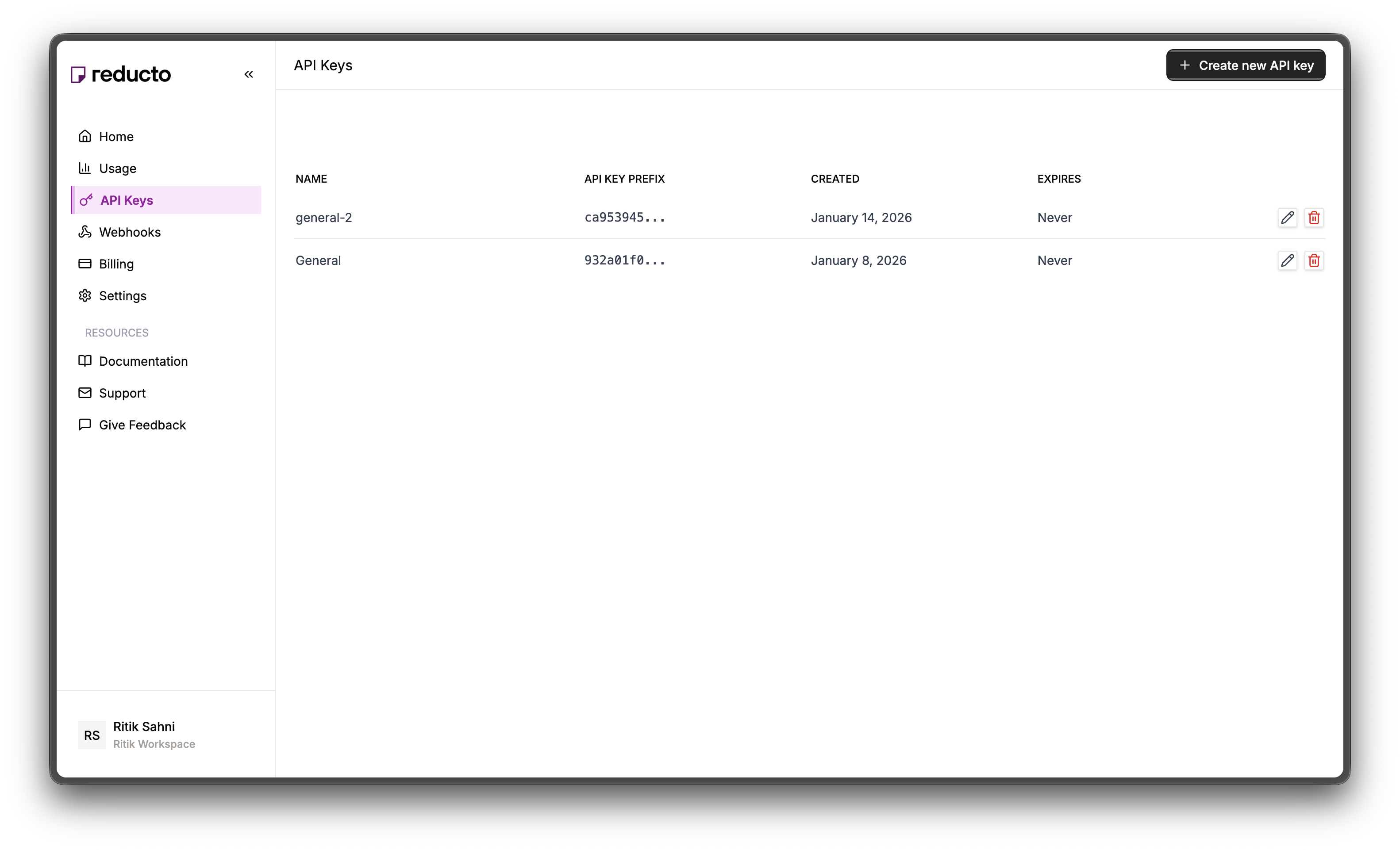
 The API Keys page shows your existing keys. Click **+ Create new API key** in the top right corner.
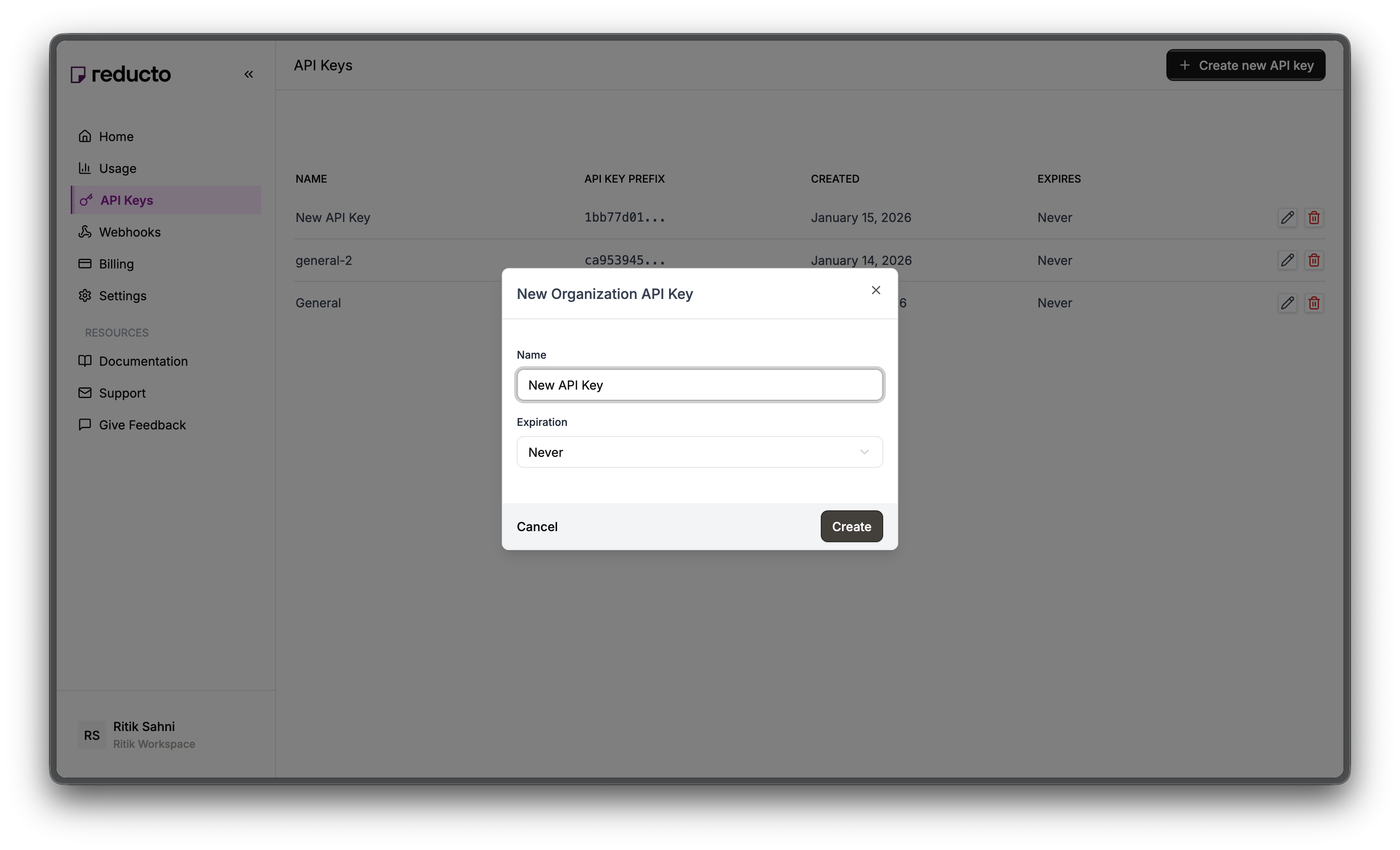
 In the modal, enter a name for your key and set an expiration policy (or select "Never" for no expiration). Click **Create**.
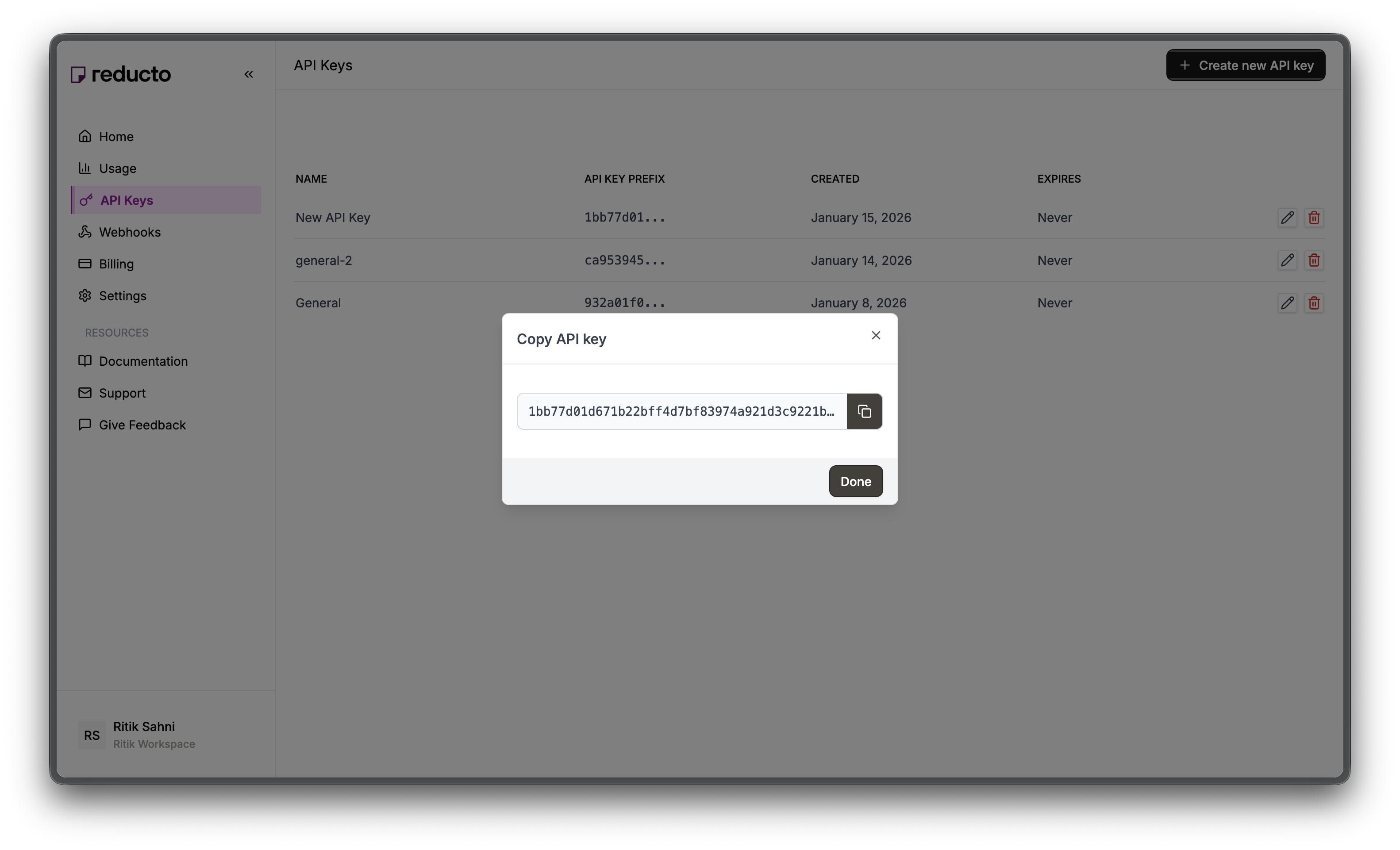
 Copy your new API key and store it securely. You won't be able to see it again after closing this dialog.
 Set the key as an environment variable:
```bash theme={null}
export REDUCTO_API_KEY="your-api-key-here"
```
***
## Download the Dataset
First, download the Northwind invoices dataset using the Hugging Face libraries:
```bash Python theme={null}
pip install datasets
```
```bash JavaScript theme={null}
npm install @huggingface/hub
```
```python Python theme={null}
from datasets import load_dataset
from pathlib import Path
# Load the dataset
dataset = load_dataset("AyoubChLin/northwind_invocies")
# Create output directory
output_dir = Path("./northwind_invoices")
output_dir.mkdir(exist_ok=True)
# Save PDFs to disk
for i, sample in enumerate(dataset["train"]):
pdf_path = output_dir / f"invoice_{i:04d}.pdf"
pdf = sample["pdf"]
pdf.stream.seek(0)
with open(pdf_path, "wb") as f:
f.write(pdf.stream.read())
print(f"Downloaded {len(dataset['train'])} invoices to {output_dir}")
```
```javascript JavaScript theme={null}
import { listFiles, downloadFile } from "@huggingface/hub";
import fs from "fs";
import path from "path";
// Load the dataset
const repo = { type: "dataset", name: "AyoubChLin/northwind_invocies" };
// Create output directory
const outputDir = "./northwind_invoices";
fs.mkdirSync(outputDir, { recursive: true });
// List and download PDF files
let count = 0;
for await (const fileInfo of listFiles({ repo })) {
if (fileInfo.path.endsWith(".pdf")) {
const response = await downloadFile({ repo, path: fileInfo.path });
const buffer = Buffer.from(await response.arrayBuffer());
const outputPath = path.join(outputDir, `invoice_${String(count).padStart(4, "0")}.pdf`);
fs.writeFileSync(outputPath, buffer);
count++;
if (count % 100 === 0) console.log(`Downloaded ${count} invoices...`);
}
}
console.log(`Downloaded ${count} invoices to ${outputDir}`);
```
```
Downloaded 831 invoices to ./northwind_invoices
```
You now have 831 PDF invoices ready to process.
***
## Process the Batch
Document processing is network-bound, not CPU-bound. While your code waits for one API response, it could be uploading and processing other documents. Python uses `AsyncReducto` with `asyncio`, while JavaScript uses `Promise.all()` with the `p-limit` package for concurrency control.
```python Python theme={null}
import asyncio
import json
from pathlib import Path
from reducto import AsyncReducto
from tqdm.asyncio import tqdm
client = AsyncReducto()
async def process_invoices(
input_dir: Path,
output_dir: Path,
max_concurrency: int = 50
):
"""Process all invoices concurrently with progress tracking."""
output_dir.mkdir(exist_ok=True)
files = list(input_dir.glob("*.pdf"))
print(f"Found {len(files)} invoices to process")
# Semaphore limits concurrent requests
sem = asyncio.Semaphore(max_concurrency)
async def process(path: Path):
async with sem:
try:
upload = await client.upload(file=path)
result = await client.parse.run(input=upload.file_id)
# Save result immediately
output_path = output_dir / f"{path.stem}.json"
output_path.write_text(json.dumps({
"source": path.name,
"pages": result.usage.num_pages,
"content": [c.content for c in result.result.chunks]
}, indent=2))
return {"file": path.name, "success": True, "pages": result.usage.num_pages}
except Exception as e:
return {"file": path.name, "success": False, "error": str(e)}
# Process all files with progress bar
tasks = [process(f) for f in files]
results = await tqdm.gather(*tasks, desc="Processing invoices")
# Summary
successes = [r for r in results if r["success"]]
failures = [r for r in results if not r["success"]]
total_pages = sum(r["pages"] for r in successes)
print(f"\nCompleted: {len(successes)} succeeded, {len(failures)} failed")
print(f"Total pages processed: {total_pages}")
if failures:
print("\nFailed files:")
for f in failures[:5]: # Show first 5 failures
print(f" - {f['file']}: {f['error']}")
return results
# Run the batch
results = asyncio.run(process_invoices(
input_dir=Path("./northwind_invoices"),
output_dir=Path("./parsed_invoices")
))
```
```javascript JavaScript theme={null}
import Reducto from "reductoai";
import fs from "fs";
import path from "path";
import pLimit from "p-limit"; // npm install p-limit
const client = new Reducto();
async function processInvoices(inputDir, outputDir, maxConcurrency = 50) {
fs.mkdirSync(outputDir, { recursive: true });
const files = fs.readdirSync(inputDir)
.filter(f => f.endsWith(".pdf"))
.map(f => path.join(inputDir, f));
console.log(`Found ${files.length} invoices to process`);
// p-limit controls concurrency (like Python's Semaphore)
const limit = pLimit(maxConcurrency);
async function processFile(filePath) {
try {
const upload = await client.upload({ file: fs.createReadStream(filePath) });
const result = await client.parse.run({ input: upload.file_id });
// Save result immediately
const outputPath = path.join(outputDir, `${path.basename(filePath, ".pdf")}.json`);
fs.writeFileSync(outputPath, JSON.stringify({
source: path.basename(filePath),
pages: result.usage.num_pages,
content: result.result.chunks.map(c => c.content)
}, null, 2));
return { file: path.basename(filePath), success: true, pages: result.usage.num_pages };
} catch (e) {
return { file: path.basename(filePath), success: false, error: e.message };
}
}
// Process all files with concurrency limit
const results = await Promise.all(files.map(f => limit(() => processFile(f))));
// Summary
const successes = results.filter(r => r.success);
const failures = results.filter(r => !r.success);
const totalPages = successes.reduce((sum, r) => sum + r.pages, 0);
console.log(`\nCompleted: ${successes.length} succeeded, ${failures.length} failed`);
console.log(`Total pages processed: ${totalPages}`);
if (failures.length > 0) {
console.log("\nFailed files:");
failures.slice(0, 5).forEach(f => console.log(` - ${f.file}: ${f.error}`));
}
return results;
}
// Run the batch
const results = await processInvoices("./northwind_invoices", "./parsed_invoices");
```
**Output:**
```
Found 831 invoices to process
Processing invoices: 100%|██████████| 831/831 [03:42<00:00, 3.73it/s]
Completed: 831 succeeded, 0 failed
Total pages processed: 831
```
***
## Extract Structured Data
To extract specific fields like invoice numbers, totals, and line items, use the Extract API with a schema:
```python Python theme={null}
import asyncio
import json
from pathlib import Path
from reducto import AsyncReducto
from tqdm.asyncio import tqdm
client = AsyncReducto()
# Schema for Northwind invoices
invoice_schema = {
"type": "object",
"properties": {
"order_id": {"type": "string", "description": "Order ID at top of invoice"},
"customer_name": {"type": "string", "description": "Ship To customer name"},
"order_date": {"type": "string", "description": "Order date"},
"shipped_date": {"type": "string", "description": "Shipped date"},
"ship_address": {"type": "string", "description": "Full shipping address"},
"line_items": {
"type": "array",
"description": "Products ordered",
"items": {
"type": "object",
"properties": {
"product": {"type": "string"},
"quantity": {"type": "number"},
"unit_price": {"type": "number"},
"discount": {"type": "number"},
"extended_price": {"type": "number"}
}
}
},
"subtotal": {"type": "number"},
"freight": {"type": "number"},
"total": {"type": "number"}
}
}
async def extract_invoices(
input_dir: Path,
output_dir: Path,
max_concurrency: int = 30
):
"""Extract structured data from invoices."""
output_dir.mkdir(exist_ok=True)
files = list(input_dir.glob("*.pdf"))[:100] # Process first 100 for demo
print(f"Extracting from {len(files)} invoices")
sem = asyncio.Semaphore(max_concurrency)
async def extract(path: Path):
async with sem:
try:
upload = await client.upload(file=path)
result = await client.extract.run(
input=upload.file_id,
instructions={"schema": invoice_schema}
)
output_path = output_dir / f"{path.stem}.json"
output_path.write_text(json.dumps(result.result, indent=2))
return {"file": path.name, "success": True, "data": result.result}
except Exception as e:
return {"file": path.name, "success": False, "error": str(e)}
tasks = [extract(f) for f in files]
results = await tqdm.gather(*tasks, desc="Extracting")
successes = [r for r in results if r["success"]]
print(f"\nExtracted {len(successes)} invoices")
# Calculate totals across all invoices
grand_total = sum(r["data"].get("total", 0) or 0 for r in successes)
print(f"Grand total across invoices: ${grand_total:,.2f}")
return results
results = asyncio.run(extract_invoices(
input_dir=Path("./northwind_invoices"),
output_dir=Path("./extracted_invoices")
))
```
```javascript JavaScript theme={null}
import Reducto from "reductoai";
import fs from "fs";
import path from "path";
import pLimit from "p-limit";
const client = new Reducto();
// Schema for Northwind invoices
const invoiceSchema = {
type: "object",
properties: {
order_id: { type: "string", description: "Order ID at top of invoice" },
customer_name: { type: "string", description: "Ship To customer name" },
order_date: { type: "string", description: "Order date" },
shipped_date: { type: "string", description: "Shipped date" },
ship_address: { type: "string", description: "Full shipping address" },
line_items: {
type: "array",
description: "Products ordered",
items: {
type: "object",
properties: {
product: { type: "string" },
quantity: { type: "number" },
unit_price: { type: "number" },
discount: { type: "number" },
extended_price: { type: "number" }
}
}
},
subtotal: { type: "number" },
freight: { type: "number" },
total: { type: "number" }
}
};
async function extractInvoices(inputDir, outputDir, maxConcurrency = 30) {
fs.mkdirSync(outputDir, { recursive: true });
const files = fs.readdirSync(inputDir)
.filter(f => f.endsWith(".pdf"))
.slice(0, 100); // Process first 100 for demo
console.log(`Extracting from ${files.length} invoices`);
const limit = pLimit(maxConcurrency);
async function extractFile(fileName) {
const filePath = path.join(inputDir, fileName);
try {
const upload = await client.upload({ file: fs.createReadStream(filePath) });
const result = await client.extract.run({
input: upload.file_id,
instructions: { schema: invoiceSchema }
});
const outputPath = path.join(outputDir, `${path.basename(fileName, ".pdf")}.json`);
fs.writeFileSync(outputPath, JSON.stringify(result.result, null, 2));
return { file: fileName, success: true, data: result.result[0] };
} catch (e) {
return { file: fileName, success: false, error: e.message };
}
}
const results = await Promise.all(files.map(f => limit(() => extractFile(f))));
const successes = results.filter(r => r.success);
console.log(`\nExtracted ${successes.length} invoices`);
// Calculate totals across all invoices
const grandTotal = successes.reduce((sum, r) => sum + (r.data?.total || 0), 0);
console.log(`Grand total across invoices: $${grandTotal.toFixed(2)}`);
return results;
}
const results = await extractInvoices("./northwind_invoices", "./extracted_invoices");
```
**Output:**
```
Extracting from 100 invoices
Extracting: 100%|██████████| 100/100 [01:45<00:00, 1.05s/it]
Extracted 100 invoices
Grand total across invoices: $128,347.52
```
***
## Cost Optimization with Job Chaining
Parse once, extract multiple times. When you need different extractions from the same documents, reuse the parse job ID to avoid re-parsing:
```python Python theme={null}
import asyncio
from pathlib import Path
from reducto import AsyncReducto
client = AsyncReducto()
async def extract_multiple_schemas(files: list[Path]):
"""Parse once, extract with multiple schemas."""
results = []
for path in files:
# Parse once
upload = await client.upload(file=path)
parse_result = await client.parse.run(input=upload.file_id)
job_id = parse_result.job_id
# Extract headers (reuses parse)
header_result = await client.extract.run(
input=f"jobid://{job_id}",
instructions={"schema": {
"type": "object",
"properties": {
"invoice_number": {"type": "string"},
"customer_name": {"type": "string"},
"date": {"type": "string"}
}
}}
)
# Extract line items (still reuses parse - no extra parse cost!)
items_result = await client.extract.run(
input=f"jobid://{job_id}",
instructions={"schema": {
"type": "object",
"properties": {
"line_items": {
"type": "array",
"items": {
"type": "object",
"properties": {
"product": {"type": "string"},
"quantity": {"type": "number"},
"price": {"type": "number"}
}
}
},
"total": {"type": "number"}
}
}}
)
results.append({
"file": path.name,
"header": header_result.result,
"items": items_result.result
})
return results
```
```javascript JavaScript theme={null}
import Reducto from "reductoai";
import fs from "fs";
const client = new Reducto();
async function extractMultipleSchemas(files) {
const results = [];
for (const filePath of files) {
// Parse once
const upload = await client.upload({ file: fs.createReadStream(filePath) });
const parseResult = await client.parse.run({ input: upload.file_id });
const jobId = parseResult.job_id;
// Extract headers (reuses parse)
const headerResult = await client.extract.run({
input: `jobid://${jobId}`,
instructions: {
schema: {
type: "object",
properties: {
invoice_number: { type: "string" },
customer_name: { type: "string" },
date: { type: "string" }
}
}
}
});
// Extract line items (still reuses parse - no extra parse cost!)
const itemsResult = await client.extract.run({
input: `jobid://${jobId}`,
instructions: {
schema: {
type: "object",
properties: {
line_items: {
type: "array",
items: {
type: "object",
properties: {
product: { type: "string" },
quantity: { type: "number" },
price: { type: "number" }
}
}
},
total: { type: "number" }
}
}
}
});
results.push({
file: filePath,
header: headerResult.result[0],
items: itemsResult.result[0]
});
}
return results;
}
```
The `jobid://` prefix tells Reducto to reuse an existing parse result. You only pay for parsing once, regardless of how many extractions you run.
***
## Handling Failures
Add retry logic with exponential backoff to handle transient network errors:
```python Python theme={null}
import asyncio
import random
from pathlib import Path
from reducto import AsyncReducto
client = AsyncReducto()
async def process_with_retry(path: Path, max_retries: int = 3):
"""Process a document with exponential backoff on failures."""
for attempt in range(max_retries):
try:
upload = await client.upload(file=path)
result = await client.parse.run(input=upload.file_id)
return {"file": path.name, "success": True, "pages": result.usage.num_pages}
except Exception as e:
if attempt == max_retries - 1:
return {"file": path.name, "success": False, "error": str(e)}
wait_time = (2 ** attempt) + random.uniform(0, 1)
await asyncio.sleep(wait_time)
async def process_batch_with_retries(input_dir: Path, max_concurrency: int = 50):
"""Process a batch with automatic retries."""
files = list(input_dir.glob("*.pdf"))
sem = asyncio.Semaphore(max_concurrency)
async def process(path):
async with sem:
return await process_with_retry(path)
tasks = [process(f) for f in files]
results = await asyncio.gather(*tasks)
successes = [r for r in results if r["success"]]
failures = [r for r in results if not r["success"]]
print(f"Completed: {len(successes)} succeeded, {len(failures)} failed")
if failures:
print("Failed files:")
for f in failures:
print(f" - {f['file']}: {f['error']}")
return results
```
```javascript JavaScript theme={null}
import Reducto from "reductoai";
import fs from "fs";
import pLimit from "p-limit";
const client = new Reducto();
async function processWithRetry(filePath, maxRetries = 3) {
for (let attempt = 0; attempt < maxRetries; attempt++) {
try {
const upload = await client.upload({ file: fs.createReadStream(filePath) });
const result = await client.parse.run({ input: upload.file_id });
return { file: filePath, success: true, pages: result.usage.num_pages };
} catch (e) {
if (attempt === maxRetries - 1) {
return { file: filePath, success: false, error: e.message };
}
const waitTime = Math.pow(2, attempt) * 1000 + Math.random() * 1000;
await new Promise(r => setTimeout(r, waitTime));
}
}
}
async function processBatchWithRetries(inputDir, maxConcurrency = 50) {
const files = fs.readdirSync(inputDir)
.filter(f => f.endsWith(".pdf"))
.map(f => `${inputDir}/${f}`);
const limit = pLimit(maxConcurrency);
const results = await Promise.all(files.map(f => limit(() => processWithRetry(f))));
const successes = results.filter(r => r.success);
const failures = results.filter(r => !r.success);
console.log(`Completed: ${successes.length} succeeded, ${failures.length} failed`);
if (failures.length > 0) {
console.log("Failed files:");
failures.forEach(f => console.log(` - ${f.file}: ${f.error}`));
}
return results;
}
```
***
## Monitoring Job Status
When using webhooks or async jobs, you can poll for job status:
```python Python theme={null}
import asyncio
from reducto import AsyncReducto
client = AsyncReducto()
async def wait_for_job(job_id: str, timeout: int = 300):
"""Poll until job completes or times out."""
for _ in range(timeout):
status = await client.job.get(job_id)
if status.status == "Completed":
return {"success": True, "status": status}
elif status.status == "Failed":
return {"success": False, "status": status}
await asyncio.sleep(1)
return {"success": False, "error": "Timeout"}
# Example: Submit job and wait
async def submit_and_wait(path):
upload = await client.upload(file=path)
job = await client.parse.run_job(input=upload.file_id)
print(f"Submitted job {job.job_id}, waiting...")
result = await wait_for_job(job.job_id)
if result["success"]:
print(f"Job completed!")
else:
print(f"Job failed or timed out")
return result
```
```javascript JavaScript theme={null}
import Reducto from "reductoai";
import fs from "fs";
const client = new Reducto();
async function waitForJob(jobId, timeout = 300) {
for (let i = 0; i < timeout; i++) {
const status = await client.job.retrieve(jobId);
if (status.status === "Completed") {
return { success: true, status };
} else if (status.status === "Failed") {
return { success: false, status };
}
await new Promise(r => setTimeout(r, 1000));
}
return { success: false, error: "Timeout" };
}
// Example: Submit job and wait
async function submitAndWait(filePath) {
const upload = await client.upload({ file: fs.createReadStream(filePath) });
const job = await client.parse.runJob({ input: upload.file_id });
console.log(`Submitted job ${job.job_id}, waiting...`);
const result = await waitForJob(job.job_id);
if (result.success) {
console.log("Job completed!");
} else {
console.log("Job failed or timed out");
}
return result;
}
```
For production workloads, prefer webhooks over polling. Webhooks are more efficient and don't require keeping connections open.
***
## Why Concurrency Control?
The semaphore (`asyncio.Semaphore` in Python, `p-limit` in JavaScript) limits how many requests run simultaneously. Without it, submitting 831 files would create 831 concurrent connections, overwhelming both your system and the API. The concurrency limiter acts as a queue, letting only `max_concurrency` requests proceed at once.
| File Size | Recommended Concurrency |
| ------------------- | ----------------------- |
| Small (\< 5 pages) | 50-100 |
| Medium (5-50 pages) | 20-50 |
| Large (50+ pages) | 10-20 |
Start conservative and increase if stable. Larger files consume more memory per request, so lower concurrency prevents memory issues.
***
## Fire-and-Forget with Webhooks
For very large batches where you don't want to wait for results, use webhooks. Submit all jobs immediately and receive results as they complete via HTTP callbacks.
```python Python theme={null}
import asyncio
from pathlib import Path
from reducto import AsyncReducto
client = AsyncReducto()
async def submit_with_webhooks(
input_dir: Path,
webhook_url: str,
max_concurrency: int = 100
):
"""Submit documents for processing with webhook notifications."""
files = list(input_dir.glob("*.pdf"))
sem = asyncio.Semaphore(max_concurrency)
async def submit(path: Path):
async with sem:
upload = await client.upload(file=path)
job = await client.parse.run_job(
input=upload.file_id,
async_={
"webhook": {"mode": "direct", "url": webhook_url},
"metadata": {"filename": path.name}
}
)
return {"file": path.name, "job_id": job.job_id}
tasks = [submit(f) for f in files]
submissions = await asyncio.gather(*tasks)
print(f"Submitted {len(submissions)} jobs - results will arrive via webhook")
return submissions
# Submit batch
asyncio.run(submit_with_webhooks(
input_dir=Path("./northwind_invoices"),
webhook_url="https://your-app.com/webhook/reducto"
))
```
```javascript JavaScript theme={null}
import Reducto from "reductoai";
import fs from "fs";
import path from "path";
import pLimit from "p-limit";
const client = new Reducto();
async function submitWithWebhooks(inputDir, webhookUrl, maxConcurrency = 100) {
const files = fs.readdirSync(inputDir)
.filter(f => f.endsWith(".pdf"))
.map(f => path.join(inputDir, f));
const limit = pLimit(maxConcurrency);
async function submitFile(filePath) {
const upload = await client.upload({ file: fs.createReadStream(filePath) });
const job = await client.parse.runJob({
input: upload.file_id,
async_: {
webhook: { mode: "direct", url: webhookUrl },
metadata: { filename: path.basename(filePath) }
}
});
return { file: path.basename(filePath), job_id: job.job_id };
}
const submissions = await Promise.all(files.map(f => limit(() => submitFile(f))));
console.log(`Submitted ${submissions.length} jobs - results will arrive via webhook`);
return submissions;
}
// Submit batch
await submitWithWebhooks("./northwind_invoices", "https://your-app.com/webhook/reducto");
```
Your webhook receives a payload when each job completes:
```json theme={null}
{
"status": "Completed",
"job_id": "abc123",
"metadata": {"filename": "invoice_0001.pdf"}
}
```
Fetch the result in your handler with `client.job.get(job_id)`.
***
## Sync Alternative (Python)
If you can't use async in Python, use threading with the synchronous `Reducto` client.
This section is Python-specific. The JavaScript SDK is async by default—all methods return Promises and work naturally with `async/await` and `Promise.all()`. No threading is needed in JavaScript.
```python theme={null}
from concurrent.futures import ThreadPoolExecutor, as_completed
from pathlib import Path
from reducto import Reducto
client = Reducto()
def process_sync(input_dir: Path, max_workers: int = 10):
files = list(input_dir.glob("*.pdf"))
def process(path: Path):
upload = client.upload(file=path)
result = client.parse.run(input=upload.file_id)
return {"file": path.name, "pages": result.usage.num_pages}
results = []
with ThreadPoolExecutor(max_workers=max_workers) as executor:
futures = {executor.submit(process, f): f for f in files}
for future in as_completed(futures):
try:
results.append(future.result())
except Exception as e:
results.append({"file": futures[future].name, "error": str(e)})
return results
```
Threading works but is less efficient than async for I/O-bound work. Use lower concurrency (10-20 workers) to avoid thread overhead.
***
## Next Steps
Deep dive into async jobs and job lifecycle
Production webhook setup with Svix
Understand per-account concurrency limits for batch sizing
Monitor and manage async jobs
Set the key as an environment variable:
```bash theme={null}
export REDUCTO_API_KEY="your-api-key-here"
```
***
## Download the Dataset
First, download the Northwind invoices dataset using the Hugging Face libraries:
```bash Python theme={null}
pip install datasets
```
```bash JavaScript theme={null}
npm install @huggingface/hub
```
```python Python theme={null}
from datasets import load_dataset
from pathlib import Path
# Load the dataset
dataset = load_dataset("AyoubChLin/northwind_invocies")
# Create output directory
output_dir = Path("./northwind_invoices")
output_dir.mkdir(exist_ok=True)
# Save PDFs to disk
for i, sample in enumerate(dataset["train"]):
pdf_path = output_dir / f"invoice_{i:04d}.pdf"
pdf = sample["pdf"]
pdf.stream.seek(0)
with open(pdf_path, "wb") as f:
f.write(pdf.stream.read())
print(f"Downloaded {len(dataset['train'])} invoices to {output_dir}")
```
```javascript JavaScript theme={null}
import { listFiles, downloadFile } from "@huggingface/hub";
import fs from "fs";
import path from "path";
// Load the dataset
const repo = { type: "dataset", name: "AyoubChLin/northwind_invocies" };
// Create output directory
const outputDir = "./northwind_invoices";
fs.mkdirSync(outputDir, { recursive: true });
// List and download PDF files
let count = 0;
for await (const fileInfo of listFiles({ repo })) {
if (fileInfo.path.endsWith(".pdf")) {
const response = await downloadFile({ repo, path: fileInfo.path });
const buffer = Buffer.from(await response.arrayBuffer());
const outputPath = path.join(outputDir, `invoice_${String(count).padStart(4, "0")}.pdf`);
fs.writeFileSync(outputPath, buffer);
count++;
if (count % 100 === 0) console.log(`Downloaded ${count} invoices...`);
}
}
console.log(`Downloaded ${count} invoices to ${outputDir}`);
```
```
Downloaded 831 invoices to ./northwind_invoices
```
You now have 831 PDF invoices ready to process.
***
## Process the Batch
Document processing is network-bound, not CPU-bound. While your code waits for one API response, it could be uploading and processing other documents. Python uses `AsyncReducto` with `asyncio`, while JavaScript uses `Promise.all()` with the `p-limit` package for concurrency control.
```python Python theme={null}
import asyncio
import json
from pathlib import Path
from reducto import AsyncReducto
from tqdm.asyncio import tqdm
client = AsyncReducto()
async def process_invoices(
input_dir: Path,
output_dir: Path,
max_concurrency: int = 50
):
"""Process all invoices concurrently with progress tracking."""
output_dir.mkdir(exist_ok=True)
files = list(input_dir.glob("*.pdf"))
print(f"Found {len(files)} invoices to process")
# Semaphore limits concurrent requests
sem = asyncio.Semaphore(max_concurrency)
async def process(path: Path):
async with sem:
try:
upload = await client.upload(file=path)
result = await client.parse.run(input=upload.file_id)
# Save result immediately
output_path = output_dir / f"{path.stem}.json"
output_path.write_text(json.dumps({
"source": path.name,
"pages": result.usage.num_pages,
"content": [c.content for c in result.result.chunks]
}, indent=2))
return {"file": path.name, "success": True, "pages": result.usage.num_pages}
except Exception as e:
return {"file": path.name, "success": False, "error": str(e)}
# Process all files with progress bar
tasks = [process(f) for f in files]
results = await tqdm.gather(*tasks, desc="Processing invoices")
# Summary
successes = [r for r in results if r["success"]]
failures = [r for r in results if not r["success"]]
total_pages = sum(r["pages"] for r in successes)
print(f"\nCompleted: {len(successes)} succeeded, {len(failures)} failed")
print(f"Total pages processed: {total_pages}")
if failures:
print("\nFailed files:")
for f in failures[:5]: # Show first 5 failures
print(f" - {f['file']}: {f['error']}")
return results
# Run the batch
results = asyncio.run(process_invoices(
input_dir=Path("./northwind_invoices"),
output_dir=Path("./parsed_invoices")
))
```
```javascript JavaScript theme={null}
import Reducto from "reductoai";
import fs from "fs";
import path from "path";
import pLimit from "p-limit"; // npm install p-limit
const client = new Reducto();
async function processInvoices(inputDir, outputDir, maxConcurrency = 50) {
fs.mkdirSync(outputDir, { recursive: true });
const files = fs.readdirSync(inputDir)
.filter(f => f.endsWith(".pdf"))
.map(f => path.join(inputDir, f));
console.log(`Found ${files.length} invoices to process`);
// p-limit controls concurrency (like Python's Semaphore)
const limit = pLimit(maxConcurrency);
async function processFile(filePath) {
try {
const upload = await client.upload({ file: fs.createReadStream(filePath) });
const result = await client.parse.run({ input: upload.file_id });
// Save result immediately
const outputPath = path.join(outputDir, `${path.basename(filePath, ".pdf")}.json`);
fs.writeFileSync(outputPath, JSON.stringify({
source: path.basename(filePath),
pages: result.usage.num_pages,
content: result.result.chunks.map(c => c.content)
}, null, 2));
return { file: path.basename(filePath), success: true, pages: result.usage.num_pages };
} catch (e) {
return { file: path.basename(filePath), success: false, error: e.message };
}
}
// Process all files with concurrency limit
const results = await Promise.all(files.map(f => limit(() => processFile(f))));
// Summary
const successes = results.filter(r => r.success);
const failures = results.filter(r => !r.success);
const totalPages = successes.reduce((sum, r) => sum + r.pages, 0);
console.log(`\nCompleted: ${successes.length} succeeded, ${failures.length} failed`);
console.log(`Total pages processed: ${totalPages}`);
if (failures.length > 0) {
console.log("\nFailed files:");
failures.slice(0, 5).forEach(f => console.log(` - ${f.file}: ${f.error}`));
}
return results;
}
// Run the batch
const results = await processInvoices("./northwind_invoices", "./parsed_invoices");
```
**Output:**
```
Found 831 invoices to process
Processing invoices: 100%|██████████| 831/831 [03:42<00:00, 3.73it/s]
Completed: 831 succeeded, 0 failed
Total pages processed: 831
```
***
## Extract Structured Data
To extract specific fields like invoice numbers, totals, and line items, use the Extract API with a schema:
```python Python theme={null}
import asyncio
import json
from pathlib import Path
from reducto import AsyncReducto
from tqdm.asyncio import tqdm
client = AsyncReducto()
# Schema for Northwind invoices
invoice_schema = {
"type": "object",
"properties": {
"order_id": {"type": "string", "description": "Order ID at top of invoice"},
"customer_name": {"type": "string", "description": "Ship To customer name"},
"order_date": {"type": "string", "description": "Order date"},
"shipped_date": {"type": "string", "description": "Shipped date"},
"ship_address": {"type": "string", "description": "Full shipping address"},
"line_items": {
"type": "array",
"description": "Products ordered",
"items": {
"type": "object",
"properties": {
"product": {"type": "string"},
"quantity": {"type": "number"},
"unit_price": {"type": "number"},
"discount": {"type": "number"},
"extended_price": {"type": "number"}
}
}
},
"subtotal": {"type": "number"},
"freight": {"type": "number"},
"total": {"type": "number"}
}
}
async def extract_invoices(
input_dir: Path,
output_dir: Path,
max_concurrency: int = 30
):
"""Extract structured data from invoices."""
output_dir.mkdir(exist_ok=True)
files = list(input_dir.glob("*.pdf"))[:100] # Process first 100 for demo
print(f"Extracting from {len(files)} invoices")
sem = asyncio.Semaphore(max_concurrency)
async def extract(path: Path):
async with sem:
try:
upload = await client.upload(file=path)
result = await client.extract.run(
input=upload.file_id,
instructions={"schema": invoice_schema}
)
output_path = output_dir / f"{path.stem}.json"
output_path.write_text(json.dumps(result.result, indent=2))
return {"file": path.name, "success": True, "data": result.result}
except Exception as e:
return {"file": path.name, "success": False, "error": str(e)}
tasks = [extract(f) for f in files]
results = await tqdm.gather(*tasks, desc="Extracting")
successes = [r for r in results if r["success"]]
print(f"\nExtracted {len(successes)} invoices")
# Calculate totals across all invoices
grand_total = sum(r["data"].get("total", 0) or 0 for r in successes)
print(f"Grand total across invoices: ${grand_total:,.2f}")
return results
results = asyncio.run(extract_invoices(
input_dir=Path("./northwind_invoices"),
output_dir=Path("./extracted_invoices")
))
```
```javascript JavaScript theme={null}
import Reducto from "reductoai";
import fs from "fs";
import path from "path";
import pLimit from "p-limit";
const client = new Reducto();
// Schema for Northwind invoices
const invoiceSchema = {
type: "object",
properties: {
order_id: { type: "string", description: "Order ID at top of invoice" },
customer_name: { type: "string", description: "Ship To customer name" },
order_date: { type: "string", description: "Order date" },
shipped_date: { type: "string", description: "Shipped date" },
ship_address: { type: "string", description: "Full shipping address" },
line_items: {
type: "array",
description: "Products ordered",
items: {
type: "object",
properties: {
product: { type: "string" },
quantity: { type: "number" },
unit_price: { type: "number" },
discount: { type: "number" },
extended_price: { type: "number" }
}
}
},
subtotal: { type: "number" },
freight: { type: "number" },
total: { type: "number" }
}
};
async function extractInvoices(inputDir, outputDir, maxConcurrency = 30) {
fs.mkdirSync(outputDir, { recursive: true });
const files = fs.readdirSync(inputDir)
.filter(f => f.endsWith(".pdf"))
.slice(0, 100); // Process first 100 for demo
console.log(`Extracting from ${files.length} invoices`);
const limit = pLimit(maxConcurrency);
async function extractFile(fileName) {
const filePath = path.join(inputDir, fileName);
try {
const upload = await client.upload({ file: fs.createReadStream(filePath) });
const result = await client.extract.run({
input: upload.file_id,
instructions: { schema: invoiceSchema }
});
const outputPath = path.join(outputDir, `${path.basename(fileName, ".pdf")}.json`);
fs.writeFileSync(outputPath, JSON.stringify(result.result, null, 2));
return { file: fileName, success: true, data: result.result[0] };
} catch (e) {
return { file: fileName, success: false, error: e.message };
}
}
const results = await Promise.all(files.map(f => limit(() => extractFile(f))));
const successes = results.filter(r => r.success);
console.log(`\nExtracted ${successes.length} invoices`);
// Calculate totals across all invoices
const grandTotal = successes.reduce((sum, r) => sum + (r.data?.total || 0), 0);
console.log(`Grand total across invoices: $${grandTotal.toFixed(2)}`);
return results;
}
const results = await extractInvoices("./northwind_invoices", "./extracted_invoices");
```
**Output:**
```
Extracting from 100 invoices
Extracting: 100%|██████████| 100/100 [01:45<00:00, 1.05s/it]
Extracted 100 invoices
Grand total across invoices: $128,347.52
```
***
## Cost Optimization with Job Chaining
Parse once, extract multiple times. When you need different extractions from the same documents, reuse the parse job ID to avoid re-parsing:
```python Python theme={null}
import asyncio
from pathlib import Path
from reducto import AsyncReducto
client = AsyncReducto()
async def extract_multiple_schemas(files: list[Path]):
"""Parse once, extract with multiple schemas."""
results = []
for path in files:
# Parse once
upload = await client.upload(file=path)
parse_result = await client.parse.run(input=upload.file_id)
job_id = parse_result.job_id
# Extract headers (reuses parse)
header_result = await client.extract.run(
input=f"jobid://{job_id}",
instructions={"schema": {
"type": "object",
"properties": {
"invoice_number": {"type": "string"},
"customer_name": {"type": "string"},
"date": {"type": "string"}
}
}}
)
# Extract line items (still reuses parse - no extra parse cost!)
items_result = await client.extract.run(
input=f"jobid://{job_id}",
instructions={"schema": {
"type": "object",
"properties": {
"line_items": {
"type": "array",
"items": {
"type": "object",
"properties": {
"product": {"type": "string"},
"quantity": {"type": "number"},
"price": {"type": "number"}
}
}
},
"total": {"type": "number"}
}
}}
)
results.append({
"file": path.name,
"header": header_result.result,
"items": items_result.result
})
return results
```
```javascript JavaScript theme={null}
import Reducto from "reductoai";
import fs from "fs";
const client = new Reducto();
async function extractMultipleSchemas(files) {
const results = [];
for (const filePath of files) {
// Parse once
const upload = await client.upload({ file: fs.createReadStream(filePath) });
const parseResult = await client.parse.run({ input: upload.file_id });
const jobId = parseResult.job_id;
// Extract headers (reuses parse)
const headerResult = await client.extract.run({
input: `jobid://${jobId}`,
instructions: {
schema: {
type: "object",
properties: {
invoice_number: { type: "string" },
customer_name: { type: "string" },
date: { type: "string" }
}
}
}
});
// Extract line items (still reuses parse - no extra parse cost!)
const itemsResult = await client.extract.run({
input: `jobid://${jobId}`,
instructions: {
schema: {
type: "object",
properties: {
line_items: {
type: "array",
items: {
type: "object",
properties: {
product: { type: "string" },
quantity: { type: "number" },
price: { type: "number" }
}
}
},
total: { type: "number" }
}
}
}
});
results.push({
file: filePath,
header: headerResult.result[0],
items: itemsResult.result[0]
});
}
return results;
}
```
The `jobid://` prefix tells Reducto to reuse an existing parse result. You only pay for parsing once, regardless of how many extractions you run.
***
## Handling Failures
Add retry logic with exponential backoff to handle transient network errors:
```python Python theme={null}
import asyncio
import random
from pathlib import Path
from reducto import AsyncReducto
client = AsyncReducto()
async def process_with_retry(path: Path, max_retries: int = 3):
"""Process a document with exponential backoff on failures."""
for attempt in range(max_retries):
try:
upload = await client.upload(file=path)
result = await client.parse.run(input=upload.file_id)
return {"file": path.name, "success": True, "pages": result.usage.num_pages}
except Exception as e:
if attempt == max_retries - 1:
return {"file": path.name, "success": False, "error": str(e)}
wait_time = (2 ** attempt) + random.uniform(0, 1)
await asyncio.sleep(wait_time)
async def process_batch_with_retries(input_dir: Path, max_concurrency: int = 50):
"""Process a batch with automatic retries."""
files = list(input_dir.glob("*.pdf"))
sem = asyncio.Semaphore(max_concurrency)
async def process(path):
async with sem:
return await process_with_retry(path)
tasks = [process(f) for f in files]
results = await asyncio.gather(*tasks)
successes = [r for r in results if r["success"]]
failures = [r for r in results if not r["success"]]
print(f"Completed: {len(successes)} succeeded, {len(failures)} failed")
if failures:
print("Failed files:")
for f in failures:
print(f" - {f['file']}: {f['error']}")
return results
```
```javascript JavaScript theme={null}
import Reducto from "reductoai";
import fs from "fs";
import pLimit from "p-limit";
const client = new Reducto();
async function processWithRetry(filePath, maxRetries = 3) {
for (let attempt = 0; attempt < maxRetries; attempt++) {
try {
const upload = await client.upload({ file: fs.createReadStream(filePath) });
const result = await client.parse.run({ input: upload.file_id });
return { file: filePath, success: true, pages: result.usage.num_pages };
} catch (e) {
if (attempt === maxRetries - 1) {
return { file: filePath, success: false, error: e.message };
}
const waitTime = Math.pow(2, attempt) * 1000 + Math.random() * 1000;
await new Promise(r => setTimeout(r, waitTime));
}
}
}
async function processBatchWithRetries(inputDir, maxConcurrency = 50) {
const files = fs.readdirSync(inputDir)
.filter(f => f.endsWith(".pdf"))
.map(f => `${inputDir}/${f}`);
const limit = pLimit(maxConcurrency);
const results = await Promise.all(files.map(f => limit(() => processWithRetry(f))));
const successes = results.filter(r => r.success);
const failures = results.filter(r => !r.success);
console.log(`Completed: ${successes.length} succeeded, ${failures.length} failed`);
if (failures.length > 0) {
console.log("Failed files:");
failures.forEach(f => console.log(` - ${f.file}: ${f.error}`));
}
return results;
}
```
***
## Monitoring Job Status
When using webhooks or async jobs, you can poll for job status:
```python Python theme={null}
import asyncio
from reducto import AsyncReducto
client = AsyncReducto()
async def wait_for_job(job_id: str, timeout: int = 300):
"""Poll until job completes or times out."""
for _ in range(timeout):
status = await client.job.get(job_id)
if status.status == "Completed":
return {"success": True, "status": status}
elif status.status == "Failed":
return {"success": False, "status": status}
await asyncio.sleep(1)
return {"success": False, "error": "Timeout"}
# Example: Submit job and wait
async def submit_and_wait(path):
upload = await client.upload(file=path)
job = await client.parse.run_job(input=upload.file_id)
print(f"Submitted job {job.job_id}, waiting...")
result = await wait_for_job(job.job_id)
if result["success"]:
print(f"Job completed!")
else:
print(f"Job failed or timed out")
return result
```
```javascript JavaScript theme={null}
import Reducto from "reductoai";
import fs from "fs";
const client = new Reducto();
async function waitForJob(jobId, timeout = 300) {
for (let i = 0; i < timeout; i++) {
const status = await client.job.retrieve(jobId);
if (status.status === "Completed") {
return { success: true, status };
} else if (status.status === "Failed") {
return { success: false, status };
}
await new Promise(r => setTimeout(r, 1000));
}
return { success: false, error: "Timeout" };
}
// Example: Submit job and wait
async function submitAndWait(filePath) {
const upload = await client.upload({ file: fs.createReadStream(filePath) });
const job = await client.parse.runJob({ input: upload.file_id });
console.log(`Submitted job ${job.job_id}, waiting...`);
const result = await waitForJob(job.job_id);
if (result.success) {
console.log("Job completed!");
} else {
console.log("Job failed or timed out");
}
return result;
}
```
For production workloads, prefer webhooks over polling. Webhooks are more efficient and don't require keeping connections open.
***
## Why Concurrency Control?
The semaphore (`asyncio.Semaphore` in Python, `p-limit` in JavaScript) limits how many requests run simultaneously. Without it, submitting 831 files would create 831 concurrent connections, overwhelming both your system and the API. The concurrency limiter acts as a queue, letting only `max_concurrency` requests proceed at once.
| File Size | Recommended Concurrency |
| ------------------- | ----------------------- |
| Small (\< 5 pages) | 50-100 |
| Medium (5-50 pages) | 20-50 |
| Large (50+ pages) | 10-20 |
Start conservative and increase if stable. Larger files consume more memory per request, so lower concurrency prevents memory issues.
***
## Fire-and-Forget with Webhooks
For very large batches where you don't want to wait for results, use webhooks. Submit all jobs immediately and receive results as they complete via HTTP callbacks.
```python Python theme={null}
import asyncio
from pathlib import Path
from reducto import AsyncReducto
client = AsyncReducto()
async def submit_with_webhooks(
input_dir: Path,
webhook_url: str,
max_concurrency: int = 100
):
"""Submit documents for processing with webhook notifications."""
files = list(input_dir.glob("*.pdf"))
sem = asyncio.Semaphore(max_concurrency)
async def submit(path: Path):
async with sem:
upload = await client.upload(file=path)
job = await client.parse.run_job(
input=upload.file_id,
async_={
"webhook": {"mode": "direct", "url": webhook_url},
"metadata": {"filename": path.name}
}
)
return {"file": path.name, "job_id": job.job_id}
tasks = [submit(f) for f in files]
submissions = await asyncio.gather(*tasks)
print(f"Submitted {len(submissions)} jobs - results will arrive via webhook")
return submissions
# Submit batch
asyncio.run(submit_with_webhooks(
input_dir=Path("./northwind_invoices"),
webhook_url="https://your-app.com/webhook/reducto"
))
```
```javascript JavaScript theme={null}
import Reducto from "reductoai";
import fs from "fs";
import path from "path";
import pLimit from "p-limit";
const client = new Reducto();
async function submitWithWebhooks(inputDir, webhookUrl, maxConcurrency = 100) {
const files = fs.readdirSync(inputDir)
.filter(f => f.endsWith(".pdf"))
.map(f => path.join(inputDir, f));
const limit = pLimit(maxConcurrency);
async function submitFile(filePath) {
const upload = await client.upload({ file: fs.createReadStream(filePath) });
const job = await client.parse.runJob({
input: upload.file_id,
async_: {
webhook: { mode: "direct", url: webhookUrl },
metadata: { filename: path.basename(filePath) }
}
});
return { file: path.basename(filePath), job_id: job.job_id };
}
const submissions = await Promise.all(files.map(f => limit(() => submitFile(f))));
console.log(`Submitted ${submissions.length} jobs - results will arrive via webhook`);
return submissions;
}
// Submit batch
await submitWithWebhooks("./northwind_invoices", "https://your-app.com/webhook/reducto");
```
Your webhook receives a payload when each job completes:
```json theme={null}
{
"status": "Completed",
"job_id": "abc123",
"metadata": {"filename": "invoice_0001.pdf"}
}
```
Fetch the result in your handler with `client.job.get(job_id)`.
***
## Sync Alternative (Python)
If you can't use async in Python, use threading with the synchronous `Reducto` client.
This section is Python-specific. The JavaScript SDK is async by default—all methods return Promises and work naturally with `async/await` and `Promise.all()`. No threading is needed in JavaScript.
```python theme={null}
from concurrent.futures import ThreadPoolExecutor, as_completed
from pathlib import Path
from reducto import Reducto
client = Reducto()
def process_sync(input_dir: Path, max_workers: int = 10):
files = list(input_dir.glob("*.pdf"))
def process(path: Path):
upload = client.upload(file=path)
result = client.parse.run(input=upload.file_id)
return {"file": path.name, "pages": result.usage.num_pages}
results = []
with ThreadPoolExecutor(max_workers=max_workers) as executor:
futures = {executor.submit(process, f): f for f in files}
for future in as_completed(futures):
try:
results.append(future.result())
except Exception as e:
results.append({"file": futures[future].name, "error": str(e)})
return results
```
Threading works but is less efficient than async for I/O-bound work. Use lower concurrency (10-20 workers) to avoid thread overhead.
***
## Next Steps
Deep dive into async jobs and job lifecycle
Production webhook setup with Svix
Understand per-account concurrency limits for batch sizing
Monitor and manage async jobs